
Gearwiz Wiz-Vac 2
Gearwiz 1400W Touchless Automatic Vacuum Dustpan User Manual
Model: Wiz-Vac 2
Introduction
Welcome to the user manual for your new Gearwiz 1400W Touchless Automatic Vacuum Dustpan. This innovative device is designed to simplify your cleaning routine by automatically collecting dirt, dust, and pet hair with its motion-activated sensor. Enjoy a hands-free, efficient, and quiet cleaning experience for various surfaces in your home, office, or commercial space. Please read this manual thoroughly before operation to ensure safe and optimal performance.
Key Features
- 1400W Powerful Suction: Ensures thorough cleaning of fine dust, pet hair, and debris.
- Motion-Activated Sensor: Automatically activates the vacuum when dirt is swept near the inlet, eliminating the need to bend or scoop.
- Hands-Free Operation: Designed for effortless tidying, making cleaning a breeze.
- Large Capacity Dustbin: Features a 7-quart removable and easy-to-empty dustbin for extended cleaning sessions.
- HEPA Filter System: Captures dust and allergens, ensuring cleaner air.
- Quiet Operation: Engineered to operate with minimal noise for a peaceful cleaning experience.
- Durable & Lightweight Design: Crafted from high-quality materials for long-lasting use and easy portability (6.74 lbs).
- Versatile Application: Suitable for various indoor spaces including kitchens, living rooms, barber shops, and pet shops.
Product Overview & Components

Figure 1: Key Features Diagram. This image highlights the main components including the Manual ON Switch, Infrared Sensor, Inlet, Exhaust Filter, and the control knob for Manual Mode, Auto Mode, and ON/OFF.

Figure 2: Internal Components. A closer look at the internal structure, showing the Canister, Lid, Pre-motor filter, Exhaust Filter, Inlet, Infrared Sensor, and the control knob for Manual Mode, Auto Mode, and ON/OFF.
Component List:
- Main Unit: The primary vacuum body.
- Dustbin/Canister: Removable container for collected debris.
- Pre-Motor Filter: Filters larger particles before they reach the motor.
- Exhaust Filter (HEPA): Filters fine dust and allergens from the exhaust air.
- Infrared Sensor: Detects debris for automatic activation.
- Manual ON Switch: Button for manual operation.
- Mode Selector Knob: Allows switching between Manual, Auto, and ON/OFF modes.
- Power Cord: For connecting to an electrical outlet.
Setup Guide
- Unpack the Unit: Carefully remove all components from the packaging. Retain packaging for future storage or transport.
- Choose a Location: Position the Gearwiz Vacuum Dustpan in your preferred spot, ideally near a wall outlet and in an area where sweeping is frequent, such as a kitchen, entryway, or salon. Ensure it is on a flat, stable surface.
- Connect to Power: Plug the power cord into a standard electrical outlet.
- Initial Filter Check: Ensure the pre-motor filter and exhaust (HEPA) filter are correctly installed before first use. Refer to the "Maintenance" section for filter installation details.

Figure 3: Setup and Operation Steps. This image illustrates the simple 3-step process: 1. Position the cleaner, 2. Select mode, 3. Guide sweep towards the cleaner.
Operating Instructions
The Gearwiz Touchless Automatic Vacuum Dustpan offers both automatic and manual operation modes for your convenience.
Selecting Operation Mode:
Use the control knob located on the top of the unit to select your desired mode:
- OFF: Turns the unit completely off.
- AUTO Mode: The default and most convenient mode. In this mode, the infrared sensor detects debris swept near the inlet and automatically activates the vacuum for a few seconds to suck up the dirt. The vacuum will then turn off automatically.
- MANUAL Mode: For continuous vacuuming or specific spot cleaning. In this mode, the vacuum will remain on until you switch it off. You can also press the Manual ON Switch button on the front of the unit to activate the vacuum for a short burst in either AUTO or MANUAL mode.
How to Use:
- Prepare the Area: Ensure the area around the dustpan is clear of large objects that could obstruct the sensor or inlet.
- Sweep Debris: Using a broom, sweep dirt, dust, pet hair, and other debris towards the inlet of the vacuum dustpan.
- Automatic Activation (AUTO Mode): As the debris approaches the infrared sensor, the vacuum will automatically turn on and powerfully suck in the swept material. It will then turn off once the area is clear.
- Manual Activation (MANUAL Mode or Spot Cleaning): If you prefer continuous operation or need to clean a specific spot, switch to MANUAL mode. The vacuum will run continuously. You can also press the Manual ON Switch button for a quick burst of suction.
- Repeat as Needed: Continue sweeping and allowing the dustpan to collect debris until your floor is clean.
Video: Gearwiz Touchless Vacuum in Action. This video demonstrates the automatic suction feature of the Gearwiz Touchless Automatic Vacuum Dustpan, showing how it effortlessly collects swept debris.
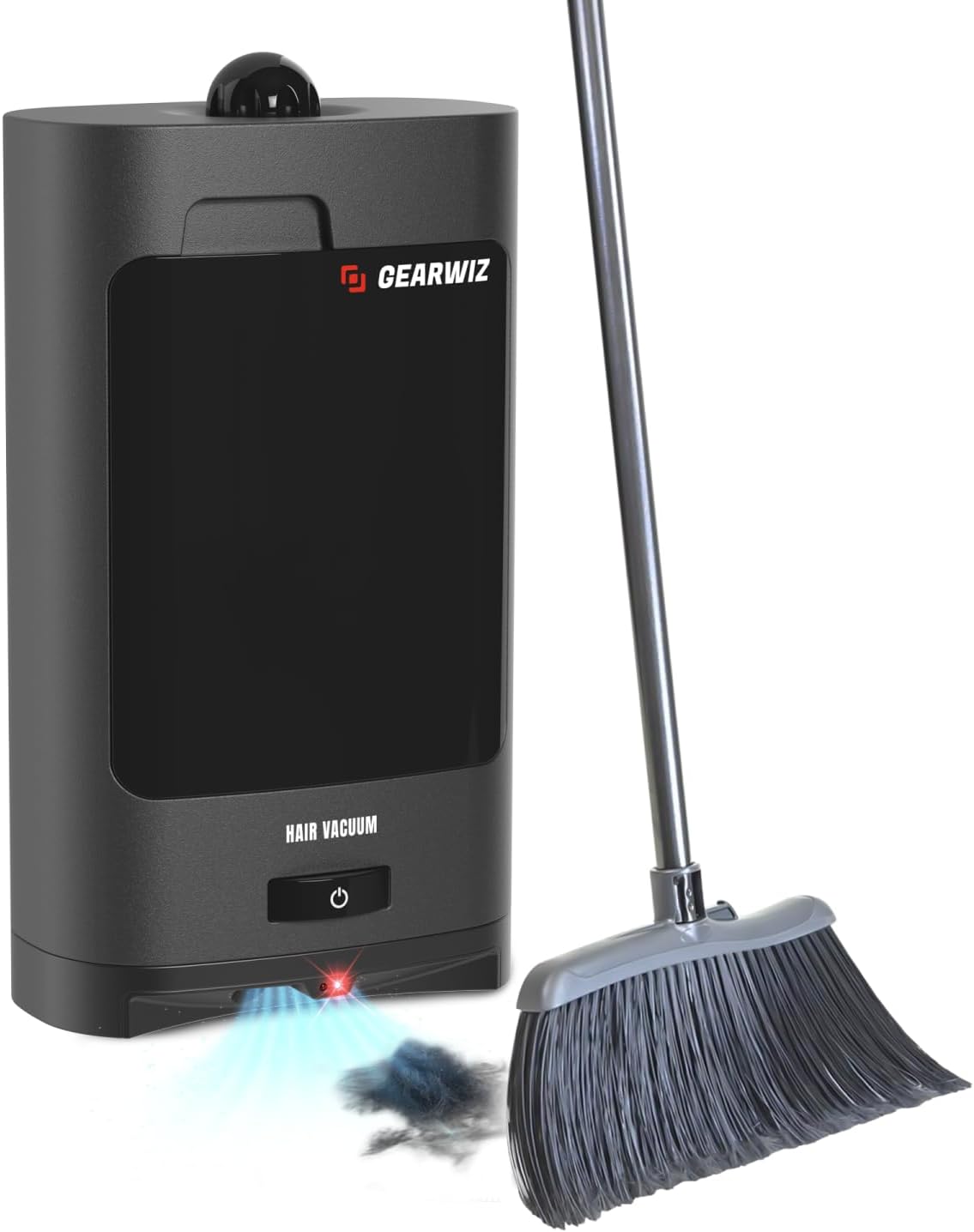
Figure 4: Sweeping towards the Dustpan. An illustration of how to sweep debris directly into the vacuum dustpan's inlet for automatic collection.
Maintenance
Regular maintenance ensures the longevity and optimal performance of your Gearwiz Vacuum Dustpan.
Emptying the Dustbin:
- Ensure the unit is turned OFF and unplugged from the power outlet.
- Locate the dustbin/canister. It is designed for easy removal.
- Carefully pull out the dustbin.
- Open the lid of the dustbin and empty its contents into a trash receptacle.
- Close the lid and reinsert the dustbin firmly into the unit until it clicks into place.

Figure 5: Easy Cleaning Experience. This image highlights the convenience of the large capacity and easy maintenance features, including the removable dustbin.
Cleaning Filters:
The Gearwiz Vacuum Dustpan uses a Pre-motor filter and a HEPA Exhaust Filter. These should be cleaned regularly to maintain suction power and air quality.
- Ensure the unit is turned OFF and unplugged.
- Remove the dustbin as described above.
- Pre-Motor Filter: This filter is typically located inside the dustbin or directly above the motor. Remove it and tap it gently over a trash can to dislodge dust. If heavily soiled, it can be rinsed under cool running water. Ensure it is completely dry before reinserting.
- HEPA Exhaust Filter: This filter is usually located at the back or side of the unit. Refer to Figure 2 for its location. Remove the filter and tap it to remove debris. Do not wash the HEPA filter unless specified by the manufacturer; washing can damage it. Replace if heavily soiled or damaged.
- Reinsert both filters securely and replace the dustbin.
Note: Filter replacement frequency depends on usage. If suction power decreases significantly even after cleaning, consider replacing the filters.
General Cleaning:
- Wipe the exterior of the unit with a soft, damp cloth. Do not use abrasive cleaners or solvents.
- Keep the infrared sensor area clean and free of dust to ensure proper automatic activation.
Troubleshooting
| Problem | Possible Cause | Solution |
|---|---|---|
| Unit does not turn on. | Not plugged in; Power switch is OFF; No power at outlet. | Ensure power cord is securely plugged in. Check if the mode selector knob is set to AUTO or MANUAL. Test the outlet with another device. |
| Low suction power. | Full dustbin; Clogged filters; Obstruction in inlet. | Empty the dustbin. Clean or replace the pre-motor and HEPA filters. Check the inlet for any blockages and remove them. |
| Automatic sensor not activating. | Sensor is dirty or obstructed; Unit is not in AUTO mode. | Clean the infrared sensor window with a soft cloth. Ensure the mode selector knob is set to AUTO. |
| Unit is excessively noisy. | Obstruction in motor/fan; Full dustbin; Loose components. | Turn off and unplug the unit. Check for any foreign objects near the motor or fan. Empty dustbin. Ensure all components are securely in place. |
Specifications
| Feature | Detail |
|---|---|
| Brand | Gearwiz |
| Model Name | Wiz-Vac 2 |
| Power | 1400W (1.87743 horsepower motor) |
| Special Feature | Bagless, Motion-Activated Sensor |
| Filter Type | HEPA Filter |
| Included Components | Nossle (likely refers to the main unit/inlet) |
| Cordless? | No |
| Dustbin Capacity | 7 Quarts |
| Form Factor | Upright/Stationary |
| Color | Black |
| Product Dimensions (L x W x H) | 12.5"L x 7"W x 16.5"H |
| Item Weight | 6.74 pounds |
| Indoor/Outdoor Usage | Indoor |
| UPC | 725657002602 |
Warranty & Support
For warranty information and customer support, please refer to the product packaging or contact Gearwiz customer service directly. Keep your purchase receipt as proof of purchase for any warranty claims.
You can also visit the official product page on Amazon.com for additional information and frequently asked questions.
Important Safety Information
- Always unplug the unit before cleaning or performing any maintenance.
- Do not use the appliance on wet surfaces or to pick up liquids.
- Do not pick up flammable or combustible materials, such as lighter fluid, gasoline, or kerosene, or use in areas where they may be present.
- Do not pick up anything that is burning or smoking, such as cigarettes, matches, or hot ashes.
- Keep hair, loose clothing, fingers, and all parts of body away from openings and moving parts.
- Use only as described in this manual. Use only manufacturer's recommended attachments.
- Do not use with a damaged cord or plug. If appliance is not working as it should, has been dropped, damaged, left outdoors, or dropped into water, return it to a service center.
- Do not pull or carry by cord, use cord as a handle, close a door on cord, or pull cord around sharp edges or corners. Do not run appliance over cord. Keep cord away from heated surfaces.
- Do not handle plug or appliance with wet hands.
- This appliance is for household use only.
- Supervise children and pets when the appliance is in use.
Ask a question about this manual
Ask about setup, troubleshooting, compatibility, parts, safety, or missing instructions. Manuals+ will review the question and use this page’s manual context to help answer it.