
1. Introduction
This manual provides detailed instructions for the proper setup, operation, and maintenance of your ChunHee Solar Motion Sensor Alarm Outdoor. Please read this manual thoroughly before using the product to ensure optimal performance and longevity. This device is designed to deter unwanted animals and intruders from your property using motion-activated sound and strobe lights.
2. Product Overview
2.1 Key Features
- Motion-Activated Deterrence: Detects movement within a 125-degree arc and up to 8 meters (26 feet).
- Loud Alarm & Strobe Light: Emits a 129dB loud sound and a bright strobe LED light to scare away animals and intruders.
- Durable & Weatherproof: Constructed from sturdy ABS casing with an IP65 waterproof rating, suitable for various outdoor conditions including rain, snow, and fog.
- Multiple Working Modes: Offers four distinct operating modes for day and night use, with options for sound, light, or light-only alerts.
- Flexible Power Options: Features solar charging for continuous operation and a USB charging port for quick power replenishment.
2.2 Package Contents
- ChunHee Solar Motion Sensor Alarm Outdoor (2 units)
- USB Charging Cable
- Mounting Screws
- Instruction Manual
2.3 Product Diagram

Figure 1: Components of the Solar Motion Sensor Alarm. Key parts include the solar panel (top), loud siren, motion sensor (front), DC charging port (back), and ON/OFF switch (back).

Figure 2: ChunHee Solar Motion Sensor Alarm Outdoor units with included USB cables.
3. Setup and Installation
3.1 Initial Charging
For first use, it is recommended to fully charge the alarm. You can do this via:
- Solar Power: Place the device in direct sunlight for 4-6 hours. Ensure the solar panel is unobstructed.
- USB Charging: Connect the included USB charging cable to the DC charging port on the back of the alarm and plug it into a 5V/1A USB power adapter (not included). Charging time is typically 2-4 hours.
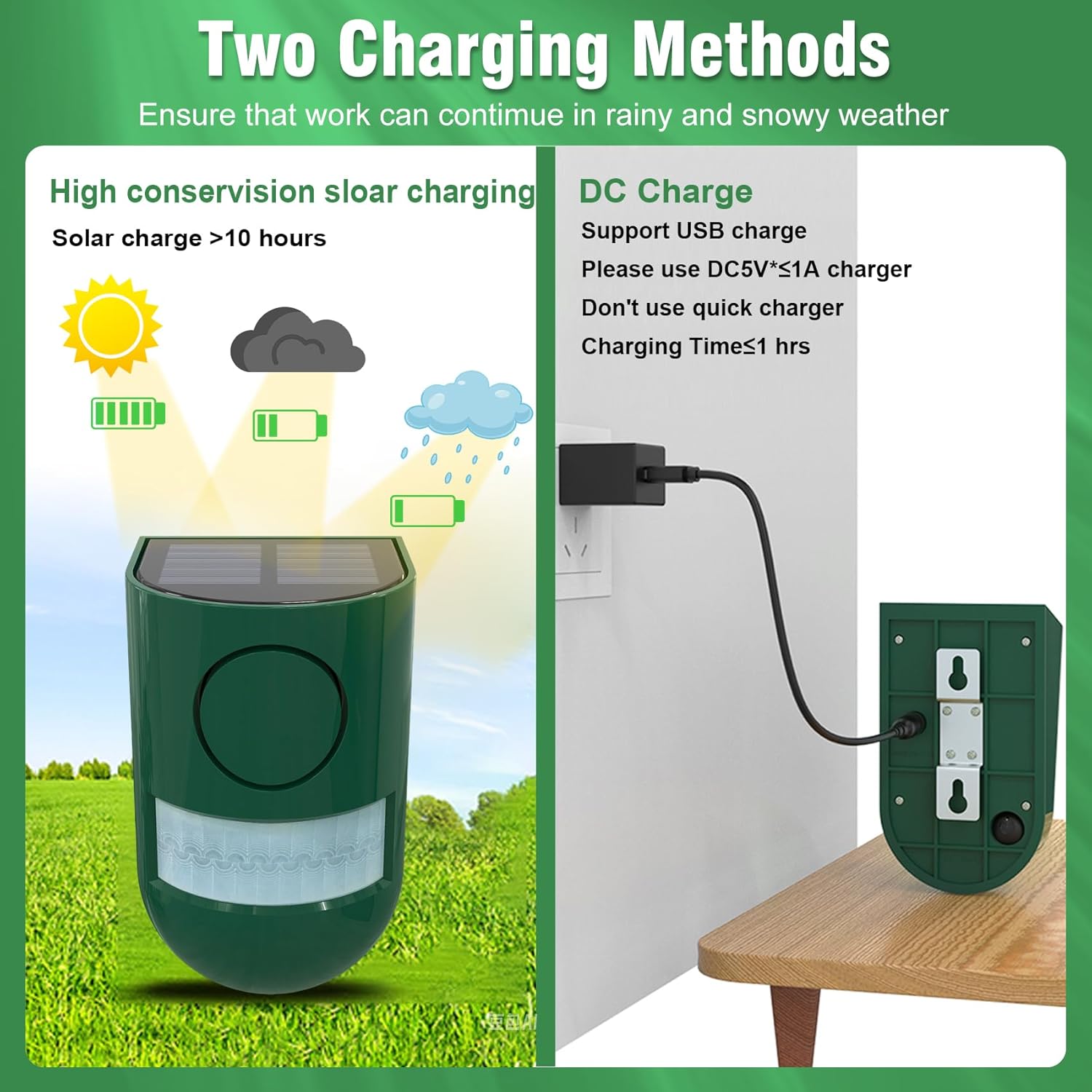
Figure 3: Solar and USB charging methods for the alarm.
3.2 Mounting Instructions
The alarm can be easily mounted on posts, fences, or trees using the provided screws. Consider the following for optimal performance:
- Recommended Height: Install the alarm between 6 to 8 feet from the ground for general use.
- Sensor Aiming: Ensure the motion sensor is aimed directly at the area you wish to monitor.
- Avoid Obstructions: Do not place objects directly in front of the sensor window, as this can interfere with detection.
- Unobstructed Environment: For best results, install the product in an open area without significant obstacles that could affect sound volume or motion detection.
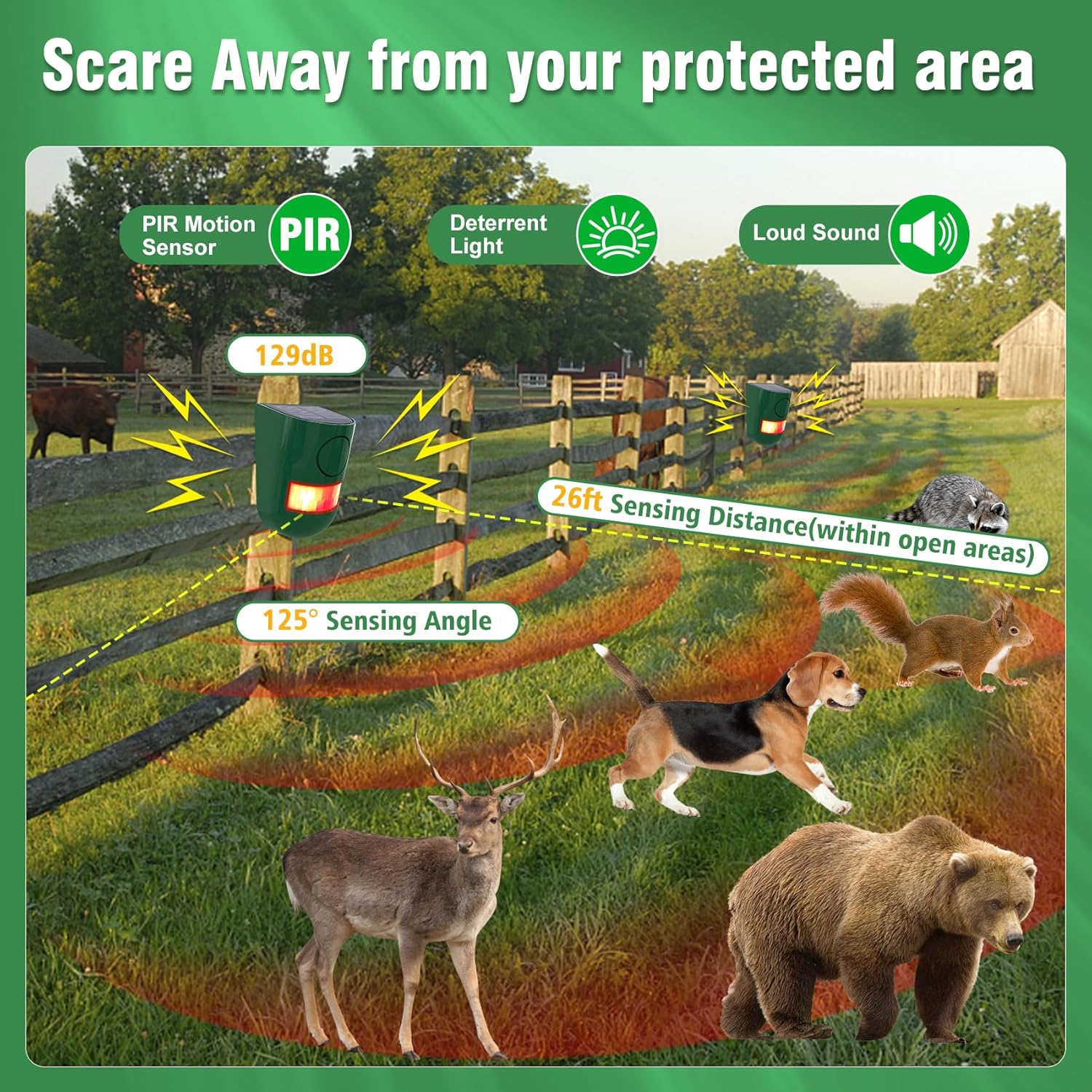
Figure 4: Alarm mounted on a fence, illustrating 125° sensing angle and 26ft detection range.
3.3 Height Recommendations for Animal Deterrence
Different installation heights are suitable for deterring specific types of animals:
| Installation Height | Target Animals |
|---|---|
| 8 Feet | Owls & Hawks |
| 4 Feet | Deer |
| 24 Inches | Large Animals (e.g., Bears) |
| 12 Inches | Small Animals (e.g., Foxes, Raccoons) |
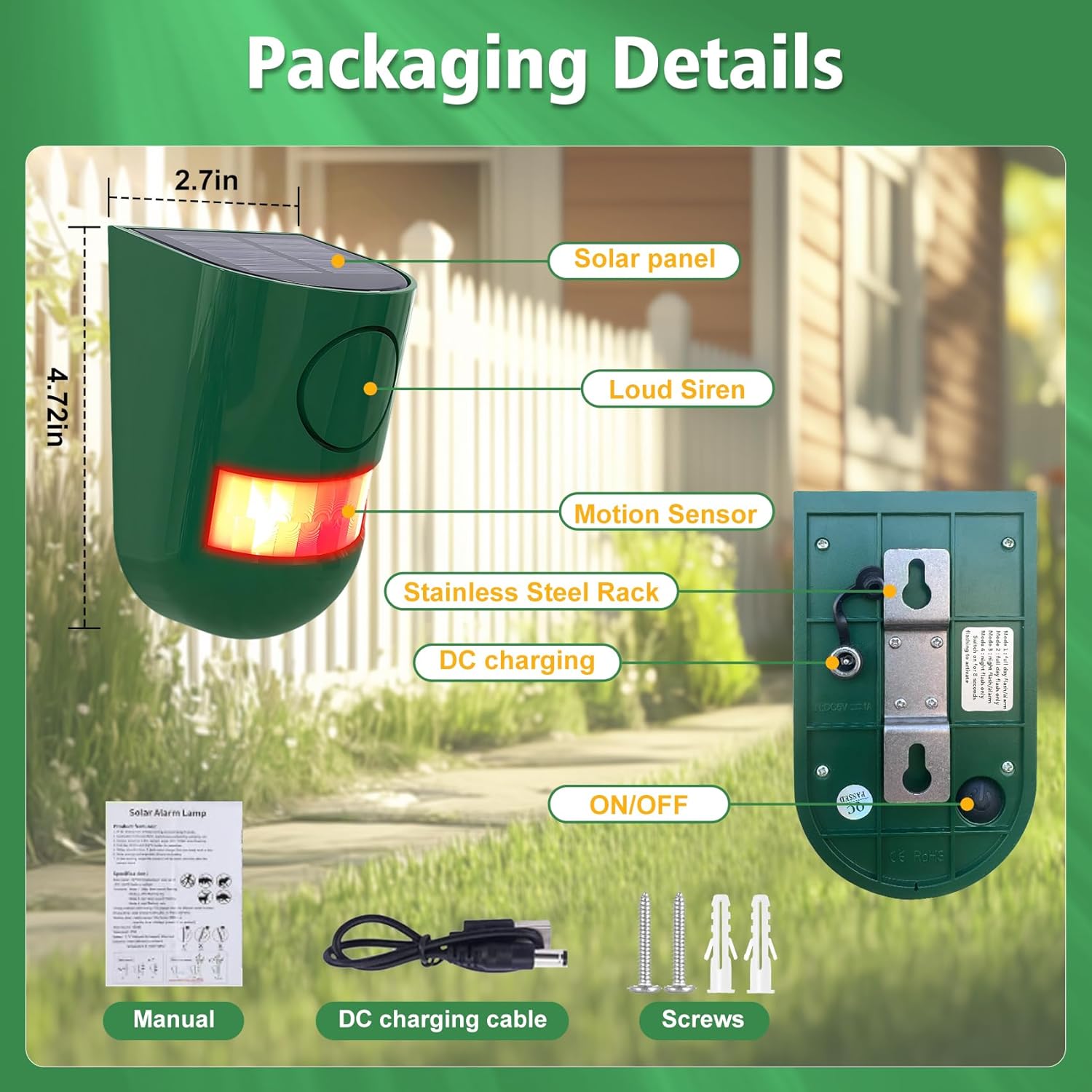
Figure 5: Recommended mounting heights for various animals.
4. Operating Modes
The ChunHee Solar Motion Sensor Alarm features four working modes, which can be cycled by pressing the button on the back of the device. The alarm duration for each trigger is 30 seconds. Please note that the volume is not adjustable, and there is no timing function.
- Mode 1 (Day & Night - Siren and Flashing Lights): The alarm will activate with both a loud siren and flashing lights when motion is detected, regardless of ambient light conditions.
- Mode 2 (Day & Night - Flashing Lights Only): The alarm will activate with flashing lights only when motion is detected, without sound, regardless of ambient light conditions.
- Mode 3 (Night - Siren and Flashing Lights): The alarm will activate with both a loud siren and flashing lights when motion is detected only during nighttime hours.
- Mode 4 (Night - Flashing Lights Only): The alarm will activate with flashing lights only when motion is detected only during nighttime hours, without sound. This mode is recommended for residential areas at night to avoid noise disturbance.

Figure 6: The alarm deterring an intruder with its 129dB sound and strobe light.
4.1 Mode Demonstration Video
Video 1: This video demonstrates the functionality and various applications of the ChunHee Solar Motion Sensor Alarm, including its use in gardens, yards, chicken coops, and farms to deter unwanted animals and intruders.
5. Maintenance
- Cleaning: Regularly wipe the solar panel and motion sensor window with a soft, damp cloth to ensure optimal performance. Avoid abrasive cleaners.
- Battery Care: If the alarm's performance diminishes (e.g., weaker sound or light), it may indicate a low battery. Recharge the device fully using either solar power or the USB cable. The device uses internal rechargeable Lithium-Ion batteries.
- Winter Use: While IP65 waterproof, prolonged periods of heavy snow or ice might reduce solar charging efficiency. Consider USB charging during such conditions if needed.
6. Troubleshooting
| Problem | Possible Cause | Solution |
|---|---|---|
| Alarm not activating (no sound/light) | Low battery Sensor obstructed Incorrect mode selected | Recharge the device via solar or USB. Clear any obstructions from the sensor window. Ensure the ON/OFF switch is on and the correct operating mode is selected. |
| Alarm activates too frequently or for no apparent reason | Sensor too sensitive or improperly aimed Movement from small animals/foliage | Adjust the alarm's position or height. Ensure it's not aimed at moving branches or high-traffic areas for small, non-target animals. |
| Sound volume is low | Obstructions Low battery | Ensure the alarm is in an unobstructed or open environment. Recharge the device. |
7. Specifications
| Feature | Specification |
|---|---|
| Model Number | SL02-GN-2 |
| Control Method | Touch (for mode selection) |
| Noise Level | Up to 129 Decibels |
| Mounting Type | Wall Mount |
| Maximum Detection Range | 8 Meters (approx. 26 feet) |
| Sensing Angle | 125 degrees |
| Sensor Technology | Motion |
| IP Rating | IP65 Waterproof |
| Item Weight | 8.8 ounces |
| Product Dimensions | 5.12 x 5.15 x 5.91 inches |
| Power Source | Solar Powered, USB Rechargeable |
| Battery Type | Rechargeable Lithium-Ion (internal) |
| Average Battery Life | Up to 30 days (on a full charge, depending on usage and solar exposure) |
8. Safety Information
- This product is not a toy. Keep out of reach of children.
- Do not attempt to open or modify the device. This may void the warranty and pose safety risks.
- Ensure proper installation to prevent the device from falling and causing injury or damage.
- Avoid direct exposure of the human ear to the siren at close range, as the high decibel level can cause discomfort.
9. Warranty and Support
For warranty information or technical support, please refer to the product packaging or contact the seller directly through your purchase platform. Please have your model number (SL02-GN-2) and purchase details ready when contacting support.