
Introduction
Thank you for choosing the HOMCOM High Back Office Chair, Model 921-799V00DR. This executive desk chair is designed for comfort and functionality in your home or office. It features high-density foam padding, a soft velvet-feel fabric cover, flip-up armrests, adjustable height, and a tilt function. Please read this manual thoroughly before assembly and use to ensure proper setup and safe operation.
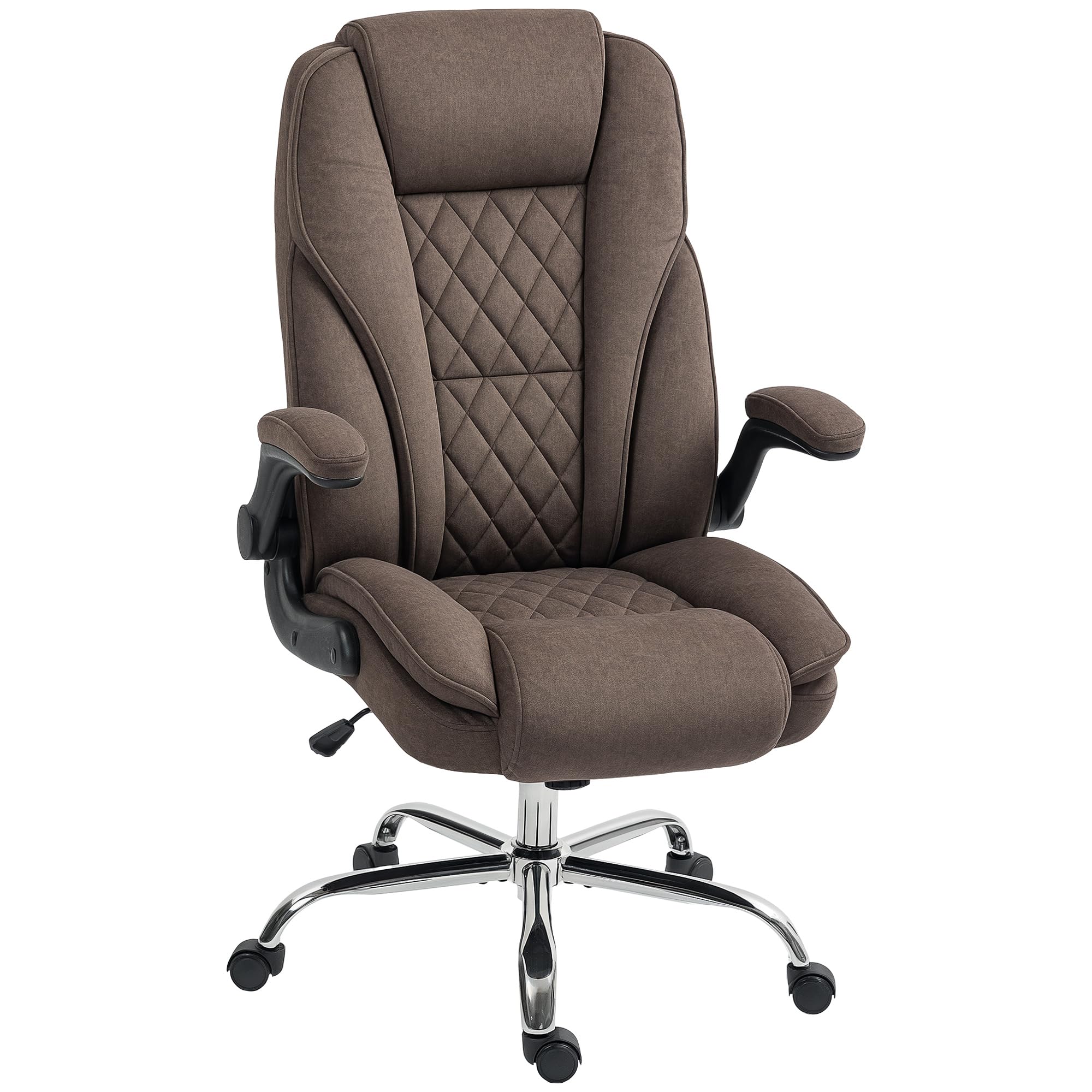
Image: The HOMCOM High Back Office Chair, Model 921-799V00DR, in a brown velvet-feel fabric, positioned in a contemporary office environment.
Safety Information
- Assembly is required. Follow all instructions carefully.
- Do not exceed the maximum weight capacity of 300 pounds (136 kg).
- Keep the chair away from heat sources to prevent damage to materials.
- Do not use the chair if any parts are damaged or missing. Contact customer support for replacement parts.
- Ensure all screws and bolts are tightened securely before use and periodically check for tightness.
- Use on a flat, stable surface.
Package Contents
Before beginning assembly, ensure all parts listed below are present and undamaged. If any parts are missing or damaged, do not proceed with assembly and contact customer service.
- Backrest
- Seat Cushion
- Armrests (2)
- Gas Lift Cylinder
- Base (5-star)
- Casters (5)
- Mechanism Plate
- Hardware Pack (screws, washers, Allen wrench)
Assembly Instructions
Follow these steps carefully to assemble your HOMCOM office chair. It is recommended to assemble the chair on a soft, clean surface to prevent scratches.
- Attach Casters to Base: Insert each of the five casters into the holes at the end of each leg of the 5-star base. Push firmly until they click into place.
- Insert Gas Lift: Place the gas lift cylinder into the center hole of the assembled base.
- Attach Mechanism Plate to Seat: Align the mechanism plate with the screw holes on the underside of the seat cushion. Ensure the front of the mechanism plate faces the front of the seat. Secure with screws using the provided Allen wrench.
- Attach Armrests to Seat: Attach the armrests to the sides of the seat cushion using the designated screws. Do not fully tighten yet.
- Attach Backrest to Armrests and Seat: Align the backrest with the armrests and the rear of the seat. Secure the backrest to the armrests and the seat using the remaining screws. Once all screws are in place, tighten all screws on the armrests and backrest firmly.
- Connect Seat Assembly to Gas Lift: Carefully place the assembled seat and backrest onto the gas lift cylinder, ensuring the center hole of the mechanism plate aligns with the top of the gas lift. Press down firmly to secure.
Video: Official product video demonstrating the assembly and features of the HOMCOM Office Chair, Model 921-799V00DR.
Operating Instructions
Your HOMCOM office chair is designed with several adjustable features to enhance your comfort and support.
- Adjustable Height: To raise the seat, lift the lever located under the right side of the seat while taking your weight off the chair. To lower the seat, lift the lever while remaining seated. Release the lever at your desired height.
- Tilt Function: The chair features a tilt function allowing you to rock back and forth. To activate the tilt, pull the lever (often the same one as height adjustment) outwards. To lock the chair in an upright position, push the lever inwards. The tension of the tilt can be adjusted by turning the round knob located under the front of the seat. Turn clockwise to increase tension (making it harder to tilt) and counter-clockwise to decrease tension (making it easier to tilt).

Image: Visual guide to the chair's tilt mechanism, illustrating the range of motion and adjustment controls.
- Comfort and Support: This chair is designed with double-tier high-density foam padding and a high back for supportive comfort, including neck, back, lumbar, hip, and leg support.

Image: An illustration highlighting the ergonomic design of the chair, providing comprehensive support for the user's body.
- Padded Cushion: The seat features a padded cushion designed for comfort during extended use.

Image: A cutaway view of the chair's seat cushion, detailing its construction for enhanced comfort.
- Flip-up Armrests: The armrests can be flipped up to allow the chair to be tucked under a desk, saving space. Simply lift the armrests upwards until they lock into a vertical position. To return them, pull them down.

Image: A user flipping up the armrests of the chair to store it compactly under a desk.
- Swivel Wheels: The chair is equipped with smooth-rolling PU wheels that allow for 360-degree swivel and movement across various floor types without causing damage.

Image: Detail of the chair's durable PU wheels, designed for smooth and quiet movement on different floor types.
Maintenance
To ensure the longevity and appearance of your HOMCOM office chair, follow these simple maintenance guidelines:
- Cleaning: Wipe clean with a damp cloth. For stubborn stains on the velvet-feel fabric, use a mild upholstery cleaner and follow the product instructions. Do not use harsh chemicals or abrasive cleaners.
- Hardware Check: Periodically check all screws and bolts to ensure they remain tight. Re-tighten as necessary to maintain stability and safety.
- Caster Care: Keep the casters free of debris (hair, dust, etc.) to ensure smooth rolling.

Image: Detailed view of the chair's soft, durable velvet-feel fabric, which is easy to maintain.
Troubleshooting
If you encounter any issues with your chair, refer to the following common troubleshooting tips:
- Chair Sinks or Won't Stay Up: The gas lift cylinder may be faulty. Contact customer support for a replacement.
- Chair is Wobbly: Check all assembly screws and bolts. Re-tighten any loose connections. Ensure the base is properly assembled and casters are fully inserted.
- Difficulty Rolling: Check casters for trapped debris (hair, lint) and clean them. Ensure the chair is used on an appropriate surface.
- Squeaking Noises: Apply a small amount of silicone lubricant to moving parts, such as the tilt mechanism or where the gas lift meets the base.
Specifications
Detailed product specifications for the HOMCOM High Back Office Chair, Model 921-799V00DR:
| Feature | Detail |
|---|---|
| Brand | HOMCOM |
| Model Number | 921-799V00DR |
| Color | Brown |
| Material | Velvet-feel fabric (Polyester), Foam, Alloy Steel |
| Overall Dimensions (D x W x H) | 27.6"D x 27.6"W x 44.9"-48"H (Adjustable) |
| Seat Dimensions (W x D x H) | 21.3"W x 20.1"D x 19.3"-22.4"H (Adjustable) |
| Backrest Height | 26" |
| Armrest Height (from seat) | 7.1" |
| Item Weight | 38.5 Pounds |
| Maximum Weight Recommendation | 300 Pounds |
| Features | Adjustable Height, Flip-up Armrests, Tilt Function, Swivel, Rolling Casters, High Back, Lumbar Support |
| Assembly Required | Yes |

Image: Technical drawing showing the precise measurements of the chair for reference.
Warranty and Support
For warranty information, replacement parts, or technical support, please contact HOMCOM customer service. Keep your purchase receipt and model number (921-799V00DR) handy for faster service.
Visit the official HOMCOM store for more products and support: HOMCOM Store