
Introduction
Thank you for choosing the Miaosical Automatic Pet Feeder SC-A60K. This device is designed to provide scheduled and portion-controlled meals for your cats and small dogs, ensuring they receive consistent nutrition. Please read this manual thoroughly before use to ensure proper operation and maintenance.
Safety Information
- This appliance is for indoor use only. Do not expose to rain or moisture.
- Do not use with wet food. Only suitable for dry kibble between 2-15mm in size.
- Keep out of reach of children and pets to prevent tampering or injury.
- Ensure the power adapter cable is not damaged and is placed where pets cannot chew it.
- Do not immerse the main unit in water. Only detachable parts are washable.
- Use only the specified power adapter (5V USB) or 3 D-cell batteries (not included).
- This feeder is intended for cats and small dogs. Do not use for larger animals.
Package Contents
Verify that all items are present in the package:
- Miaosical Automatic Pet Feeder Main Unit
- Food Storage Container Lid
- Food Bowl (ABS)
- Stainless Steel Bowl (Optional, if included with your model)
- 5V USB Power Adapter and Cable
- User Manual

Product Overview
The Miaosical Automatic Pet Feeder consists of a food storage container, a base unit with a control panel, and a detachable food bowl. The transparent container allows you to monitor food levels easily.

Key Features:
- 3.6 Liter Capacity: Holds a substantial amount of dry kibble.
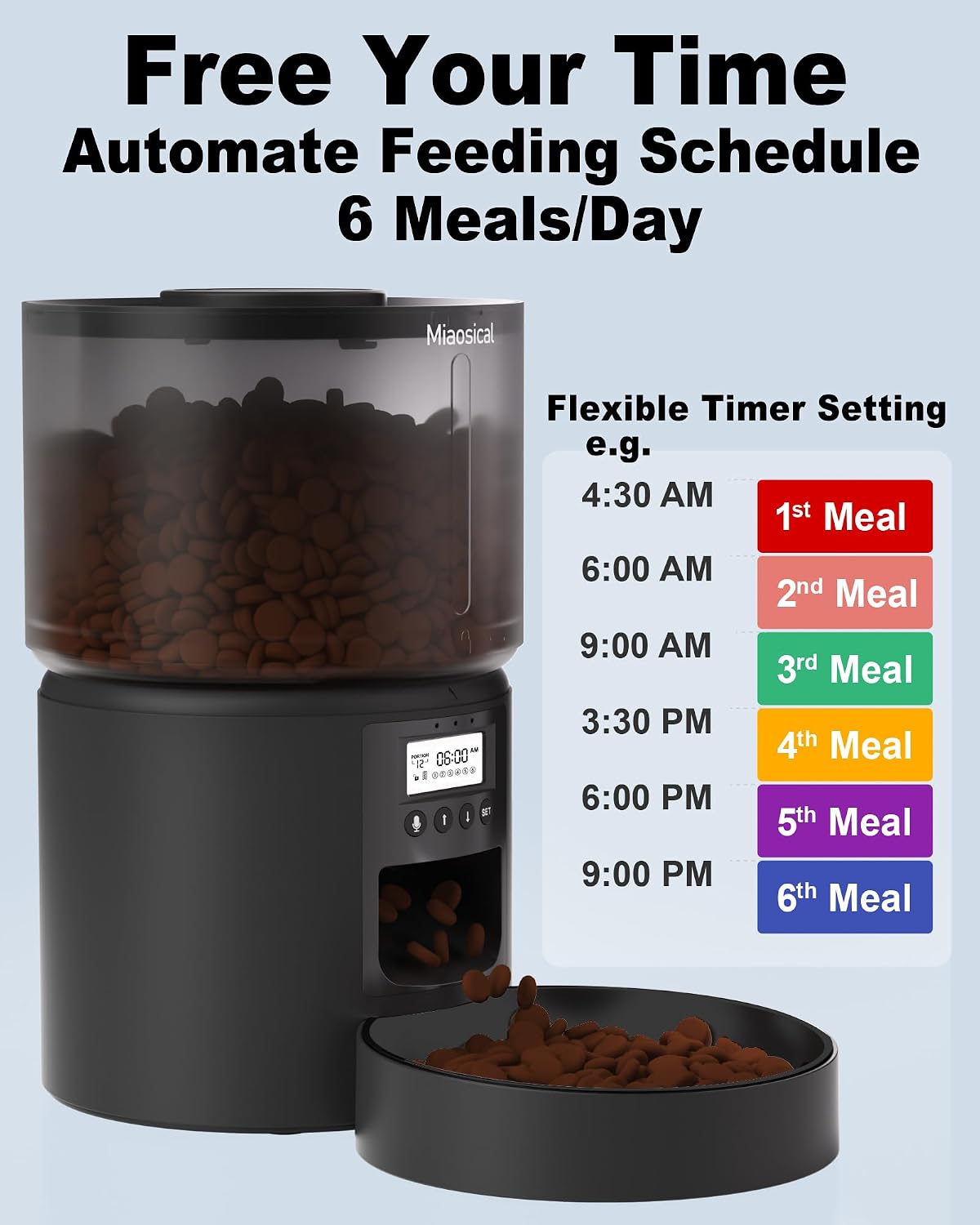
- Programmable Feeding: Up to 6 meals per day with 1-12 portions per meal.
- Voice Recording: Record a 10-second message to call your pet.
- Dual Power Supply: Operates via 5V USB adapter or 3 D-cell batteries for backup.
- Anti-Jam Mechanism: Clover-shaped rotor designed to prevent kibble jams.
- Easy to Clean: Detachable food bowl and container for simple cleaning.

Setup
- Unpack Components: Carefully remove all parts from the packaging.
- Assemble Food Bowl: Place the chosen food bowl (ABS or stainless steel) into the designated slot at the base of the feeder.
- Fill Food Container: Open the lid of the food storage container. Pour dry kibble into the container. Ensure the kibble size is between 2-15mm to prevent jamming. Close the lid securely.
- Power the Feeder:
- USB Power: Connect the 5V USB power adapter to the feeder and plug it into a wall outlet.
- Battery Backup (Optional): For power outage protection, insert 3 D-cell batteries (not included) into the battery compartment located at the bottom of the feeder. Ensure correct polarity.

Operating Instructions
Control Panel Overview:
The control panel features an LCD screen and several buttons for programming:
- SET Button: Enters programming mode and confirms settings.
- UP/DOWN Buttons: Adjust values (time, meal number, portions).
- Record Button: Initiates and saves voice recordings.
- Manual Feed Button: Dispenses one portion manually.
1. Setting Current Time:
- Press and hold the SET button for 3 seconds until the hour digit flashes.
- Use the UP and DOWN buttons to adjust the hour.
- Press SET to confirm the hour and move to minutes.
- Use the UP and DOWN buttons to adjust the minutes.
- Press SET to confirm and exit time setting mode.
2. Programming Feeding Schedule:
The feeder supports up to 6 meals per day. Each meal can be programmed with 1 to 12 portions (approximately 6g per portion).
- Press the SET button once to enter Meal 1 programming. The meal number and hour will flash.
- Use UP and DOWN to set the desired feeding hour for Meal 1. Press SET to confirm.
- Adjust the minutes for Meal 1 using UP and DOWN. Press SET to confirm.
- The portion number will flash. Use UP and DOWN to select the number of portions (1-12) for Meal 1. Press SET to confirm.
- Repeat steps 1-4 for Meal 2 through Meal 6 as needed. If you do not wish to set all 6 meals, simply press SET repeatedly to cycle through and exit programming mode after setting your desired meals.
3. Voice Recording:
You can record a 10-second voice message that will play at each scheduled feeding time to call your pet.
- Press and hold the Record button until you hear a beep.
- Speak your message clearly into the microphone (located near the control panel) within 10 seconds.
- Release the Record button to save the message. You will hear two beeps to confirm.
- To test the recording, briefly press the Record button once.

4. Manual Feeding:
To dispense one portion of food immediately, briefly press the Manual Feed button.
Maintenance and Cleaning
Regular cleaning ensures hygiene and proper functioning of your pet feeder.
- Detachable Parts: The food bowl and food storage container are detachable and can be hand-washed with mild soap and water. Rinse thoroughly and dry completely before reassembling.
- Main Unit: The main unit containing electronic components is NOT WASHABLE. Wipe the exterior with a soft, damp cloth. Do not use abrasive cleaners or immerse in water.
- Food Outlet: Periodically check the food outlet for any kibble residue or blockages. Clean gently with a small brush if necessary.

Troubleshooting
| Problem | Possible Cause | Solution |
|---|---|---|
| Feeder not powering on. | No power from USB adapter; batteries depleted or incorrectly inserted. | Check USB connection and wall outlet. Replace D-cell batteries or ensure correct polarity. |
| Food not dispensing. | Food container empty; kibble jammed; food outlet blocked; incorrect schedule settings. | Refill food container. Check for kibble jams (kibble too large or sticky). Clear food outlet. Verify feeding schedule and portion settings. |
| Voice recording not playing. | No recording saved; volume too low. | Re-record your message. Ensure the recording process was completed successfully. |
| Time or schedule incorrect. | Time not set correctly; schedule not saved. | Follow instructions to reset current time and reprogram the feeding schedule. |
Specifications
- Model Number: SC-A60K
- Dimensions (L x W x H): 17 x 17 x 21 cm (6.7 x 6.7 x 8.3 inches)
- Weight: 1.2 kg (2.6 lbs)
- Capacity: 3.6 Liters
- Material: Acrylonitrile Butadiene Styrene (ABS)
- Target Species: Cat, Small Dog
- Power Source: 5V USB Power Adapter (included), 3 x D-cell Batteries (not included)
- Special Features: Feeding Schedule, Voice Recording, Timer, Durable
- Recommended Kibble Size: 2-15mm dry food
Warranty and Support
For warranty information or technical support, please refer to the contact details provided on the product packaging or contact Miaosical customer service directly. Keep your purchase receipt as proof of purchase.

