
Product Overview
The SunJack MC4 Solar Panel to Power Station Adapter Cable is designed to connect your solar panel with MC4 output connectors to a variety of portable power stations or solar generators. This versatile cable features a main MC4 input and three common output connectors: DC5521, XT60, and Anderson, providing broad compatibility for your solar charging needs.

Image: The SunJack MC4 Solar Panel to Power Station Adapter Cable, coiled for storage, showcasing its various connectors.
Key Features
- Multi-Connector Design: Features MC4 input and three output connectors (DC5521, XT60, Anderson) for wide compatibility.
- Durable Construction: Built with heavy-duty 14AWG copper wire for efficient power transmission and minimal loss.
- Weatherproof: MC4 plugs are IP68 rated, offering protection against rain, sand, dust, and moisture.
- Extended Length: 10 feet (3 meters) total cable length provides flexibility in solar panel placement.
- Robust Insulation: Thick outer PVC insulation coating resists scratches, corrosion, and UV damage.

Image: A banner highlighting the key features of the MC4 Solar Panel Adapter Cable, including its efficiency, durability, and waterproof design.
Setup Instructions
- Identify Connectors: Ensure your solar panel has MC4 output connectors and your power station has a compatible input (DC5521, XT60, or Anderson).
- Connect to Solar Panel: Quickly and easily connect the main cable’s MC4 plugs to the solar panel’s output MC4 plugs. Ensure a secure connection.
- Connect to Power Station: Select the appropriate branch cable plug (DC5521, XT60, or Anderson) and plug it into the corresponding input port on your power station.
- Position Solar Panel: Place your solar panel in direct sunlight for optimal charging. The 10ft cable allows for flexible positioning.
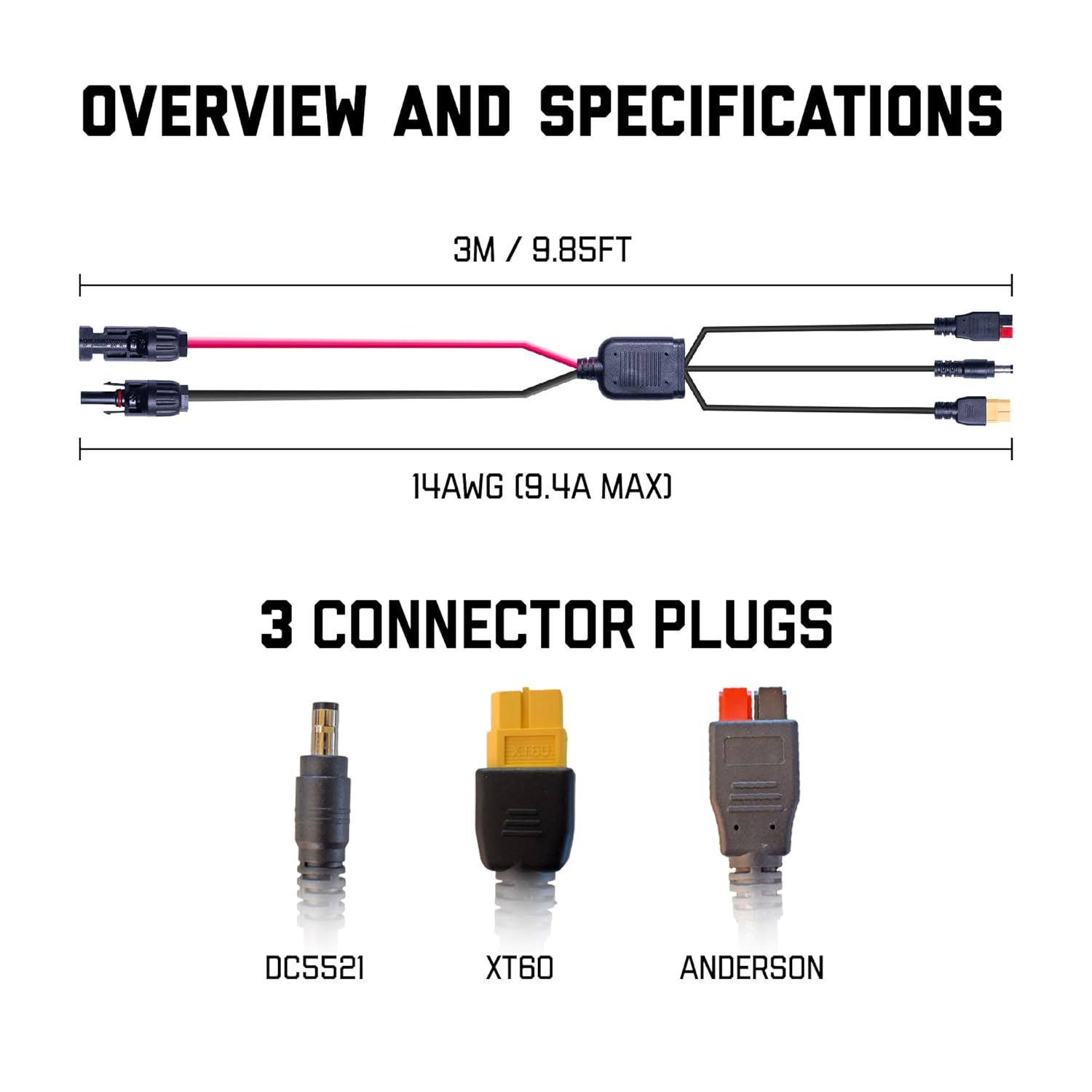
Image: A visual guide demonstrating the plug-and-play MC4 connection from a solar panel to the adapter cable, and then to a power station via one of the three branch connectors.
Operating Instructions
Once the cable is securely connected between your solar panel and power station, the power station should begin charging automatically, provided the solar panel is receiving sufficient sunlight. Monitor your power station's display for charging status.
Disconnecting MC4 Plugs:
To disconnect the MC4 plugs, simply press the tab on both sides of the built-in lock on the male solar connector with your fingers and pull apart. Do not force the connection.

Image: A close-up view of the waterproof MC4 connectors, highlighting their robust design for outdoor use.
Maintenance
- Regular Inspection: Periodically inspect the cable and connectors for any signs of wear, damage, or corrosion.
- Cleaning: If necessary, clean the cable and connectors with a dry, soft cloth. Avoid using harsh chemicals or abrasive materials.
- Storage: When not in use, coil the cable neatly and store it in a dry, cool place away from direct sunlight and extreme temperatures.
- Waterproof Integrity: While MC4 plugs are IP68 rated, ensure they are free from debris before connecting to maintain their waterproof seal.
Troubleshooting
No Charging / Low Charging Rate:
- Check Sunlight: Ensure the solar panel is in direct, unobstructed sunlight. Shading, even partial, can significantly reduce output.
- Verify Connections: Double-check all MC4 and power station connections to ensure they are secure and properly seated.
- Cable Damage: Inspect the cable for any visible damage, kinks, or cuts that might impede power flow.
- Power Station Input: Confirm your power station's input port is functioning correctly and is compatible with the selected adapter plug.
- Polarity: Ensure correct polarity when connecting MC4 connectors. The red cable with the (+) label has a (-) in the plug and is the positive cable. The black cable with the (-) label has a (+) sign on the plug and is the negative cable.
Difficulty Disconnecting MC4 Plugs:
- Use Tabs: Remember to press the built-in tabs on both sides of the male MC4 connector to release the lock before pulling.
- Avoid Force: Do not pull forcefully without disengaging the locking mechanism, as this can damage the connectors.
Specifications
| Feature | Detail |
|---|---|
| Main Cable Plug Type | MC4 |
| Branch Cable Plug Types | DC 5.5 x 2.1mm, XT60, Anderson |
| Total Length | 10ft (3m) |
| Branch Cable Length (each) | 1ft |
| Cable Gauge | 14AWG |
| Maximum Operating Current | 9.4A |
| Waterproof Rating | IP68 (MC4 plugs) |
| Outer Material | Polyvinyl Chloride (PVC) |
| Model Number | SJ-SPLT-MC4-14AWG |

Image: Detailed view of the Anderson, DC5521, and XT60 adapter plugs, emphasizing the 14AWG copper wire for efficient power transfer.
Warranty and Support
This SunJack product is backed by a 24-month hassle-free warranty. For any questions, issues, or support needs, please contact SunJack customer service. Contact information can typically be found on the product packaging or the official SunJack website.


