
Introduction
This manual provides detailed instructions for the installation, operation, and maintenance of your EsaSam Android 13 Car Stereo QLED Display, Model 4 Core NF1 1G+32G. This unit is designed for compatibility with JAC Refine S3 vehicles manufactured between 2013 and 2016. Please read this manual thoroughly before using the product to ensure proper function and safety.
Package Contents
- 1x Car MP5 Player (Main Unit)
- 1x Power Harness
- 1x RCA Harness
- 1x GPS Antenna
- 2x USB Harness
- 1x Tool Kit
- 1x Reversing Camera Kit
Note: Additional accessories like a microphone and 4G antenna are not included with the 4 Core NF1 1G+32G model.
Setup and Installation
Before beginning installation, ensure your vehicle is turned off and the battery is disconnected. Professional installation is recommended.
1. Compatibility Check
This unit is specifically designed for JAC Refine S3 models from 2013 to 2016. Verify that your vehicle's original center console matches the product images. If there are discrepancies, consult the seller before proceeding.
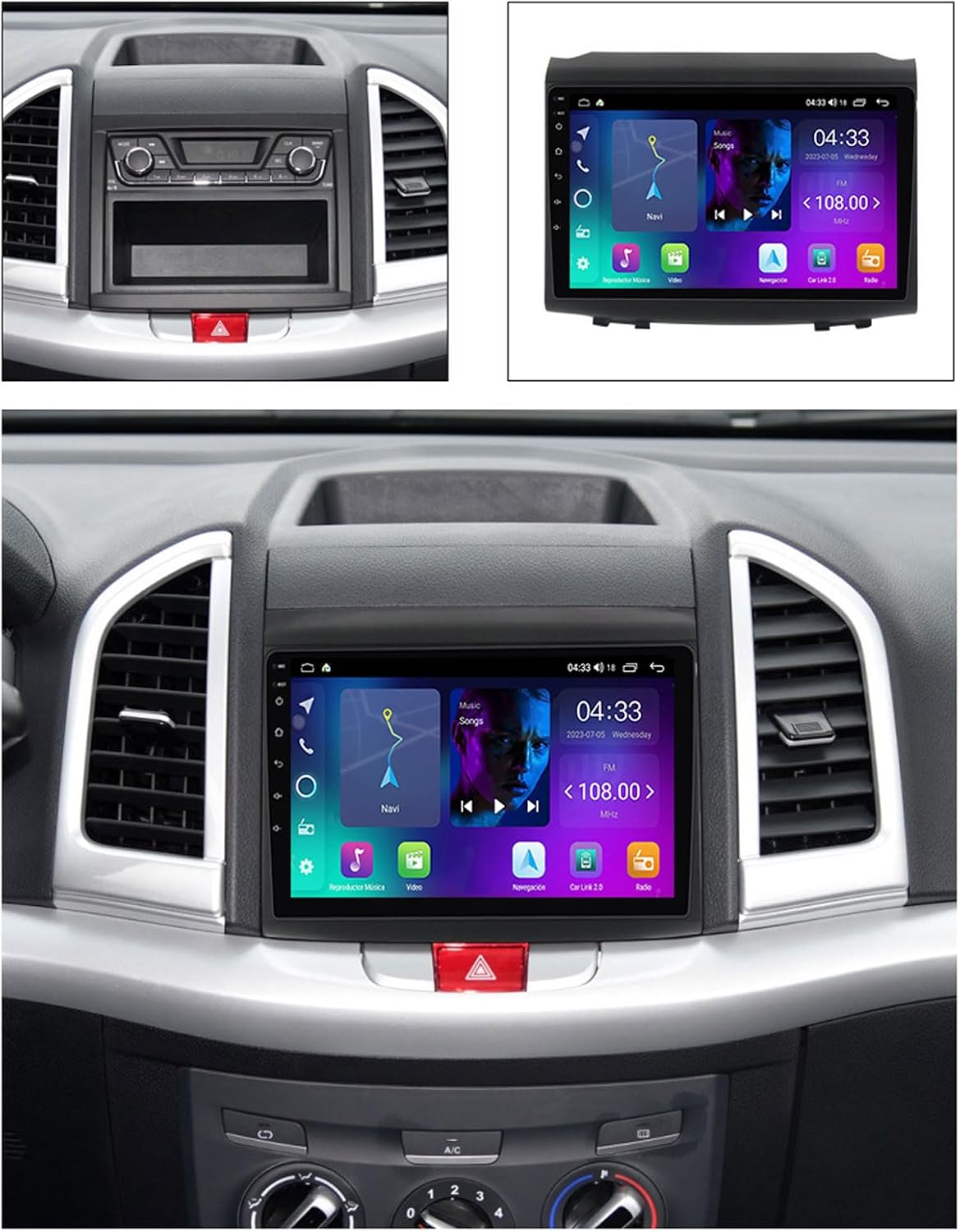
Image: The EsaSam car stereo unit shown alongside an example of its installation within a compatible vehicle's dashboard, illustrating the fit and appearance.
2. Wiring Connections
Connect the provided power harness, RCA harness, GPS antenna, and USB harnesses to the corresponding ports on the main unit and your vehicle's wiring system. Refer to your vehicle's service manual for specific wiring diagrams if needed.

Image: A clear front view of the EsaSam Android car stereo, showcasing its QLED display and the main user interface with various application icons.
3. Steering Wheel Control Configuration
- Without CANBUS: Access the system settings and use the button learning function to map your steering wheel controls.
- With CANBUS: Configure the CANBUS protocol within the system settings.
Operating Instructions
1. Basic Operation
The unit features a 9-inch QLED touch screen with a 1280*720 pixel display. Navigate the interface by tapping icons and swiping. The system supports 1920*1080 video playback for a clear visual experience.
2. Radio (FM/RDS)
Access the radio application to listen to FM stations. The unit supports automatic and manual station search. You can save preset stations for quick access. RDS (Radio Data System) functionality is available on this model.

Image: A composite image detailing the built-in GPS navigation interface, the RDS radio screen with frequency display, and a clear view from the AHD rear view camera.
3. Bluetooth Connectivity
Pair your mobile device via Bluetooth 5.0 to make hands-free calls and stream audio directly to the car stereo. Access Bluetooth settings to search for devices and connect.
4. GPS Navigation
The unit includes built-in global GPS navigation. Use the pre-installed maps or download additional navigation applications. The system provides real-time traffic conditions and accurate positioning.
5. CarPlay and Android Auto
This model supports wireless CarPlay and wired Android Auto. Connect your smartphone to access compatible apps, navigation, music, and messaging directly on the stereo display.

Image: An infographic highlighting key features of the car stereo, including the QLED Quantum Screen with 1280*720 resolution, DSP Equalizer, wireless CarPlay and Android Auto, and steering wheel control functionality.
6. Split Screen and Floating Window
Utilize the split-screen function to display two applications simultaneously, such as navigation and music. The floating window feature allows for a small, movable application overlay, enhancing multitasking capabilities.

Image: A visual representation of the car stereo's advanced features, including the ability to run two apps side-by-side in split-screen mode, a floating video player, and an illustration of 4G LTE and WiFi connectivity options.
7. Rear View Camera
The included reversing camera kit provides a clear view behind your vehicle when reversing. The display automatically switches to the camera feed when the vehicle is put into reverse gear.
Maintenance
- Cleaning: Use a soft, dry cloth to clean the screen and unit. Avoid abrasive cleaners or solvents.
- Software Updates: Periodically check for software updates through the system settings or the manufacturer's website to ensure optimal performance and access to new features.
- Environmental Conditions: Avoid exposing the unit to extreme temperatures, direct sunlight for prolonged periods, or excessive moisture.
Troubleshooting
- Unit Does Not Power On:
- Check all power connections to ensure they are secure.
- Verify the vehicle's fuse for the stereo system is intact.
- Steering Wheel Controls Not Working:
- If your vehicle does not have CANBUS, ensure the steering wheel learning function in system settings has been properly configured.
- If your vehicle has CANBUS, verify the CANBUS protocol is correctly configured in the system settings.
- Ensure all wiring for steering wheel controls is correctly connected.
- No Sound:
- Check volume levels on the unit and your connected device.
- Verify speaker wire connections.
- Ensure the correct audio source is selected.
- GPS Signal Issues:
- Ensure the GPS antenna is properly installed and has a clear view of the sky.
- Check GPS settings within the unit.
- Bluetooth Connection Problems:
- Ensure Bluetooth is enabled on both the stereo and your mobile device.
- Delete previous pairings and attempt to re-pair the devices.
- Move your device closer to the stereo.
For persistent issues, please contact EsaSam customer service for assistance.
Specifications
| Feature | Specification |
|---|---|
| Model | 4 Core NF1 1G+32G |
| Operating System | Android 13 |
| Core Processor | 4 Core |
| RAM/ROM | 1GB RAM + 32GB ROM |
| Screen Type | QLED Touch Screen |
| Screen Size | 9 Inch |
| Resolution | 1280*720 |
| Bluetooth | Bluetooth 5.0 |
| Internet Connectivity | WiFi |
| CarPlay/Android Auto | Wireless CarPlay, Wired Android Auto |
| Radio | FM, RDS |
| Rear View Camera | Supported (Kit Included) |
| DSP | Not included (Optional for higher models) |
| 4G LTE | Not included (Optional for higher models) |

Image: A detailed comparison chart outlining the specifications for various EsaSam car stereo models (NF-1 to NF-7), including internet connectivity, OS, core processor, RAM/ROM, screen type, resolution, and supported features.
Warranty and Support
For any questions, technical support, or warranty inquiries, please contact EsaSam customer service directly. Refer to your purchase documentation for specific warranty terms and contact information.
Note: The product description advises contacting the seller's customer service email in time for any questions.