
Newday DC1155-8B/62
Newday 62-inch Large Ceiling Fan with Lights and Remote
Model: DC1155-8B/62
Introduction
Thank you for purchasing the Newday 62-inch Large Ceiling Fan with Lights and Remote. This manual provides detailed instructions for safe installation, operation, and maintenance of your new ceiling fan. Please read this manual thoroughly before installation and retain it for future reference.
Important Safety Information
To reduce the risk of electric shock, fire, or personal injury, always follow these basic precautions:
- Read all instructions carefully before installing the fan.
- Ensure the power is turned off at the circuit breaker before installation or servicing.
- All wiring must be in accordance with national and local electrical codes. Consult a qualified electrician if you are unsure about wiring procedures.
- The fan must be mounted to a structurally sound ceiling joist or outlet box capable of supporting the fan's weight (approximately 23.4 pounds).
- Do not operate the fan with damaged blades or housing.
- Avoid placing objects in the path of the fan blades.
- This fan is suitable for both indoor and covered outdoor use. Do not expose to direct water spray.
Package Contents
Verify that all components are present before beginning installation:
- Ceiling Fan Motor Assembly
- 8 Fan Blades (dual-color: black and wood grain)
- LED Light Kit
- Remote Control with Wall Mount Bracket
- Downrods (6-inch and 12-inch options)
- Mounting Hardware (screws, washers, wire nuts)
- Instruction Manual

Image: Main components of the Newday 62-inch Ceiling Fan, showing the motor, eight blades, remote control, and two downrod options.
Product Features
- 62-inch Diameter: Large size suitable for spacious rooms and covered outdoor areas.
- Dual-Color Blades: Eight reversible blades with black on one side and wood grain on the other, allowing for style customization.

Image: Illustration of the dual-color blades, demonstrating both the black and wood grain sides in a living room environment.
- Integrated LED Light: Dimmable 24W LED light (20%-100%) with three color temperature options (3000K Warm White, 4200K Neutral White, 6500K Cool White).

Image: Visual representation of the fan's customizable light, displaying warm, neutral, and cool light settings, along with a dimming scale.
- 6-Speed Reversible DC Motor: Energy-efficient and quiet DC motor with six speed settings and reversible airflow for summer (downward) and winter (upward) modes. Noise level below 35dB.

Image: Diagram illustrating the fan's reversible airflow, showing cool air delivery in summer mode and warm air circulation in winter mode.
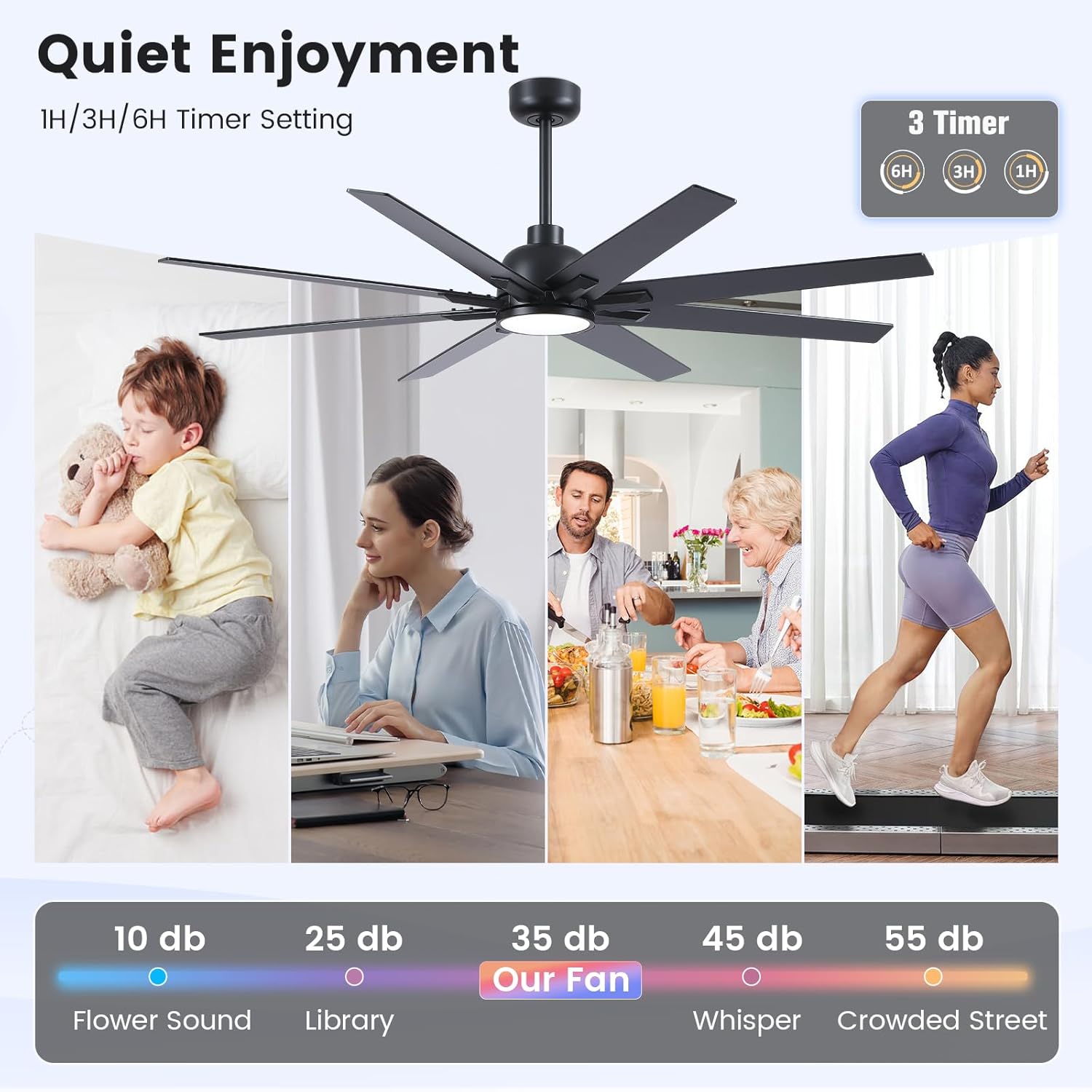
Image: Chart comparing the fan's quiet operation (35dB) to other common sounds like a library (25dB) or a crowded street (55dB).
- Remote Control: Full-function remote for convenient control of fan speeds, light settings, reverse mode, and timer functions.

Image: The remote control for the Newday 62-inch Ceiling Fan, highlighting its various functions including speed, light, and timer controls.
- Timer Function: Set the fan to turn off automatically after 1, 3, or 6 hours.
- Sleep Mode: Activates a simulated natural wind mode, cycling through speeds 1, 2, and 3 every 20 seconds for gentle airflow.
- Downrod Options: Includes 6-inch and 12-inch downrods to accommodate various ceiling heights.
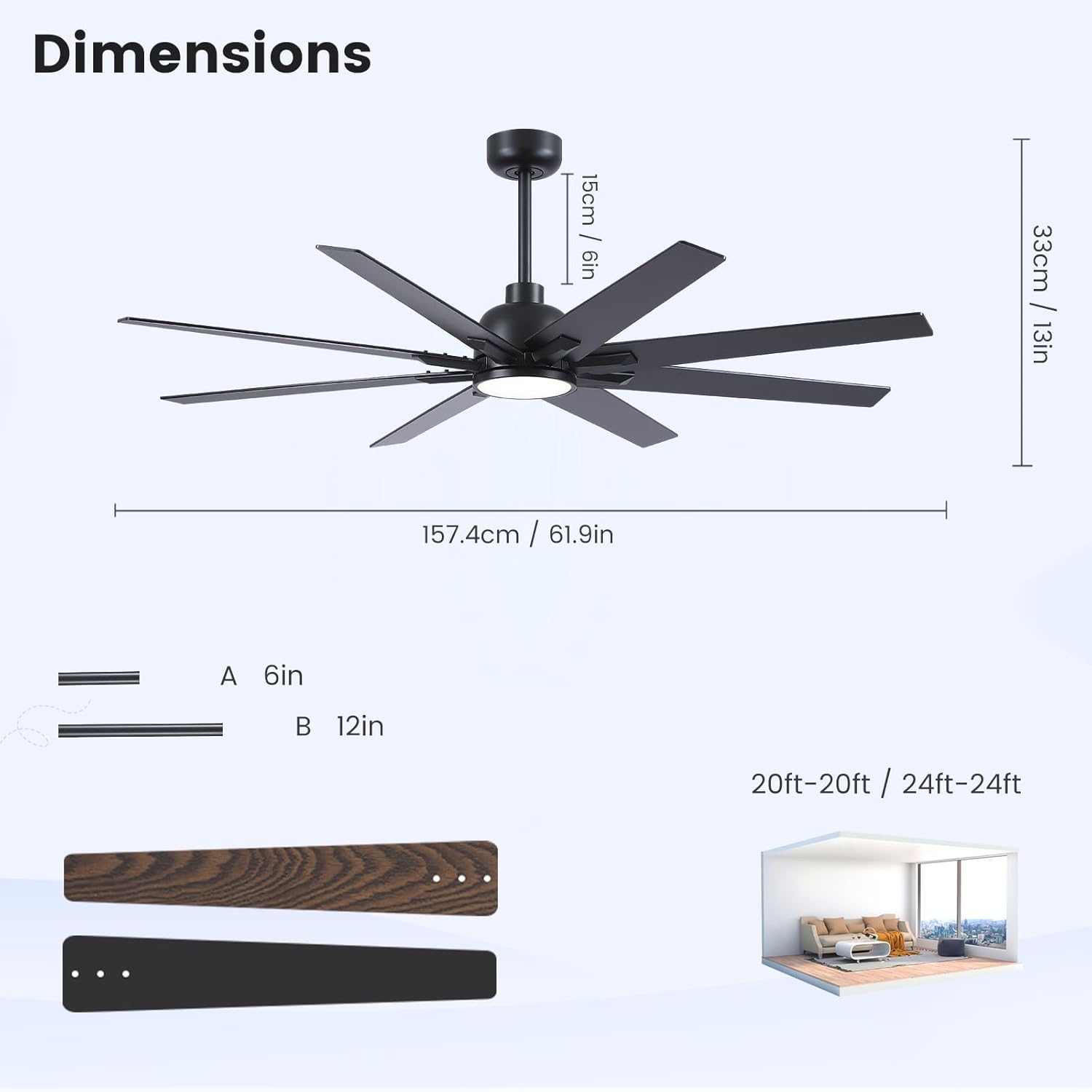
Image: Diagram showing the fan's dimensions and the two available downrod lengths (6 inches and 12 inches).
Setup and Installation
1. Pre-Installation Checks
- Ensure the power supply is disconnected at the main circuit breaker.
- Confirm the mounting location can support the fan's weight.
- Gather all necessary tools (screwdriver, wire strippers, ladder, etc.).
2. Mounting Bracket Installation
Attach the mounting bracket securely to the ceiling outlet box or a structural joist. Ensure all screws are tightened.
3. Downrod Assembly
Select either the 6-inch or 12-inch downrod based on your ceiling height. Feed the electrical wires through the downrod and attach it to the fan motor assembly.
4. Wiring Connections
Connect the fan's electrical wires to the household wiring according to the provided wiring diagram in the full manual. Use the included wire nuts and ensure all connections are secure.
5. Fan Body and Blade Installation
Carefully lift the fan assembly and hang it from the mounting bracket. Secure the fan body. Attach the fan blades to the motor housing, ensuring they are firmly fastened. Choose the desired blade color (black or wood grain) during this step.
6. Light Kit Installation
Connect the LED light kit wires to the fan motor assembly and secure the light kit to the fan housing.
For detailed visual guidance, please refer to the installation video available on the product page or the comprehensive user manual included in the package. This fan can be installed on flat ceilings and sloping ceilings with a maximum slope of up to 15 degrees.
Operating Instructions
Your Newday ceiling fan is operated using the included remote control. Ensure the remote has working batteries installed.
Remote Control Functions:
- Power Button: Turns the fan and light ON/OFF.
- Fan Speed Buttons (1-6): Adjusts fan speed from 1 (lowest) to 6 (highest).
- Light Color Temperature (WW, NW, DW):
- "WW" (Warm White): Sets light to 3000K. Press and hold to decrease color temperature (K-).
- "NW" (Neutral White): Sets light to 4200K.
- "DW" (Cool White): Sets light to 6500K. Press and hold to increase color temperature (K+).
- Brightness Buttons (+/-): Adjusts light brightness from 20% to 100%.
- Reverse Arrow Button: Switches between summer (downward airflow) and winter (upward airflow) modes.
- Timer Buttons (1H, 3H, 6H): Sets the fan to turn off automatically after 1, 3, or 6 hours.
- Sleep Mode (Moon Icon): Activates a simulated natural wind mode, cycling through speeds 1, 2, and 3 every 20 seconds for gentle airflow.
Maintenance
Regular maintenance ensures optimal performance and extends the life of your ceiling fan.
- Cleaning: Periodically wipe the fan blades and motor housing with a soft, damp cloth. Do not use abrasive cleaners or solvents, as these can damage the finish.
- Blade Inspection: Check fan blades for any signs of damage or warping. Replace damaged blades immediately.
- Tightness of Fasteners: Annually check all screws and fasteners for tightness. Vibration can cause them to loosen over time.
- Light Source: The LED light source is designed for long life. If replacement is needed, contact customer support for compatible parts.
Troubleshooting
| Problem | Possible Cause | Solution |
|---|---|---|
| Fan does not start. | No power to the fan; loose wire connections; remote control battery low. | Check circuit breaker; ensure all wiring connections are secure; replace remote control batteries. |
| Light does not work. | Loose wire connection to light kit; LED module failure; remote control battery low. | Check light kit wiring; contact customer support for LED replacement; replace remote control batteries. |
| Fan wobbles. | Loose blades or mounting hardware; unbalanced blades. | Ensure all blade screws and mounting hardware are tight; use a blade balancing kit (not included) if necessary. |
| Noisy operation. | Loose screws; motor hum; blades hitting an obstruction. | Check all screws for tightness; ensure no obstructions are near blades. DC motors are designed for quiet operation, but some minimal hum may be present. |
| Remote control not working. | Low battery; remote not paired (if applicable); obstruction between remote and receiver. | Replace remote battery; ensure clear line of sight; refer to remote pairing instructions in the full manual if needed. |
Specifications
| Brand | Newday |
| Model Name | DC1155-8B/62 |
| Size | 62 INCH |
| Color | Black (with reversible wood grain blades) |
| Material | Metal |
| Indoor/Outdoor Usage | Indoor, Outdoor (covered patio) |
| Power Source | DC |
| Voltage | 120 Volts (DC) |
| Light Source Type | LED |
| Wattage | 24 watts (for light) |
| Brightness | 2500 lumen |
| Light Color Temperatures | 3000K (Warm White), 4200K (Neutral White), 6500K (Cool White) |
| Control Method | Remote |
| Number of Blades | 8 |
| Item Weight | 23.4 pounds |
| Product Dimensions | 13.78 x 61.81 x 61.81 inches |
| Estimated Yearly Energy Cost (Fan Only) | $8 (Based on 12 cents per kWh and 6.4 hours use per day) Image: EnergyGuide label detailing the estimated yearly energy cost and airflow efficiency of the fan. |
Warranty and Support
Newday provides a two-year warranty for this ceiling fan. If you encounter any problems with our products, please do not hesitate to contact our customer support team. We are committed to providing prompt assistance for after-sales questions and installation issues.
For support, please refer to the contact information provided in your purchase documentation or visit the official Newday store on Amazon.
Ask a question about this manual
Ask about setup, troubleshooting, compatibility, parts, safety, or missing instructions. Manuals+ will review the question and use this page’s manual context to help answer it.