1. Product Overview
This manual provides instructions for the Junsun Android 13 Car Radio Stereo, designed for select Dodge RAM models. This unit integrates an Android 13 operating system with features such as wireless CarPlay, Android Auto, GPS navigation, WiFi connectivity, Bluetooth, and FM/AM radio. It is specifically compatible with Dodge RAM 1500, 2500, and 3500 models manufactured between 2013 and 2018 that are equipped with manual air conditioning controls.

Image 1.1: Junsun Android 13 Car Radio Stereo overview, highlighting compatibility with Dodge RAM 2013-2018 models with manual AC.
2. Applicable Models and Compatibility
This car radio stereo is designed for:
- Dodge RAM 1500 (2013-2018)
- Dodge RAM 2500 (2013-2018)
- Dodge RAM 3500 (2013-2018)
Important Compatibility Note: This unit is only compatible with vehicles equipped with manual air conditioning controls. It is not compatible with vehicles that have automatic air conditioning systems.

Image 2.1: Visual guide illustrating the difference between manual AC controls (compatible) and automatic AC controls (not compatible) for Dodge RAM models.
3. Package Contents
Verify that all items listed below are included in your package:
- Car Radio Unit
- RCA Cable
- Power Cable
- Screwdriver
- Can Bus Decoder
- Crowbar (Pry Tool)
- Reversing Line (Camera Cable)
- Original USB Adapter
- Antenna Adapter Cable
- USB Cable (x2)
- Speaker
- Microphone
- GPS Module
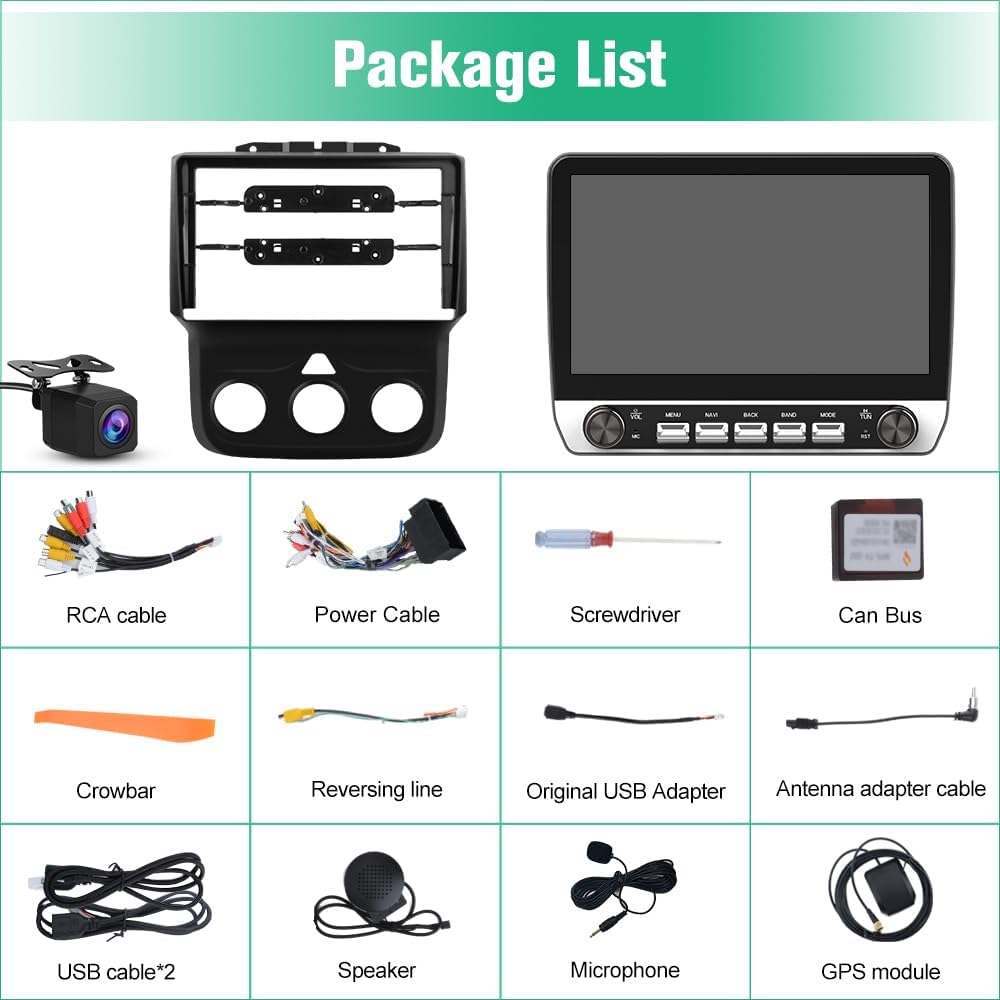
Image 3.1: A visual representation of all components included in the product package.
4. Installation Guide
Installation of the Junsun Android 13 Car Radio Stereo requires basic knowledge of automotive electronics. It is recommended to consult a professional if you are unsure about any steps. Ensure the vehicle's battery is disconnected before beginning installation.
4.1 Wiring Definition Diagram
Refer to the following diagram for correct wiring connections. Ensure all cables are securely connected to their corresponding ports.

Image 4.1: Detailed wiring diagram showing connections for power, speakers, GPS antenna, USB, and camera inputs.
4.2 General Installation Steps
- Carefully remove the original car radio unit and trim panels using the provided crowbar.
- Connect the power cable, RCA cables, and other necessary wiring from the vehicle to the new Junsun unit according to the wiring diagram.
- Install the GPS module and microphone in suitable locations.
- If installing the reversing camera, route the reversing line and connect the camera.
- Mount the new car radio stereo into the dashboard opening.
- Reconnect the vehicle's battery and test the unit's functionality.
- Secure all trim panels.
5. Operating Instructions
5.1 Android 13 System
The unit operates on an Android 13 system, providing a familiar interface similar to a smartphone. You can install or delete Android applications from the Application Store when connected to WiFi.
5.2 Wireless CarPlay and Android Auto
Connect your iPhone or Android phone wirelessly or via a wired connection to access features like your address book, notifications, messages, map navigation, and music directly on the car stereo display.

Image 5.1: Display of Wireless CarPlay and Android Auto functionality on the car stereo screen.

Image 5.2: Overview of wireless connectivity options including CarPlay, Android Auto, and Mirror Link.
5.3 GPS Navigation and WiFi Connectivity
The unit supports online maps when connected to WiFi, allowing for real-time navigation. It also includes built-in offline North America maps for use without an internet connection. The 5GHz WiFi connectivity enables browsing websites and streaming videos.

Image 5.3: GPS navigation interface and icons representing WiFi connectivity.

Image 5.4: GPS Navigation features including turn-by-turn directions and points of interest.

Image 5.5: Illustration of 5GHz WiFi connectivity enabling various online applications.
5.4 Bluetooth Functionality
Bluetooth 5.0 allows for hands-free calling and wireless audio streaming. The built-in microphone ensures clear call quality. You can answer/make calls and stream music from your favorite services.

Image 5.6: Bluetooth calling interface and FM radio frequency display.

Image 5.7: Bluetooth 5.0 capabilities for phone calls, music streaming, and phonebook synchronization.
5.5 FM/AM Radio
The unit features FM/AM radio functionality with a digital display for precise tuning. Access news, music, and weather broadcasts.

Image 5.8: FM Radio interface with frequency display and tuning options.
5.6 Reversing Image (Backup Camera)
When the vehicle is shifted into reverse gear, the unit automatically displays the rear view from the connected camera, providing parking assistance with guidelines.

Image 5.9: Rear view camera display with dynamic parking assistance lines.

Image 5.10: Illustration of the rear view camera activating automatically when reversing.
5.7 Physical Buttons and Steering Wheel Control
The unit features physical buttons and knobs for intuitive control, allowing drivers to operate the system without diverting attention from the road. Steering wheel controls can be configured to manage functions like volume adjustment and station toggling, enhancing driving safety and convenience.

Image 5.11: Explanation of physical buttons for volume, menu, navigation, back, band, mode, and reset.
6. Specifications
| Feature | Specification |
|---|---|
| Operating System | Android 13 |
| Display Size | 9 Inches |
| Memory Storage Capacity | 64 GB |
| Connectivity Technology | Bluetooth 5.0, WiFi (5GHz) |
| Special Features | Wireless CarPlay, Android Auto, GPS Navigation, FM/AM Radio, Steering Wheel Control, Reversing Image, Built-in DSP |
| Mounting Type | Dashboard Mount |
| Map Type | North America (Offline) |
| Item Weight | 4.66 pounds |
| Package Dimensions | 13.27 x 11.73 x 4.65 inches |
6.1 Built-in DSP
The unit features a built-in Digital Signal Processor (DSP) for enhanced audio quality and customization. This allows for precise sound tuning and optimization for various audio environments within the vehicle.

Image 6.1: Illustration of the built-in DSP for advanced audio processing and sound field control.
7. Troubleshooting
This section addresses common issues you might encounter with your Junsun Car Radio Stereo.
7.1 Connectivity Issues (CarPlay/Android Auto)
- Problem: CarPlay or Android Auto fails to connect wirelessly or via USB.
- Solution:
- Ensure your phone's Bluetooth and WiFi are enabled.
- For wired connections, try a different USB cable or port if available.
- Restart both your phone and the car stereo unit.
- Check for any pending software updates for the car stereo.
7.2 Sound Quality
- Problem: Audio quality is poor or unbalanced.
- Solution:
- Adjust the equalizer settings within the unit's audio menu.
- Verify speaker connections are secure.
- Ensure the DSP settings are configured correctly for your vehicle's acoustics.
7.3 Screen Glare
- Problem: Excessive screen glare makes the display difficult to view.
- Solution: While the unit's design may have some inherent glare, adjusting the screen brightness and contrast settings can help. Consider aftermarket anti-glare screen protectors if necessary.
8. Warranty and Support
8.1 Product Warranty
This Junsun Car Radio Stereo comes with a 1-year manufacturer's warranty from the date of purchase. This warranty covers defects in materials and workmanship under normal use. Please retain your proof of purchase for warranty claims.
8.2 Customer Support
For technical assistance, troubleshooting, or warranty inquiries, please contact Junsun customer support.
Email: Junsun-US@outlook.com

Image 8.1: Junsun customer support details, including contact email.


