
1. Introduction
This manual provides comprehensive instructions for the setup, operation, and maintenance of your new XINFUTE RM-C3184 replacement remote control. This remote is designed to be compatible with various JVC LCD LED TV models, including LT32VH53A, LT55V73AU, and LT43VF53A.
The RM-C3184 is a direct replacement unit, engineered to function identically to the original remote control for the specified TV models. No programming is required for its use.
2. Product Overview
Familiarize yourself with the physical appearance and key components of the RM-C3184 remote control.
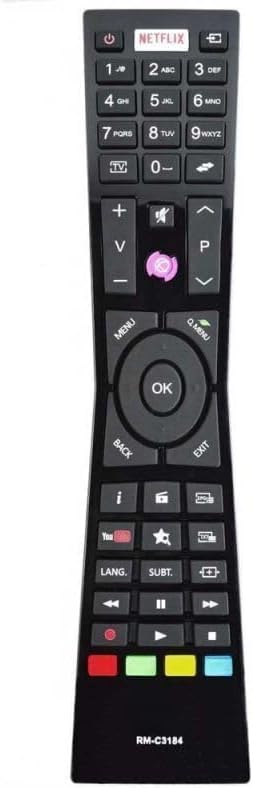
Figure 2.1: Front view of the RM-C3184 remote control. This image displays the full layout of the remote's buttons, including the power button, Netflix button, numerical keypad, channel and volume controls, menu navigation, and dedicated media playback and smart TV buttons.

Figure 2.2: Side profile of the RM-C3184 remote control. This view highlights the slim and ergonomic design of the remote, which is designed for comfortable handling.

Figure 2.3: Back view of the RM-C3184 remote control. This image shows the smooth, black rear casing of the remote, including the outline of the battery compartment cover.

Figure 2.4: Back view of the RM-C3184 remote control with the battery cover open. This image clearly shows the two AAA battery slots inside the compartment, indicating where batteries should be inserted.
3. Setup
3.1. Battery Installation
The RM-C3184 remote control requires two (2) AAA batteries (not included) for operation. Follow these steps to install the batteries:
- Locate the battery compartment on the back of the remote control.
- Press down on the tab and slide the battery cover downwards to open it.
- Insert two AAA batteries, ensuring that the positive (+) and negative (-) terminals align correctly with the markings inside the compartment.
- Slide the battery cover back into place until it clicks securely.
Important: Ensure batteries are inserted with correct polarity to prevent damage to the remote control.
3.2. Initial Use
This remote control is a direct replacement and typically requires no programming. Once batteries are installed, it should be ready for immediate use with compatible JVC LCD LED TV models (LT32VH53A, LT55V73AU, LT43VF53A).
- Point the remote control towards your JVC TV.
- Press the Power button to turn the TV on or off.
- Test other functions like volume, channel, and menu navigation to confirm functionality.
4. Operating Instructions
The RM-C3184 remote control provides full functionality for your compatible JVC TV. Below are common button functions:
- Power Button: Turns the TV on or off.
- Number Pad (0-9): Direct channel selection.
- Volume Up/Down (+/-): Adjusts the TV volume.
- Channel Up/Down (P+/P-): Changes TV channels.
- Mute Button: Mutes or unmutes the TV audio.
- Menu Button: Accesses the TV's main menu.
- Navigation Buttons (Up, Down, Left, Right, OK): Navigates through menus and confirms selections.
- Back/Exit Button: Returns to the previous screen or exits the current menu.
- Source/Input Button: Changes the input source (HDMI, AV, etc.).
- Dedicated App Buttons (e.g., Netflix): Provides quick access to specific streaming applications.
- Media Playback Controls (Play, Pause, Stop, Rewind, Fast Forward): Controls media playback on compatible devices or TV functions.
Refer to your JVC TV's original user manual for specific functions related to your TV model.
5. Maintenance
Proper care and maintenance will extend the life of your remote control.
- Cleaning: Use a soft, dry cloth to clean the surface of the remote control. Do not use liquid cleaners or abrasive materials.
- Battery Replacement: Replace batteries when the remote's response becomes sluggish or stops working. Always replace both batteries at the same time with new ones of the same type (AAA).
- Storage: If the remote control will not be used for an extended period, remove the batteries to prevent leakage and potential damage.
- Environment: Avoid exposing the remote control to extreme temperatures, direct sunlight, high humidity, or liquids.
6. Troubleshooting
If you experience issues with your RM-C3184 remote control, try the following troubleshooting steps:
- Remote Not Responding:
- Check if the batteries are inserted correctly with the correct polarity.
- Replace old batteries with new AAA batteries.
- Ensure there are no obstructions between the remote control and the TV's infrared sensor.
- Confirm that the remote is pointed directly at the TV.
- Certain Buttons Not Working:
- This remote is a replacement unit. While designed to work as the original, some specific functions unique to certain TV models might require the original remote or TV's on-screen controls.
- Clean the remote's surface, especially around the non-working buttons, to ensure no debris is interfering.
- Intermittent Operation:
- This often indicates low battery power. Replace the batteries.
- Ensure the remote is within effective operating range of the TV.
If problems persist after trying these steps, please refer to the Warranty and Support section for contact information.
7. Specifications
| Feature | Detail |
|---|---|
| Model Number | RM-C3184 |
| Compatible Devices | JVC LCD LED TVs (LT32VH53A, LT55V73AU, LT43VF53A) |
| Connectivity Technology | Infrared (IR) |
| Power Source | 2 x AAA Batteries (not included) |
| Product Dimensions | 6 x 3 x 1 inches (approximately) |
| Item Weight | 2.82 ounces (without batteries) |
| Special Features | Ergonomic design, No programming required |
| Max Number of Supported Devices | 1 (Television) |
| Manufacturer | XINFUTE |
8. Warranty and Support
8.1. Warranty Information
XINFUTE provides a one-year warranty on all purchases of the RM-C3184 remote control. This warranty covers manufacturing defects and ensures the product functions as described.
Please retain your proof of purchase for warranty claims.
8.2. Customer Support
All products are inspected before shipment. If you are not satisfied with your purchase or encounter any issues, please contact XINFUTE customer support within 24 hours of receipt of your product.
For support, please refer to the contact information provided with your purchase or visit the official XINFUTE store page on Amazon.
XINFUTE Store Link: XINFUTE Official Store