
Lenovo Yoga 7i
Lenovo Yoga 7i 2-in-1 Laptop User Manual
Model: Yoga 7i
Introduction
This manual provides essential information for setting up, operating, maintaining, and troubleshooting your Lenovo Yoga 7i 2-in-1 laptop. The Lenovo Yoga 7i is a versatile and powerful device designed for productivity and entertainment, featuring a 360° foldable touchscreen and advanced Intel Core Ultra processing capabilities.

Image: The Lenovo Yoga 7i 2-in-1 laptop shown with its included accessories, highlighting its touchscreen, backlit keyboard, fingerprint reader, and Thunderbolt 4 USB-C port.
Setup
What's in the Box
- Lenovo Yoga 7i Laptop
- AC Adapter
- Battery (integrated)
- Documentation (this manual and other guides)
- USB Hub with Ethernet Port
- 512GB Portable SSD

Image: A visual representation of the included accessories: a Timetec Portable SSD, a YGYTE USB Hub, and a cleaning cloth, alongside the YGYTE accessory suite packaging.
Initial Power-On and Configuration
- Charge the Battery: Connect the AC adapter to the laptop's USB-C port (Thunderbolt 4) and plug it into a power outlet. Allow the battery to charge fully before first use.
- Power On: Press the power button, typically located on the side or keyboard deck.
- Windows Setup: Follow the on-screen prompts to complete the Windows 11 Pro setup. This includes selecting your region, keyboard layout, connecting to a Wi-Fi network, and creating a user account.
- Microsoft Office Activation: The laptop includes a lifetime license for Microsoft Office. Follow the instructions provided during Windows setup or in the pre-installed Office applications to activate your license.
Operating Your Laptop
Understanding the 2-in-1 Design
The Lenovo Yoga 7i features a 360° hinge, allowing it to transform into four distinct modes:
- Laptop Mode: Traditional laptop configuration for typing and productivity.
- Tent Mode: Ideal for watching videos or presentations in confined spaces.
- Stand Mode: Perfect for touch-based interactions, media consumption, or presentations.
- Tablet Mode: Folded completely back for use as a tablet, leveraging the touchscreen.

Image: The Lenovo Yoga 7i laptop displayed in its four versatile modes: Laptop, Tablet, Tent, and Stand, demonstrating its 360° flip-and-fold design.
Key Features and Connectivity
Your Yoga 7i is equipped with a range of features to enhance your experience:
- Touchscreen Display: The 16-inch WUXGA (1920x1200) FHD+ IPS touch display offers crisp visuals and intuitive interaction.
- Backlit Keyboard: For comfortable typing in low-light conditions.
- Fingerprint Reader: For secure and quick login.
- Ports:
- 2x Thunderbolt 4 USB-C (Power Delivery, DisplayPort, Charge)
- 2x SuperSpeed 5Gbps USB-A
- HDMI 2.1 (up to 4K/60Hz)
- SD Card Reader
- Headphone/Microphone Combo Jack
- Wireless Connectivity: Killer Wi-Fi 6E for fast internet and Bluetooth 5.3 for connecting peripherals.
- Camera and Audio: FHD 1080p IR camera with Privacy Shutter and Stereo speakers with Dolby Audio.
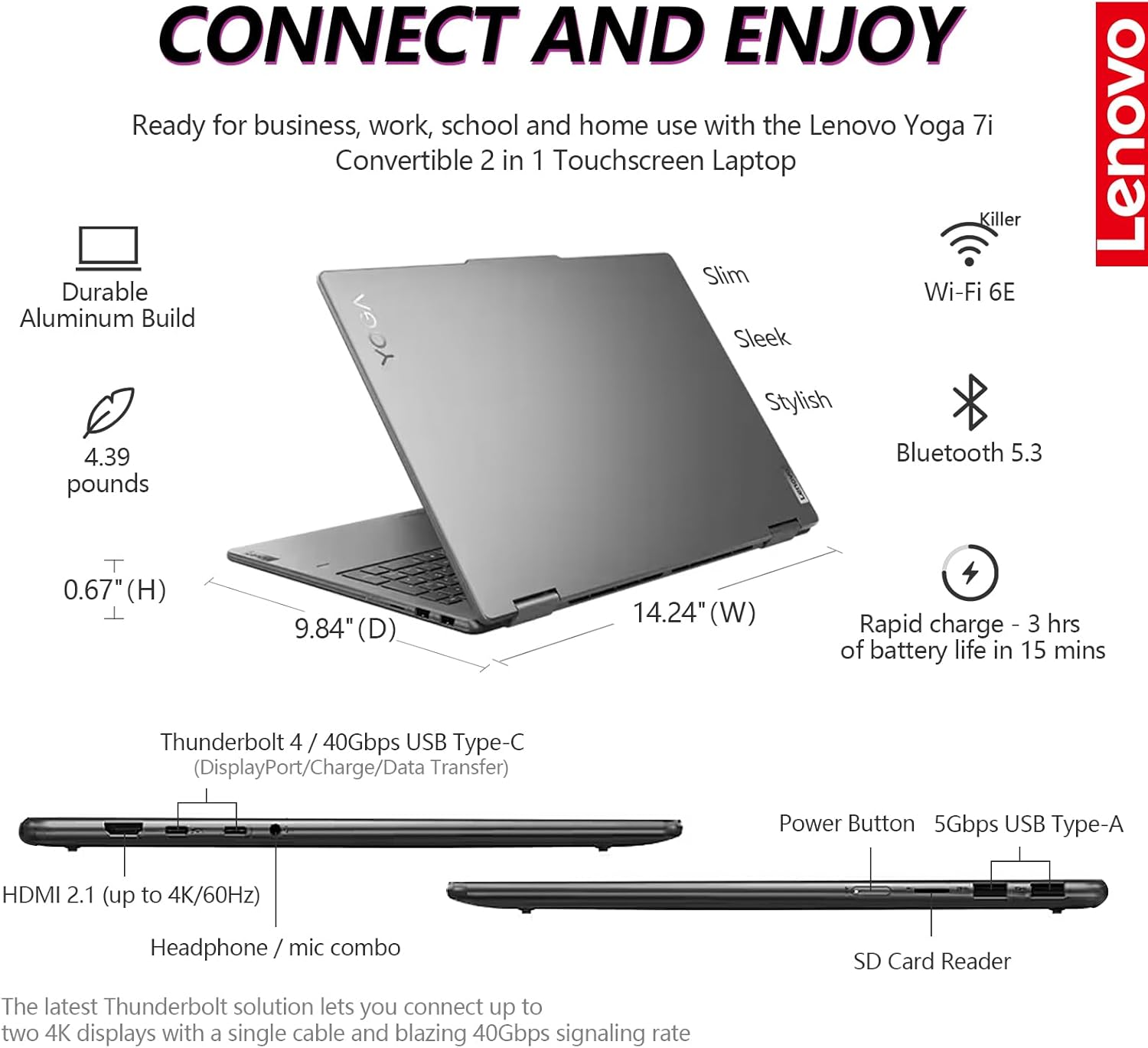
Image: A detailed view of the Lenovo Yoga 7i's connectivity ports, including Thunderbolt 4 USB-C, USB-A, HDMI 2.1, SD Card Reader, and headphone/mic combo, along with indicators for Wi-Fi 6E and Bluetooth 5.3.

Image: Visuals highlighting the 1080p FHD IR camera with privacy shutter, Dolby Audio stereo speakers, fingerprint reader, backlit keyboard, and buttonless Mylar surface multi-touch touchpad.
Maintenance
Cleaning Your Laptop
- Screen: Use a soft, lint-free cloth specifically designed for electronics. Dampen it slightly with water or a screen cleaner. Avoid harsh chemicals.
- Keyboard and Chassis: Use a soft, dry cloth. For stubborn dirt, a slightly dampened cloth with mild soap solution can be used, ensuring no liquid enters openings.
- Ports: Use compressed air to gently clear dust from ports.
Battery Care
- Avoid extreme temperatures.
- For optimal battery longevity, avoid constantly discharging the battery to 0% or keeping it at 100% for extended periods.
- The laptop supports Rapid Charge, providing up to 3 hours of battery life in 15 minutes of charging.
Software Updates
Regularly check for and install Windows updates and Lenovo driver updates to ensure optimal performance, security, and compatibility.
Troubleshooting
Common Issues and Solutions
| Issue | Possible Solution |
|---|---|
| Laptop does not power on. | Ensure the AC adapter is securely connected and the power outlet is functional. Try a different outlet. If battery is completely drained, allow it to charge for at least 30 minutes before attempting to power on. |
| Wi-Fi connection issues. | Check if Wi-Fi is enabled in Windows settings. Restart your router and modem. Update Wi-Fi drivers from the Lenovo support website. |
| Touchscreen not responding. | Restart the laptop. Check for updated display or touchscreen drivers. Ensure the screen is clean and free of debris. |
| Slow performance. | Close unnecessary applications. Check Task Manager for high CPU/RAM usage. Ensure sufficient free space on the SSD. Run a virus scan. Install all pending Windows updates. |
| Battery not charging. | Verify the AC adapter is correctly connected. Check the charging port for damage. Update power management drivers. |
For more detailed troubleshooting, refer to the Lenovo support website or contact customer service.
Specifications
Below are the key technical specifications for the Lenovo Yoga 7i 2-in-1 Laptop:
| Feature | Detail |
|---|---|
| Model Name | Yoga 7i |
| Processor | Intel Core Ultra 5 125U (12 cores, 14 threads, up to 4.3GHz) with Intel AI Boost NPU |
| RAM | 16 GB LPDDR5x |
| Storage | 1 TB PCIe NVMe M.2 SSD + 512GB Portable SSD (Total 1.5 TB) |
| Display | 16 inch WUXGA (1920x1200) FHD+ IPS Touchscreen, micro-edge, TÜV low blue light |
| Graphics | Intel Iris Xe Graphics (Integrated) |
| Operating System | Windows 11 Pro 64-bit |
| Wireless Connectivity | Killer Wi-Fi 6E, Bluetooth 5.3 |
| Ports | 2x Thunderbolt 4 USB-C, 2x SuperSpeed 5Gbps USB-A, HDMI 2.1, SD Card Reader, Headphone/mic combo |
| Camera | FHD 1080p IR camera with Privacy Shutter |
| Audio | Stereo speakers with Dolby Audio |
| Battery Life | Up to 13 hours (average) |
| Dimensions (LxWxH) | 14.24 x 9.84 x 0.67 inches |
| Weight | 4.39 pounds |
| Color | Storm Grey |

Image: A diagram illustrating the Intel Core Ultra 5 125U processor with its 12 cores, 14 threads, 12MB cache, and 4.30GHz maximum turbo frequency, highlighting its AI capabilities and integration with Copilot.

Image: An overview of the Lenovo Yoga 7i's speedy productivity, featuring Windows 11 Pro, Intel Core Ultra 5 processor, and Intel Iris Xe Graphics, designed for demanding tasks.

Image: Details of the 16-inch FHD+ IPS display with 1920x1200 WUXGA resolution, micro-edge design, IPS technology, TÜV low blue light certification, and touch functionality.

Image: Information on the Lenovo Yoga 7i's memory and storage, including 16GB LPDDR5x RAM, 1.5TB total SSD storage (1TB PCIe NVMe M.2 SSD + 512GB Portable SSD), and the inclusion of Lifetime Microsoft Office.
Warranty and Support
Your Lenovo Yoga 7i laptop comes with a standard manufacturer's warranty. For specific warranty terms and conditions, please refer to the warranty card included in your product packaging or visit the official Lenovo support website.
Contacting Support
For technical assistance, driver downloads, or service requests, please visit the Lenovo Support website: support.lenovo.com.
When contacting support, please have your laptop's serial number ready. The serial number is typically located on a sticker on the bottom of the laptop or can be found in the system information within Windows.