
T4TREAM FPSC48CVD-NO
Contents
T4TREAM Fluted Makeup Vanity Desk User Manual
Model: FPSC48CVD-NO | Brand: T4TREAM
1. Introduction
Thank you for choosing the T4TREAM Fluted Makeup Vanity Desk. This manual provides detailed instructions for assembly, operation, maintenance, and troubleshooting to ensure you get the most out of your new vanity. Designed with modern elegance and practical features, this corner-friendly vanity offers ample storage and smart functionalities to enhance your beauty routine.

Figure 1: T4TREAM Fluted Makeup Vanity Desk (Natural Oak)
2. Important Safety Information
Please read and understand all safety instructions before assembly and use. Failure to follow these instructions may result in injury or damage to the product.
- Always unplug the vanity before assembly, cleaning, or performing any maintenance.
- Be cautious of sharp edges and pinch points during assembly.
- Do not place heavy objects on the tempered glass top to avoid damage. The glass tabletop is designed to bear up to 30 lbs.
- Keep electrical components (charging station, lights) away from water or excessive moisture.
- Always follow the assembly instructions carefully and ensure all components are securely fastened before use.
- This product is intended for indoor use only.
3. Package Contents
Verify that all parts are present and undamaged before beginning assembly. Each component is meticulously labeled with serial numbers for easy identification.
- Vanity Desk Components (various wood panels, drawers, cabinet doors)
- Three-Way Mirror Assembly with Integrated Lighting
- Tempered Glass Tabletop
- Gold Metal Handles
- Charging Station Unit (2 AC outlets, 1 USB port, 1 Type-C charger)
- Assembly Hardware (screws, dowels, cam locks, etc.)
- Assembly Instructions Manual
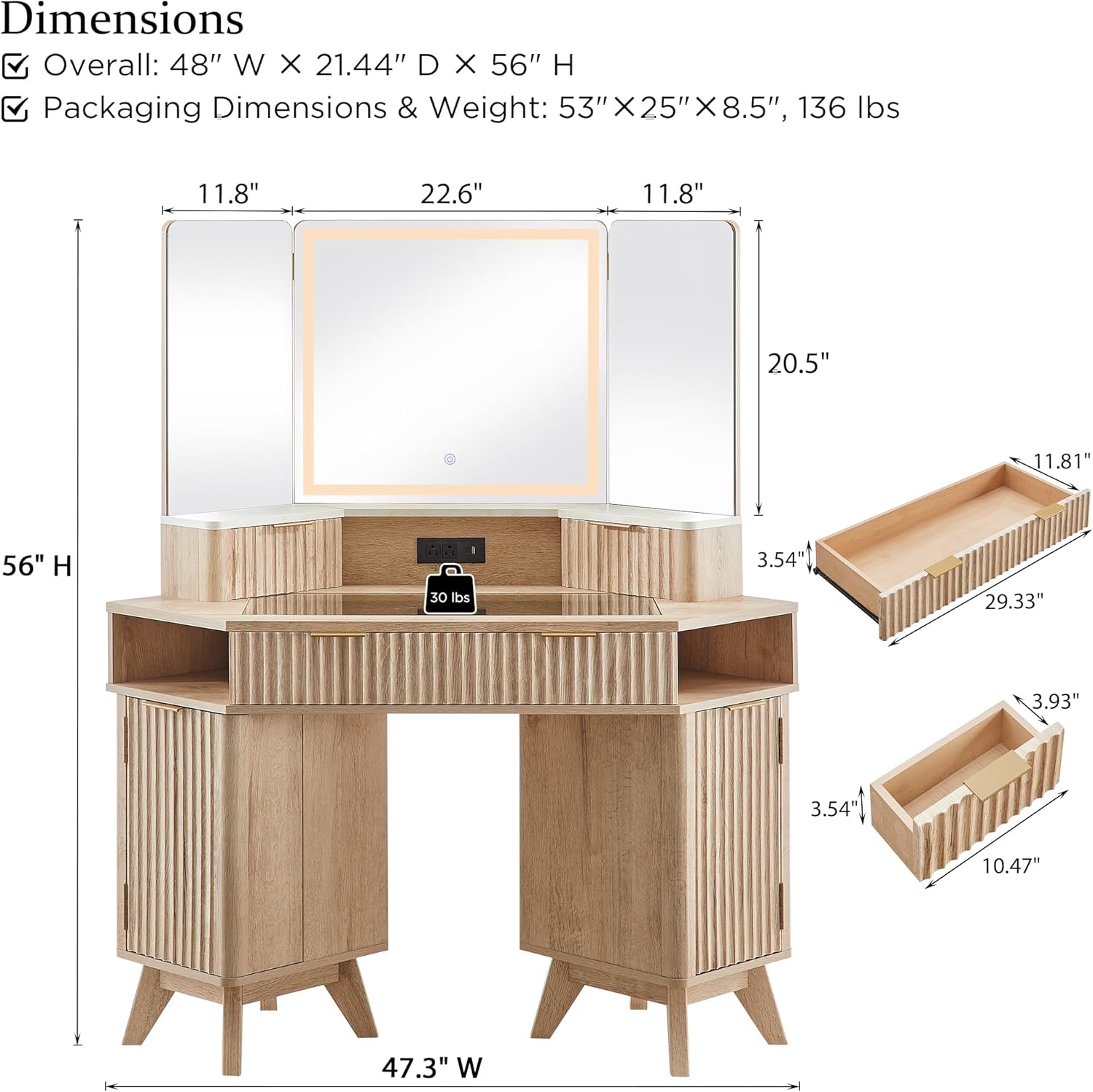
Figure 2: Overall Dimensions and Key Components
4. Setup and Assembly
Assembly is required for this product. It is recommended to have two people for assembly due to the size and weight of the components. Follow the step-by-step instructions provided in the included assembly manual. Ensure you have adequate space and the necessary tools (e.g., screwdriver) before starting.
Assembly Tips:
- Lay out all parts on a soft, clean surface to prevent scratches.
- Identify each part using the labels and diagrams in the separate assembly guide.
- Do not overtighten screws to avoid damaging the wood.
- If you encounter any difficulties, refer to the detailed instructions or contact customer support.
5. Operating Instructions
5.1 Three-Way Mirror with Lights
The vanity features a three-way mirror system for comprehensive viewing angles and enhanced lighting distribution. The central mirror includes touch-controlled LED lighting.
- Power On/Off: Lightly tap the touch sensor on the mirror to turn the lights on or off.
- Adjust Brightness: Long press the touch sensor to adjust the brightness from 0% to 100%.
- Change Color Mode: Tap the touch sensor repeatedly to cycle through three lighting modes: Cool Daylight, Neutral Light, and Warm Light.

Figure 3: Mirror Lighting Controls
5.2 Built-in Charging Station
The vanity is equipped with a convenient charging station to power your devices.
- The charging station includes 2 standard AC outlets, 1 USB port, and 1 Type-C charger.
- Simply plug your hair dryer, phone, or other electronic devices into the appropriate port.
- Ensure the vanity is properly connected to a power source for the charging station to function.

Figure 4: Integrated Charging Station
5.3 Storage Features
The vanity offers extensive storage options to keep your cosmetics and accessories organized.
- Transparent Tempered Glass Tabletop: The central glass top provides a clear view of items stored beneath, making them easily accessible.
- Top Small Drawers: Two small drawers are located on either side of the central mirror for refined storage of smaller items.
- 28" Wide Middle Drawer: A spacious main drawer with a fluted panel and smooth metal rails for larger items.
- Semi-Open Side Cubbies: Two semi-open cubbies provide quick access storage.
- Dual Storage Cabinets: Cabinets on both sides feature adjustable shelves for customizable storage of taller or bulkier items.
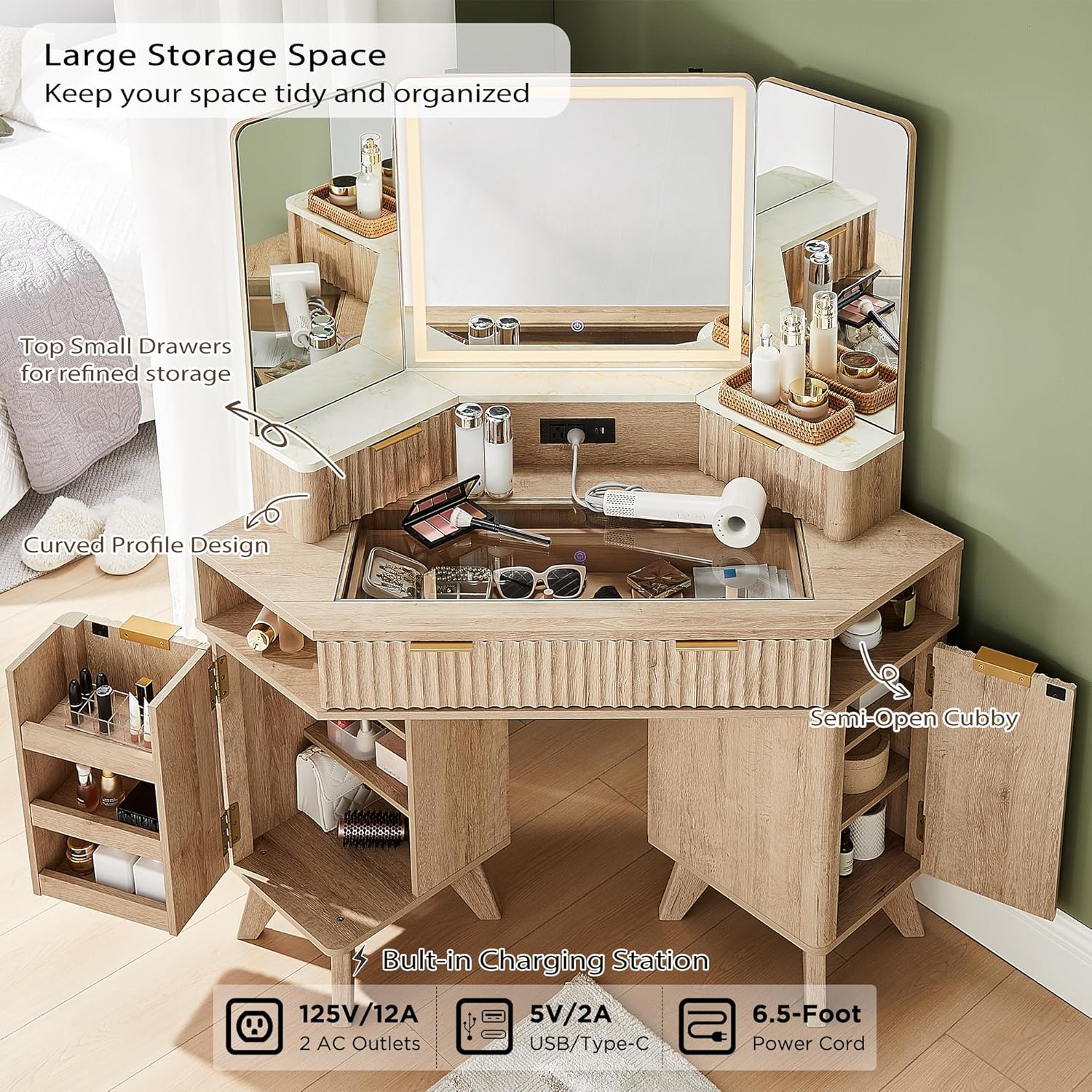
Figure 5: Large Storage Space Overview

Figure 6: View of Glass Tabletop Storage

Figure 7: Drawer and Cabinet Details
6. Maintenance
Proper care and maintenance will prolong the life and appearance of your vanity desk.
- Cleaning: Wipe surfaces with a soft, damp cloth. Avoid harsh chemicals or abrasive cleaners that may damage the finish or glass.
- Glass Top: Use a glass cleaner for the tempered glass tabletop. Do not use excessive force when cleaning the glass.
- Dusting: Regularly dust all surfaces with a dry, soft cloth.
- Electrical Components: Ensure the charging station and mirror lights are unplugged before cleaning. Do not spray liquids directly onto electrical parts.
- Hardware: Periodically check and tighten all screws and fasteners to ensure stability.
7. Troubleshooting
If you encounter any issues with your T4TREAM vanity desk, refer to the following common problems and solutions:
| Problem | Possible Cause | Solution |
|---|---|---|
| Mirror lights not turning on. | Not plugged in; power outage; faulty connection; touch sensor issue. | Ensure the vanity is properly plugged into a working outlet. Check the power connection. Lightly tap the touch sensor. If issues persist, contact customer support. |
| Lights are dim or not changing color. | Brightness setting too low; incorrect color mode selected. | Long press the touch sensor to increase brightness. Tap to cycle through color modes. |
| Charging station not working. | Vanity not powered; device not properly connected; faulty port. | Verify the vanity is plugged in. Ensure devices are securely connected. Try a different port or device. |
| Drawers or doors are stiff/misaligned. | Loose hardware; improper assembly. | Check and tighten all screws and fasteners. Refer to assembly instructions to ensure correct alignment of rails and hinges. |
8. Specifications
- Brand: T4TREAM
- Model Number: FPSC48CVD-NO
- Color: Natural Oak
- Overall Dimensions (W x D x H): 48" x 21.44" x 56"
- Frame Material: Engineered Wood (FSC-Certified wood, optimal MDF, P2 engineered wood)
- Tabletop Material: Transparent Tempered Glass, Faux Marble (melamine veneer)
- Weight Capacity (Glass Top): Up to 30 lbs
- Mirror Features: Three-way mirror, Touch-controlled LED lights (Cool Daylight, Neutral Light, Warm Light)
- Charging Station: 2 AC Outlets (125V/12A), 1 USB Port (5V/2A), 1 Type-C Charger (5V/2A)
- Power Cord Length: 6.5 feet
- Country of Origin: China
9. Warranty and Support
T4TREAM is committed to providing high-quality products. For any questions, concerns, or assistance with your vanity desk, please contact T4TREAM customer support. Refer to your purchase documentation for specific warranty details.
You can often find support contact information on the manufacturer's website or through the retailer where you purchased the product.
Documents and downloads
Ask a question about this manual
Ask about setup, troubleshooting, compatibility, parts, safety, or missing instructions. Manuals+ will review the question and use this page’s manual context to help answer it.