
4D Build 6074724
4D Build Pokémon Bulbasaur 3D Model Kit - Instruction Manual
Brand: 4D Build | Model: 6074724
Introduction
This manual provides comprehensive instructions for assembling your 4D Build Pokémon Bulbasaur 3D Model Kit. Designed for enthusiasts aged 12 and up, this kit allows you to construct a detailed replica of Bulbasaur, the grass-type Pokémon from Kanto. The model features 195 punch-out pieces made from high-quality EPS foam, requiring no glue or additional tools for assembly. Once completed, your Bulbasaur model measures approximately 9.3"x11.4"x9.4" and is perfect for display.

Figure 1: The 4D Build Pokémon Bulbasaur 3D Model Kit, showcasing the assembled Bulbasaur and its packaging.
Safety Information
- Age Recommendation: This product is recommended for ages 12 years and up.
- Small Parts: The kit contains small parts which may pose a choking hazard for children under 3 years. Keep out of reach of young children.
- Handling: Handle pieces with care during assembly to prevent damage.
Package Contents
Your 4D Build Pokémon Bulbasaur 3D Model Kit includes the following:
- 16 EPS Foam 3D Puzzle Sheets
- 1 Set of Assembly Instructions

Figure 2: The 16 sheets of high-quality EPS foam pieces included in the kit, ready for punching out.
Setup and Assembly
Follow these steps to assemble your Bulbasaur 3D Model Kit. No glue or tools are required for this process.
- Preparation: Carefully remove all 16 EPS foam sheets from the packaging.
- Punch Out Pieces: Refer to the included instruction booklet. Gently punch out the required pieces for each step from the foam sheets. Ensure not to force pieces to avoid damage.
- Follow Instructions: The instruction booklet provides detailed, step-by-step visual guides for assembling the model. Each step indicates which pieces are needed and how they connect.
- Connect Pieces: Align the tabs and slots on the foam pieces and gently press them together. The durable design ensures a secure fit.
- Assemble Sections: Build the model section by section, typically starting with the base or core structure and then adding details like the head, body, bulb, and vines.
- Final Assembly: Once all sections are complete, connect them according to the final steps in the instruction booklet to form the complete Bulbasaur figure.

Figure 3: Demonstrating the assembly process, showing how durable pieces connect easily.
Assembly Video Guide
For a visual walkthrough of the assembly process and to see the finished product in action, please watch the official video below:
Video 1: Official 4D Build Pokémon Puzzles video, showcasing the assembly and features of various Pokémon models, including Bulbasaur.
Operating and Display
Your 4D Build Bulbasaur model is designed for display and features articulated elements for enhanced interaction:
- Articulated Mouth: Bulbasaur's mouth can be gently opened and closed.
- Movable Bulb: The green bulb on Bulbasaur's back can be adjusted.
- Poseable Vines: The vines extending from the bulb are poseable, allowing for dynamic display options.
Place your finished model on a flat, stable surface as a decorative piece for your desk, shelf, or game room.

Figure 4: The completed Bulbasaur model, designed for display as a decorative item.
Maintenance
To keep your 4D Build Bulbasaur model in excellent condition:
- Cleaning: Gently wipe the model with a dry, soft cloth to remove dust. Avoid using liquid cleaners or abrasive materials.
- Storage: If disassembling for storage, keep all pieces in a secure container to prevent loss or damage.
- Avoid Direct Sunlight: Prolonged exposure to direct sunlight may cause colors to fade over time.
Troubleshooting
- Missing Pieces: Carefully check all packaging and foam sheets. If a piece is genuinely missing, contact customer support.
- Difficulty Connecting Pieces: Ensure pieces are correctly oriented and aligned with their corresponding tabs and slots. Apply gentle, even pressure. Do not force pieces.
- Damaged Pieces: If a piece is damaged during assembly, assess if it can be repaired with a small amount of craft glue. If not, contact customer support for possible replacement options.
Specifications
| Product Dimensions | 9.3" x 11.4" x 9.4" (23.5 x 29 x 23.9 cm) |
| Item Weight | 12 ounces |
| Model Number | 6074724 |
| Manufacturer Recommended Age | 12 years and up |
| Number of Pieces | 195 |
| Material | EPS Foam |
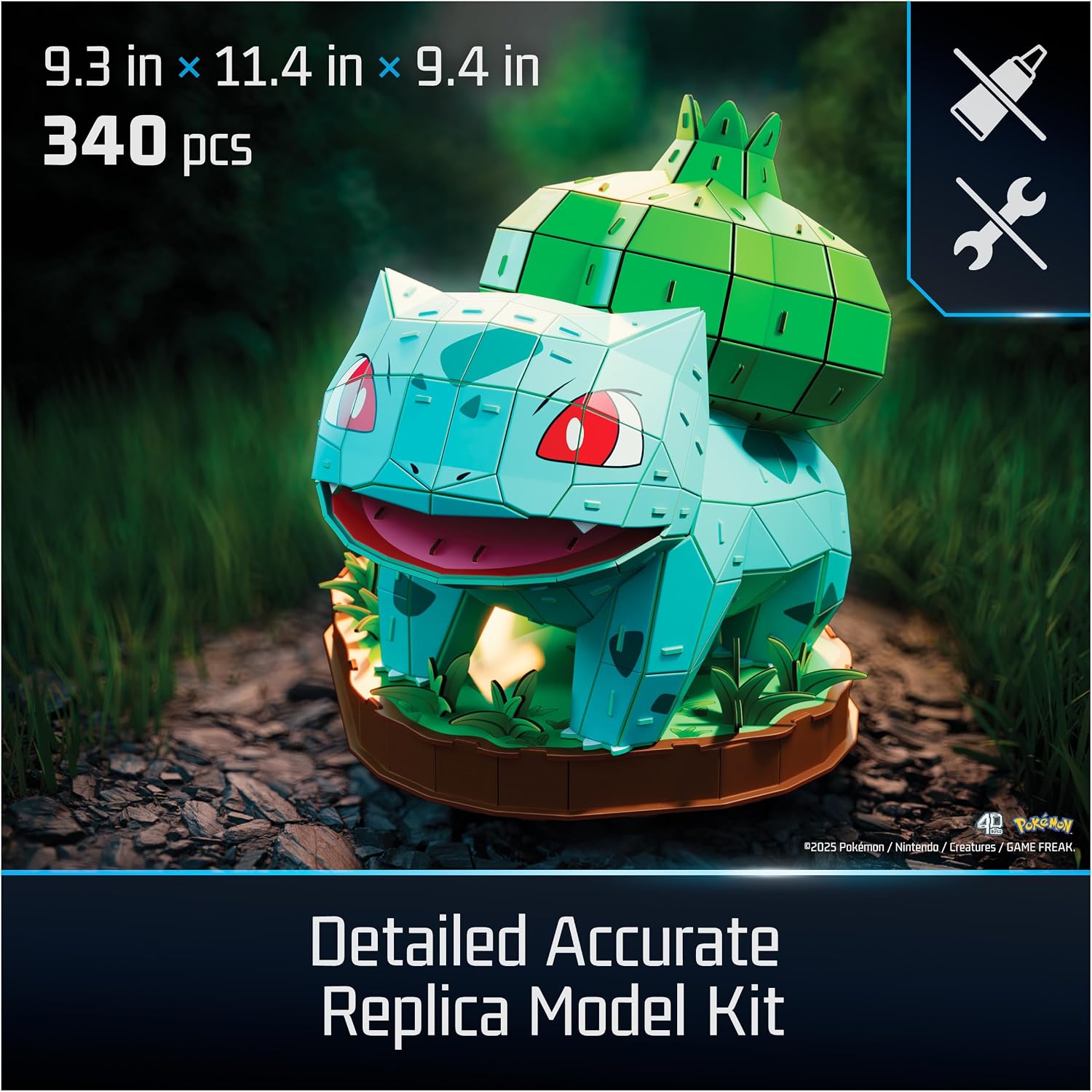
Figure 5: Visual representation of the Bulbasaur model's dimensions. Note: The image states 340 pieces, but the product description specifies 195 pieces for this particular Bulbasaur variant.
Warranty and Support
For warranty information, product support, or to inquire about replacement parts, please contact 4D Build customer service. Refer to the product packaging for specific contact details or visit the official 4D Build website.
Ask a question about this manual
Ask about setup, troubleshooting, compatibility, parts, safety, or missing instructions. Manuals+ will review the question and use this page’s manual context to help answer it.