
Introduction
This manual provides essential information for the safe and effective operation, maintenance, and troubleshooting of your RYOBI 40V 15-inch Expand-It Cordless String Trimmer. Please read this manual thoroughly before using the product and retain it for future reference.
Important Safety Information
WARNING:
- Always wear appropriate safety gear, including eye protection and sturdy shoes.
- Be aware of your surroundings and the trimmer's cutting path to avoid injury to yourself or others.
- Never operate the trimmer at high speeds near people or pets.
- Always follow the manufacturer's instructions for safe operation and maintenance.
Package Contents
Your RYOBI 40V 15-inch Expand-It Cordless String Trimmer package includes:
- RYOBI 40V 15-inch Expand-It Cordless String Trimmer (Tool Only)
- Trimmer Head with .080" line pre-installed
- Adjustable Auxiliary Handle
- Safety Guard
Note: Battery and charger are sold separately. This product comes in bulk packaging, not retail packaging.

Image: The RYOBI 40V 15-inch Expand-It Cordless String Trimmer, showing the main unit with the trimmer head and auxiliary handle attached.

Image: A clear warning indicating that batteries and charger are not included with the tool.

Image: A notice stating that the product is shipped in bulk packaging, not retail packaging.
Setup
1. Attaching the Trimmer Head
The trimmer head is designed for easy attachment to the main shaft. Align the square drive shaft of the trimmer head with the receiver on the main unit and push until it clicks into place. Ensure the locking mechanism is engaged.

Image: The RYOBI string trimmer showing the Expand-It connection point on the shaft, where attachments can be secured.
2. Installing the Battery
To install the 40V Lithium battery (sold separately), align the battery with the battery port on the trimmer's power head. Slide the battery firmly into place until it locks. To check the battery charge, press the power button on the battery itself.
Video: Demonstrates how to insert the 40V Lithium battery into the RYOBI tool and check its charge level using the integrated power button.
3. Adjusting the Auxiliary Handle
Loosen the knob on the auxiliary handle. Position the handle to a comfortable operating position, then tighten the knob securely. This allows for optimal balance and control during use.
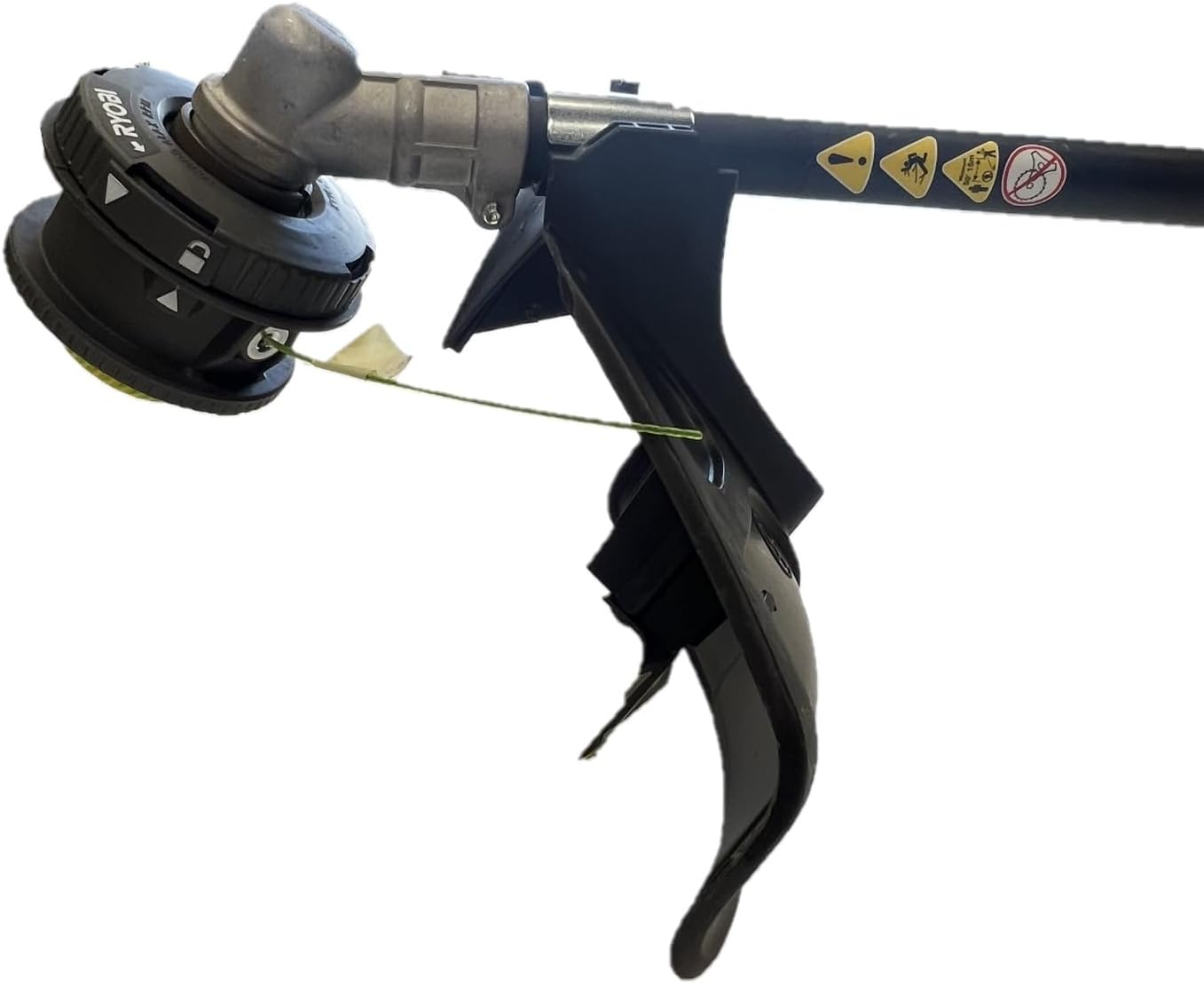
Image: Close-up view of the adjustable auxiliary handle on the trimmer, highlighting the knob for loosening and tightening.
Operating Instructions
1. Starting and Stopping
To start the trimmer, ensure the battery is fully inserted. Press the safety lock-out button (if present) and then squeeze the variable speed trigger. To stop, release the trigger.
2. Variable Speed Trigger
The trimmer features a variable speed trigger, allowing you to control the cutting speed based on the task. Squeeze the trigger gently for lower speeds and fully for maximum power. This provides precise control for various trimming conditions.
3. Cutting Swath Adjustment
The cutting swath is adjustable from 13 inches to 15 inches. A larger cut swath provides maximum performance for wider areas, while a smaller cut swath offers maximum runtime for detailed work. Refer to the product diagram for adjustment points.
4. Line Compatibility
This trimmer is compatible with .080" diameter trimmer line. Using the correct line size ensures optimal cutting performance and prevents damage to the tool.
Video: Illustrates the process of attaching the trimmer head to the shaft and demonstrates the trimmer in operation, cutting grass.
Maintenance
1. Line Replacement
When the trimmer line wears down, it will need to be replaced. This model uses .080" line. Consult the trimmer head instructions for specific steps on how to open the head and spool new line. Ensure the trimmer is off and the battery is removed before performing any maintenance.

Image: Close-up of the trimmer head, showing the installed line and the guard.
2. Cleaning
After each use, clean the trimmer head and guard to remove grass clippings and debris. Use a damp cloth; do not use harsh chemicals or abrasive cleaners. Ensure all vents are clear to prevent overheating.
Troubleshooting
1. String Not Advancing
If the trimmer line is not advancing, first ensure the trimmer is off and the battery is removed. Check the trimmer head for tangled line or debris that might be obstructing the feed mechanism. You may need to manually pull out the line or re-spool it according to the line replacement instructions.
2. Trimmer Not Starting
Verify that the 40V battery is fully charged and properly inserted into the tool. Check the battery's charge indicator. Ensure the safety lock-out button is pressed before squeezing the trigger.
Specifications
- Brand: RYOBI
- Model Number: RY40ST01B
- Power Source: Battery Powered (40V)
- Cutting Width: 13 - 15 Inches (Adjustable)
- Line Diameter: .080 Inches
- Speed: 7000 RPM
- Item Weight: 8.6 Pounds
- Product Dimensions: 69"L x 11.5"W
- Assembly Required: Yes
- Cordless: Yes
Warranty and Support
For warranty information, please refer to the documentation included with your purchase or visit the official RYOBI website. For technical support or service, contact RYOBI customer service.


