
1. Important Safety Information
Please read all instructions carefully before installation and use. Retain this manual for future reference.
- Electrical Safety: Ensure the power source matches the requirements specified on the product label. Do not overload electrical outlets.
- Water Resistance: This product is IP67 waterproof, designed for outdoor use. However, ensure all connections are secure and sealed to maintain water resistance. Do not submerge the control box or power adapter in water.
- Installation: Installation should be performed by a competent individual. Use appropriate tools and safety equipment, especially when working at heights.
- Temperature Range: The lights are designed to operate within a temperature range of -40°C to 60°C (-4°F to 140°F). Operating outside this range may affect performance or lifespan.
- Damage: Do not use the product if any part is damaged. Contact customer support for assistance.
- Children and Pets: Keep packaging materials and small components away from children and pets to prevent choking hazards.
2. Package Contents
Verify that all components are present in the package:
- 2 x 150ft Permanent Outdoor RGB Lights (Total 300ft)
- 1 x Power Adapter
- 1 x Control Box
- 1 x Remote Control (with 1 x 12V battery included)
- 1 x Screw Mounting Kit
- 1 x User Manual (this document)

Figure 2.1: Overview of product features including 16 million colors, smart control, timer, app/remote, IP67 waterproof, and adjustable brightness.
3. Setup and Installation
Follow these steps for proper installation of your permanent outdoor lights. It is recommended to test the lights before permanent mounting.
3.1 Pre-Installation Check
- Test Lights: Before mounting, connect the lights to the power adapter and control box. Plug them in to ensure all lights function correctly. If any issues arise, contact customer support.
- Surface Preparation: Clean the installation surface thoroughly with a cloth or tissue to ensure proper adhesion.
3.2 Mounting Instructions
The lights offer dual fixing methods: adhesive and screws. For long-term use and in humid environments, using both methods is strongly recommended.
- Positioning: Install the light fixtures 2-4 inches away from the wall surface for optimal light dispersion.
- Adhesive Application: Peel off the protective backing from the adhesive on the back of each lamp. Press the light firmly onto the surface for more than 5 seconds.
- Screw Reinforcement: Use the provided diagonal screws on each permanent light to ensure a secure and lasting fit.
- Connecting Components: Connect the light strings to the waterproof controller and tighten all connections securely.

Figure 3.1: Step-by-step installation guide for the lights.
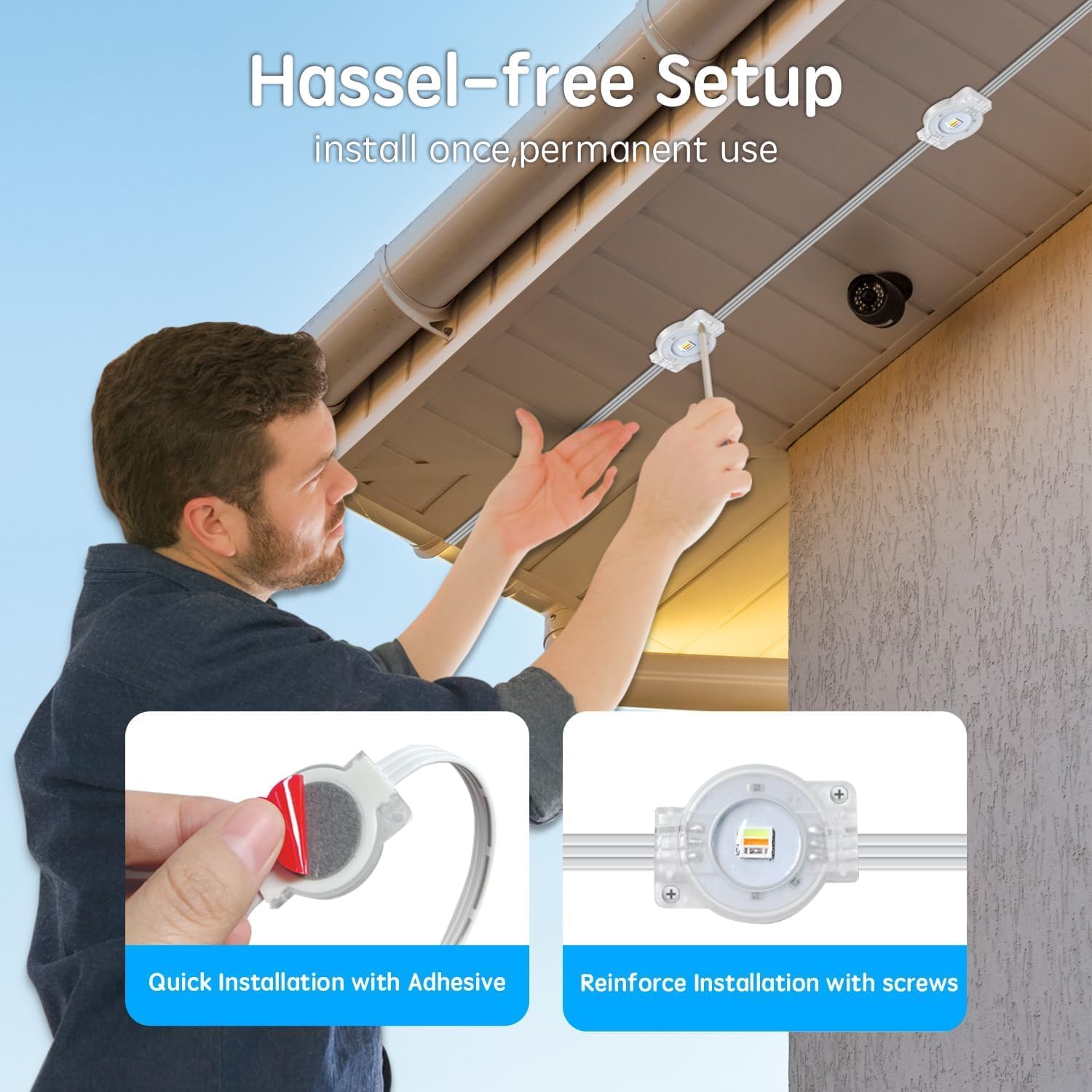
Figure 3.2: Detailed view of adhesive and screw installation methods.
3.3 Video Guide: Installation Overview
Video 3.1: An overview of the permanent outdoor RGB lights and their installation process, provided by the manufacturer.
4. Operating Instructions
Your Sxlofty Permanent Outdoor RGB Lights can be controlled via a smartphone app or the included remote control.
4.1 App Control ("Lotus Lamp Pro")
- Download App: Search for and download the "Lotus Lamp Pro" app from your smartphone's app store.
- Pairing: Follow the in-app instructions to pair your lights with your smartphone.
- Features:
- Color Customization: Choose from 16 million color combinations, including a white light option. Note: This RGB light system displays one single RGB or white color at a time across the entire string.
- Brightness Adjustment: Adjust the light intensity to your preference.
- Lighting Modes: Select various dynamic lighting effects and modes.
- Music Synchronization: Sync the lights with music for dynamic displays.
- Timer Function: Set schedules for automatic ON/OFF times.

Figure 4.1: App and remote control interfaces for managing light settings.
4.2 Remote Control
The included remote control provides quick access to common functions without needing your phone.
- Power ON/OFF: Turn the lights on or off.
- Color Selection: Directly select preset colors.
- Brightness Control: Increase or decrease light brightness.
- Mode Selection: Cycle through various lighting modes.
4.3 Timer Function
Utilize the timer function via the app to automate your lighting schedule.
- Set specific times for the lights to turn ON and OFF daily.
- This feature helps save energy and provides convenience.

Figure 4.2: Setting automatic ON/OFF times using the app.
4.4 Understanding RGB vs. RGB+IC Lights
It is important to understand the difference between standard RGB lights and RGB+IC lights, as this product is a standard RGB system.

Figure 4.3: Comparison of RGB and RGB+IC lighting technologies.
- RGB Lights (This Product):
- No independent chip control (IC).
- Displays one single RGB or white color at a time across the entire light string.
- Offers various lighting effects, but colors change uniformly.
- RGB+IC Lights (Not This Product):
- Features multiple independent chip controls (IC).
- Can display multiple colors simultaneously along the light string.
- Allows for more advanced and sectional lighting effects.
5. Maintenance
Proper maintenance ensures the longevity and optimal performance of your outdoor lights.
- Cleaning: Periodically clean the light fixtures with a soft, damp cloth to remove dirt and debris. Do not use harsh chemicals or abrasive cleaners.
- Inspections: Regularly inspect the wiring, connections, and mounting points for any signs of wear, damage, or loosening. Address any issues promptly.
- Weather Protection: While IP67 rated, extreme weather conditions (e.g., severe storms, prolonged heavy snow) may warrant additional checks after the event.
- Storage: If storing the lights for an extended period, ensure they are clean, dry, and stored in a cool, dry place away from direct sunlight.
6. Troubleshooting
If you encounter issues with your lights, refer to the following common problems and solutions:
| Problem | Possible Cause | Solution |
|---|---|---|
| Lights do not turn on. | No power, loose connection, faulty power adapter/control box. | Check power outlet. Ensure all connections are secure. Test with another outlet. If problem persists, contact support. |
| Remote control not working. | Dead battery, remote out of range, obstruction. | Replace the 12V battery in the remote. Ensure clear line of sight to the control box. Move closer to the control box. |
| App cannot connect to lights. | Bluetooth/Wi-Fi off, incorrect pairing, app issue. | Ensure Bluetooth/Wi-Fi is enabled on your phone. Re-attempt pairing process in the app. Restart the app and/or your phone. |
| Lights display incorrect colors or modes. | Software glitch, interference. | Restart the lights by unplugging and re-plugging the power. Reset settings via the app. |
| Adhesive failing. | Improper surface preparation, humid environment, insufficient pressure during installation. | Ensure surface is clean and dry. Reinforce with screws as per installation instructions. |
7. Specifications
| Feature | Detail |
|---|---|
| Brand | Sxlofty |
| Model Number | YXY-001 |
| Light Type | Permanent Outdoor RGB LED Lights |
| Length | 300 feet (2 x 150ft strings) |
| Light Color | RGB Multi-colored (16 million colors + white light) |
| Waterproof Rating | IP67 |
| Control Method | App ("Lotus Lamp Pro") & Remote Control |
| Special Features | Color Changing, Music Synchronization, Timer Function, Rainproof, Water Resistant |
| Power Source | Corded Electric |
| Operating Temperature | -40°C to 60°C (-4°F to 140°F) |
| Lifespan | 50,000 hours |
| Material Type | PBS |
| Manufacturer | Puyang Yunxing Micro Network Technology Co., Ltd |

Figure 7.1: Durability and weather resistance features of the lights.
8. Warranty and Support
The Sxlofty Permanent Outdoor RGB Lights come with a 2-year manufacturer's warranty.
For any questions, technical support, or warranty claims, please contact Sxlofty customer service through the retailer's platform or the contact information provided in the product packaging.