
1. Introduction
Thank you for choosing the Setpower PT30 12 Volt Car Refrigerator. This portable dual-zone freezer/fridge is designed to keep your food and beverages cool or frozen during travel, camping, or any outdoor adventure. It features advanced cooling technology, dual-zone temperature control, and convenient APP connectivity. Please read this manual thoroughly before use to ensure proper operation and maintenance.

Image 1.1: Setpower PT30 Car Refrigerator with protective cover and mobile app interface.
2. Safety Instructions
To prevent injury to yourself and others, or damage to your appliance, please observe the following safety precautions:
- Ensure the power supply voltage matches the specifications of the refrigerator.
- Do not operate the refrigerator if the power cord is damaged or if the appliance shows signs of malfunction.
- Keep the ventilation openings clear of obstructions.
- Do not use electrical appliances inside the food storage compartments unless they are of the type recommended by the manufacturer.
- Avoid placing the refrigerator in direct sunlight or near heat sources.
- Always disconnect the power supply before cleaning or performing maintenance.
- This appliance is not intended for use by persons (including children) with reduced physical, sensory or mental capabilities, or lack of experience and knowledge, unless they have been given supervision or instruction concerning use of the appliance by a person responsible for their safety.
3. Package Contents
Verify that all items are present in the package:
- 1 x Setpower PT30 Car Refrigerator
- 1 x PT30 Protective Cover
- 1 x 12V/24V DC Power Cord
- 1 x AC Adapter (100-240V)
- 1 x User Manual (this document)
- 4 x Securing Ropes (for transport)
4. Product Overview
The Setpower PT30 features a robust design with user-friendly components. Familiarize yourself with the main parts:

Image 4.1: Humanized Design features of the Setpower PT30, highlighting the control panel, power inlets, vents, handles, and battery pocket.
Key components include:
- Control Panel: Located on the top, with a transparent cover for easy access and visibility.
- Dual Compartments: Two independently controlled zones for refrigeration or freezing.
- Power Inlets: For DC (12V/24V) and AC (100-240V) power connections.
- Mesh Vents: For proper airflow and heat dissipation.
- Portable Handles: Integrated for easy carrying.
- Reserved Battery Pocket: For optional external battery (not included).
- Protective Cover: Made of 420D silver gray fabric with 6MM pearl cotton and galvanized aluminum for insulation and protection.
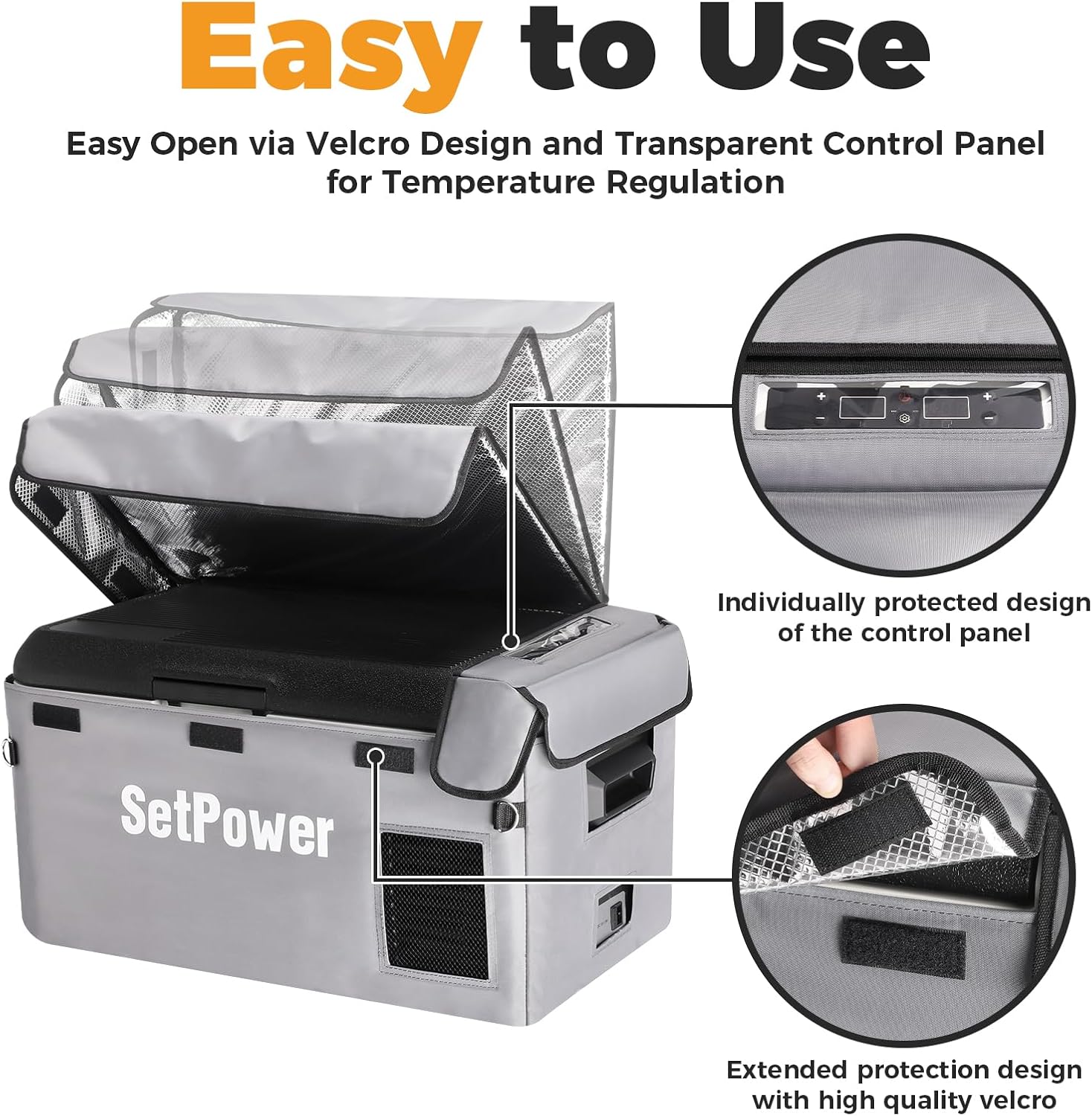
Image 4.2: Construction of the protective cover, illustrating its three layers for durability and insulation.
5. Setup
5.1 Unpacking and Placement
- Carefully remove the refrigerator from its packaging.
- Place the refrigerator on a flat, stable surface. Ensure there is adequate ventilation around the unit, especially near the mesh vents.
- The PT30 is designed for various vehicle types and can be placed in the front seat, trunk, or truck cab.

Image 5.1: Examples of compact placement in various vehicles.
5.2 Power Connection
The PT30 can be powered by both DC and AC sources:
- DC Power (12V/24V): Connect the provided DC power cord to the refrigerator's DC inlet and then to your vehicle's cigarette lighter socket or a 12V/24V power source.
- AC Power (100-240V): Connect the AC adapter to the refrigerator's AC inlet, then plug the adapter into a standard wall outlet.

Image 5.2: Various power connection methods for the PT30.
6. Operating Instructions
6.1 Powering On/Off
Press the power button on the control panel to turn the refrigerator on or off.
6.2 Temperature Adjustment (Dual Zone)
The PT30 features dual-zone temperature control, allowing you to set different temperatures for each compartment. The temperature range is from 68°F (20°C) down to -4°F (-20°C).

Image 6.1: Control panel for dual-zone temperature adjustment.
- Use the '+' and '-' buttons corresponding to each zone on the LCD panel to adjust the desired temperature.
- Each zone can function as either a refrigerator or a freezer independently.

Image 6.2: Dual Zone Dual Control modes.
6.3 Cooling Modes (ECO/MAX)
Select between ECO (Economy) and MAX (Maximum) cooling modes based on your needs:
- ECO Mode: Operates at 28W for energy efficiency, suitable for maintaining temperatures.
- MAX Mode: Operates at 38W for rapid cooling, ideal for quickly reaching desired temperatures.
The PT30 can cool from 70°F (21°C) to 32°F (0°C) in approximately 15 minutes, and reach -4°F (-20°C) in about 45 minutes.

Image 6.3: Fast cooling performance chart.

Image 6.4: ECO and MAX power consumption modes.
6.4 Battery Protection
The refrigerator includes a 3-level battery protection system to prevent your vehicle's battery from draining. You can select High, Medium, or Low protection levels.

Image 6.5: Battery protection voltage levels.
6.5 Anti-Shake Design
The PT30 is engineered with an anti-shake design, allowing it to maintain cooling performance even when tilted up to 40 degrees, making it suitable for off-road use.

Image 6.6: Anti-shake design for stable operation.
7. APP Control
The Setpower PT30 can be controlled via a mobile application for convenient management of settings.
7.1 App Download and Pairing
- Refer to the included user manual or product packaging for specific instructions on where to download the Setpower control app.
- Follow the in-app instructions to pair your smartphone with the PT30 refrigerator via Bluetooth.
7.2 App Functions
Once connected, the app allows you to:
- Independently manage temperatures for both zones.
- Switch between ECO and MAX cooling modes.
- Turn the refrigerator on or off remotely.
- Monitor the refrigerator's status.
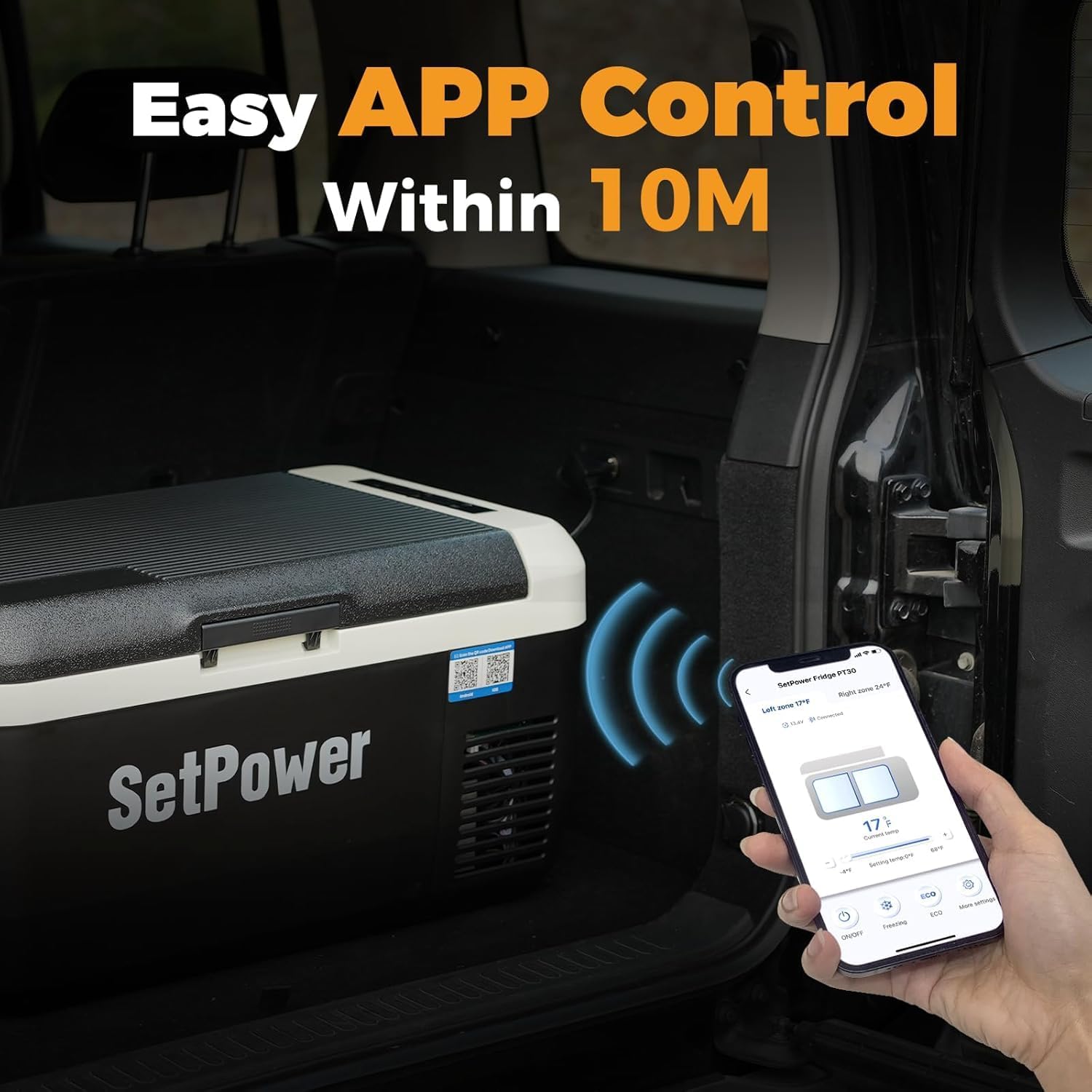
Image 7.1: Easy APP control interface.

Image 7.2: App control for real-time monitoring and remote setup.
8. Maintenance
8.1 Cleaning
- Always disconnect the power before cleaning.
- Wipe the interior and exterior surfaces with a damp cloth and mild detergent.
- Do not use abrasive cleaners or sharp objects that could damage the surfaces.
- Ensure the ventilation openings are free from dust and debris.
8.2 Storage
- When not in use for extended periods, ensure the refrigerator is clean and dry.
- Store it in a dry, well-ventilated area.
- The included protective cover can be used to shield the refrigerator from dust and minor impacts during storage.
Image 8.1: Protective cover features for easy use and access.
9. Troubleshooting
If you encounter issues with your Setpower PT30, refer to the following common problems and solutions:
| Problem | Possible Cause | Solution |
|---|---|---|
| Refrigerator does not turn on | No power supply; Damaged power cord; Blown fuse in vehicle | Check power connections; Try a different power outlet; Inspect power cord for damage; Check vehicle's fuse box. |
| Insufficient cooling | Ventilation blocked; Temperature setting too high; Door not closed properly; Ambient temperature too high | Ensure vents are clear; Lower temperature setting; Close door securely; Move to a cooler environment if possible. |
| Error code displayed | Internal malfunction; Sensor issue | Refer to the specific error code in the detailed manual (if available) or contact customer support. |
| Excessive noise | Unit not level; Fan obstruction | Place the unit on a level surface; Check for any obstructions around the fan. Note that the PT30 operates at less than 35dB. |

Image 9.1: Noise level comparison, showing the PT30 operates quietly.
10. Specifications
Detailed technical specifications for the Setpower PT30 Car Refrigerator:
- Model: PT30
- Capacity: 30 Liters (32 QT)
- Refrigerator Fresh Food Capacity: 15 Liters
- Freezer Capacity: 15 Liters
- Product Dimensions: 27.1 x 15.1 x 13.8 inches (68.8 x 38.4 x 35.1 cm)
- Item Weight: 29 pounds (13.15 kg)
- Voltage: 12 Volts / 24 Volts DC, 100-240 Volts AC
- Annual Energy Consumption: Approximately 45 Watt Hours (ECO mode)
- Installation Type: Freestanding
- Defrost System: Automatic
- Number of Doors: 1
- Shelves: 1
- Color: Black & White
- Special Features: Portable, Dual Zone, APP Control, Fast Cooling, Battery Protection
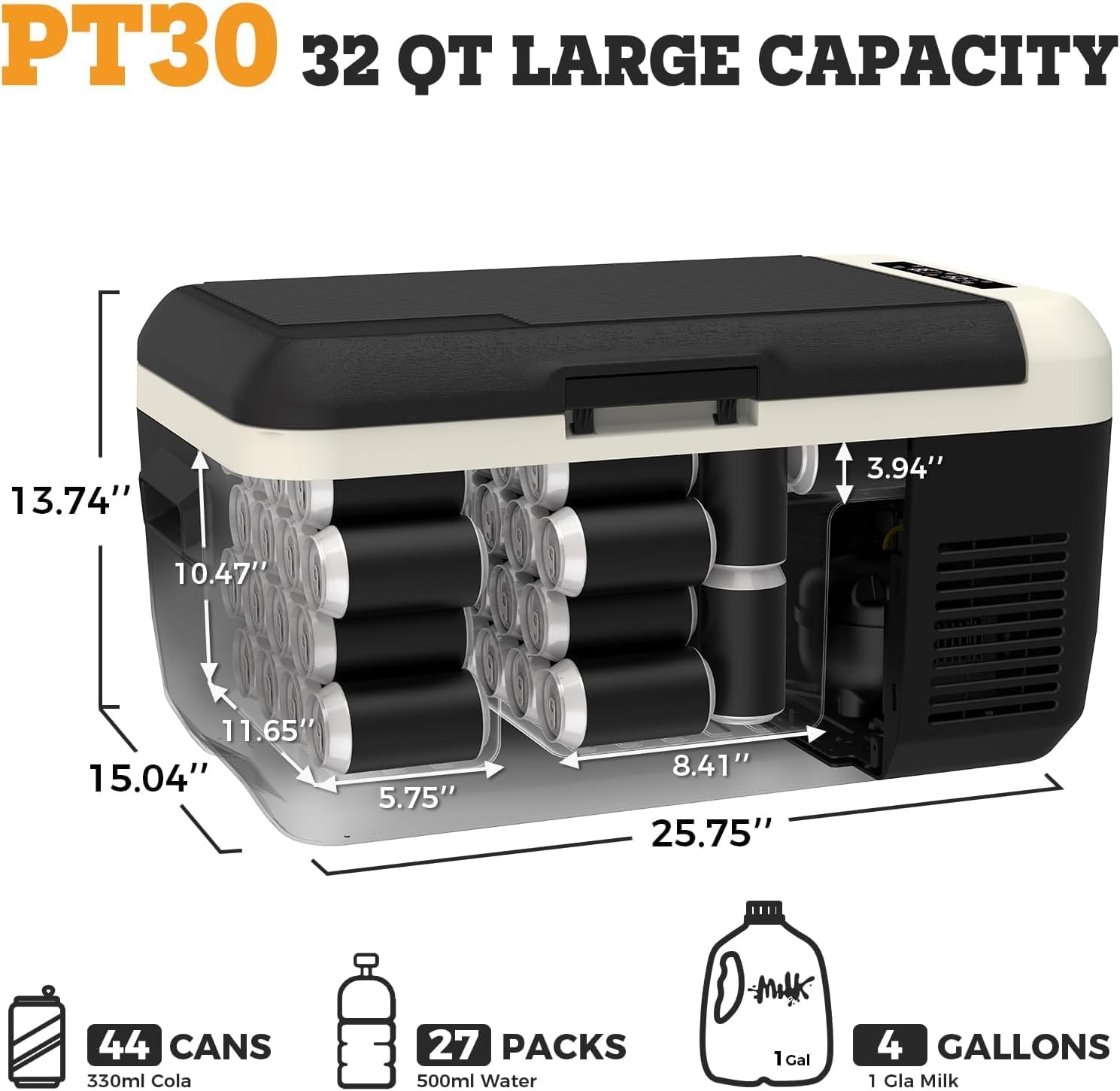
Image 10.1: PT30 capacity and dimensions.
11. Warranty and Support
Setpower is committed to providing reliable products and excellent customer service.
- Compressor Warranty: 3 years of technical support on the compressor.
- Parts Warranty: 1 year warranty for all other parts.
For any product questions, technical assistance, or warranty claims, please do not hesitate to reach out to Setpower customer support. Refer to your product packaging or the official Setpower website for the most current contact information.

Image 11.1: Setpower's commitment to professional support and warranty.


