
1. Introduction
Thank you for choosing the HeroSet Executive Leather Office Chair Model HS5199-1. This ergonomic computer desk chair is designed to provide optimal comfort and support for extended periods of sitting, whether for work, study, or gaming. This manual will guide you through the assembly, operation, and maintenance of your new chair to ensure a safe and satisfying user experience.

Image: The HeroSet Executive Leather Office Chair Model HS5199-1, showcasing its design and presence in an office environment.
2. Safety Information
Please read all safety instructions carefully before assembling and using the chair. Retain this manual for future reference.
- Maximum Weight Capacity: Do not exceed the maximum weight capacity of 400 pounds (181 kg). Exceeding this limit may cause damage to the chair and potential injury.
- Assembly: Ensure the chair is properly assembled according to the instructions provided. Loose components can lead to instability and accidents.
- Stability: Avoid standing on the chair or using it as a step stool. Do not lean excessively to one side while seated, especially when reclining.
- Children and Pets: Keep children and pets away from the chair during assembly. Do not allow children to play on or with the chair.
- Moving the Chair: When moving the chair, lift it rather than dragging it to prevent damage to the floor or chair components.
- Maintenance: Regularly check all bolts and screws to ensure they are tight. Re-tighten if necessary.
3. Package Contents
Before beginning assembly, verify that all parts are present and undamaged. If any parts are missing or damaged, please contact customer support.
- Backrest
- Seat Cushion with Armrests
- Base (5-star)
- Casters (5 pieces)
- Gas Lift Cylinder
- Gas Lift Cover
- Mechanism Plate
- Footrest Assembly
- Hardware Pack (screws, washers, Allen wrench)
- Instruction Manual
4. Assembly Instructions
Assembly typically takes approximately 20 minutes. It is recommended to assemble the chair on a soft, clean surface to prevent scratches.
- Attach Casters to Base: Insert each of the five casters into the holes at the end of each leg of the 5-star base until they click securely into place.
- Install Gas Lift: Place the gas lift cylinder into the center hole of the assembled base. Cover the gas lift with the telescopic plastic cover.
- Attach Mechanism Plate to Seat: Align the mechanism plate with the screw holes on the underside of the seat cushion. Ensure the front of the mechanism faces the front of the seat. Secure with screws using the provided Allen wrench.
- Attach Backrest to Seat: Align the backrest with the mounting brackets on the seat cushion. Secure with screws.
- Connect Seat to Gas Lift: Carefully place the assembled seat and backrest onto the gas lift cylinder, ensuring the center hole of the mechanism plate aligns with the top of the gas lift. Press down firmly to secure.
- Install Footrest: Slide the footrest assembly into the designated slots under the seat. Ensure it moves smoothly.

Image: Product dimensions and weight capacity (400 lbs) for reference during assembly and use.
5. Operating Instructions
Your HeroSet office chair offers several adjustable features to customize your seating experience.
- Height Adjustment: To raise the seat, lift the lever on the right side of the chair while taking your weight off the seat. To lower the seat, lift the lever while seated. Release the lever at the desired height. The chair offers 4.0 inches (10 cm) of height adjustment.
- Recline Function (90-135°): Pull the lever on the left side of the chair upwards to unlock the backrest. Lean back to your desired angle (between 90 and 135 degrees) and push the lever downwards to lock it in place.
- Footrest Operation: To extend the footrest, pull it out from underneath the seat. To retract, push it back in until it is fully stored.
- Lumbar Support: The chair features integrated lumbar support designed to conform to the natural curve of your spine, reducing fatigue.
- Swivel and Mobility: The chair features a 360-degree swivel function and smooth-rolling PU casters for easy movement across various floor types.

Image: Visual guide for adjusting chair height and reclining the backrest with the retractable footrest extended.
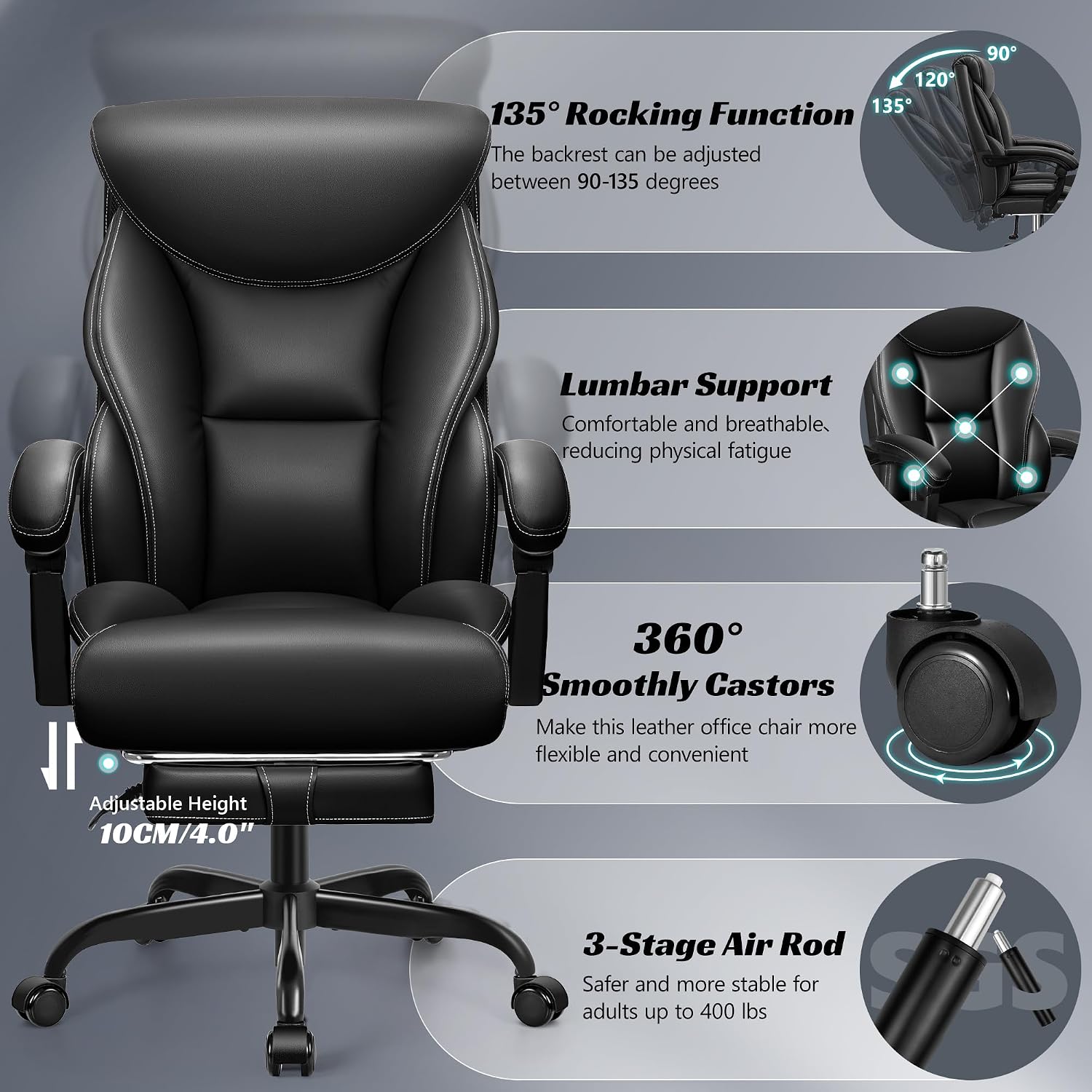
Image: Key features including rocking function, lumbar support, smooth casters, and the robust 3-stage air rod.
6. Maintenance
Proper maintenance will extend the life and appearance of your HeroSet office chair.
- Cleaning: The PU leather upholstery is easy to clean. Wipe the chair with a soft, damp cloth. For stubborn stains, use a mild soap solution and wipe dry immediately. Avoid harsh chemicals or abrasive cleaners.
- Hardware Check: Periodically check all screws and bolts to ensure they are tight. Re-tighten as necessary to maintain stability and prevent squeaks.
- Caster Care: Keep casters free of hair and debris to ensure smooth rolling.
- Avoid Direct Sunlight: Prolonged exposure to direct sunlight can cause the leather to fade or crack.

Image: The durable PU leather material, highlighting its easy-to-clean and breathable properties.
7. Troubleshooting
If you encounter any issues with your chair, refer to the following common problems and solutions:
| Problem | Possible Cause | Solution |
|---|---|---|
| Chair is wobbly/unstable | Loose screws or bolts. | Check and re-tighten all assembly screws. Ensure the gas lift is fully seated in the base. |
| Chair squeaks | Loose connections or friction between parts. | Re-tighten all screws. Apply a small amount of silicone lubricant to moving parts if necessary. |
| Gas lift not adjusting height | Lever not engaged or gas lift malfunction. | Ensure the height adjustment lever is fully pulled up or pushed down. If the issue persists, contact customer support. |
| Backrest not reclining/locking | Recline lever not engaged or mechanism obstruction. | Ensure the recline lever is fully pulled up to unlock and pushed down to lock. Check for any obstructions in the mechanism. |
| Casters not rolling smoothly | Debris caught in casters. | Remove any hair, dust, or debris from the caster wheels. |
8. Specifications
Detailed specifications for the HeroSet Executive Leather Office Chair Model HS5199-1:
- Brand: HeroSet
- Model Name: HS5199-1
- Color: Matte Black
- Product Dimensions (D x W x H): 15.83"D x 11.42"W x 20.08"H (Note: These dimensions seem to be for a component, not the full chair. Refer to diagram for full chair dimensions.)
- Overall Dimensions (Approximate, refer to diagram): Height: 42.9-46.9 inches (109-119 cm), Seat Width: 20.9 inches (53 cm), Seat Depth: 19.7 inches (50 cm)
- Back Style: Breathable Lumbar Support Back
- Special Features: Adjustable Height, Adjustable Lumbar, Arm Rest, Ergonomic, Swivel, Reclining, Retractable Footrest
- Product Care Instructions: Wipe Clean
- Recommended Uses: Computer, Gaming, Office
- Maximum Weight Recommendation: 400 Pounds (181 kg)
- Material: PU Leather, High-Density Sponge, PP Cotton, Steel Base
- Item Weight: 20 pounds (9.07 kg)
- UPC: 679065055241

Image: Ergonomic design elements providing comprehensive support for neck, back, lumbar, hips, and legs, featuring the retractable footrest.
9. Warranty and Customer Support
HeroSet provides a 3-year warranty service for this office chair. If you encounter any issues or have questions, please do not hesitate to contact our after-sales service team.
Contact Information:
- Email: cs@herosets.com
- Phone: +1 (978) 647-3329
- Online Support: You can also contact the seller through your Amazon account:
- Login to your Amazon Account.
- Go to "Your Orders".
- Find your order for this product.
- Click "Contact Seller".

Image: HeroSet customer support details and instructions for contacting the seller via Amazon.