
WALI MF003W
WALI MF003-W Triple Monitor Stand Instruction Manual
Model: MF003W
Safety Information
Please read this manual thoroughly before installation and use. Keep this manual for future reference.
- Ensure your desk can support the combined weight of the stand and three monitors.
- Do not exceed the maximum weight capacity of 22 lbs (10 kg) per arm.
- This product is designed for monitors between 17 and 27 inches.
- Use only with VESA compatible monitors (75x75mm or 100x100mm).
- Tighten all screws firmly but do not overtighten. Overtightening can damage components.
- Keep small parts away from children.
- If any parts are missing or damaged, contact WALI customer support.
Package Contents
Verify that all components are present before beginning assembly.
- Main Pole (A)
- Base (B)
- Monitor Arms (C, D, E)
- VESA Plates (F, G, H)
- Cable Clips
- Mounting Hardware Kit (screws, washers, spacers)
- Hex Keys

Image: All components of the WALI MF003-W Triple Monitor Stand, including the base, pole, arms, VESA plates, and hardware.
Specifications
| Model | MF003W |
| Material | Metal |
| Color | White |
| Monitor Size Compatibility | 17 - 27 inches |
| Weight Capacity per Arm | 22 lbs (10 kg) |
| VESA Compatibility | 75x75mm, 100x100mm |
| Mounting Type | Free Standing or Grommet Base |
| Tilt Angle | +/- 90 degrees (side monitors), +/- 15 degrees (center monitor) |
| Swivel Angle | +/- 90 degrees |
| Rotation | 360 degrees |

Image: Visual representation of display compatibility, showing maximum weight capacity of 22 lbs, VESA sizes 75x75mm and 100x100mm, and maximum screen size of 27 inches.
Setup Instructions
Step 1: Prepare Your Workspace
Clear your desk of any obstructions. Ensure you have enough space for assembly and monitor placement. You can choose between a free-standing base or a grommet base installation.
Step 2: Assemble the Base
Attach the main pole to the chosen base (free-standing V-base or grommet base). Secure it firmly using the provided screws and hex key.
Step 3: Attach the Monitor Arms
Slide the monitor arms onto the main pole. Adjust their height and position as needed. Ensure the arms are aligned and balanced to support the monitors evenly.
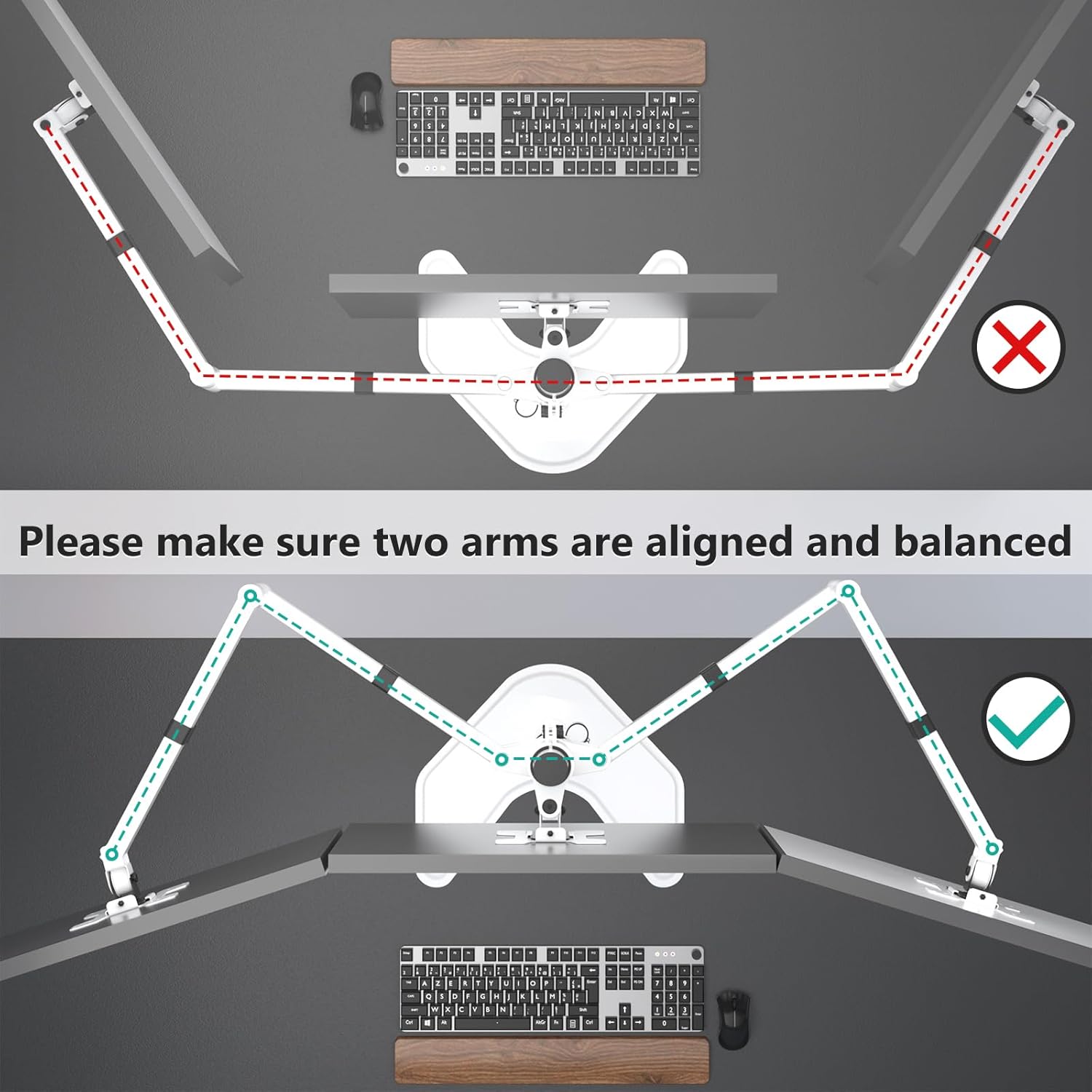
Image: Illustration showing the correct alignment of the monitor arms to ensure stability and balance for the attached displays.
Step 4: Mount Monitors
Attach the VESA plates to the back of your monitors using the appropriate screws from the hardware kit. Then, slide the monitors with attached VESA plates onto the monitor arms. Secure them with the locking mechanisms.
Step 5: Cable Management
Utilize the integrated cable clips along the arms and pole to route and organize your monitor cables. This helps maintain a tidy workspace and prevents cable damage.
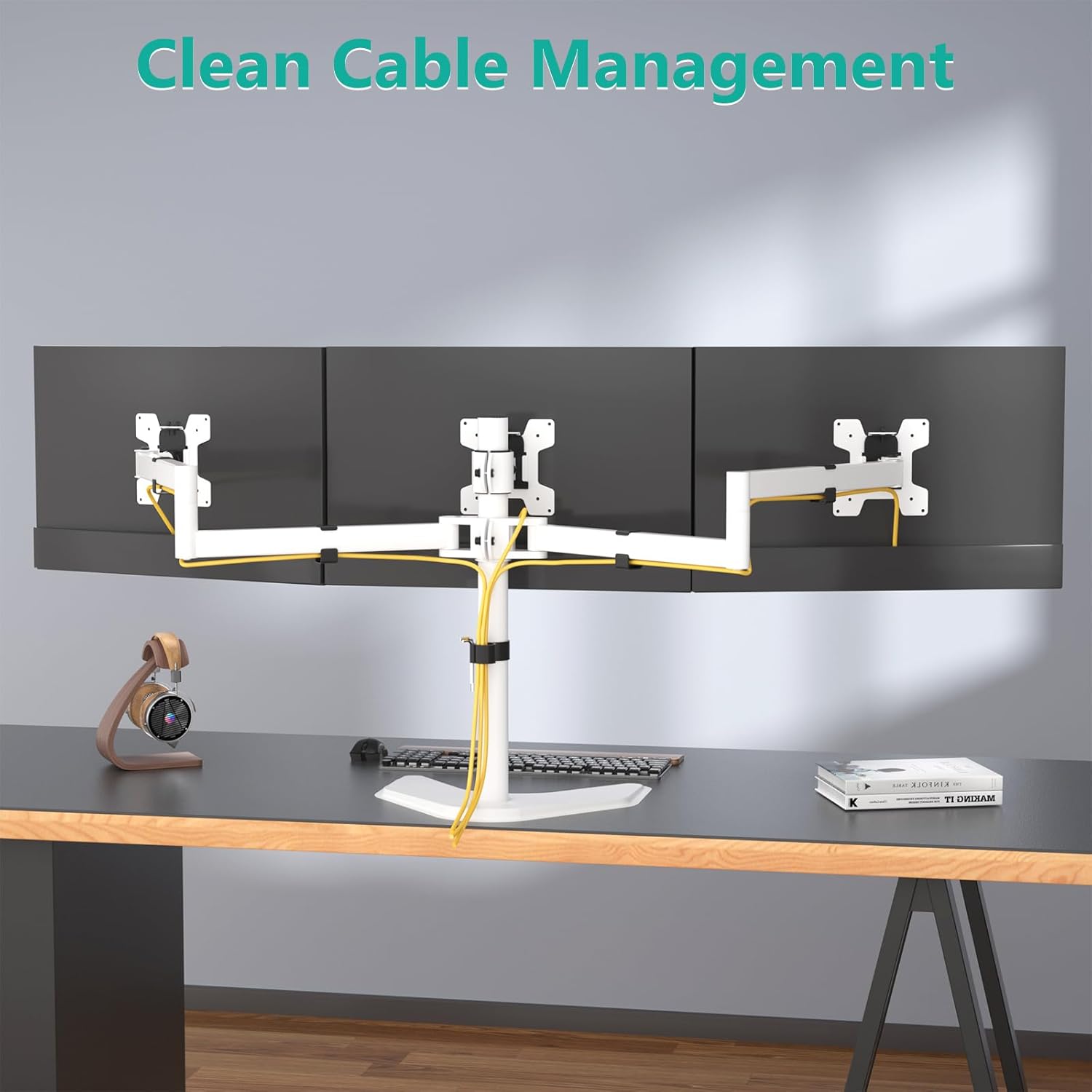
Image: The monitor stand with cables neatly routed through the integrated cable management clips, demonstrating a clean setup.
Operating Instructions (Adjustments)
The WALI MF003-W monitor stand offers various adjustment options for optimal viewing comfort.
- Height Adjustment: Loosen the collar on the main pole to slide the arms up or down. Retighten to secure the desired height.
- Tilt Adjustment: The VESA plates allow for tilting the monitors up or down. The center monitor tilts +/-15 degrees, while side monitors tilt +/-90 degrees. Loosen the tilt knob, adjust, and retighten.
- Swivel Adjustment: Each monitor can swivel +/-90 degrees horizontally. Gently rotate the monitor to the desired angle.
- Rotation: Rotate monitors 360 degrees to switch between landscape and portrait orientations.

Image: Diagram illustrating the tilt (+/-90 degrees), rotation (360 degrees), and swivel (+/-90 degrees) capabilities of the monitor arms.
Maintenance
Regular maintenance ensures the longevity and proper function of your monitor stand.
- Cleaning: Wipe the stand with a soft, damp cloth. Avoid abrasive cleaners or solvents.
- Check Connections: Periodically check all screws and bolts to ensure they are securely tightened.
- Cable Management: Ensure cables are not pinched or stressed. Re-route if necessary.
Troubleshooting
| Problem | Possible Cause | Solution |
|---|---|---|
| Monitors are not level. | Uneven arm height or tilt adjustment. | Adjust the height of the arms on the main pole. Fine-tune the tilt of each VESA plate. Ensure arms are balanced. |
| Stand feels unstable. | Loose connections or excessive monitor weight. | Verify all screws are tightened. Ensure total monitor weight does not exceed capacity. If using free-standing base, ensure it is centered and not over-extended. |
| Difficulty adjusting monitor position. | Adjustment knobs/screws are too tight. | Loosen the relevant adjustment knob or screw slightly, make the adjustment, then retighten. |
Warranty and Support
WALI provides a limited warranty for this product. For specific warranty details, please refer to the documentation included with your purchase or visit the official WALI website.
If you encounter any issues or have questions regarding your WALI MF003-W Triple Monitor Stand, please contact our customer support team. Experienced and friendly US-based customer support is available to assist 7 days a week.
Contact Information:
- Refer to your product packaging or the WALI website for the most current contact methods (email, phone).
Related documentsMF003W


Ask a question about this manual
Ask about setup, troubleshooting, compatibility, parts, safety, or missing instructions. Manuals+ will review the question and use this page’s manual context to help answer it.