1. Introduction
Welcome to the DYU Electric Bike user manual. This guide provides essential information for the safe assembly, operation, maintenance, and troubleshooting of your new electric bicycle. Please read this manual thoroughly before your first ride to ensure optimal performance and safety.
2. Safety Information
Your safety is paramount. Always adhere to local traffic laws and regulations. Failure to follow these instructions may result in serious injury or property damage.
- Always wear a helmet that meets safety standards.
- Perform a pre-ride inspection before each use, checking brakes, tires, battery, and all connections.
- Be aware of your surroundings and ride defensively.
- Avoid riding in adverse weather conditions (heavy rain, snow, ice).
- Do not operate the bike under the influence of alcohol or drugs.
- Ensure all components are securely fastened before riding.
3. Package Contents
Upon opening the package, verify that all components are present and undamaged. The main components include:
- DYU Electric Bike Frame (partially assembled)
- Front Wheel
- Handlebar Assembly
- Front and Rear Fenders
- Pedals (Left and Right)
- Removable Battery (36V / 12.5Ah)
- Battery Charger
- Seat Cushion and Seat Post
- Front Basket
- Rear Rack
- Multifunctional Wrench
- Car Lock
- User Manual
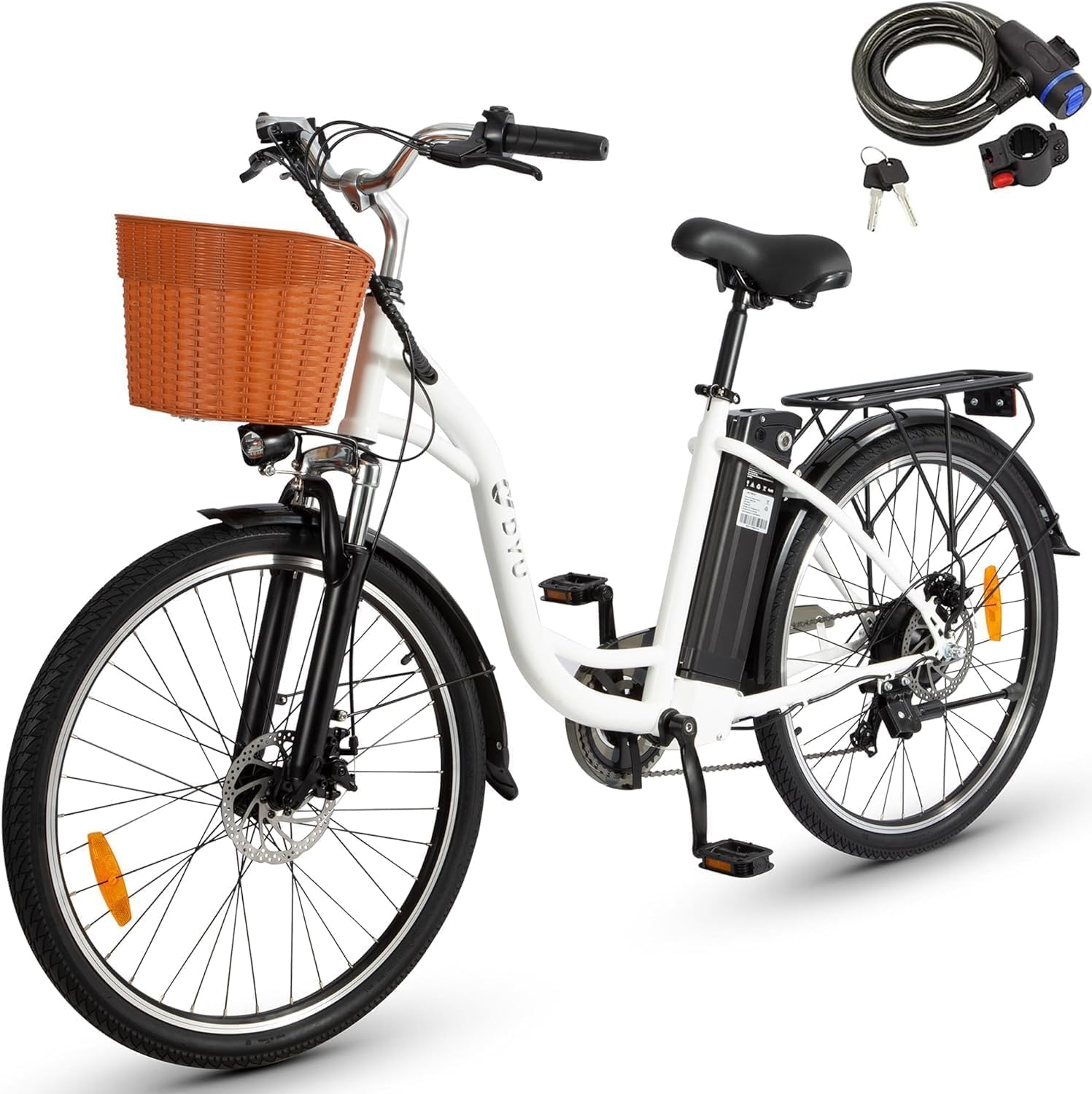
Image: All components included with the DYU Electric Bike, including the main bike frame, wheels, pedals, battery, and tools.
4. Setup and Assembly
Your DYU Electric Bike comes mostly pre-assembled. Follow these steps for final assembly:
Video: Official Ebike Installation Guide provided by DYUfactory. This video demonstrates the complete assembly process from unboxing to final checks.
4.1. Unpacking
Carefully open the package and remove the bike and all components. Cut any zip ties and remove protective foam packaging from the bike frame and wheels.
4.2. Handlebar Installation
Insert the handlebar stem into the fork tube. Ensure the handlebar is aligned straight with the front wheel. Tighten the bolt on the stem using the provided multifunctional wrench until secure.
4.3. Fender Installation
Attach the front fender to the front fork using the provided bolts and the multifunctional wrench. Repeat for the rear fender, securing it to the frame.
4.4. Wheel Installation
Insert the front wheel into the front fork, ensuring the disc brake rotor slides correctly into the brake caliper. Secure the wheel with the quick-release skewer or axle nuts, ensuring it is centered and tight.
4.5. Pedal Installation
Identify the left (L) and right (R) pedals. The left pedal tightens counter-clockwise, and the right pedal tightens clockwise. Thread each pedal into its respective crank arm and tighten firmly with the multifunctional wrench.
4.6. Battery Installation
Insert the removable battery into its designated slot on the bike frame. Push down firmly until it clicks into place. Use the provided key to lock the battery securely. The battery can be removed for charging or storage.

Image: The 12.5Ah removable battery, designed for easy installation and charging.
4.7. Seat Cushion Installation
Insert the seat post with the attached seat cushion into the seat tube. Adjust the height to a comfortable riding position where your feet can touch the ground when stopped. Secure the seat post with the quick-release clamp.
4.8. Handlebar Adjustment
Adjust the angle of the handlebar for comfortable riding. Loosen the bolts on the handlebar clamp, set the desired angle, and then re-tighten securely.
4.9. Initial Test
After assembly, perform a quick test: check brake functionality, ensure the wheels spin freely, and confirm the display powers on and shows battery level. Test all gears and electric assist modes in a safe, open area.
5. Operating Instructions
5.1. Powering On/Off
To power on the bike, press and hold the power button on the handlebar display. To power off, press and hold the same button. Ensure the battery is locked in place before powering on.
5.2. Riding Modes
Your DYU Electric Bike offers three riding modes:
- Pedal Assist Mode: The motor provides assistance as you pedal. Adjust the assist level using the '+' and '-' buttons on the display.
- Throttle Mode: Engage the throttle on the handlebar for motor power without pedaling. This mode is ideal for quick acceleration or cruising.
- Manual Mode: Ride the bike like a traditional bicycle without any electric assistance.
5.3. Display Functions
The LCD display provides real-time information:
- Speed: Current riding speed.
- Battery Level: Indicates remaining battery charge.
- Odometer/Trip: Tracks total distance or current trip distance.
- Assist Level: Shows the current level of pedal assistance.

Image: The intelligent speed sensor system, which detects pedaling and transmits power for an easier ride.
6. Maintenance
Regular maintenance ensures the longevity and safe operation of your e-bike.
- Battery Care: Charge the battery regularly, even if not in use, to maintain its health. Avoid fully discharging the battery. Store in a cool, dry place.
- Tire Pressure: Check tire pressure before each ride. Maintain recommended PSI for optimal performance and safety.
- Brakes: Regularly inspect brake pads and rotors for wear. Ensure brakes are responsive and properly adjusted.
- Cleaning: Clean the bike with a damp cloth. Avoid high-pressure washing directly on electrical components.
- Lubrication: Lubricate the chain and other moving parts periodically to ensure smooth operation.
7. Troubleshooting
Here are some common issues and their potential solutions:
| Problem | Possible Cause | Solution |
|---|---|---|
| Bike not powering on | Battery not installed correctly or low charge | Ensure battery is fully inserted and locked. Charge battery. |
| Motor not assisting | Low battery, assist level set to zero, or loose connection | Check battery level, increase assist level on display. Inspect connections. |
| Brakes feel weak | Worn brake pads or improper adjustment | Inspect and replace brake pads if worn. Adjust brake cables. |
| Tires flat or losing air | Puncture or low pressure | Check for punctures and repair. Inflate tires to recommended PSI. |
8. Specifications
| Feature | Specification |
|---|---|
| Bike Type | Electric Bike |
| Brand | DYU |
| Model Name | C6 |
| Number of Speeds | 6 |
| Color | White |
| Suspension Type | Rear, Front |
| Wattage | 350 watts (Peak 500W Brushless Motor) |
| Battery | 36V / 12.5Ah (562Wh) Removable Lithium Battery |
| Maximum Range | Up to 50 Miles |
| Wheel Size | 26 inch |
| Brake Style | Disc |
| Maximum Weight Recommendation | 120 Kilograms (264 lbs) |
| Net Weight | 60 lbs |
| Recommended Height | 5'3" - 6'5" |
9. Warranty and Support
DYU provides a limited warranty for its electric bikes, covering manufacturing defects. Please refer to the warranty card included in your package for specific terms and conditions. For technical support, parts, or warranty claims, please contact DYU customer service.
You can also reach out via email: supportus@dyucycle.com


