
1. Introduction
The BAOFENG UV-26 is a professional 10W multi-band handheld ham radio designed for long-range communication. It features a wide frequency range, 999 memory channels, and multiple programming options, making it suitable for various communication needs. This manual provides detailed instructions for setting up, operating, and maintaining your UV-26 radio.

Image 1.1: BAOFENG UV-26 Ham Radio with various accessories including antennas, batteries, and charging equipment.
2. Package Contents
Verify that all items are present in your package:
- 2 × UV26 Ham Radios
- 4 × 2500mAh USB-C Batteries
- 2 × Handheld Microphones
- 2 × 771 Ham Antennas
- 2 × Aviation Antennas
- 2 × 805 Antennas
- 2 × Original Antennas
- 2 × USB-C Chargers with Cables
- 2 × Earpieces
- 2 × Belt Clips
- 2 × Hand Straps
3. Key Features
The BAOFENG UV-26 radio incorporates several advanced features for enhanced communication and utility:
- 10W High Power Output: Provides robust signals for extended communication range.
- Multi-Band Operation: Supports a wide range of frequencies including VHF, 1.25m, and UHF bands for both transmission and reception.
- 999 Memory Channels: Ample storage for frequently used frequencies and settings.
- Frequency Copy Function: Allows for quick and easy duplication of frequencies from other radios.
- NOAA Weather Receiver: Access to 10 NOAA weather channels for emergency alerts and weather information.
- USB-C Charging: Convenient and modern charging method for the 2500mAh batteries.
- 1.77" TFT Screen: Clear and informative display for operational status.
- Emergency Alarm: Built-in SOS function for critical situations.
- Flashlight: Integrated LED light for illumination.
- Multiple Programming Methods: Supports Chirp, CPS, and wireless programming.
- Basic Functions: Includes CTCSS, DCS codes, Scan, VOX, A/B band selection, dual display, dual standby, and Auto Keypad Lock.
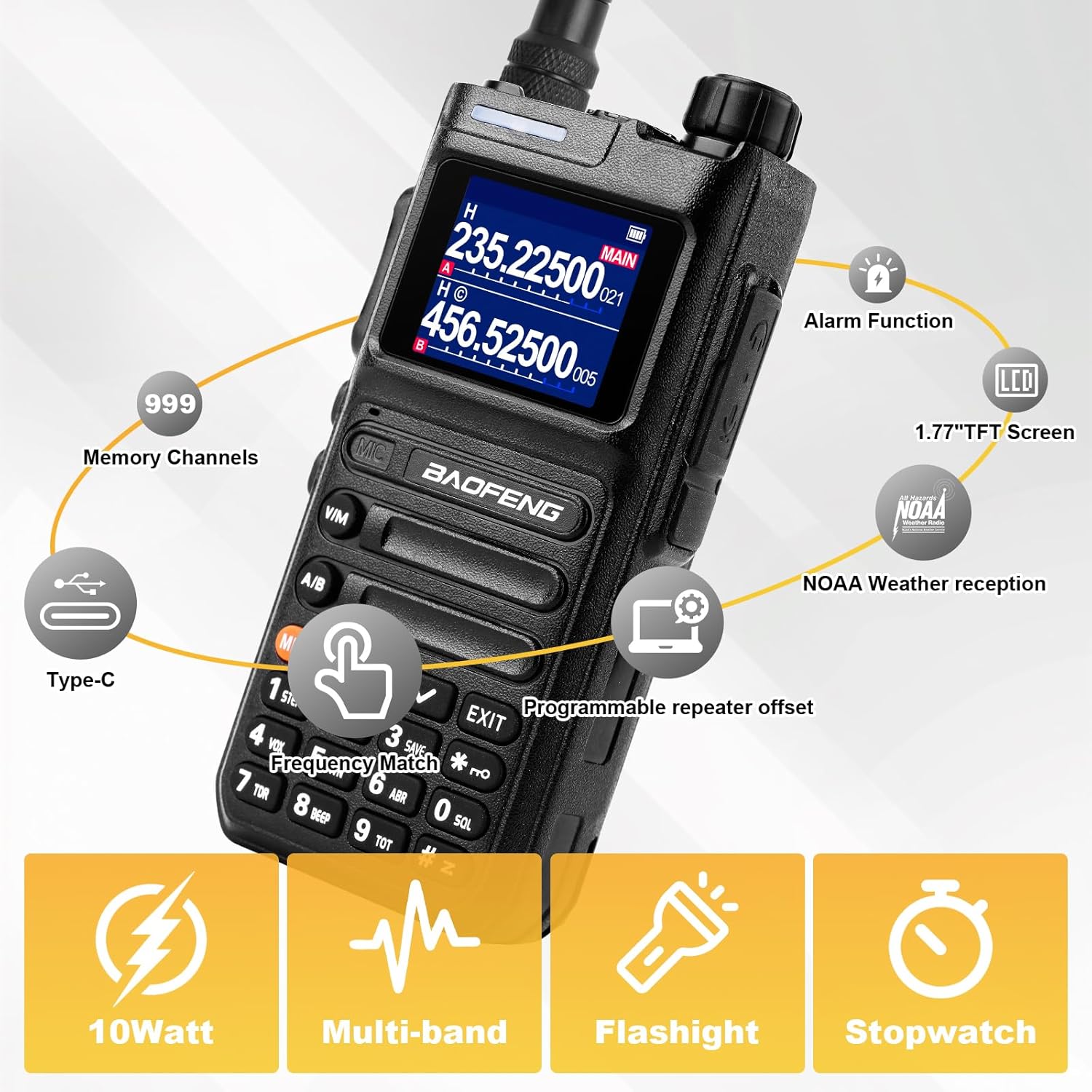
Image 3.1: Overview of the UV-26's main features, including 999 memory channels, Type-C charging, 1.77" TFT screen, NOAA weather reception, alarm function, programmable repeater offset, 10W power, multi-band capability, flashlight, and stopwatch.
4. Setup Guide
4.1 Battery Installation and Charging
The UV-26 uses 2500mAh Lithium Polymer batteries. Ensure batteries are fully charged before first use.
- Align the battery pack with the grooves on the back of the radio.
- Slide the battery pack upwards until it clicks into place.
- To charge, connect the USB-C cable directly to the battery pack or place the radio with the battery installed into the charging base.
- The charging indicator will show charging status. A full charge typically provides 12-16 hours of use.

Image 4.1: Comparison of 2500mAh battery life (12-16 hours) versus 1800mAh battery life (6-8 hours), highlighting the Type-C charging port on the battery.
4.2 Antenna Attachment
Select the appropriate antenna for your desired frequency band and communication range. The package includes 771 ham antennas, aviation antennas, 805 antennas, and original antennas.
- Screw the chosen antenna clockwise onto the antenna connector at the top of the radio until it is finger-tight. Do not overtighten.

Image 4.2: Visual comparison highlighting the quality difference between a genuine TIDRADIO antenna and a lower quality alternative, emphasizing the internal coil structure.
4.3 Belt Clip and Hand Strap Installation
Attach the belt clip and hand strap for convenient carrying.
- Secure the belt clip to the back of the radio using the provided screws.
- Thread the hand strap through the designated loop on the radio body.
5. Operating Instructions
5.1 Power On/Off and Volume Control
- To power on, rotate the power/volume knob clockwise.
- To power off, rotate the knob counter-clockwise until it clicks.
- Adjust the volume by rotating the same knob.
5.2 Channel/Frequency Selection
The UV-26 supports both Channel Mode and Frequency Mode (VFO).
- Press the [V/M] button to switch between Channel Mode and Frequency Mode.
- In Frequency Mode, use the keypad to directly input frequencies or the UP/DOWN arrow keys to adjust.
- In Channel Mode, use the UP/DOWN arrow keys to navigate through stored channels.
5.3 Transmit/Receive
- To transmit, press and hold the PTT (Push-To-Talk) button on the side of the radio. Speak clearly into the microphone.
- Release the PTT button to receive.
5.4 Dual Display and Dual Standby
The UV-26 features a dual display allowing you to monitor two frequencies simultaneously (A and B bands). Dual standby means the radio monitors both frequencies and will receive on the first one that becomes active.
- Press the [A/B] button to switch the active (main) frequency between the A and B bands.
5.5 Auto Keypad Lock
The auto keypad lock prevents accidental key presses.
- To enable/disable, navigate through the menu settings. Refer to the full user manual for specific menu options.
6. Advanced Functions
6.1 One-Key Frequency Matching (Frequency Copy)
This feature allows you to quickly copy a frequency from another radio without manual programming.
- Power on your UV-26 radio. The display will show "Search".
- Long-press the [V/M] key on your UV-26.
- Place the transmitting radio near your UV-26 and transmit on the desired frequency.
- When your UV-26 detects the frequency, press [MENU] to confirm and save.
- Switch to Channel Mode to view the newly copied frequency.

Image 6.1: Visual guide demonstrating the three steps for copying a frequency wirelessly: power on and search, press and hold V/M while receiving, then confirm with MENU and switch to channel mode.
6.2 Programming the Radio
The UV-26 can be programmed using various software methods:
- Chirp: A popular open-source programming software. When using Chirp, select "Baofeng" as the vendor and "5RM" or "UV17Pro" as the model.
- CPS (Customer Programming Software): Official software available for download from walkietalkiesoftware.com.
- Wireless Programmer: Supports programming via a wireless connection (e.g., Odmaster app).

Image 6.2: Illustration of the three primary programming methods: Chirp software (with model selection), CPS software (downloadable), and wireless programming via an app.
6.3 NOAA Weather Radio
The UV-26 can receive 10 NOAA weather channels, providing critical weather alerts and information.
- Access the NOAA weather channels through the radio's menu or dedicated function. Consult the full manual for specific steps.

Image 6.3: The UV-26 radio displaying weather information, indicating its capability to receive 10 NOAA weather channels for various hazards like hurricanes, fires, floods, earthquakes, tsunamis, and snowstorms.
6.4 Emergency Alarm (SOS)
The SOS function can be activated in emergencies to emit an alarm signal.
- Refer to the radio's menu or dedicated button for activating the SOS emergency alarm.

Image 6.4: A visual representation of the emergency alarm feature, showing a flashing red light icon on the radio's display, indicating its activation in a scenario where assistance is needed.
7. Frequency Information
The BAOFENG UV-26 offers a wider frequency range compared to the 5RM model.
| Function | Frequency Range (UV-26) |
|---|---|
| Transmit (TX) | 136-174 MHz, 220-260 MHz, 400-520 MHz |
| Receive (RX) | FM 76-108 MHz, AM 108-136 MHz (Aviation Band), VHF 136-174 MHz, 220-260 MHz, UHF 350-390 MHz, 400-520 MHz |

Image 7.1: A side-by-side comparison of the BAOFENG UV-26 and UV-5RM radios, highlighting the extended transmit and receive frequency ranges of the UV-26, including the new 480-520MHz range for TX.

Image 7.2: The UV-26 radio shown with an airplane in the background, indicating its capability to receive on the AM Aviation Band (108-136MHz RX).
8. Technical Specifications
| Specification | Detail |
|---|---|
| Model Number | UV-26 |
| Item Weight | 3.47 pounds |
| Package Dimensions | 8.74 x 7.91 x 4.25 inches |
| Batteries | 4 Lithium Polymer batteries required (included) |
| Color | Black |
| Number of Channels | 999 |
| Talking Range Maximum | 10 Kilometers |
| Voltage | 7.4 Volts |
| Water Resistance Level | Water Resistant |
9. Troubleshooting
This section addresses common issues you might encounter with your BAOFENG UV-26 radio.
- Radio not powering on: Ensure the battery is correctly installed and fully charged. Check the power/volume knob is rotated clockwise.
- No reception/transmission: Verify the antenna is securely attached. Check that you are on the correct frequency or channel. Ensure the battery has sufficient charge.
- Poor audio quality: Adjust the volume. Ensure the antenna is properly connected. Check for strong interference sources nearby.
- Programming issues: Ensure the correct programming cable is used and drivers are installed. For Chirp, confirm "Baofeng" vendor and "5RM" or "UV17Pro" model are selected.
- Keypad unresponsive: Check if the auto keypad lock is enabled. Disable it via the menu or a specific key combination (refer to the full manual).
For more detailed troubleshooting or issues not listed here, please refer to the comprehensive user manual or contact BAOFENG customer support.
10. Care and Maintenance
Proper care and maintenance will extend the life of your UV-26 radio:
- Cleaning: Use a soft, damp cloth to clean the radio's exterior. Do not use harsh chemicals or abrasive cleaners.
- Storage: Store the radio in a cool, dry place away from direct sunlight and extreme temperatures. Remove the battery if storing for extended periods.
- Battery Care: Avoid overcharging or completely draining the battery. Charge regularly, even if not in use, to maintain battery health.
- Water Resistance: The radio is water resistant, but not waterproof. Avoid submerging it in water. Dry thoroughly if it gets wet.
- Antenna: Handle antennas carefully to prevent bending or damage.
11. Warranty and Support
For warranty information, technical support, or service inquiries, please refer to the documentation included with your purchase or visit the official BAOFENG website. Keep your purchase receipt as proof of purchase for warranty claims.
Online Resources:
- BAOFENG Official Website: www.baofengradio.com (Note: This is a general placeholder, actual support links may vary by region or seller.)