
Product Overview
The Carlinkit Mini SE Pro is a versatile adapter designed to convert your vehicle's existing wired Apple CarPlay or Android Auto system into a wireless one. This device offers a seamless and cable-free experience, allowing you to access your smartphone's features directly on your car's infotainment screen.

Figure 1: The compact Carlinkit Mini SE Pro adapter shown with smartphones, highlighting its small size and wireless functionality.
Key Features:
- Wireless Connectivity: Converts factory wired Apple CarPlay and Android Auto to wireless.
- Fast & Stable Connection: Utilizes 5GHz WiFi and Bluetooth 5.2 for low-latency data transmission.
- Dual Port Design: Integrated USB-A and USB-C connector for broad compatibility with various car models.
- Automatic Reconnection: Connects automatically to your phone after initial setup.
- Original Control Retention: Maintains functionality of steering wheel buttons, factory knobs, and touchscreen.
- Over-The-Air (OTA) Updates: Ensures the device stays updated with the latest features.
What's in the Box
- Carlinkit Mini SE Pro Wireless Adapter (Product *1)
- Blister Package (Blister Package *1)
Setup Instructions
Follow these steps to set up your Carlinkit Mini SE Pro adapter for wireless CarPlay or Android Auto:
- Plug in the Adapter: Insert the Carlinkit Mini SE Pro into your car's USB-A or USB-C port, which is typically used for wired CarPlay/Android Auto.
- Activate Bluetooth & WiFi: On your mobile phone, enable Bluetooth and WiFi. Search for the device's Bluetooth signal, which will begin with "VehiConn_xxxx".
- Pair with Your Phone: Select the "VehiConn_xxxx" device from your phone's Bluetooth settings and confirm the pairing request. Allow permissions for CarPlay/Android Auto usage.
- Automatic Connection: After the initial pairing, the adapter will automatically connect to your phone each time you start your car.
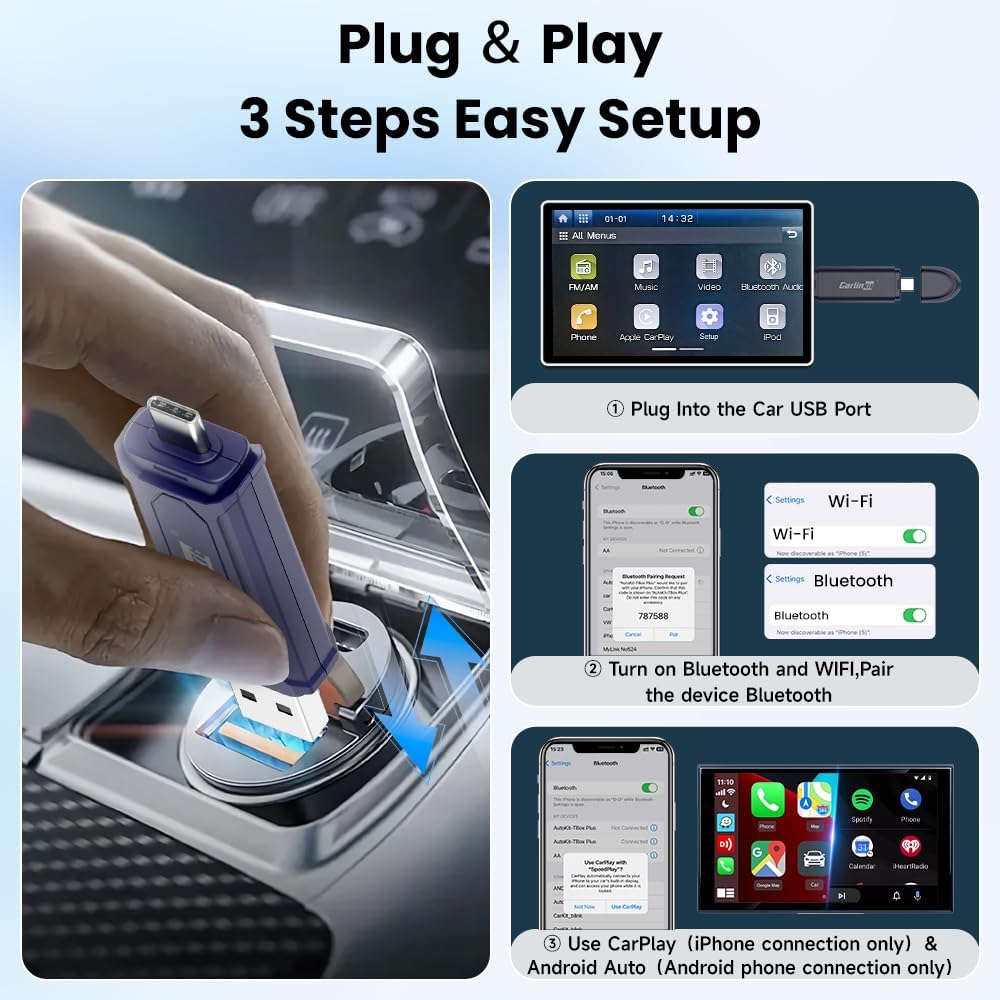
Figure 2: Visual guide for the simple 3-step setup process of the Carlinkit Mini SE Pro adapter.
Detailed Setup Steps:

Figure 3: Detailed instructions for initial setup and accessing the device's background for upgrades.
For a visual guide on setting up the adapter, please watch the video below:
Video 1: This video demonstrates the step-by-step process of setting up the Carlinkit Mini SE Pro 2-in-1 Wireless Adapter, from plugging it in to connecting your smartphone.
Operating Instructions
Once successfully set up, the Carlinkit Mini SE Pro provides a seamless wireless experience:
- Wireless CarPlay/Android Auto: Your car's display will automatically show the CarPlay or Android Auto interface.
- Access Apps: Navigate through your favorite apps like navigation, music, and messaging directly on your car's screen.
- Voice Control: Utilize your car's voice assistant (Siri or Google Assistant) for hands-free commands.
- Retain Car Controls: Continue to use your car's original controls, including touchscreen, steering wheel buttons, and factory knobs, to interact with the wireless system.
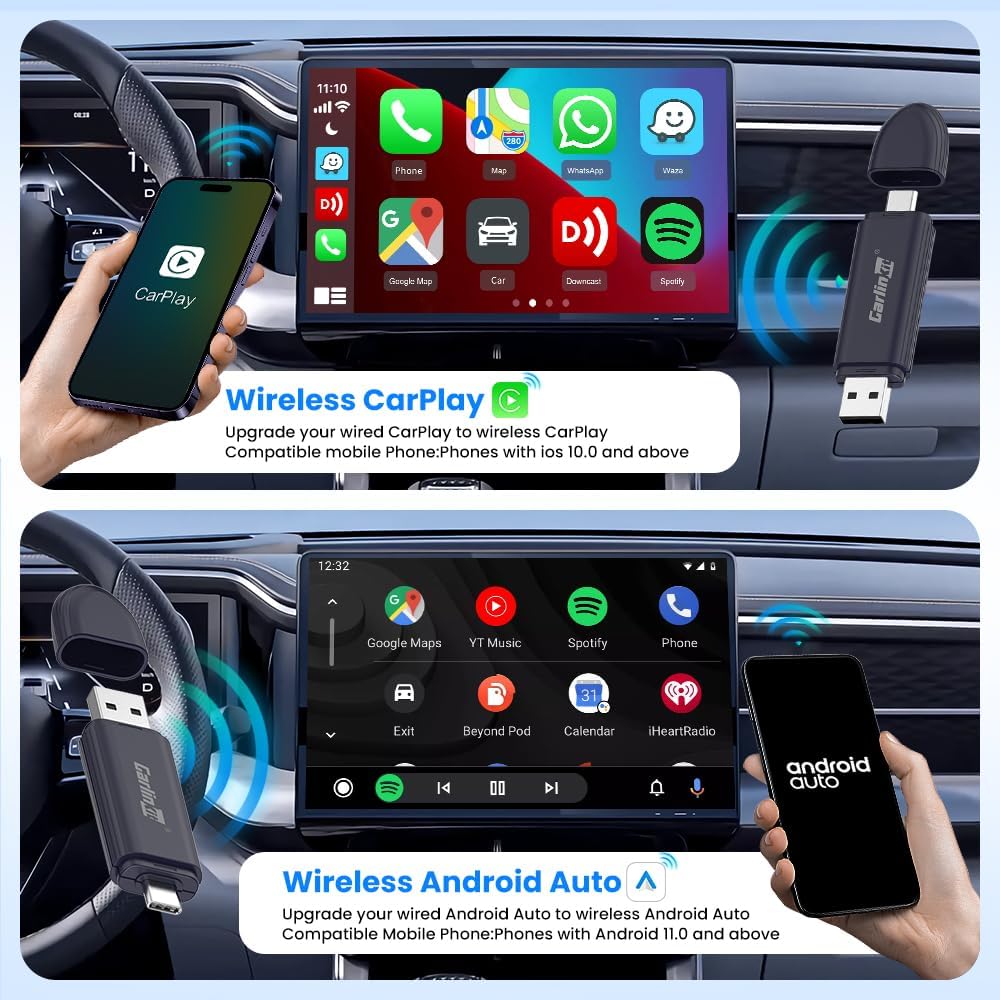
Figure 4: The car's infotainment system displaying both Wireless CarPlay and Wireless Android Auto, illustrating the adapter's functionality.

Figure 5: The adapter allows users to maintain full control using their car's existing interface, including touch, buttons, and knobs.
See the adapter in action, showcasing its 2-in-1 functionality:
Video 2: This video highlights the 2-in-1 functionality of the Carlinkit Mini SE Pro Wireless Adapter, demonstrating its use with both CarPlay and Android Auto.
Observe how the Carlinkit Mini SE Pro converts wired systems to wireless:
Video 3: This video illustrates the conversion of a wired CarPlay/Android Auto system to wireless using the Carlinkit Mini SE Pro adapter.
Compatibility
The Carlinkit Mini SE Pro is designed for broad compatibility:
- Vehicles: Compatible with most cars (2016+ models) that have factory-installed wired CarPlay or Android Auto.
- Apple CarPlay: Requires iPhone 6 and above with iOS 10 or higher.
- Android Auto: Requires Android phones with Android 11.0 and above.
- USB Ports: Features an integrated USB-A and USB-C connector for compatibility with both port types.

Figure 6: A comprehensive compatibility chart for the Carlinkit Mini SE Pro, detailing supported car brands and phone operating system requirements.

Figure 7: The adapter supports both USB Type-A and USB Type-C ports, offering flexible connectivity.
Important Notes:
- This device does not support converting factory built-in wired CarPlay to Wireless Android Auto, nor does it support converting factory built-in Wired Android Auto to Wireless CarPlay. It only supports same channel connection (CarPlay to Wireless CarPlay, Android Auto to Wireless Android Auto).
- Video playback is not supported due to CarPlay and Android Auto limitations. The device supports all apps that CarPlay and Android Auto natively support.

Figure 8: Clarification that video playback is not supported through the adapter due to platform limitations.
Maintenance
To ensure optimal performance and longevity of your Carlinkit Mini SE Pro adapter:
- Keep the device clean and free from dust and debris.
- Avoid exposing the adapter to extreme temperatures or moisture.
- Ensure the device firmware is up-to-date through OTA updates for the best performance and compatibility.
Troubleshooting
If you encounter issues with your Carlinkit Mini SE Pro, consider the following:
- Connection Issues: Ensure Bluetooth and WiFi are enabled on your phone and the adapter is correctly plugged into the car's USB port. Try restarting both your phone and the car's infotainment system.
- Lag or Disconnections: Check for any available OTA updates for the adapter. Ensure your phone's operating system is up-to-date.
- No CarPlay/Android Auto Display: Verify that your car supports wired CarPlay/Android Auto natively. Confirm that the adapter is paired correctly via Bluetooth.
- Controls Not Responding: Restart the car's infotainment system and re-pair the device.
Specifications
| Feature | Detail |
|---|---|
| Brand | Carlinkit |
| Model Number | CarlinKit MINI SE Pro |
| Compatible Devices | Laptop, Personal Computer, Smartphone |
| Specific Uses For Product | Converting wired CarPlay to wireless CarPlay and wired Android Auto to wireless Android Auto |
| Connector Type | USB Type A, USB Type C |
| Color | Dark Blue |
| Item Dimensions L x W x H | 3.2 x 0.41 x 0.8 inches |
| Item Weight | 9.07 g |
| Number of Ports | 2 |
| Power Plug Type | No Plug |
| Smart Home Compatibility | Not Smart Home Compatible |
Warranty and Support
The Carlinkit Mini SE Pro comes with a One Year Warranty. For any product problems, technical assistance, or customer service inquiries, please contact the seller, CAR Tech. They aim to reply within 24 hours.

Figure 9: Overview of Carlinkit's service commitment, including warranty and customer support.