
1. Introduction
Thank you for choosing the TriPole KW64 Portable Rechargeable Oscillating Fan. This manual provides essential information for the safe and efficient operation, maintenance, and troubleshooting of your new fan. Please read this manual thoroughly before use and retain it for future reference.
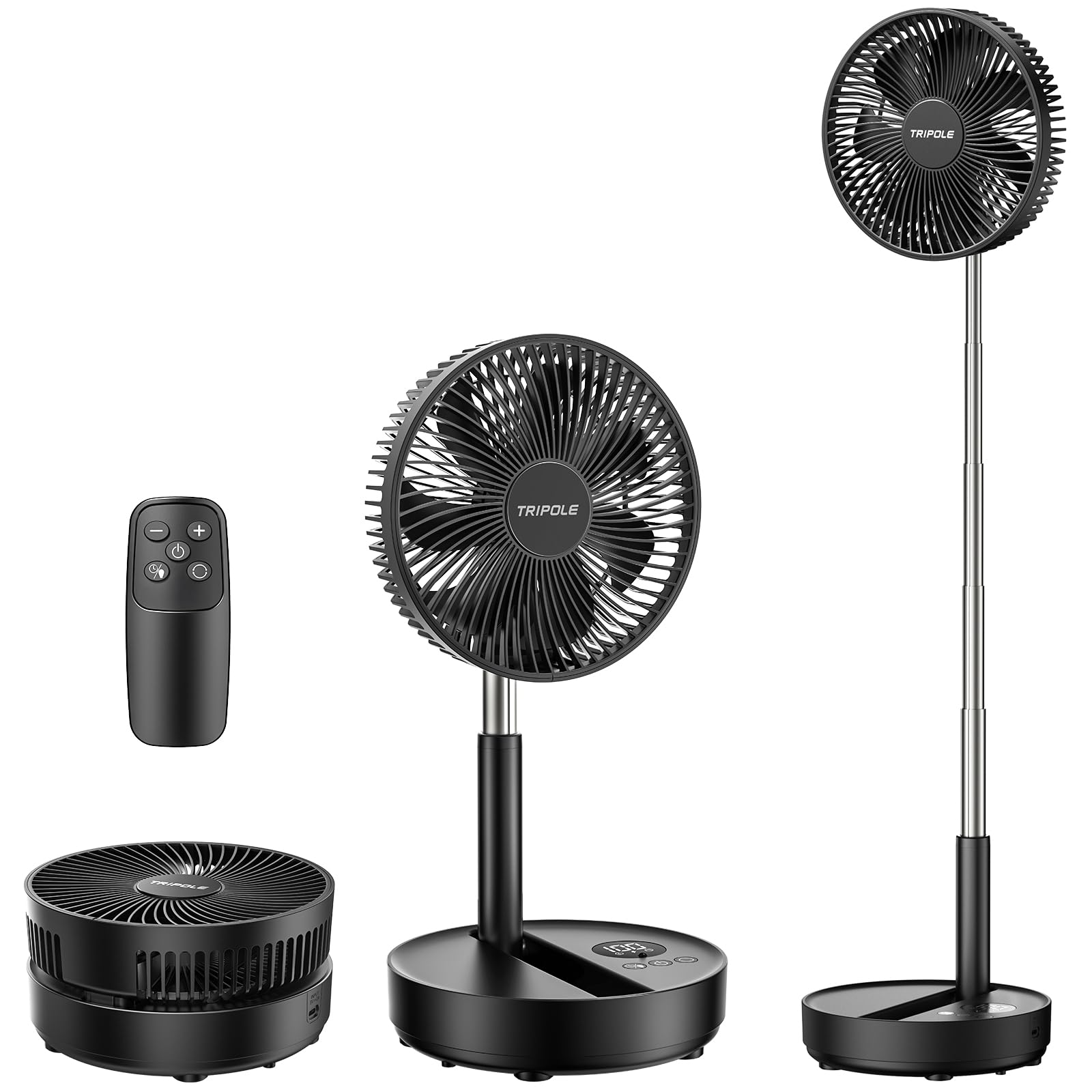
Figure 1: TriPole KW64 Portable Rechargeable Oscillating Fan
2. Product Features
- Long-Lasting & LED Display: Equipped with an 8000 mAh rechargeable battery, providing 2.5 to 28.5 hours of operation depending on speed. The LED display shows real-time battery power, timer settings, and current speed.
- Telescopic & Foldable Design: Adjustable height from 14.7 inches to 34.4 inches, suitable for both floor and desk use. Folds compactly to 4.17 inches for easy storage and portability.
- Powerful Yet Quiet Operation: Features a high-performance brushless motor and CFD-optimized blades for strong airflow (up to 4.9m/s) with ultra-quiet operation.
- Flexible Oscillation & Tilt: Offers 90° wide oscillation for broad air distribution and a 180° tiltable head for directional airflow.
- Remote Control & Timer: An infrared remote control allows operation of all functions (speed, timer, oscillation) from up to 20 feet away. Includes a 1-8 hour auto-shutoff timer.
- Additional Functions: Sleep mode (dim LED screen by holding timer button for 3s) and Child Lock (activate by pressing timer and oscillation buttons simultaneously). The front grille is detachable for easy cleaning.
3. Setup
3.1 Unpacking and Initial Charge
- Carefully remove the fan and all accessories from the packaging.
- Before first use, fully charge the fan using the provided USB-C cable. The LED display will indicate charging status.
3.2 Adjusting Height and Folding
The fan features a telescopic pole for height adjustment and a foldable design for compact storage.

Figure 2: Height Adjustment and Foldable Design
- To Adjust Height: Gently pull the fan head upwards to extend the telescopic pole. Push downwards to retract. The height can be set between 14.7 and 34.4 inches.
- To Fold for Storage: Retract the telescopic pole completely. Fold the fan head down onto the base. The fan will be compact at 4.17 inches for easy storage.
4. Operating Instructions
4.1 Power On/Off and Speed Settings

Figure 3: 4-Speed Adjustable Fan
- Power: Press the power button on the base or remote to turn the fan on or off.
- Speed Adjustment: Press the speed button on the base or the '+' / '-' buttons on the remote to cycle through 4 fan speeds. The LED display will show the current speed level.
4.2 Oscillation and Tilt

Figure 4: 90° Oscillation and 180° Tilt
- Oscillation: Press the oscillation button on the base or remote to activate/deactivate 90° wide-angle oscillation.
- Tilt: Manually adjust the fan head up or down to achieve a 180° tilt for desired airflow direction.
4.3 Timer Function
- Set Timer: Press the timer button on the base or remote to set the auto-shutoff timer from 1 to 8 hours. The LED display will show the remaining time.
4.4 Remote Control

Figure 5: Remote Control for TriPole KW64 Fan
The infrared remote control allows convenient operation of all fan functions from a distance of up to 20 feet.
4.5 Special Functions
- Sleep Mode (Dim LED): Hold the timer button for 3 seconds to dim the LED screen for undisturbed sleep.
- Child Lock: Press the timer and oscillation buttons simultaneously to activate the child lock, preventing accidental changes to settings.
5. Maintenance
5.1 Cleaning

Figure 6: Detachable Front Grille for Easy Cleaning
- Front Grille: The front grille is detachable for easy cleaning. Gently twist or unclip the grille as per the design to remove it. Wipe with a soft, damp cloth. Ensure the fan is unplugged and turned off before cleaning.
- Fan Blades: Use a soft, dry cloth or a brush to clean dust from the fan blades.
- Exterior: Wipe the exterior surfaces with a soft, damp cloth. Do not use abrasive cleaners or solvents.
5.2 Storage
When not in use for extended periods, fold the fan to its most compact size and store it in a cool, dry place, preferably in its original packaging or a protective bag.
6. Troubleshooting
- Fan does not turn on: Ensure the battery is charged. Connect the fan to a power source using the USB-C cable.
- Remote control not working: Check the batteries in the remote control and replace if necessary. Ensure there are no obstructions between the remote and the fan.
- Reduced airflow: The front grille or fan blades may be dusty. Refer to the cleaning instructions in Section 5.1.
- Fan not oscillating: Ensure the oscillation function is activated via the button on the base or remote.
7. Specifications
| Feature | Specification |
|---|---|
| Brand | TriPole |
| Model Name | KW64 |
| Color | Black |
| Power Source | Battery Powered (8000mAh) |
| Adjustable Height | 14.7" to 34.4" |
| Folded Dimensions | 8.07"D x 8.07"W x 4.33"H |
| Number of Speeds | 4 |
| Oscillation | 90° |
| Tilt Angle | 180° |
| Control Method | Remote, On-device buttons |
| Timer | 1-8 Hours |
| Material | Plastic |
| Voltage | 5 Volts (DC) |
| Wattage | 40 watts |
8. Official Product Videos
8.1 Adjustable Cordless Fan Overview
Video Description: This video demonstrates the adjustable height and cordless operation of the TriPole KW64 fan, highlighting its portability and ease of use.
8.2 Portable Standing Fan for Camping
Video Description: A review showcasing the TriPole KW64 fan's suitability for outdoor activities like camping, emphasizing its impressive portability and standing capabilities.
9. Warranty and Support
For warranty information, technical support, or any inquiries regarding your TriPole KW64 fan, please refer to the contact information provided with your product packaging or visit the official TriPole website. Keep your purchase receipt as proof of purchase for warranty claims.