Introduction
Thank you for choosing the TESSAN Surge Protector Power Strip, Model TS-1026-C. This device is designed to provide convenient power distribution and surge protection for your electronic devices. It features multiple AC outlets and USB charging ports, including a USB-C port, all within a compact and versatile design.
Safety Instructions
- Do not exceed the maximum power rating of 1875W (15A/125V).
- This device is for indoor use only. Avoid exposure to moisture or wet environments.
- Do not disassemble or modify the power strip. Refer servicing to qualified personnel.
- Keep away from children and pets.
- Ensure the plug is fully inserted into the wall outlet.
- Do not use with aquariums or other water-related products.
- Do not use in conjunction with other extension cords or power strips.
Product Overview
The TESSAN TS-1026-C is an 11-in-1 power solution, offering 8 AC outlets and 3 USB charging ports (2 USB-A, 1 USB-C). Its unique design includes a flat plug and a 5-foot extension cord for flexible placement.
Key Features:
- Flat Plug Design: Ultra-thin 0.31-inch flat plug with a 45° right-angle design, ideal for tight spaces behind furniture.
- Multiple Outlets: 8 widely spaced AC outlets to accommodate bulky adapters without blocking adjacent ports.
- USB Charging: 2 USB-A ports (5V/2.4A, 12W Max) and 1 USB-C port (5V/3A, 15W Max) for smart device charging.
- Surge Protection: 900 Joules surge protection to safeguard your electronics from voltage spikes.
- Overload Protection Switch: A reset switch that automatically cuts power in case of overload.
- Mountable Design: Two mounting holes for secure installation on walls, desks, or under counters.
- Stable Placement: Four rubber feet on the base prevent slipping and sliding.

Image: The TESSAN Surge Protector Power Strip, showcasing its 8 AC outlets and 3 USB ports, capable of charging up to 11 devices simultaneously.
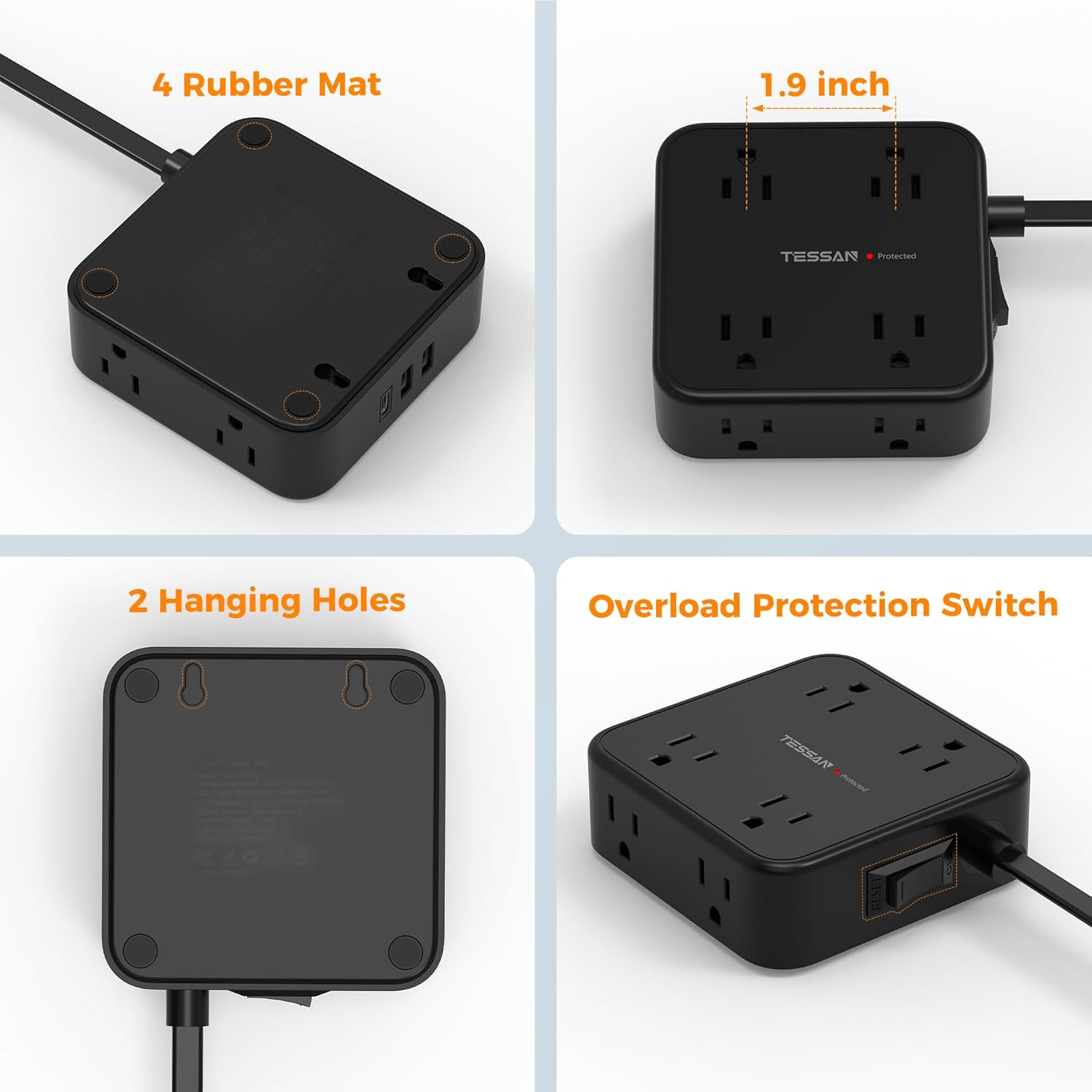
Image: Detailed view of the TESSAN Power Strip, highlighting its four rubber feet for stability, compact dimensions, two hanging holes for mounting, and the overload protection switch.
Setup
- Unpack: Carefully remove the power strip from its packaging.
- Placement: Choose a suitable location for the power strip. Consider using its flat plug design for outlets behind furniture.
- Plug In: Insert the flat plug of the power strip into a standard 3-prong wall outlet. Ensure it is fully seated.

Image: The ultra-thin flat plug design allows the power strip to be used in tight spaces, such as behind furniture, without obstruction.
- Activate: Locate the On/Off switch on the side of the power strip and press it to the "On" position. The "Protected" indicator light should illuminate (if applicable to your model).
- Optional Mounting: If desired, use the two mounting holes on the back of the unit to securely attach it to a wall, desk, or other surface using appropriate screws (not included).

Image: The power strip demonstrating its wall-mountable design, allowing for space-saving installation.
Operating Instructions
Using AC Outlets:
- Plug your electronic devices directly into any of the 8 available AC outlets. The wide spacing ensures that larger power adapters do not obstruct other outlets.
- Ensure the total power consumption of all connected devices does not exceed 1875W.
Using USB Charging Ports:
- Connect your USB-powered devices (smartphones, tablets, headphones, etc.) to the 2 USB-A ports or the 1 USB-C port.
- The USB ports are designed to detect your device and deliver optimal charging speed (USB-A: 2.4A Max, USB-C: 3A Max).

Image: The power strip functioning as a USB charging station, with devices connected to its USB-A and USB-C ports.
Overload Protection:
The power strip is equipped with a 900J surge protector and an overload protection switch. In case of an electrical overload, the switch will automatically trip to protect your devices. To reset, unplug some devices, then press the switch back to the "On" position.

Image: Diagram illustrating the 900J surge protection feature, safeguarding connected devices from electrical surges.
Video: A demonstration of the TESSAN Flat Plug Power Strip, highlighting its 8 AC outlets and 3 USB ports, including a USB-C port, and its compact design.
Maintenance
- Keep the power strip clean and free from dust. Use a dry, soft cloth for cleaning.
- Do not use liquid cleaners or aerosols.
- Regularly inspect the cord and plug for any signs of damage. If damaged, discontinue use immediately.
Troubleshooting
- No Power:
- Ensure the power strip is securely plugged into a functioning wall outlet.
- Check if the On/Off switch is in the "On" position.
- If the overload protection switch has tripped, reduce the load by unplugging some devices and then reset the switch.
- Devices Not Charging via USB:
- Verify that the USB cables are properly connected to both the power strip and your devices.
- Ensure your devices are compatible with the USB charging specifications (5V/2.4A for USB-A, 5V/3A for USB-C).
- Try a different USB port or cable to rule out a faulty connection.
- "Protected" Indicator Light Off:
- If the "Protected" light is off, it may indicate that the surge protection components have been compromised due to a severe power surge. The power strip may still function as a multi-outlet extension cord, but without surge protection. It is recommended to replace the unit for continued surge protection.
Specifications
| Feature | Detail |
|---|---|
| Model Number | TS-1026-C |
| AC Outlets | 8 |
| USB-A Ports | 2 (5V/2.4A, 12W Max) |
| USB-C Port | 1 (5V/3A, 15W Max) |
| Total Power Outlets | 11 (8 AC + 3 USB) |
| Voltage | 125 Volts |
| Max Wattage | 1875W |
| Surge Protection | 900 Joules |
| Cord Length | 5 Feet |
| Plug Type | Flat, 45° Right Angle |
| Dimensions (Package) | 7.24 x 6.3 x 1.81 inches |
| Item Weight | 1.06 pounds |
Warranty and Support
For warranty information or technical support, please visit the official TESSAN website or contact their customer service directly. You can find more information at the TESSAN Brand Store on Amazon.


