
KOSPET TANK T3 Ultra 2
Contents
KOSPET Tank T3 Ultra 2 Smart Watch User Manual
Model: TANK T3 Ultra 2 | Brand: KOSPET
1. Introduction
This user manual provides comprehensive instructions for the KOSPET Tank T3 Ultra 2 Smart Watch. Please read this manual carefully before using the device to ensure proper operation and to maximize its features.

Image: KOSPET Tank T3 Ultra 2 Smart Watch, Silver Modern variant.
2. What's in the Box
Upon opening the package, verify that all the following items are included:
- 1 x KOSPET Tank T3 Ultra 2 Smart Watch (Stainless Steel)
- 1 x Charging Cable
- 1 x Watchband
- 1 x User Manual

Image: Diagram showing the smartwatch, charger, watchband, and user manual included in the package.
3. Setup Guide
3.1 Initial Charging
Before first use, fully charge your KOSPET Tank T3 Ultra 2 Smart Watch. Connect the provided charging cable to the watch's charging port and a USB power source. The watch has a 470mAh pure cobalt battery, offering extended battery life.

Image: The smartwatch on a charging dock, illustrating its extra-large battery life capabilities.
3.2 App Installation and Pairing
To unlock the full potential of your smartwatch, download the "KOSPET FIT" app from the Google Play Store (for Android) or Apple App Store (for iOS). The smartwatch is compatible with iOS 10.0+ and Android 5.1+ devices.
- Download the "KOSPET FIT" app.
- Turn on your phone's Bluetooth.
- Open the KOSPET FIT app, go to "Device" and click "Add a new device".
- Click "Pair" in the pop-up window on your phone and the watch.
- Enable "Notifications" Permission when prompted.

Image: Visual guide for connecting the smartwatch to a smartphone via the KOSPET FIT app.
3.3 Receiving Notifications
To receive messages and app notifications, ensure the "KOSPET FIT" app remains active. For Android users, add the app to the whitelist in Settings. Disable "Do Not Disturb" and "Low Power Mode" on your phone. Message sync will not occur if the app is logged into other devices or phones in the chat interface.

Image: Instructions for enabling message and app notifications on iOS devices.

Image: Instructions for enabling message and app notifications on Android devices.
4. Operating Instructions
4.1 Basic Navigation
The KOSPET Tank T3 Ultra 2 features a 1.43" AMOLED display with touch screen functionality. Navigate through menus by swiping and tapping. The physical buttons on the side provide additional control for 'UP', 'DOWN', 'SEL' (Select), and 'BACK' functions.
4.2 Sports Modes and GPS Tracking
The watch supports over 170 built-in sports modes, covering a wide range of activities. It also features smart recognition for 6 common sports (walking, running, cycling, elliptical, rowing machine, stationary state), automatically detecting your activity and initiating monitoring.

Image: A user exercising with the smartwatch, highlighting the 170+ sports modes and intelligent recognition of 6 sports.
The built-in GPS works with 6 Satellite Positioning Systems (L1 and L5 signals) for accurate location tracking during outdoor activities. It can track your activity path, but does not provide navigation or mapping capabilities.

Image: The smartwatch displaying a tracked route on a map, illustrating its built-in GPS capabilities.
4.3 Health Monitoring
The T3 Ultra 2 provides 24-hour health tracking including heart rate, blood oxygen, sleep tracking, and calorie expenditure. It also includes an internal compass, altitude pressurization, and altimeter sensor to display current location altitude and barometric pressure.
- Heart Rate & Blood Oxygen: Monitor your heart rate and blood oxygen levels throughout the day.
- Sleep Tracking: Track sleep stages, daytime naps, and receive in-depth sleep analysis.
- Altitude & Pressure: Utilize the altimeter and barometer for environmental data.
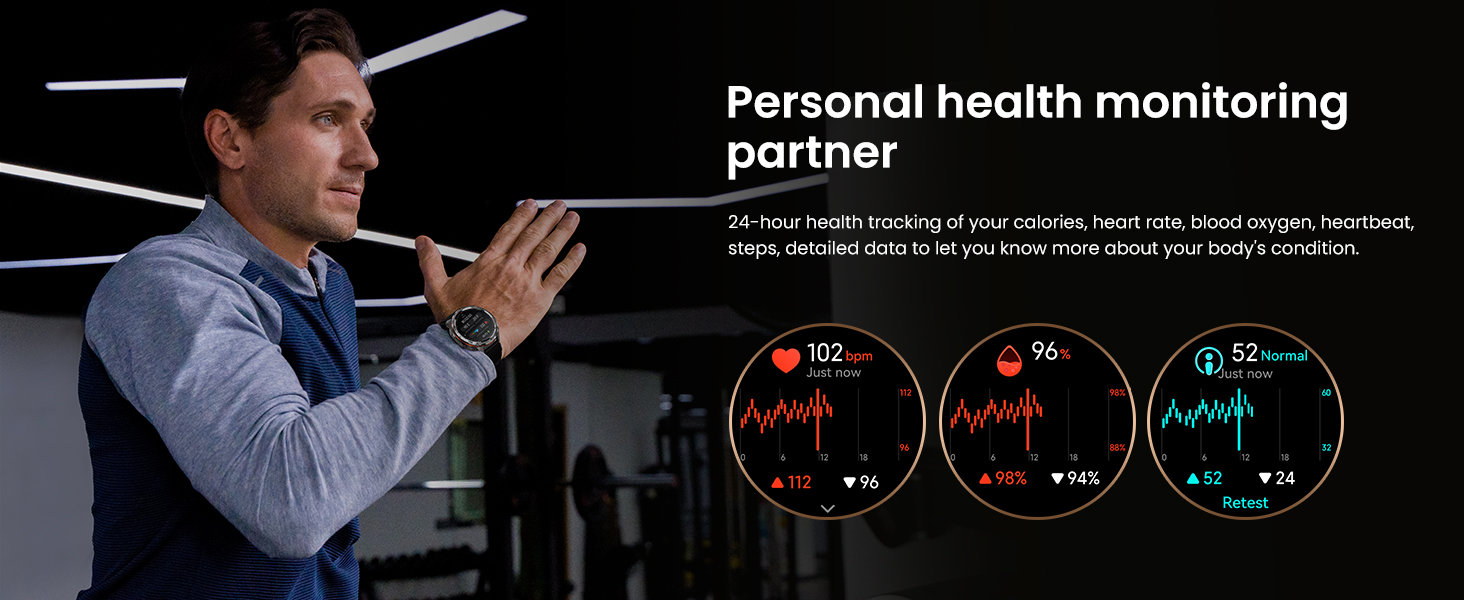
Image: Visual representation of heart rate, blood oxygen, and steps monitoring on the smartwatch.
4.4 Bluetooth Calling & AI Voice Assistant
The smartwatch supports Bluetooth calling, allowing you to make and receive calls directly from your wrist. It also integrates an AI voice assistant for hands-free commands, useful during driving or exercise.

Image: A user interacting with the smartwatch for Bluetooth calls and voice assistant commands.
4.5 Other Features
The T3 Ultra 2 includes various practical features:
- Remote photo capture
- Music control
- Alarm clock
- Calculator
- Sedentary reminder
- Weather forecast
- Stopwatch
- Customizable watch faces (over 500 available via KOSPET Fit App)
5. Maintenance
5.1 Waterproofing
The KOSPET Tank T3 Ultra 2 is 5ATM dynamic waterproof and IP69K static waterproof, allowing immersion up to 50m deep. It is suitable for swimming, diving, and surfing.

Image: The smartwatch submerged in water, demonstrating its 5ATM and IP69K waterproof ratings.
After swimming or exposure to water, use the drainage function on the watch and wipe the watch body dry to maintain its condition.
5.2 Cleaning
Regularly clean your smartwatch and watchband with a soft, dry cloth. For stubborn dirt, a slightly damp cloth can be used, ensuring the watch is completely dry afterward.
5.3 Durability
The watch features a full stainless steel unibody and 1.43" 3rd generation Corning Gorilla 9H double-layer glass display, making it highly resistant to scratches, drops, and polishing. It has passed 15 military-grade tests for temperature, high altitude, low pressure, dust, salt spray, and liquid contamination.

Image: Collage showing the smartwatch undergoing various durability tests, including drop and water resistance, highlighting its military-grade quality.
6. Troubleshooting
6.1 Common Issues and Solutions
- Watch not turning on/low battery: Ensure the watch is fully charged. If it enters power-saving mode (displaying only time, steps, and battery), other functions will be disabled. Long-press the SEL button for 5 seconds to exit power-saving mode.
- Connectivity issues: Ensure Bluetooth is enabled on your phone and the KOSPET FIT app is running. Check app permissions and ensure "Do Not Disturb" or "Low Power Mode" are not active on your phone.
- Inaccurate health data: While the watch provides health monitoring, it is important to note that this product is not a medical device and cannot be used to diagnose or monitor any medical conditions. For 24-hour automatic heart rate monitoring, enter the app, click Device > Health Monitoring > Automatic Measurement, and set the monitoring frequency.
- Voice Assistant not responding: Ensure the watch is properly connected to your phone and the KOSPET FIT app has necessary permissions.
Video: KOSPET TANK T3 Ultra 2 Smart Watch overview, demonstrating features and durability. This video is provided by the seller.
7. Specifications
| Feature | Detail |
|---|---|
| Model Number | TANK T3 Ultra 2 |
| Display | 1.43 Inches AMOLED, Corning Gorilla 9H Glass |
| Body Material | Full Stainless Steel Unibody |
| Waterproof Rating | 5ATM & IP69K |
| Battery Capacity | 470 Milliamp Hours (Pure Cobalt) |
| Battery Life (Typical Usage) | Up to 16 days (Smartwatch mode), 42 hours (GPS mode), 14 days (Power-saving mode) |
| GPS | Built-in GPS (Dual-band, 6 Satellite Positioning Systems) |
| Sensors | Heart Rate, Blood Oxygen, Compass, Altimeter, Barometer |
| Sports Modes | 170+ (with 6 smart recognition modes) |
| Connectivity | Bluetooth |
| Operating System | Compatible for Android and iOS |
| Item Weight | 8.1 ounces |
| Package Dimensions | 4.37 x 4.25 x 2.05 inches |
8. Warranty and Support
For any product inquiries, technical support, or warranty claims, please contact KOSPET customer service. Refer to the contact information provided on the product packaging or the official KOSPET website. KOSPET is committed to providing excellent customer service.
This product is not a medical device and cannot be used to diagnose and monitor any medical conditions.
Ask a question about this manual
Ask about setup, troubleshooting, compatibility, parts, safety, or missing instructions. Manuals+ will review the question and use this page’s manual context to help answer it.