
TechCare Massager Plus 24 Modes
TechCare Plus 24 Modes TENS Unit Instruction Manual
Model: Plus 24 Modes
Your comprehensive guide to effective pain relief and muscle stimulation.
1. Introduction to Your TechCare TENS Unit
The TechCare Plus 24 Modes TENS Unit is a combination Transcutaneous Electrical Nerve Stimulation (TENS) and Powered Muscle Stimulator (PMS) device. This drug-free method of pain relief has been utilized by physical therapists and medical professionals for over 40 years. It operates by delivering low-voltage electrical pulses to the skin, which stimulate nerve fibers to effectively block pain signals from reaching the brain. Additionally, it promotes the release of natural endorphins, which are the body's inherent pain relievers.
This device is designed to provide temporary relief of pain associated with sore and aching muscles in the shoulder, waist, back, neck, upper extremities (arm), and lower extremities (leg) due to strain from exercise or normal household and work activities.

Overview of the TechCare TENS Unit's key features, including 24 modes, dual channel, portability, long battery life, adjustable timer, and rechargeable design.
2. Important Safety Information
Please read all instructions and warnings before using this device. Keep this manual for future reference.
- Do not place electrode pads directly over the spine, heart, or other bones.
- Consult your physician before using this device if you have a pacemaker, heart condition, epilepsy, or are pregnant.
- Do not use this device while driving or operating heavy machinery.
- Keep out of reach of children.
- Statements regarding dietary supplements have not been evaluated by the FDA and are not intended to diagnose, treat, cure, or prevent any disease or health condition. This device is not a substitute for professional medical advice.
3. Package Contents
Your TechCare Massager complete set includes the following items:
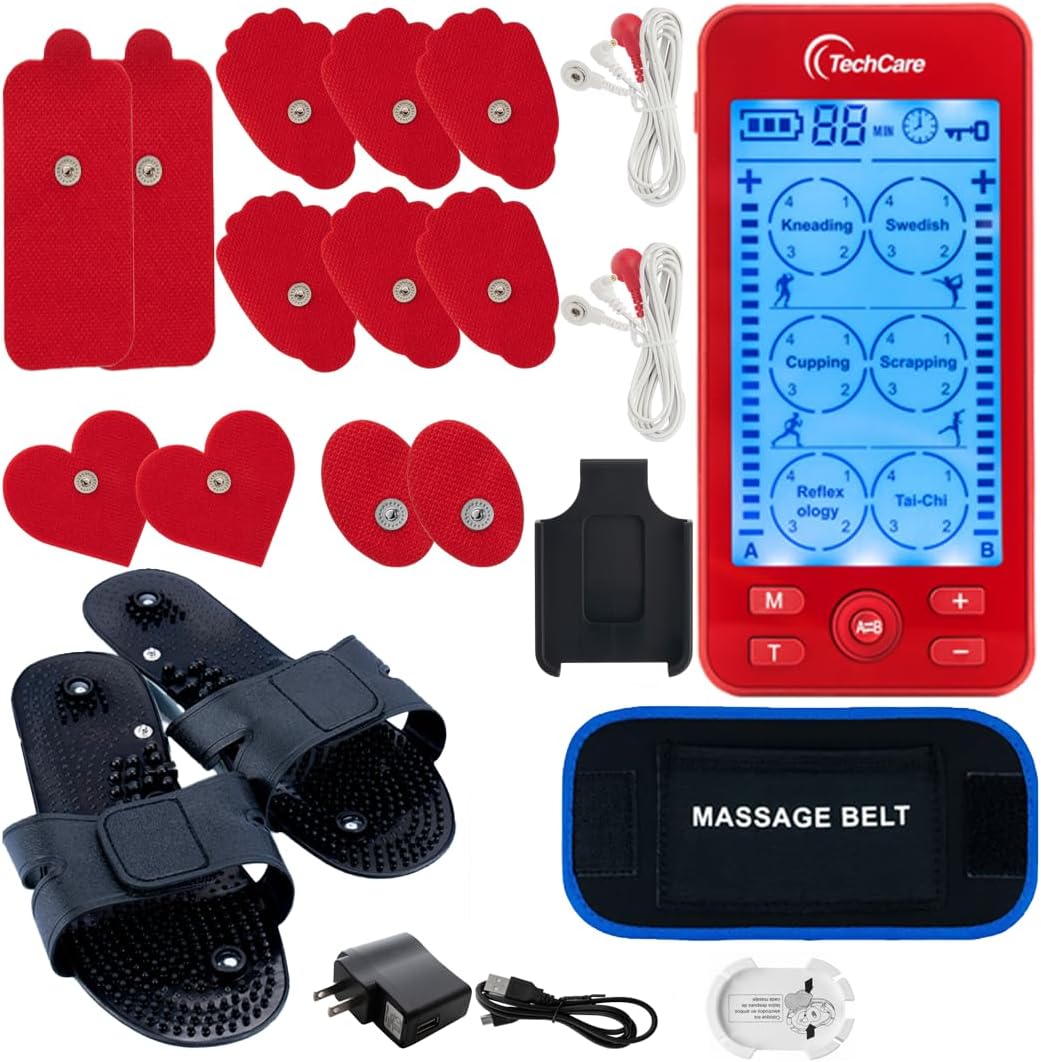
All components included in the TechCare Plus 24 Modes TENS Unit complete set.
- 1 x TechCare Plus 24 Mode Dual A-B Massager Unit
- 1 x Controller
- 1 x Pair Reflexology Shoes
- 1 x Massage Belt
- 6 x Large Electrodes (3 pairs)
- 2 x Electrode Cables
- 1 x User's Manual
- 1 x USB Cable
- 1 x Wall Charger
- 1 x Electrode Pad and Wire Holder
- 1 x Treatment Points Chart
4. Setup and Initial Use
- Charge the Device: Before first use, fully charge the internal lithium battery. Connect the USB cable to the unit and the wall charger, then plug into a power outlet. The battery indicator on the screen will show charging status. A full charge can provide up to 20 hours of continuous use.

The TENS unit features a rechargeable internal battery.
- Attach Electrode Pads: Ensure the skin is clean and dry before applying pads. Connect the electrode cables to the pads by snapping them onto the metal studs. Then, plug the other end of the cables into the A or B output ports on the top of the TENS unit.
- Power On: Slide the ON/OFF switch located on the side of the unit to the 'ON' position. The screen will illuminate.
5. Operating Instructions
The TechCare TENS Unit offers 24 pre-programmed massage modes and dual A-B output channels, allowing for two different intensity settings or two different modes simultaneously if desired.

The main unit displaying the 24 pre-programmed massage modes.
- Select a Mode: Press the 'M' button to cycle through the 24 available massage modes. Each press will advance to the next mode. The selected mode will be highlighted on the screen.

Press the 'M' button to select your desired massage mode.
- Adjust Intensity: Use the '+' and '-' buttons for each channel (A and B) to increase or decrease the intensity of the stimulation. Start with the lowest intensity and gradually increase until you feel a comfortable, strong, but not painful, sensation. The unit features a 20-level intensity bar.

Use the '+' and '-' buttons to adjust the intensity for each channel.
- Set Timer: Press the 'T' button to adjust the treatment time. The timer can be set from 20 to 60 minutes. The remaining time will be displayed on the screen. The device will automatically shut off when the timer expires.

Press the 'T' button to set the treatment duration.
- Dual Output (A/B): The 'A=B' button allows you to switch between controlling both channels simultaneously or independently. When independent, you can set different modes and intensities for channels A and B, effectively treating two different areas or users.

The 'A=B' button controls the dual output channels.
6. Electrode Pad Placement
Proper placement of electrode pads is crucial for effective and safe treatment. Refer to the included Treatment Points Chart for common placement areas. Always ensure pads are placed on clean, dry skin.

Guide for common electrode pad placement points on the body.
General Guidelines:
- Place pads on or around the area of pain.
- Ensure pads are at least one inch apart.
- Avoid placing pads over joints, open wounds, or irritated skin.
- Never place pads on your head, face, throat, or directly over your heart.
7. Using the Reflexology Shoes
The included reflexology shoes are designed to provide targeted stimulation to acupressure points on your feet, promoting improved circulation and pain relief through magnetic field therapy technology.
- Connect the Shoes: Plug one end of an electrode cable into the designated port on each reflexology shoe. Connect the other end of the cable to one of the output ports (A or B) on the TENS unit.
- Wear the Shoes: Place your feet into the shoes.
- Activate: Turn on the TENS unit and select a suitable mode and intensity. Modes like 'Reflexology' are specifically designed for foot stimulation.

The reflexology shoes included with your TechCare TENS unit.

Setup for using the reflexology shoes with the TENS unit.
8. Using the Massage Belt
The massage belt is ideal for larger areas such as the back or abdomen, providing broad coverage for muscle stimulation and pain relief.
- Connect the Belt: Plug one end of an electrode cable into the designated port on the massage belt. Connect the other end of the cable to one of the output ports (A or B) on the TENS unit.
- Secure the Belt: Wrap the massage belt around the desired area (e.g., lower back, abdomen) and secure it with the Velcro fasteners. Ensure the conductive pads on the belt are in contact with your skin.
- Activate: Turn on the TENS unit and select a suitable mode and intensity.
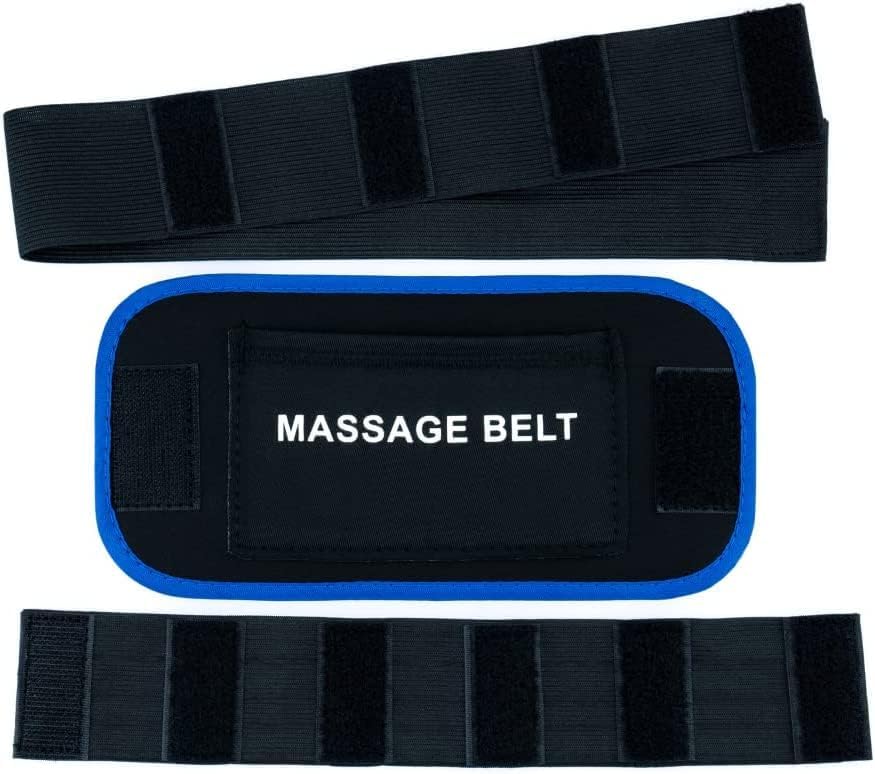
The massage belt accessory.

Setup for using the massage belt with the TENS unit.
9. Maintenance and Storage
- Cleaning the Unit: Wipe the main unit with a soft, damp cloth. Do not use abrasive cleaners or immerse the unit in water.
- Electrode Pads: After each use, place the electrode pads back onto the provided pad holder or plastic film to maintain their adhesive quality. If pads lose stickiness, clean them gently with a damp cloth or replace them.
- Storage: Store the device and all accessories in a cool, dry place, away from direct sunlight and extreme temperatures. Use the included electrode pad and wire holder to keep cables organized.
10. Troubleshooting
| Problem | Possible Cause | Solution |
|---|---|---|
| No sensation or weak sensation |
|
|
| Unit does not turn on |
|
|
| Sensation is uncomfortable or stinging |
|
|
11. Product Specifications
| Feature | Detail |
|---|---|
| Product Dimensions | 3 x 3 x 4 inches |
| Weight | 2.03 Pounds |
| Battery Type | 1 Lithium Ion battery (included) |
| Modes | 24 Pre-programmed Massage Modes |
| Timer | Adjustable 20 to 60 minutes |
| Output Channels | Dual A-B Output |
| Manufacturer | Otto Trade Inc |
12. Warranty and Support
The TechCare Massager complete set comes with a LIFE TIME LIMITED WARRANTY. For warranty claims, technical support, or any questions regarding your device, please contact TechCare Massager customer service. Refer to the contact information provided with your product packaging or visit the official TechCare Massager website for assistance.
For additional resources and product information, you may visit the TechCare Massager Store on Amazon.
Ask a question about this manual
Ask about setup, troubleshooting, compatibility, parts, safety, or missing instructions. Manuals+ will review the question and use this page’s manual context to help answer it.