
1. Introduction
This manual provides essential information for the safe and efficient installation, operation, and maintenance of your Vent-Axia Supra Design 100B bathroom fan. Please read these instructions carefully before installation and retain them for future reference.
2. Safety Information
Always observe the following safety precautions to reduce the risk of injury or damage:
- Electrical Safety: Installation and electrical connection must be carried out by a qualified electrician in accordance with local wiring regulations.
- Power Disconnection: Ensure the power supply is disconnected at the mains before performing any installation, maintenance, or cleaning.
- Intended Use: This appliance is designed for ventilating bathrooms and similar domestic environments. Do not use it for purposes other than its intended use.
- Children and Vulnerable Persons: This appliance can be used by children aged 8 years and above and persons with reduced physical, sensory or mental capabilities or lack of experience and knowledge if they have been given supervision or instruction concerning use of the appliance in a safe way and understand the hazards involved. Children shall not play with the appliance. Cleaning and user maintenance shall not be made by children without supervision.
- Obstruction: Do not obstruct the air inlet or outlet of the fan. Ensure adequate airflow for proper operation.
3. Product Overview
The Vent-Axia Supra Design 100B is a compact and efficient bathroom fan designed to extract stale, humid air from your bathroom, helping to prevent condensation and improve air quality. It features a clean, white aesthetic suitable for various interior designs.
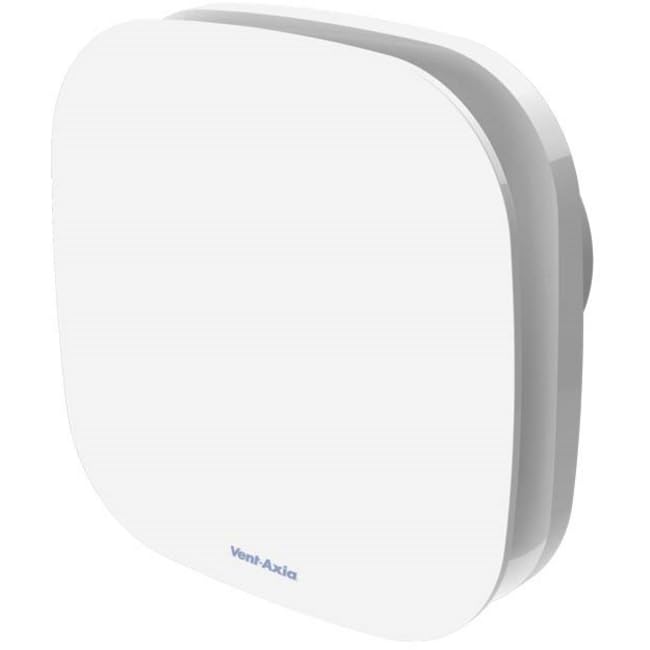
This image shows the front view of the Vent-Axia Supra Design 100B bathroom fan. It features a clean, white, square-shaped cover with rounded corners. The Vent-Axia logo is subtly visible at the bottom center of the front panel.
4. Setup and Installation
Installation of the Vent-Axia Supra Design 100B fan should be performed by a qualified professional to ensure compliance with all electrical and building regulations.
- Location Selection: Choose an appropriate location for the fan, typically on a wall or ceiling, ensuring it is within the designated zones for electrical appliances in a bathroom. The fan is designed for a 100mm diameter duct.
- Power Supply: Ensure the main power supply to the installation area is switched off before commencing any work.
- Mounting: Securely mount the fan unit to the chosen surface using appropriate fixings. Ensure the fan is level and stable.
- Ducting Connection: Connect the fan to the appropriate ducting system (100mm diameter) to vent air to the outside. Ensure all connections are airtight.
- Electrical Connection: Connect the fan to the electrical supply according to the wiring diagram provided with the product and local electrical codes. This typically involves connecting live, neutral, and potentially a switched live for timer functions (if applicable to your specific model variant).
- Final Checks: Once installed, restore power and test the fan's operation.
5. Operating Instructions
The Vent-Axia Supra Design 100B fan operates automatically or via a standard light switch, depending on its wiring configuration.
- Standard Operation: If wired to a light switch, the fan will activate when the light is turned on and will switch off when the light is turned off (or continue for a set overrun period if a timer model).
- Continuous Operation: Some installations may configure the fan for continuous low-level ventilation, with a boost function activated by a switch.
- Humidity Sensor (if applicable): If your model includes a humidity sensor, the fan will automatically activate when the humidity level in the room exceeds a preset threshold and will switch off once the humidity drops.
6. Maintenance
Regular cleaning and maintenance will ensure optimal performance and longevity of your fan.
- Disconnect Power: ALWAYS switch off the electrical supply to the fan at the mains before attempting any cleaning or maintenance.
- Clean Exterior: Wipe the exterior casing and grille with a soft, damp cloth. Do not use abrasive cleaners, solvents, or harsh chemicals, as these can damage the plastic.
- Clean Impeller (if accessible): If the impeller (fan blades) becomes dusty, carefully remove the front cover (if designed for user access) and gently clean the blades with a soft brush or vacuum cleaner. Ensure no foreign objects enter the motor housing.
- Reassemble: Securely reattach any covers removed for cleaning.
- Restore Power: Once cleaning is complete and the fan is fully reassembled, restore power at the mains.
Note: Do not lubricate any parts of the fan. The motor is designed for maintenance-free operation.
7. Troubleshooting
If you encounter issues with your Vent-Axia Supra Design 100B fan, refer to the following common problems and solutions:
- Fan does not operate:
- Check if the power supply to the fan is switched on at the mains.
- Verify that the light switch (if connected) is in the 'on' position.
- Ensure all electrical connections are secure (consult a qualified electrician).
- Reduced airflow:
- Check if the fan grille or impeller is obstructed by dust or debris. Clean as per maintenance instructions.
- Ensure the external vent is not blocked.
- Excessive noise:
- Check for loose screws or mounting.
- Ensure the impeller is clean and free from obstructions.
- If the noise persists and is unusual, contact a qualified technician.
If the problem cannot be resolved using these steps, contact Vent-Axia customer support or a qualified electrician. Do not attempt to repair the fan yourself beyond basic cleaning.
8. Specifications
| Attribute | Detail |
|---|---|
| Brand | Vent-Axia |
| Model | Supra Design 100B |
| ASIN | B0DQ2LSJ4Y |
| Color | White |
| Fan Design | Bathroom Exhaust Fan (listed as 'Wearable portable fan' in source, but functionally a fixed bathroom fan) |
| Power Source | Corded Electric |
| Style | Compact |
| Special Feature | Portable (as per source data) |
| Duct Diameter | 100 mm |


