
1. Product Overview
The Kwikset SmartKey Security Double Cylinder Deadbolt provides enhanced security for exterior doors. This deadbolt requires a key for both locking and unlocking from both the interior and exterior sides of the door. It features SmartKey Security technology, which offers advanced protection against common break-in techniques and allows you to re-key the lock yourself in seconds to match an existing Kwikset (KW1) or Schlage (SC1) keyway.
Constructed from durable zinc with a polished brass finish, this deadbolt is designed for longevity and aesthetic appeal. The latch features a round corner faceplate for easy installation.
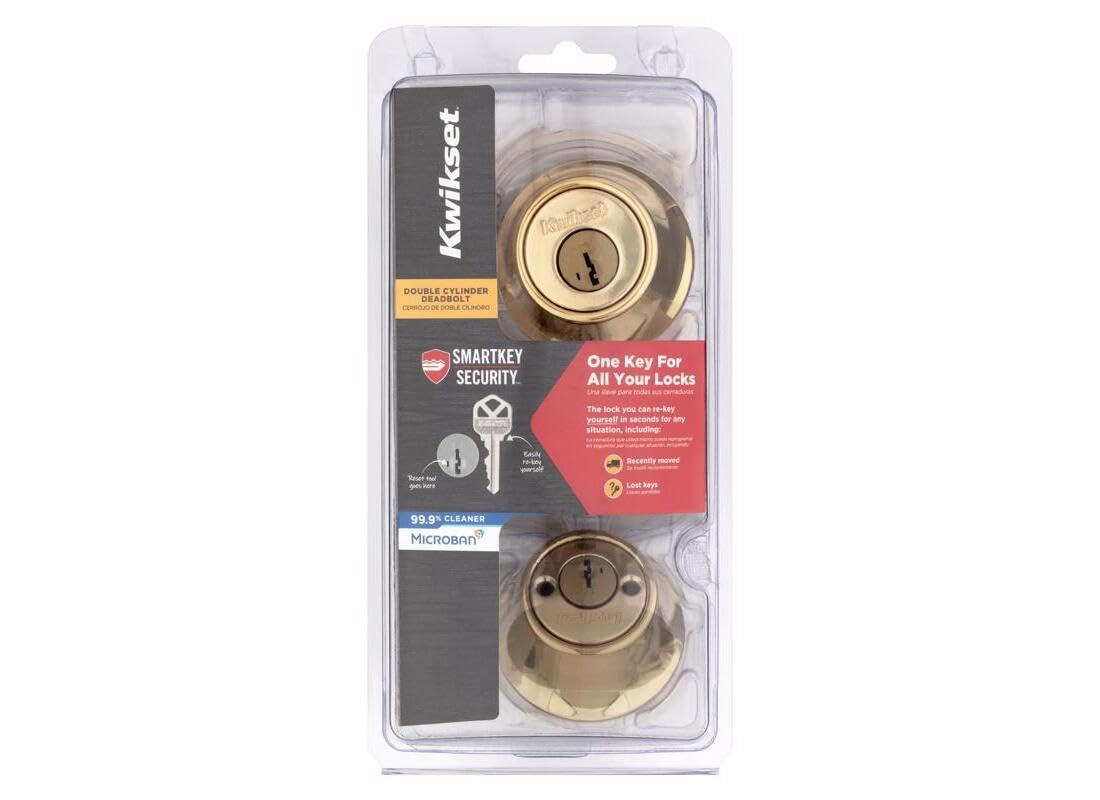
Image 1.1: Kwikset SmartKey Security Double Cylinder Deadbolt in its retail packaging, highlighting SmartKey features.
2. Safety Information
Please read and understand all instructions before installation and use. Keep these instructions for future reference.
- Emergency Egress: As this is a double cylinder deadbolt, a key is required to unlock it from both the interior and exterior. In case of an emergency, such as a fire, ensure that a key is readily accessible and stored in a designated, safe location away from the door and any glass panels. This is critical for quick exit.
- Proper Installation: Incorrect installation can compromise the security and functionality of the deadbolt. Follow all installation steps carefully.
- Child Safety: Keep keys out of reach of children to prevent accidental lock-ins or unauthorized access.
3. Setup and Installation
Installation typically takes approximately 15 minutes with basic tools, primarily a screwdriver. Ensure your door is prepared with the correct bore holes and backset before beginning.
3.1 Components Overview

Image 3.1: Key components of the Kwikset Double Cylinder Deadbolt, showing the exterior and interior assemblies, latch, and mounting hardware.
3.2 Installation Steps
- Prepare the Door: Verify that the door bore holes and backset (distance from door edge to center of bore hole) are correct for the deadbolt. Adjust the latch if necessary for 2-3/8" or 2-3/4" backsets.
- Install the Latch: Insert the latch into the edge of the door, ensuring the bolt faces the correct direction. Secure it with the provided screws.
- Install Exterior Cylinder: Place the exterior cylinder assembly through the bore hole from the outside of the door. Ensure the tailpiece passes through the latch mechanism.
- Install Interior Cylinder: Align the interior cylinder assembly with the exterior assembly, ensuring the tailpiece engages correctly. Secure the interior assembly to the exterior assembly using the long mounting screws. Tighten securely but do not overtighten.
- Install Strike Plate: Install the strike plate on the door frame, aligning it with the deadbolt latch.
- Test Operation: Insert a key into both the exterior and interior cylinders and test the locking and unlocking mechanism. The bolt should extend and retract smoothly.
3.3 SmartKey Re-keying Instructions
The SmartKey Security feature allows you to re-key your lock to an existing Kwikset (KW1) or Schlage (SC1) key in seconds without removing the lock from the door.

Image 3.2: Illustration of the SmartKey re-keying process, showing the original key, the re-keying tool, and the new key.
- Insert Existing Key: Insert your currently working key fully into the cylinder and turn it 90 degrees clockwise (to the 3 o'clock position).
- Insert SmartKey Tool: While the key is still turned, insert the SmartKey re-keying tool firmly into the small hole next to the keyway. You will feel a click.
- Remove Keys: Remove the SmartKey tool first, then remove the existing key.
- Insert New Key: Insert your new key (the one you want the lock to recognize) fully into the cylinder.
- Turn New Key: Turn the new key 180 degrees counter-clockwise (to the 9 o'clock position), then 90 degrees clockwise (back to the 12 o'clock position).
- Test New Key: Remove the new key and re-insert it to test that it operates the lock smoothly.
Important: Always perform the re-keying process with the door open to avoid accidental lock-outs.
4. Operating the Deadbolt
To operate the Kwikset SmartKey Security Double Cylinder Deadbolt:
- To Lock: Insert the key into the cylinder (either interior or exterior), turn it clockwise until the deadbolt fully extends into the strike plate, and then remove the key.
- To Unlock: Insert the key into the cylinder (either interior or exterior), turn it counter-clockwise until the deadbolt fully retracts, and then remove the key.
Ensure the door is properly closed and aligned for smooth operation of the deadbolt.
5. Maintenance
Regular maintenance helps ensure the longevity and smooth operation of your deadbolt.
- Cleaning: Clean the exterior surfaces with a soft, damp cloth. Avoid abrasive cleaners or solvents that could damage the polished brass finish. The product features Microban antimicrobial protection to keep surfaces 99.9% cleaner.
- Lubrication: If the lock mechanism feels stiff, apply a small amount of graphite lubricant or a silicone-based lubricant specifically designed for locks into the keyway. Avoid oil-based lubricants as they can attract dust and debris.
- Check Screws: Periodically check and tighten any loose mounting screws to ensure the deadbolt remains securely installed.
6. Troubleshooting
| Problem | Possible Cause | Solution |
|---|---|---|
| Key does not turn or is stiff. | Dirt or debris in keyway; worn key; misaligned components. | Clean keyway with compressed air and lubricate with graphite. Try a new, unworn key. Check for proper alignment during installation. |
| Deadbolt does not extend/retract fully. | Misaligned strike plate; door frame issues; internal mechanism obstruction. | Adjust strike plate position. Check door and frame for warping. Ensure no debris is obstructing the bolt path. |
| SmartKey re-keying fails. | Incorrect key insertion/turn; SmartKey tool not fully inserted; wrong key type. | Ensure original key is fully inserted and turned 90 degrees. Insert SmartKey tool firmly until a click is felt. Ensure new key is a Kwikset (KW1) or Schlage (SC1) compatible key. Repeat steps carefully. |
| Deadbolt feels loose after installation. | Mounting screws are not tight enough. | Tighten the mounting screws on the interior cylinder assembly. |
| End caps do not fit flush with door. | Door bore hole is too small for the end caps. | Ensure the door bore hole meets standard dimensions. If not, the outer trim pieces may need to be used without the end caps, or the bore hole may need to be enlarged by a professional. |
7. Specifications
- Brand: Kwikset
- Model Number: 96650-509
- UPC: 883351813907
- Lock Type: Double Cylinder Deadbolt
- Material: Zinc
- Finish: Polished Brass
- Item Dimensions (L x W x H): 22.9 x 11.3 x 8.1 cm (9.0 x 4.4 x 3.2 inches)
- Item Weight: 544 g (1.2 lbs)
- Recommended Use: Exterior doors in residential or commercial buildings
- Special Feature: SmartKey Security, Microban Antimicrobial Protection
8. Warranty and Support
For warranty information, technical support, or to purchase replacement parts, please contact Kwikset customer service directly. Refer to the official Kwikset website or the product packaging for the most current contact details and warranty terms.
You can typically find support information on the official Kwikset website: www.kwikset.com