
1. Introduction
Thank you for choosing the CG Mobile Guess Charm TWS Wireless Earphones. This manual provides essential information for the proper setup, operation, and maintenance of your new wireless earphones. Please read this manual thoroughly before use to ensure optimal performance and longevity of the product.
2. Package Contents
Verify that all items are present in your product package:
- CG Mobile Guess Charm TWS Wireless Earphones (Left and Right)
- Charging Case with Charm
- USB Charging Cable
- User Manual

Image: Product packaging showing the wireless earphones, charging case, and included accessories.
3. Product Overview
The CG Mobile Guess Charm TWS Wireless Earphones are designed for wireless audio playback and hands-free calling, featuring Bluetooth connectivity and Active Noise Cancellation.
3.1 Earphones
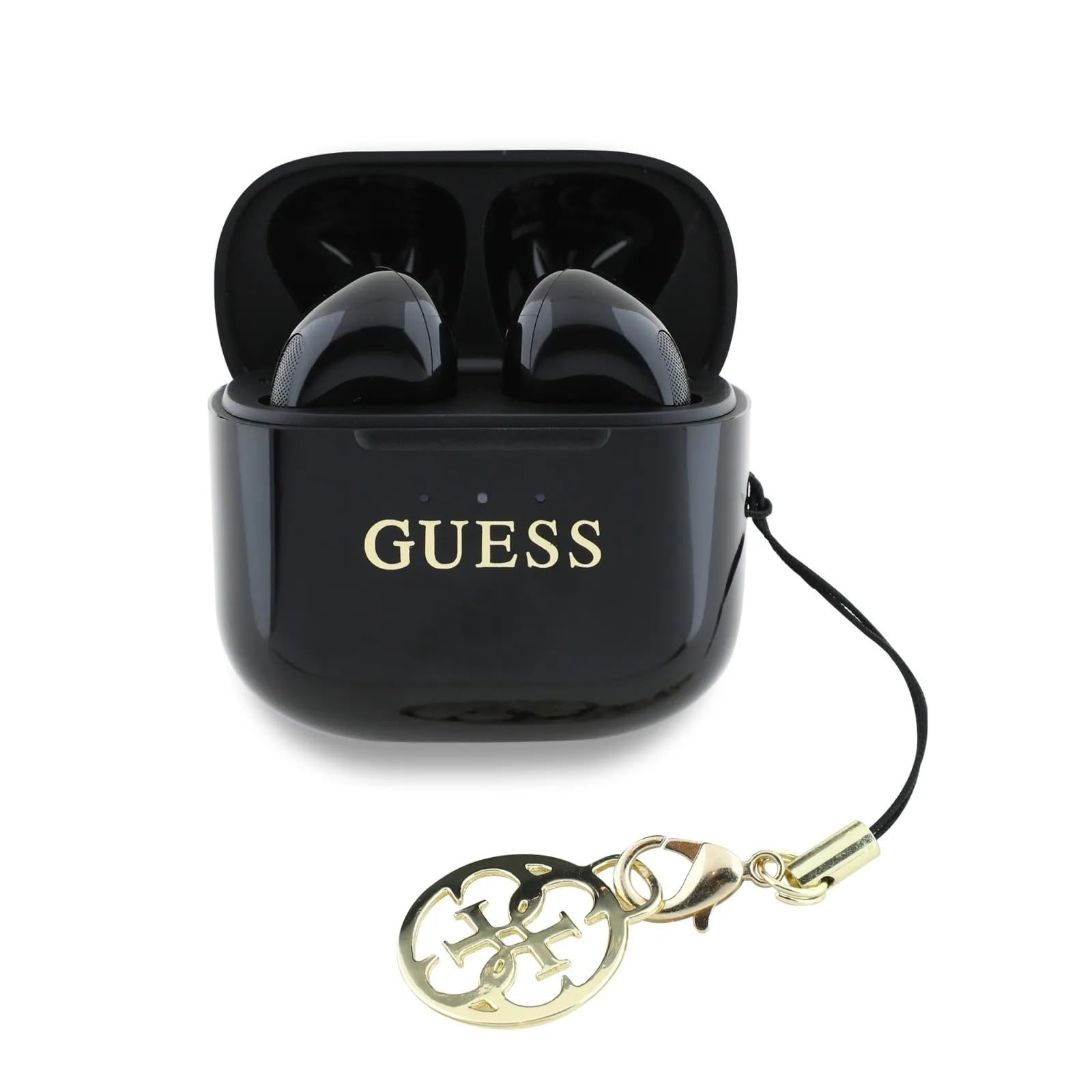
Image: The left and right wireless earphones, showcasing their glossy black finish and Guess logo.
Each earphone is equipped with a speaker for audio output and a microphone for calls. The earphones feature a glossy black finish and the Guess logo.
3.2 Charging Case

Image: The black charging case with a gold Guess charm attached, used for storing and charging the earphones.
The charging case protects the earphones and recharges them when not in use. It features a USB-C charging port and an attached decorative charm.
4. Setup
4.1 Charging the Earphones and Case
- Place both earphones into the charging case.
- Connect the provided USB charging cable to the charging port on the case and to a compatible USB power source.
- The charging indicator on the case will illuminate to show charging status. A full charge typically takes approximately 2 hours.
- Once fully charged, disconnect the charging cable.
Note: Ensure the earphones and case are fully charged before first use for optimal battery life.
4.2 Bluetooth Pairing
- Ensure the earphones are charged and placed in the charging case.
- Open the charging case. The earphones will automatically enter pairing mode, indicated by a flashing light (if applicable, refer to specific LED indicators on your device).
- On your mobile device (smartphone, tablet, etc.), go to the Bluetooth settings.
- Enable Bluetooth and search for available devices.
- Select "Guess Charm TWS" (or similar name) from the list of found devices.
- Once connected, a confirmation message will appear on your device, and the earphone indicator light will stop flashing.
Note: The earphones will automatically reconnect to the last paired device when removed from the case, if Bluetooth is enabled on the device.
5. Operating Instructions
The earphones are controlled via remote touch sensors. Specific functions may vary slightly depending on your connected device.
5.1 Power On/Off
- Power On: Open the charging case, and the earphones will power on automatically.
- Power Off: Place the earphones back into the charging case and close the lid. They will power off automatically and begin charging.
5.2 Music Playback
- Play/Pause: Tap the touch sensor on either earphone once.
- Next Track: Double-tap the touch sensor on the right earphone.
- Previous Track: Double-tap the touch sensor on the left earphone.
5.3 Call Management
- Answer/End Call: Tap the touch sensor on either earphone once.
- Reject Call: Press and hold the touch sensor on either earphone for 2 seconds.
5.4 Active Noise Cancellation (ANC)
The earphones feature Active Noise Cancellation to reduce ambient noise.
- Activate/Deactivate ANC: Triple-tap the touch sensor on either earphone. A voice prompt or sound cue will indicate the change in mode.
6. Maintenance
6.1 Cleaning
- Use a soft, dry, lint-free cloth to clean the earphones and charging case.
- Do not use abrasive cleaners, solvents, or aerosol sprays.
- Avoid getting moisture into any openings.
6.2 Storage
- Store the earphones in their charging case when not in use to protect them and keep them charged.
- Avoid storing the product in extreme temperatures (hot or cold) or in humid environments.
6.3 Water Resistance
These earphones are not water resistant. Avoid exposure to water, rain, or excessive moisture to prevent damage.
7. Troubleshooting
| Problem | Possible Cause | Solution |
|---|---|---|
| Earphones do not power on. | Low battery. | Charge the earphones and charging case fully. |
| Cannot pair with device. | Bluetooth is off on device; earphones not in pairing mode; interference. | Ensure Bluetooth is enabled on your device. Place earphones in case, open lid to re-enter pairing mode. Move closer to your device. |
| No sound from earphones. | Volume too low; not properly connected; media paused. | Increase volume on your device. Check Bluetooth connection. Ensure media is playing. |
| One earphone has no sound. | Earphones not properly synced. | Place both earphones back into the charging case, close the lid, then open it again to re-sync. |
| Charging case not charging. | Faulty cable or power source. | Try a different USB cable or power adapter. Ensure connections are secure. |
8. Specifications
| Model Number | GUTWSXMCCLK |
| Brand | CG MOBILE |
| Connectivity Technology | Wireless, Bluetooth |
| Bluetooth Version | Not specified (standard Bluetooth) |
| Charging Time | Approximately 2 Hours |
| Battery Type | Lithium Ion (rechargeable) |
| Item Weight | 80 Grams |
| Product Dimensions | 10 x 5 x 3 cm |
| Control Method | Remote (Touch Sensor) |
| Water Resistance Level | Not Water Resistant |
| Noise Control | Active Noise Cancellation |
| Headphones Jack | No Jack |
| Material | Silicone (ear tips, if applicable) |
9. Warranty and Support
9.1 Warranty Information
CG Mobile products are covered by a limited warranty. Please refer to the warranty card included in your package or visit the official CG Mobile website for detailed warranty terms and conditions. Keep your proof of purchase for warranty claims.
9.2 Customer Support
For technical assistance, troubleshooting, or product inquiries, please contact CG Mobile customer support through their official website or the contact information provided on your product packaging. Have your model number (GUTWSXMCCLK) and purchase details ready when contacting support.