
EZON R7
Contents
EZON R7 GPS Sports Watch User Manual
Model: R7
1. Introduction
The EZON R7 GPS Sports Watch is a lightweight, multi-sport tracking device designed for athletes and fitness enthusiasts. It features advanced optical heart rate monitoring, dual-band GNSS for precise location tracking, and a long-lasting battery. This manual provides essential information for setting up, operating, and maintaining your EZON R7 watch.
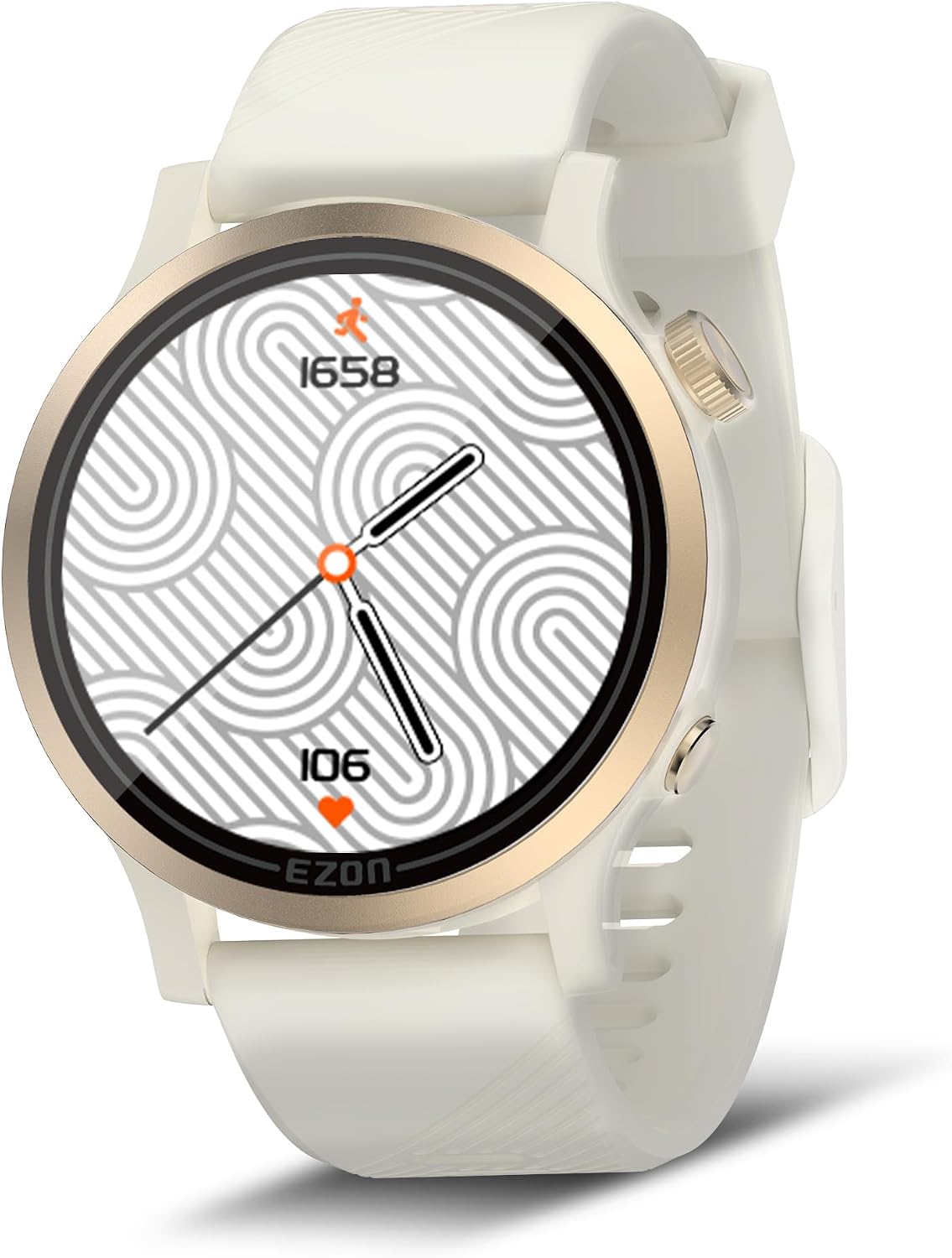
Image 1.1: The EZON R7 GPS Sports Watch, showcasing its round display and white strap. This watch is designed for active lifestyles, offering a blend of functionality and comfort.
2. Package Contents
Ensure all items are present in the product packaging:
- EZON R7 Sports Watch
- Charging Cable
- User Manual (this document)

Image 2.1: Contents of the EZON R7 package, including the watch, its unique clip-style charging cable, and the user manual.
3. Key Features
- Precise Heart Rate Monitoring: Equipped with a 4-channel optical heart rate sensor for real-time heart rate tracking and HRV analysis.
- Accurate GPS Tracking: Supports L1 + L5 Dual-band GNSS for stable signal reception and precise tracking in various environments.
- Lightweight Design: Weighs only 29g, ensuring comfort for all-day wear and during intense activities.
- Extended Battery Life: Up to 30 days of standby time and 25 hours of continuous GPS use. Full charge in approximately 2 hours.
- Durable Outdoor Display: Features an MIP outdoor display for clear visibility in direct sunlight and Corning Gorilla Glass for scratch resistance. 5ATM water resistance for harsh conditions.
- 28 Professional Sports Modes: Covers a wide range of activities including running, swimming, hiking, trail running, and triathlons.
- Comprehensive Health Monitoring: Tracks heart rate, blood oxygen, sleep quality, and breathing. Provides insights like VO2max, workout pacing, and recovery time.
- Wireless Sync with Runnerkit App: Seamless data transfer via Bluetooth for professional training reports and workout plan adjustments.
4. Setup
4.1. Charging the Device
Before initial use, fully charge your EZON R7 watch. Use the provided charging cable. Align the clip with the charging contacts on the back of the watch and connect the USB end to a power source (computer USB port or wall adapter).

Image 4.1: The EZON R7 watch connected to its charging cable. The watch features a unique clip-style charger that securely attaches to the back of the device for efficient power transfer.
4.2. Connecting to the Runnerkit App
The EZON R7 watch syncs with the Runnerkit App, available for both Android and iOS devices. Download the app from your device's respective app store. Follow the in-app instructions to pair your watch via Bluetooth. The app allows for detailed data analysis and personalized settings.

Image 4.2: A smartphone displaying the Runnerkit App interface, showing workout data and charts. The app provides comprehensive analysis to help users optimize their training.
4.3. Initial Device Settings
Upon first use or after a factory reset, you may need to configure basic settings directly on the watch or through the Runnerkit App. These include:
- Time and Date: The watch automatically sets time and date via GPS when connected.
- Units: Select preferred units for distance (km/miles), weight, etc.
- Watch Face: Customize the watch face to display desired information.
- Backlight: Adjust backlight brightness for optimal visibility.
5. Operating the Device
The EZON R7 watch is primarily operated using its physical buttons and rotating dial, eliminating the need for a touchscreen. This design ensures reliable operation even in challenging conditions or with wet hands.
5.1. Navigation
Use the rotating dial to scroll through menus and options. Press the main button to select an item or confirm an action. A secondary button may be available for quick access to specific functions or to go back.
5.2. Monitoring Health Data
The watch continuously monitors various health metrics:
- Heart Rate (HR): Real-time heart rate and Heart Rate Variability (HRV) are tracked. The 4-channel optical sensor provides accurate readings.
- Blood Oxygen (SpO2): Measures blood oxygen saturation levels.
- Sleep Quality: Monitors sleep patterns and provides insights into sleep stages.
- Steps & Calories: Tracks daily steps taken and estimated calories burned.

Image 5.1: The EZON R7 watch showing 24/7 heart rate monitoring. The green light from the optical sensor on the back of the watch indicates active heart rate tracking.
5.3. Tracking Activities
The EZON R7 offers 28 professional sports modes. To start an activity:
- Navigate to the 'Exercise Menu' using the dial.
- Select your desired sport mode (e.g., Free Run, Cycling, Pool Swim, Triathlon).
- Wait for GPS signal acquisition if it's an outdoor activity.
- Press the main button to start tracking.
During activities, the watch provides real-time data such as pace, distance, duration, and heart rate. Post-workout, detailed reports are available in the Runnerkit App.

Image 5.2: The EZON R7 watch displaying workout data, surrounded by icons representing its 28 different sport modes, including running, cycling, swimming, and more.
5.4. Compass, Altimeter, and Barometer
For outdoor navigation and environmental awareness, the watch includes:
- Compass: Provides real-time directional information.
- Altimeter: Measures current altitude.
- Barometer: Tracks atmospheric pressure, which can indicate weather changes.

Image 5.3: The EZON R7 watch showing its GPS, compass, altitude, and barometer functions, essential tools for outdoor enthusiasts.
6. Maintenance
To ensure the longevity and optimal performance of your EZON R7 watch:
- Cleaning: Regularly clean the watch and strap with a soft, damp cloth. Ensure the optical sensor on the back is free of debris for accurate readings.
- Water Resistance: The watch has 5ATM water resistance, suitable for swimming and showering. Avoid prolonged exposure to hot water or steam.
- Storage: Store the watch in a cool, dry place when not in use. Avoid extreme temperatures.
- Charging Cable Care: Handle the charging cable with care. Do not bend or twist it excessively.

Image 6.1: The EZON R7 watch demonstrating its 50m water resistance and rugged Corning Gorilla Glass, designed to withstand challenging outdoor environments.
7. Troubleshooting
If you encounter issues with your EZON R7 watch, try the following:
- Watch Not Turning On: Ensure the watch is fully charged. Connect it to the charging cable and allow it to charge for at least 30 minutes.
- App Connection Issues: Ensure Bluetooth is enabled on your smartphone and the watch is within range. Restart both the watch and the app.
- Inaccurate Readings (HR/GPS): Ensure the watch is worn snugly on your wrist, about a finger's gap from your wrist bone. For GPS, ensure you are in an open area with a clear view of the sky.
- Display Not Clear in Sunlight: The MIP outdoor display is designed for visibility in direct sunlight. Ensure the screen is clean and free from smudges.
- Factory Reset: If persistent issues occur, you may perform a factory reset through the watch's settings menu. Refer to section 4.3 for general settings access. Note that this will erase all personal data on the watch.
8. Specifications
| Attribute | Detail |
|---|---|
| Model Number | R7 |
| Display Size | 1.2 Inches |
| Display Type | MIP Outdoor Display |
| Screen Material | Corning Gorilla Glass 3 |
| Weight | 29g (0.19 Kilograms / 6.7 ounces) |
| Water Resistance | 5ATM (50 meters) |
| GPS | Built-in Dual-Band GNSS (L1 + L5) |
| Heart Rate Sensor | 4-channel Optical Heart Rate Sensor |
| Battery Life (GPS Mode) | Up to 25 hours |
| Battery Life (Standby) | Up to 30 days |
| Charging Time | Approximately 2 hours |
| Battery Capacity | 220 Milliamp Hours (Lithium Polymer) |
| Connectivity | Bluetooth |
| Compatible OS | Android & iOS (via Runnerkit App) |
| Operating Temperature | -20°C to +60°C |
9. Warranty and Support
The EZON R7 GPS Sports Watch comes with a 1-year warranty. For technical support, warranty claims, or further assistance, please refer to the contact information provided on the EZON official website or your purchase documentation.
- Lifetime Support: EZON offers ongoing support for its products.
- 24-Hour Response: Expect a response to inquiries within 24 hours.
- 30-Day Return Policy: Refer to your retailer's policy for returns.
- 1-Year Free Replacement: Covers manufacturing defects within the first year.
Documents and downloads
Ask a question about this manual
Ask about setup, troubleshooting, compatibility, parts, safety, or missing instructions. Manuals+ will review the question and use this page’s manual context to help answer it.