1. Setup and Initial Use
1.1 Package Contents
Before you begin, please ensure all items are present in the package:
- EZON R7 GPS Sports Watch
- Charging Cable
- User Manual (this document)
1.2 Initial Charging
Upon first use, fully charge your EZON R7 watch. Connect the provided charging cable to the watch's charging port and a USB power source. A full charge typically takes approximately 2 hours. The watch offers up to 30 days of standby time and 25 hours of continuous GPS use on a single charge.

Image: EZON R7 watch charging, illustrating the charging cable and battery status.
1.3 App Pairing and Language Settings
To unlock the full potential of your EZON R7, download and install the Runnerkit App on your smartphone (compatible with Android and iOS). Sync the watch wirelessly via Bluetooth to the app. During the initial setup, ensure you select your preferred language. If the watch defaults to a non-English language, navigate through the settings menu using the watch's physical buttons and crown to locate the language option and switch to English.

Image: The EZON R7 watch and its companion Runnerkit app displaying synchronized workout data.
2. Operating Instructions
2.1 Basic Navigation
The EZON R7 watch operates using a combination of its physical buttons and a rotating crown. Familiarize yourself with these controls to navigate menus, select options, and start/stop activities.
2.2 Sports Modes
The watch features 28 professional sports modes, covering a wide range of activities including running, swimming, hiking, trail running, and triathlons. Select the appropriate mode for your activity to ensure accurate data tracking.

Image: The EZON R7 watch highlighting its 28 sports modes for diverse activities.
2.3 GPS Tracking
For outdoor activities, the EZON R7 utilizes dual-band GNSS (L1 + L5) supporting multiple satellite systems (GPS, GLONASS, BDS, Galileo, QZSS) for stable signal reception and precise tracking of your route, distance, and pace.

Image: The EZON R7 watch demonstrating its dual-band GNSS capabilities for accurate positioning.
2.4 Heart Rate Monitoring
The watch is equipped with a 4-channel optical heart rate sensor for real-time heart rate monitoring. This allows for accurate tracking of heart rate changes during various intensity levels, providing scientific data for training adjustments.
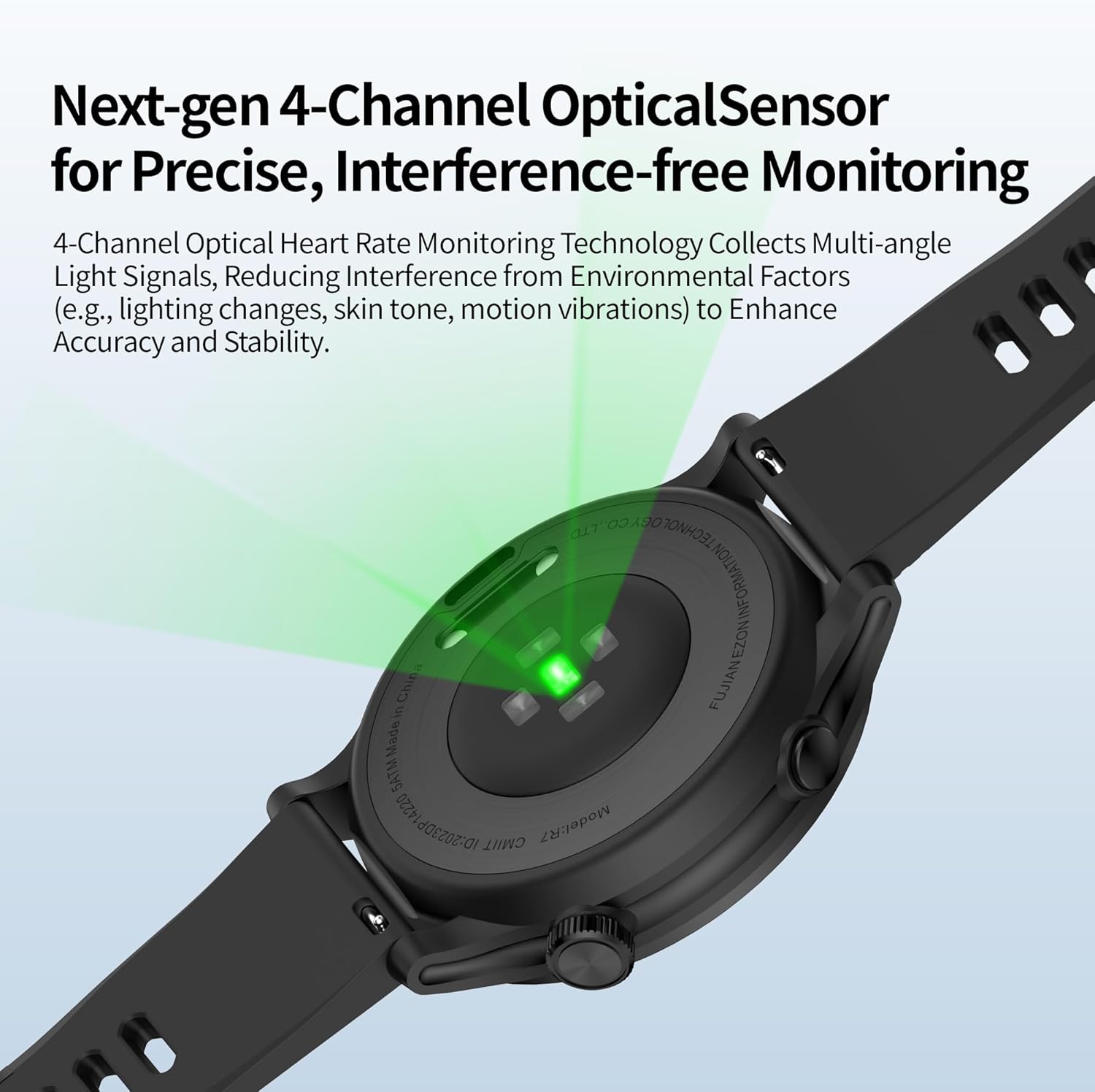
Image: Close-up of the EZON R7's 4-channel optical heart rate sensor.
2.5 Comprehensive Health Monitoring
Beyond heart rate, the EZON R7 monitors HRV (Heart Rate Variability), blood oxygen levels, sleep quality, and breathing. It also provides insights such as VO2max, workout pacing, and recovery time to help optimize training and prevent overtraining.
3. Maintenance
3.1 Cleaning
Regularly clean your watch with a soft, damp cloth to remove sweat, dirt, and debris. Avoid using harsh chemicals or abrasive materials that could damage the watch's finish or sensors.
3.2 Battery Care
To prolong battery life, avoid fully discharging the watch frequently. Charge it when the battery level is low. Store the watch in a cool, dry place when not in use for extended periods.
3.3 Water Resistance
The EZON R7 features 5ATM water resistance, making it suitable for swimming and showering. However, it is not recommended for diving or high-pressure water activities. Ensure the watch is dry before charging.

Image: The EZON R7 watch demonstrating its water resistance and durable construction.
4. Troubleshooting
4.1 Screen Visibility Issues
The EZON R7 features an MIP outdoor display designed for clear visibility in direct sunlight. However, in certain low-light conditions or extreme angles, the screen may appear less bright. Adjust your viewing angle or move to a better-lit environment for optimal readability.

Image: The EZON R7's MIP outdoor display, designed for clarity in sunlight.
4.2 Inaccurate GPS Tracking
If you experience issues with GPS accuracy, ensure you are in an open outdoor area with a clear view of the sky. The dual-band GNSS system is designed for high precision, but dense urban areas or heavy tree cover can sometimes affect signal acquisition. Allow the watch a few moments to acquire a strong satellite signal before starting your activity.
4.3 Shorter Battery Life Than Expected
Battery life can vary based on usage, especially with continuous GPS tracking or frequent heart rate monitoring. While the watch offers up to 25 hours of continuous GPS use, intensive use of multiple features simultaneously may reduce this duration. Ensure background app usage on your phone is minimized and consider adjusting notification settings on the watch to conserve power.
4.4 App Connectivity and Permissions
If the watch fails to sync with the Runnerkit App, ensure Bluetooth is enabled on your smartphone and the watch is within range. Verify that the Runnerkit App has all necessary permissions granted on your phone for proper functionality. If concerns arise regarding data privacy, review the app's privacy policy.
4.5 Charging Issues
The EZON R7 uses a unique clip-on charging cable. Ensure the cable is securely attached to the watch's charging contacts. If the watch does not charge, try a different USB power source or inspect the cable for any damage. Contact support if the issue persists.
5. Specifications
| Feature | Detail |
|---|---|
| Model Number | R7 |
| Display Size | 1.2 Inches |
| Display Type | MIP Outdoor Display with Corning Gorilla Glass 3 |
| Item Weight | 0.19 Kilograms (approx. 29g body weight) |
| Battery Life (GPS) | Up to 25 Hours |
| Battery Life (Standby) | Up to 30 Days |
| Charging Time | Approx. 2 Hours |
| Water Resistance | 5ATM |
| Operating System Compatibility | Android & iOS |
| Connectivity | Bluetooth |
| GPS | Built-in Dual-band GNSS (L1 + L5) |
| Heart Rate Monitor | 4-channel Optical Heart Rate Sensor |
| Special Features | Activity Tracker, GPS, Lightweight, Notifications, Waterproof |
6. Warranty and Support
6.1 Product Warranty
The EZON R7 GPS Sports Watch comes with a 1-year warranty from the date of purchase, covering manufacturing defects. Please retain your proof of purchase for warranty claims.
6.2 Customer Support
EZON is committed to providing comprehensive customer support:
- Lifetime Support: Assistance is available for the lifespan of your product.
- 24-Hour Response: Expect a response to your inquiries within 24 hours.
- 30-Day Return Policy: Products can be returned within 30 days of purchase, subject to terms and conditions.
- 1-Year Free Replacement: In case of eligible defects, a free replacement is offered within the first year.
For support, please visit the official EZON website or contact their customer service directly.

Image: EZON customer support commitments.


