
Introduction
Thank you for choosing AUDERWIN Solar Spot Lights. These outdoor lights are designed to provide efficient and reliable illumination for various outdoor spaces such as patios, gardens, driveways, and walkways. Featuring 63 high-power LEDs and three adjustable lighting modes, these IP65 waterproof spotlights are built for durability and performance in diverse weather conditions. Please read this manual carefully before installation and use to ensure optimal performance and longevity of your product.
Package Contents
- 2 x AUDERWIN Solar Spot Lights
- Mounting Accessories (stakes and screws)
- User Manual (this document)
Safety Information
- Ensure proper installation in an unobstructed location to maximize solar charging efficiency.
- Keep the product away from open flames or high heat sources.
- Do not attempt to disassemble, repair, or modify the product. This may void the warranty and pose safety risks.
- Avoid direct eye exposure to the LED light.
- Children should not play with the product.
Setup and Installation
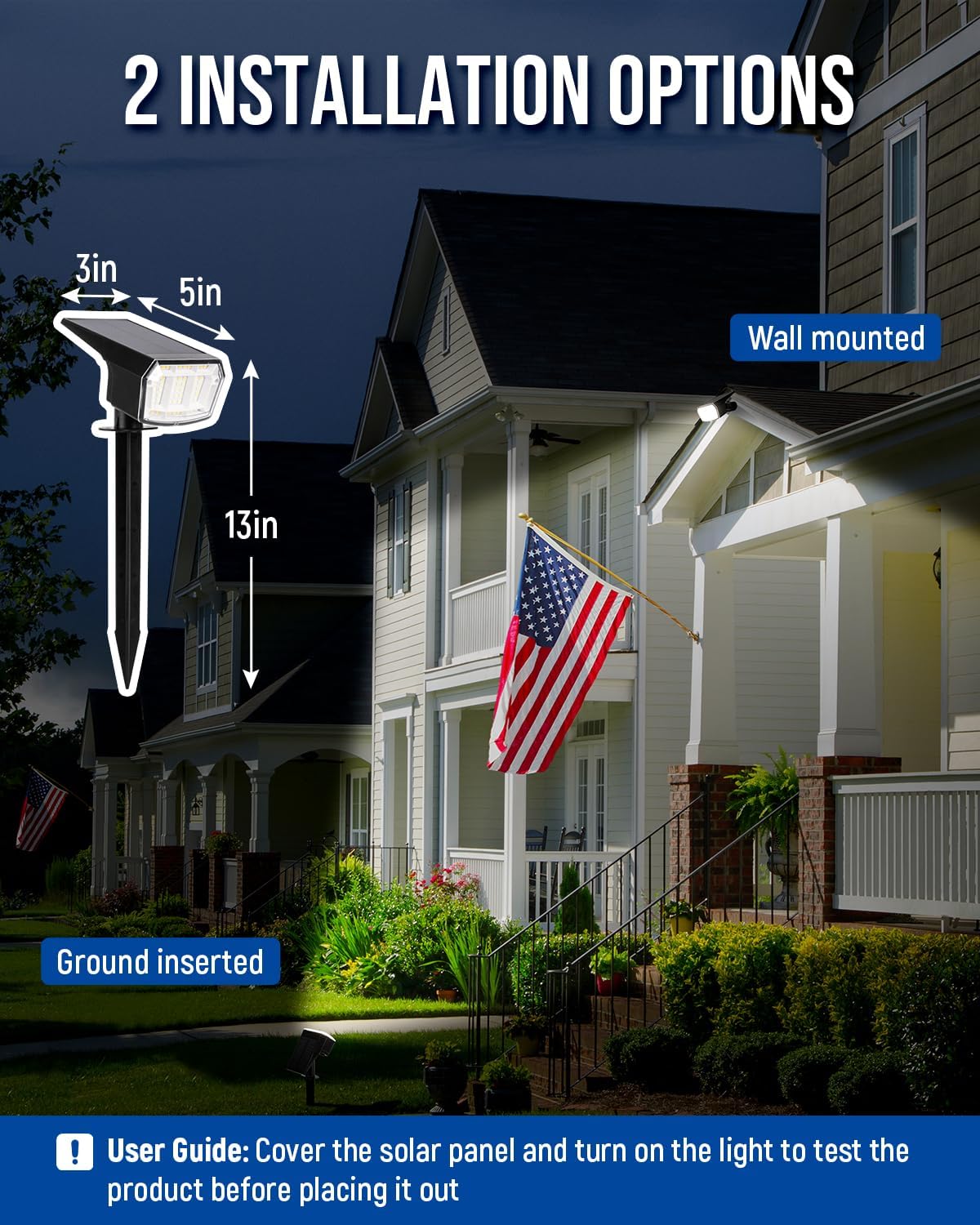
Your AUDERWIN Solar Spot Lights offer versatile installation options: ground insertion or wall mounting. Before permanent installation, it is recommended to cover the solar panel and turn on the light to test its functionality.
Choosing a Location:
Select a location where the solar panel can receive at least 6-8 hours of direct sunlight daily. Avoid areas under trees, eaves, or other structures that may obstruct sunlight, as this will affect charging efficiency and illumination time.
Installation Steps:
- Assemble the Light: Attach the ground stake or wall mount bracket to the light unit as desired.
- Ground Insertion: If using the ground stake, firmly push the assembled light into soft ground. Ensure the solar panel faces upwards towards the sun.
- Wall Mounting: If wall mounting, use the provided screws and anchors to secure the bracket to a wall or fence. Adjust the angle of the light and solar panel for optimal sun exposure and illumination.
- Initial Test: Cover the solar panel completely to simulate darkness. Press the ON/OFF/MODE button to ensure the light turns on.
Operating Instructions
The AUDERWIN Solar Spot Light features an integrated ON/OFF/MODE button located on the back of the unit. This button allows you to power the light on or off and cycle through the three available lighting modes.
Powering On/Off:
Press and hold the ON/OFF/MODE button for 3 seconds to turn the light ON or OFF.
Changing Lighting Modes:
Once the light is ON, short press the ON/OFF/MODE button to cycle through the following modes:
- Mode 1 (Low Light): Provides up to 24 hours of illumination on a full charge.
- Mode 2 (Medium Light): Provides up to 18 hours of illumination on a full charge.
- Mode 3 (High Light): Provides up to 12 hours of illumination on a full charge. In this mode, the spotlight operates at 100% brightness for 4 hours, then gradually dims to 40% for 2 hours, and finally to 20% for the remaining duration.
The light will automatically turn on at dusk and turn off at dawn, based on the selected mode, provided the solar panel has received sufficient charge during the day.

Maintenance
To ensure the optimal performance and longevity of your solar spot lights, follow these simple maintenance guidelines:
- Clean Solar Panel: Regularly wipe the solar panel with a soft, damp cloth to remove dust, dirt, leaves, or snow. A clean panel ensures maximum sunlight absorption and charging efficiency.
- Clear Obstructions: Periodically check that no new obstructions (e.g., growing foliage, new structures) are blocking direct sunlight from reaching the solar panel.
- Battery Care: While the internal battery is designed for long life, extreme temperatures can affect its performance. If storing the lights for an extended period, ensure they are fully charged and stored in a cool, dry place.
- Weather Resistance: The IP65 waterproof rating protects against rain and splashes. However, avoid submerging the unit in water.

Troubleshooting
If your AUDERWIN Solar Spot Lights are not functioning as expected, please refer to the following common issues and solutions:
| Problem | Possible Cause | Solution |
|---|---|---|
| Light does not turn on at night. | 1. Solar panel not receiving enough sunlight. 2. ON/OFF/MODE button is OFF. 3. Battery charge is too low. | 1. Relocate the light to an area with direct sunlight for 6-8 hours daily. 2. Press and hold the ON/OFF/MODE button for 3 seconds to turn it ON. 3. Allow the light to charge for 1-2 sunny days. |
| Light is dim or only stays on for a short time. | 1. Insufficient charging due to cloudy weather or obstructions. 2. Solar panel is dirty. | 1. Ensure the solar panel is in direct sunlight. Allow more charging time during overcast days. 2. Clean the solar panel regularly to remove dirt and debris. |
| Light flickers. | Loose connection or low battery. | Ensure all connections are secure. Allow the light to fully charge. |
Specifications
- Brand: AUDERWIN
- Model Number: 9921
- Power Source: Solar Powered
- Light Source: LED (63 high power LEDs)
- Light Color: Natural Light (4000 Kelvin)
- Material: Acrylonitrile Butadiene Styrene (ABS)
- Water Resistance Level: IP65 Waterproof
- Operating Temperature: -4°F to 140°F (-20°C to 60°C)
- Item Dimensions (L x W x H): 4"L x 4.5"W x 10"H (approximate, when ground inserted)
- Number of Items: 2 Pack
- Control Method: Touch (ON/OFF/MODE button)
- Installation Type: Floor Mount / Wall Mount
Warranty and Support
AUDERWIN provides a 12-month worry-free assurance for this product. This warranty covers manufacturing defects and ensures your satisfaction with the product's performance under normal use.
If you encounter any issues, have questions, or require assistance with your AUDERWIN Solar Spot Lights, please do not hesitate to contact our friendly customer service team. Please refer to the contact information provided on the product packaging or the official AUDERWIN website for support.
We are committed to providing excellent customer service and will assist you promptly.