
DEVAISE ASJZ032
DEVAISE 48x24 Inch Electric Standing Desk with Drawers (Model ASJZ032) User Manual
Comprehensive instructions for assembly, operation, and maintenance.
Important Safety Information
Please read all instructions carefully before assembly and use. Keep this manual for future reference.
- Always ensure that the total weight on the desk does not exceed 180 lbs (81.6 kg).
- Be cautious of obstructions when adjusting the desk height to avoid potential damage or injury.
- Utilize the anti-collision feature to prevent collisions with objects or people during height adjustments.
- Keep children and pets away from the desk during operation.
- Ensure all screws and bolts are securely tightened before use. Periodically check for loose connections.
- Do not sit or stand on the desk.
- Disconnect power before cleaning or maintenance.
Package Contents
Verify that all components are present before beginning assembly. Refer to the assembly video for visual identification of parts.
Video: "Fast Assembly for DEVAISE Standing Desk with Drawers" - This video provides a visual guide to all included parts and the assembly process.
The package should include:
- Desktop (1 piece)
- Legs (2 pieces)
- Crossbar/Frame components
- Motor and control box
- Control panel
- Power adapter and cables
- Drawers (2 pieces)
- Storage shelf
- Headphone hooks (2 pieces)
- Assembly hardware (screws, bolts, Allen wrench)
- Instruction manual
Assembly Instructions
Follow these steps carefully for proper assembly. All parts are clearly labeled, and pre-drilled holes are provided for convenience. An Allen wrench is included for assembly.
- Step 1: Attach the Drive Rod to the Motor.
Insert the drive rod (part 4 in video) into the motor (part 5 in video). Ensure it is securely seated.

Image: Exploded view of desk components, illustrating the quick installation process with labeled parts.
- Step 2: Assemble the Desk Legs.
Attach the foot supports to the bottom of each leg (parts 3 and 10 in video) using the provided screws (A) and Allen wrench (E).
- Step 3: Connect Legs with Crossbar.
Position the legs upright and connect them using the main crossbar (part 1 in video). Secure with screws (B) and Allen wrench (E).
- Step 4: Install Side Brackets.
Attach the side brackets (part 2 in video) to the top of the leg assembly, securing them with screws (B) and Allen wrench (E).
- Step 5: Prepare the Desktop.
Place the desktop (parts 7 and 18 in video) face down on a soft, clean surface. Attach the connecting plates (N) and wooden dowels (H) to join the desktop sections if applicable.
- Step 6: Attach Leg Assembly to Desktop.
Carefully align the assembled leg frame with the pre-drilled holes on the underside of the desktop. Secure the frame to the desktop using screws (C) and Allen wrench (E).
- Step 7: Connect Control Box and Cables.
Mount the control box (G) and connect all motor and control panel cables (F) as shown in the diagram. Ensure all connections are firm.
- Step 8: Assemble the Storage Shelf.
Assemble the storage shelf components (parts 11, 12, 13, 14, 15 in video) using screws (I), wooden dowels (H), and the provided tools (E, K, L).
- Step 9: Attach Storage Shelf to Desktop.
Carefully place the assembled storage shelf onto the desktop, aligning it with the designated holes. Secure it with screws (I) and wooden dowels (H).
- Step 10: Install Drawers and Hooks.
Insert the fabric drawers (part 16 in video) into their compartments. Attach the headphone hooks (part 8 in video) to the sides of the desk.

Image: Fully assembled DEVAISE Electric Standing Desk with two monitors, a laptop, and various office accessories, highlighting its functional design.
Operating Instructions
This section details how to use the electric height adjustment and integrated features of your DEVAISE standing desk.
Electric Height Adjustment
The desk features a smooth electric height adjustment system, allowing you to switch between sitting and standing positions effortlessly. The height range is from 28.35 inches to 46.45 inches.
- Use the Up (▲) and Down (▼) arrows on the control panel to manually adjust the desk height.
- The LED display will show the current height in inches.
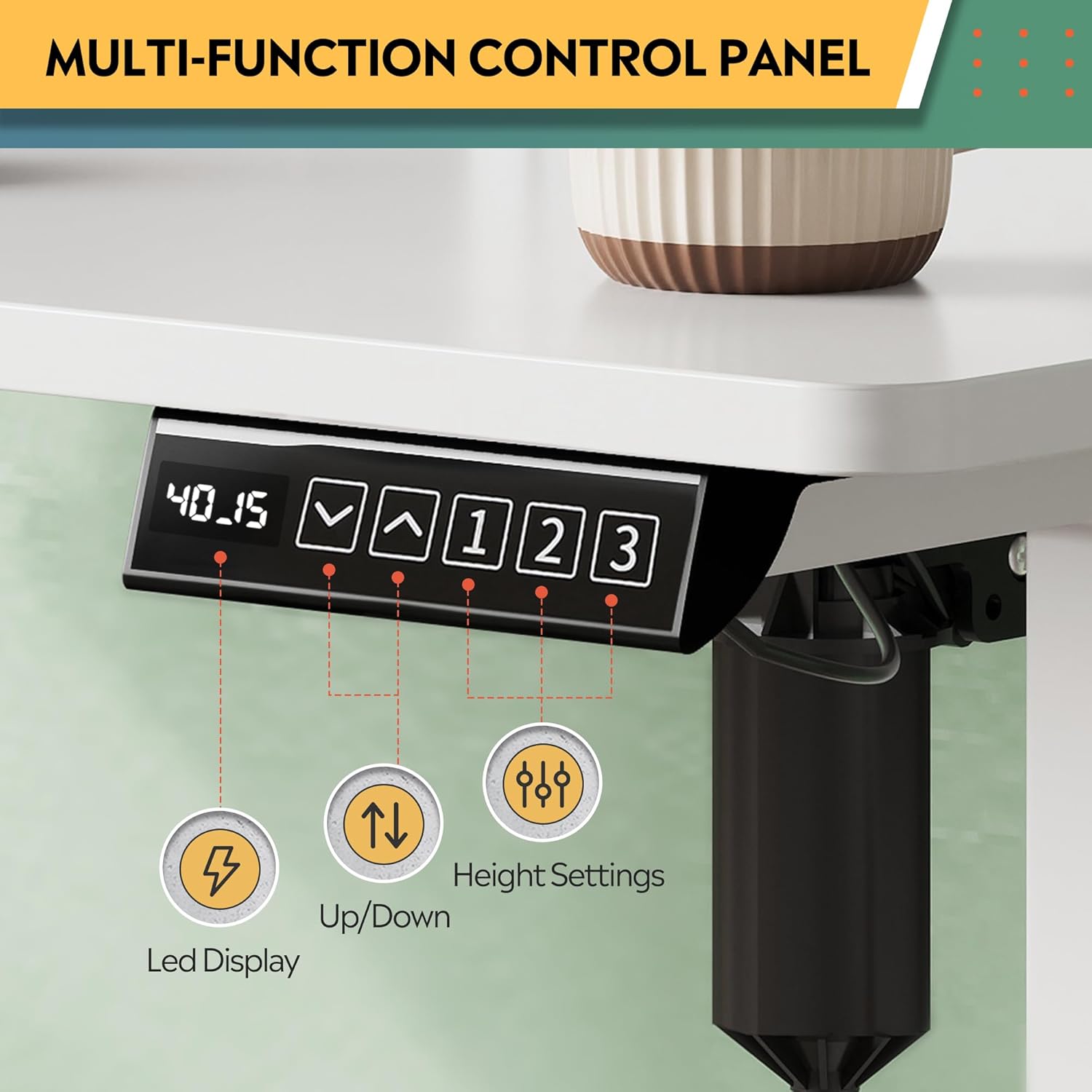
Image: Multi-function control panel showing LED display, up/down arrows, and memory preset buttons.
Memory Presets
The desk includes three programmable height settings for quick, one-touch adjustments to your preferred sitting or standing heights.
- Adjust the desk to your desired height using the Up/Down arrows.
- Press the "M" button (or similar memory set button, if present) followed by one of the numbered preset buttons (1, 2, or 3) to save the current height.
- To recall a saved height, simply press the corresponding numbered preset button (1, 2, or 3).
Integrated Power Outlets and USB Ports
The desk is equipped with 2 AC outlets and 2 USB ports (12A, 110~125V) for convenient power access for your devices.
- Plug your monitors, laptops, and other devices directly into the AC outlets.
- Use the USB ports to charge smartphones, tablets, and other USB-powered accessories.
Video: "DEVAISE Standing Desk with S" - Demonstrates the integrated power outlets, USB ports, and headphone hooks.
Anti-Collision Feature
The smart anti-collision feature automatically stops and reverses the desk's movement if an obstruction is detected, protecting both the desk and your belongings.
Video: "DEVAISE Electric Standing Desk for Home Office" - Illustrates the sit-to-stand functionality and the anti-collision system.
Maintenance
Regular maintenance ensures the longevity and optimal performance of your standing desk.
- Cleaning: Wipe the desk surface with a soft, damp cloth. Avoid harsh chemicals or abrasive cleaners that may damage the finish.
- Inspections: Periodically check all screws and connections to ensure they are tight. Re-tighten if necessary.
- Cable Management: Ensure cables are neatly organized and not interfering with the desk's movement. Use the provided cable management features.
- Motor Care: The motor system is designed for maintenance-free operation. Do not attempt to open or service the motor or control box.
Troubleshooting
If you encounter any issues with your DEVAISE standing desk, refer to the following common problems and solutions.
| Problem | Possible Cause | Solution |
|---|---|---|
| Desk does not move. | Power cable disconnected, motor cable loose, control box error. | Check all power and motor connections. Unplug the desk for 10 seconds, then plug it back in to reset. |
| Desk moves unevenly or makes unusual noise. | Uneven load, loose screws, obstruction. | Ensure weight is evenly distributed. Check and tighten all assembly screws. Clear any obstructions. |
| Anti-collision feature triggers too often. | Sensitivity setting too high, minor obstruction. | Check the area for any subtle obstructions. Refer to the control panel manual for adjusting anti-collision sensitivity (if available). |
| Memory presets not working. | Presets not saved correctly. | Re-program the memory presets following the "Memory Presets" instructions in this manual. |
If the problem persists, please contact customer support.
Specifications
| Feature | Detail |
|---|---|
| Brand | DEVAISE |
| Model Number | ASJZ032 |
| Desk Design | Standing Desk |
| Product Dimensions (D x W x H) | 27.6"D x 47.24"W x 28.35"H (70.1cm D x 120cm W x 72cm H) |
| Color | White |
| Minimum Height | 28.35 Inches (72 cm) |
| Maximum Height | 46.45 Inches (118 cm) |
| Maximum Weight Capacity | 180 Pounds (81.6 kg) |
| Base Material | Iron, Alloy Steel Frame |
| Top Material Type | Engineered Wood |
| Number of Drawers | 2 |
| Power Outlets | 2 AC Outlets, 2 USB Ports (12A, 110~125V) |
| Special Features | Adjustable Height, Electric, Headphone Hooks, Storage Shelf |
| Assembly Required | Yes |
Warranty and Support
Your DEVAISE Electric Standing Desk comes with a limited warranty. For specific details regarding the warranty period and coverage, please refer to the warranty card included in your package or contact DEVAISE customer support.
Customer Support: Should you require assistance with assembly, product operation, or any other inquiries, our U.S.-based customer support team is available to help. Please refer to the contact information provided in your product packaging or on the official DEVAISE website.
Optional protection plans are available for purchase, offering extended coverage for 2-year or 3-year durations, or a monthly complete protect plan. Details can be found where the product was purchased.
Ask a question about this manual
Ask about setup, troubleshooting, compatibility, parts, safety, or missing instructions. Manuals+ will review the question and use this page’s manual context to help answer it.