1. Introduction
Thank you for choosing Mirasing Rechargeable Digital BTE (Behind-The-Ear) Hearing Aids. This device is designed to enhance your hearing experience with advanced digital technology, app control, and comfortable wear. Please read this manual carefully to ensure proper use, maintenance, and optimal performance of your hearing aids.
Key Features:
- Lightweight and Discreet: Designed to be nearly invisible when worn behind the ear, made from medical skin-friendly materials for comfort.
- App Control: Personalize settings and adjust volume via the "Widersonic" app, available for iOS and Android devices.
- Four Hearing Modes: Adapt to various listening environments with preset modes, switchable via the app.
- Powerful Battery Performance: Fast charging (2 hours) provides 15 hours of continuous use, with the portable charging case offering 45-60 hours of backup power.
- Easy & Professional Operation: Features auto-on/off when removed from or placed into the charging case, and advanced noise reduction technology.
2. Product Overview

Image: Overview of the Mirasing rechargeable hearing aids and their portable charging case. The image highlights features such as 100% rechargeable, volume adjustable, comfortable design, advanced digital chip, app control, and noise reduction.

Image: Detailed dimensions of the Mirasing BTE hearing aid, showing a height of 33mm (1.3 inches), depth of 7mm, width of 10mm, and a weight of 2.87g (0.1 oz). The image also indicates the charging case provides 45-60 hours of battery life.

Image: A Mirasing hearing aid shown with six different sizes of ear tips, allowing users to choose the most comfortable and effective fit for their ear canal.
3. Setup Guide
3.1 Initial Charging
Before first use, fully charge your Mirasing hearing aids and the charging case.
- Place the hearing aids into their respective slots in the charging case. Ensure they are correctly seated.
- Connect the charging case to a power source using the provided USB cable.
- The indicator lights on the charging case will show the charging status. A full charge typically takes about 2 hours for the hearing aids. The charging case provides 3-4 full charges for the hearing aids, offering 45-60 hours of backup power.
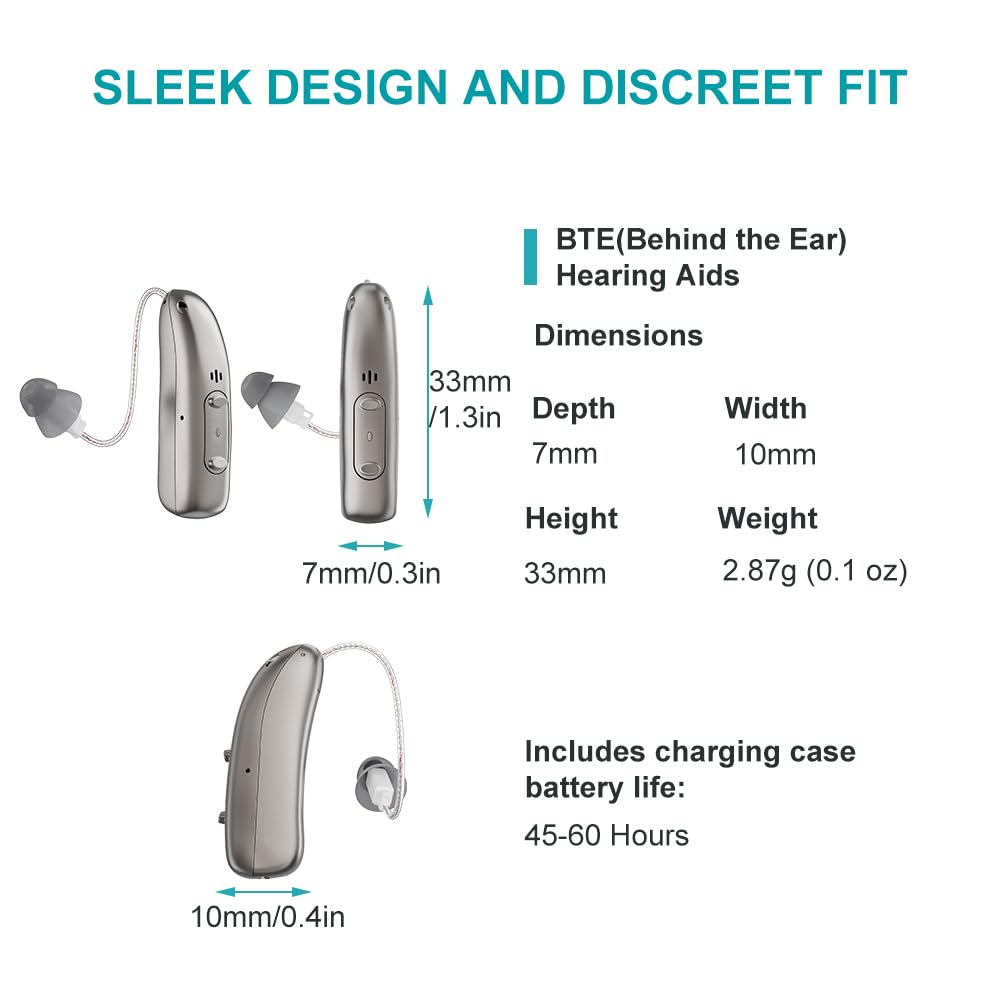
Image: Illustration of the Mirasing hearing aids charging within their case, showing charging times (3 hours for case, 15 hours working time per charge) and backup power capacity (45-60 hours).
3.2 Fitting the Hearing Aids
Proper fit is crucial for comfort and sound quality. The device comes with an anti-fall ear hook and various earplug sizes.

Image: A step-by-step guide on how to wear the Mirasing hearing aids. It illustrates selecting the correct earplug, gently inserting it into the ear canal, holding the receiver cable, wrapping the device behind the ear, and distinguishing left (blue) from right (red) indicators.
- Choose a Suitable Earplug: Select an earplug size that fits snugly and comfortably in your ear canal. Install it onto the sound tube.
- Insert Earplug: Gently insert the earplug into your ear canal.
- Position the Device: Hold the cable at the bend in front of the receiver with your thumb and forefinger. Wrap the main body of the device over the top of your ear, carefully placing it behind your ear.
- Distinguish Left/Right: The sound tube tail is marked. Blue indicates the left ear (2B), and red indicates the right ear (2R).
3.3 App Installation
The "Widersonic" app allows for personalized control of your hearing aids.
- Download the "Widersonic" app from the App Store (for iOS devices) or Google Play Store (for Android devices).
- Follow the on-screen instructions to pair your hearing aids with your smartphone via Bluetooth.
4. Operating Instructions
4.1 Power On/Off
The hearing aids feature an automatic power management system:
- Power On: The hearing aids will automatically power on when taken out of the charging case.
- Power Off: The hearing aids will automatically power off when placed back into the charging case.
4.2 App Control and Settings
The "Widersonic" app provides comprehensive control over your hearing aids.

Image: A comparison showing the effectiveness of the Mirasing hearing aids' advanced digital chip and noise cancellation solution. It displays the app interface with various modes and settings, contrasting a noisy experience from another brand with the clear sound provided by Mirasing.
- Volume Adjustment: Use the app to precisely adjust the volume levels for each hearing aid.
- Personalized Settings: The app allows for personalized settings based on your individual listening experience.
4.3 Changing Hearing Modes
Your Mirasing hearing aids are equipped with four distinct hearing modes to suit different environments.

Image: An illustration of the four listening programs available through the Mirasing hearing aid app. It shows different app screens for selecting modes and adjusting frequency bands, alongside images of people enjoying various listening situations.
- Open the "Widersonic" app on your smartphone.
- Navigate to the program selection interface.
- Select the desired mode (Mode 1, Mode 2, Mode 3, Mode 4) to adapt to your current environment. The device will remember your selection.
- These programs are preset to optimize sound for various needs. If your left and right ears are connected, changing a program in the app will change both devices simultaneously.
4.4 Noise Reduction
The advanced noise reduction technology filters out background noise, allowing you to focus on desired sounds.

Image: A visual representation of the multi-directional noise reduction capability of the Mirasing hearing aids. It shows an ear with the hearing aid, surrounded by icons representing various environmental sounds (birds, traffic, rain, music, leaves, people) that the device can filter.
5. Maintenance
5.1 Cleaning
- Regularly clean your hearing aids with a soft, dry cloth.
- Use the provided cleaning tools (if any) to remove earwax or debris from the earplugs and sound tubes.
- Do not use water or cleaning solvents directly on the hearing aids.
5.2 Storage
- When not in use, store the hearing aids in their charging case to protect them from dust, moisture, and physical damage.
- Store in a cool, dry place away from direct sunlight and extreme temperatures.
5.3 Charging
- Ensure the charging case is regularly charged to provide power to the hearing aids.
- Avoid overcharging by disconnecting the charger once the case is fully charged.
6. Troubleshooting
If you encounter any issues with your Mirasing hearing aids, please refer to the following common solutions:
| Problem | Possible Cause | Solution |
|---|---|---|
| No sound or weak sound | Low battery; Earplug blocked by earwax; Incorrect volume setting; Device not powered on. | Charge the hearing aids; Clean the earplug and sound tube; Adjust volume via app; Ensure device is out of charging case. |
| Whistling or feedback sound | Improper fit of earplug; Earplug too small; Earwax in ear canal. | Re-insert the hearing aid for a snug fit; Try a larger earplug size; Consult a healthcare professional for earwax removal. |
| App not connecting | Bluetooth off; App not updated; Hearing aids not in pairing mode. | Ensure Bluetooth is enabled on your phone; Update the "Widersonic" app; Restart hearing aids by placing them in and out of the charging case. |
| Short battery life | Aging battery; Frequent use at high volume. | Ensure full charge before use; Reduce volume if possible; Contact customer support if issue persists. |
If the problem persists after trying these solutions, please contact Mirasing customer support for further assistance.
7. Specifications
| Feature | Detail |
|---|---|
| Model Name | RM |
| Brand | Mirasing |
| Style | Behind-The-Ear (BTE) |
| Color | Black |
| Material | Plastic |
| Package Dimensions | 4.41 x 4.17 x 3.11 inches |
| Item Weight | 8.1 ounces |
| Batteries | 1 Lithium Ion battery required (included) |
| Manufacturer | Mirasing |
| App Compatibility | "Widersonic" app (iOS & Android) |
8. Warranty and Support
For warranty information and customer support, please refer to the documentation included with your purchase or contact the Mirasing Store directly. Keep your proof of purchase for any warranty claims.
Contact Information:
- Refer to the contact details provided in your product packaging.
- Visit the official Mirasing website for support resources.


