
Introduction
The Quad Lock Stem Cap Bike Mount Kit provides a secure and convenient solution for mounting your iPhone 13 to your bicycle. Engineered with a patented dual-stage lock, this system ensures your phone remains stable over various terrains. The kit includes a durable MAG Case for your iPhone 13, offering both protection and wireless charging compatibility. This manual details the installation, operation, and maintenance of your Quad Lock Stem Cap Bike Mount Kit.
What's Included
Your Quad Lock Stem Cap Bike Mount Kit includes the following components:
- 1x Quad Lock Stem Cap Bike Mount
- 1x Quad Lock MAG Phone Case for iPhone 13

Figure 1: Components of the Quad Lock Stem Cap Bike Mount Kit. This image displays the mount and the MAG case included in the package.
Setup and Installation
The Quad Lock Stem Cap Bike Mount is designed for easy installation on most bicycle stems with a diameter of 28.6mm (1 1/8 inches). There are two main types of stem cap mounts available: the standard Stem Cap Mount and the Adjustable Stem Cap Mount.
Mount Options:
- Standard Stem Cap Mount: Offers a fixed angle of approximately +/- 15 degrees, suitable for most common stem angles.
- Adjustable Stem Cap Mount: Features a hinged design, allowing for stem angles from +15 degrees to +55 degrees for customized phone positioning.
Installation Steps:
- Remove your existing stem cap from the bicycle.
- Place the Quad Lock Stem Cap Mount onto the stem, ensuring it aligns correctly.
- Secure the mount using the provided short black lever and screw. Tighten firmly but do not overtighten.
- The mount features a dual-sided head design, allowing you to position the lever head on either side for optimal flexibility based on your stem angle and preference.
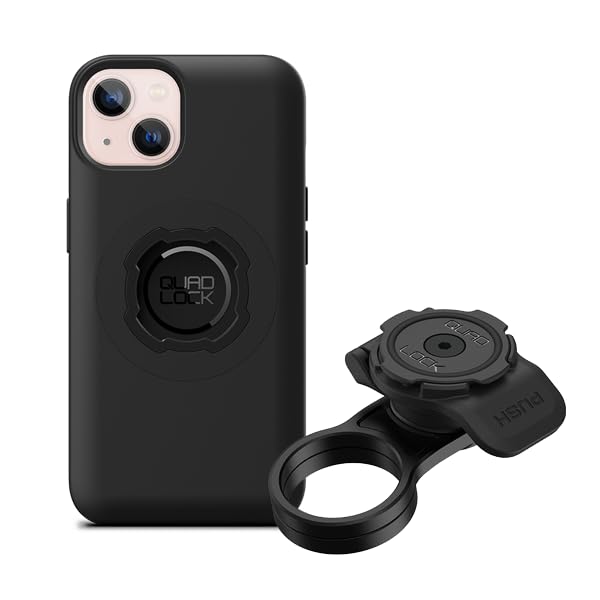
Figure 2: The Quad Lock Stem Cap Bike Mount installed on a bicycle stem. This image shows the mount securely in place, ready for phone attachment.

Figure 3: The Adjustable Stem Cap Mount. This image highlights the hinged design for customizable viewing angles.
Video 1: Official video demonstrating the installation and usage of the Quad Lock Stem Cap Bike Mount range, highlighting its features and benefits for various cycling activities.
Operating Instructions
Attaching and detaching your iPhone 13 to the Quad Lock Stem Cap Bike Mount is a quick and secure process.
Attaching Your Phone:
- Ensure your iPhone 13 is fitted with the Quad Lock MAG Phone Case.
- Align the phone case with the Quad Lock mount on your bicycle stem. The MAG case will help guide the phone into position.
- Press down and twist your phone until you hear a 'click'. This indicates the patented dual-stage lock has engaged, securing your phone firmly in place.
Detaching Your Phone:
- To release your phone, press down on the blue or black lever located on the side of the mount.
- While holding the lever down, twist your phone to unlock it from the mount.
- Lift your phone away from the mount.

Figure 4: Attaching the iPhone 13 to the Quad Lock mount. This image demonstrates the simple twist-and-lock mechanism.

Figure 5: iPhone 13 securely mounted and displaying a map. This image illustrates the phone's stable position for navigation.
Maintenance
To ensure the longevity and optimal performance of your Quad Lock Stem Cap Bike Mount Kit, follow these simple maintenance guidelines:
- Regular Cleaning: Wipe down the mount and phone case with a damp cloth to remove dirt, dust, and grime. Avoid harsh chemicals that may damage the materials.
- Check Tightness: Periodically check that the mounting screw is securely tightened. Over time, vibrations from riding can cause screws to loosen.
- Inspect for Wear: Regularly inspect the mount and phone case for any signs of wear, cracks, or damage. Replace components if they show significant wear to maintain security.
- Lubrication (Optional): If the twist-and-lock mechanism feels stiff, a small amount of silicone-based lubricant can be applied to the moving parts.
Troubleshooting
If you encounter any issues with your Quad Lock Stem Cap Bike Mount Kit, refer to the following common problems and solutions:
| Problem | Possible Cause | Solution |
|---|---|---|
| Phone feels loose or wobbly on the mount. | Mounting screw is loose; phone not fully engaged. | Ensure the stem cap screw is tightened. Re-attach phone, ensuring a 'click' sound confirms engagement. |
| Difficulty attaching or detaching phone. | Mechanism is dirty or stiff; incorrect alignment. | Clean the mount and case. Apply a small amount of silicone lubricant if needed. Ensure correct alignment before twisting. |
| Mount rotates on the stem. | Stem cap screw is not tight enough. | Tighten the stem cap screw. If the issue persists, consult a bike mechanic. |
Specifications
Detailed specifications for the Quad Lock Stem Cap Bike Mount Kit:
| Feature | Detail |
|---|---|
| Brand | Quad Lock |
| Model Name | QLK-SCM-IP13M-MAG |
| Compatible Phone Models | iPhone 13 |
| Mounting Type | Stem Cap |
| Compatible with Vehicle Type | Bicycle |
| Enclosure Material | Black anodised aircraft-grade aluminium Mount, TPU Case |
| Additional Features | Hand Free, One-Hand Operation, Dual-Stage Lock, MAG compatibility |
| Stem Diameter Compatibility | 28.6mm (1 1/8 inches) |
Warranty and Support
Your Quad Lock Stem Cap Bike Mount Kit is covered by a 1 Year Warranty from the date of purchase. This warranty covers manufacturing defects and material faults under normal use.
For warranty claims, technical support, or any product-related inquiries, please visit the official Quad Lock website or contact their customer service department. Ensure you have your proof of purchase and product model number (QLK-SCM-IP13M-MAG) ready when seeking support.