
Introduction
This manual provides comprehensive instructions for the SV3C HX11 4G LTE Cellular Security Camera. Designed for outdoor use, this wireless, solar-powered camera offers advanced surveillance capabilities without requiring Wi-Fi, making it ideal for remote locations. It features dual lenses, PTZ functionality with auto-tracking, PIR motion detection, two-way audio, and versatile night vision modes.
Product Overview
The SV3C HX11 camera system includes the main camera unit, an external solar panel, and necessary mounting hardware. Key components are detailed below:

Image: Detailed view of the SV3C HX11 camera, highlighting its components including antennas, plastic housing, 3.6mm lenses, infrared light, floodlight, SIM card slot, Micro SD card slot, Reset Button, Type-C Charging Port, Speaker & Microphone, and Power On/Off switch.
Key Components:
- Dual Lens System: One fixed lens for wide-angle view and one PTZ (Pan-Tilt-Zoom) lens for dynamic monitoring.
- Solar Panel: 8W external solar panel for continuous power supply.
- Rechargeable Battery: High-capacity 15,600mAh battery for extended operation.
- 4G LTE Module: Built-in module with pre-installed SIM card for cellular connectivity.
- PIR Motion Sensor: For accurate human motion detection.
- Two-Way Audio: Integrated microphone and speaker for communication.
- Night Vision: Equipped with 12 LED lights for both color and infrared night vision.
- Storage Slots: Micro SD card slot (up to 128GB, not included) and cloud storage option.
- Durable Housing: IP66 waterproof plastic and aluminum alloy construction.
Setup
1. SIM Card Installation:
The camera comes with a free SIM card pre-installed, including 300MB of free cellular data for initial testing. Ensure the SIM card is properly seated in its designated slot. If replacing, use a compatible 4G LTE SIM card.

Image: A close-up view of the SV3C camera showing the SIM card slot with a SIM card being inserted, illustrating the cellular data plan options and supported carriers.
2. Solar Panel Connection:
Connect the 8W solar panel to the camera's charging port. Position the solar panel in an area that receives maximum direct sunlight throughout the day for optimal charging efficiency. The camera's internal battery will be continuously charged by the solar panel.
3. Initial Power-Up:
Ensure the camera is fully charged before initial use. Turn on the camera using the Power On/Off switch. The camera will begin its self-test and connect to the 4G LTE network.
4. App Download and Configuration:
Download the CamHiPro app from your smartphone's app store. Follow the in-app instructions to add your camera. This typically involves scanning a QR code on the camera or manually entering its ID. Once connected, you can view live feeds, control PTZ functions, and configure settings.

Image: A smartphone screen showing four simultaneous camera feeds, demonstrating the "4 Monitoring Area in 1 Screen" feature via the CamHiPro app.
Operating Instructions
Live View and PTZ Control:
Access the live feed through the CamHiPro app. The dual-lens system provides both a fixed wide view and a controllable PTZ view. Use the on-screen controls to pan the camera 350°, tilt 90°, and utilize the 4X digital zoom. The camera also supports smart auto-tracking, automatically following detected human motion.
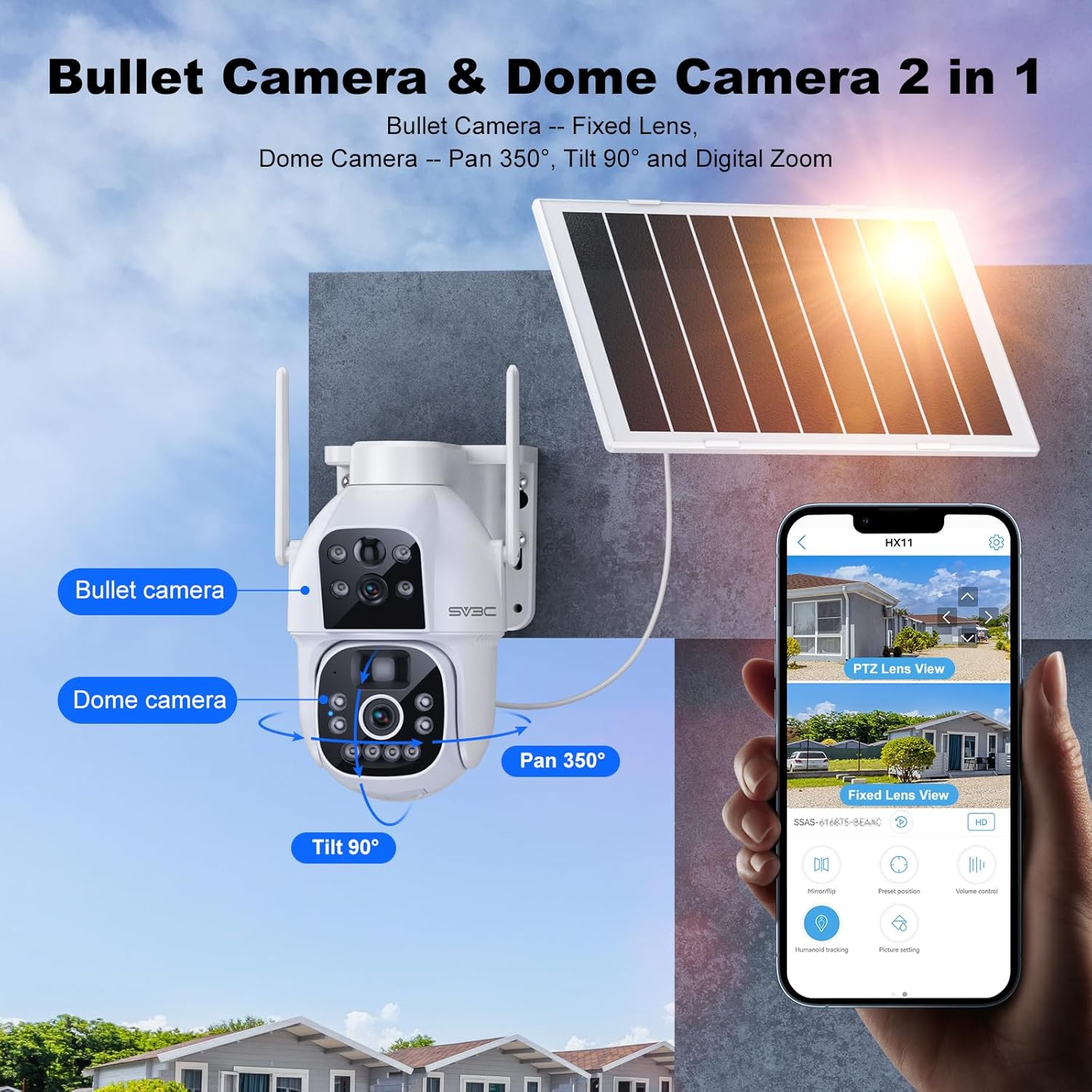
Image: The SV3C camera mounted outdoors, illustrating its "Bullet Camera & Dome Camera 2 in 1" design with a fixed lens and a pan-tilt-zoom (PTZ) lens capable of 350° pan and 90° tilt.
Motion Detection and Alerts:
The integrated PIR motion detection system will trigger alerts upon detecting human movement. You can configure the app to receive instant notifications, email alerts, or sound alarms. The camera can also be set to automatically record events when motion is detected.

Image: An illustration depicting the camera detecting human motion and sending an alert notification to a smartphone, highlighting sound, email, app notifications, and alarm recording features.
Two-Way Audio:
Utilize the built-in microphone and speaker for two-way communication. This feature allows you to speak to visitors or deter unwanted individuals remotely through the app.

Image: A visual representation of the two-way audio feature, showing a person at a door speaking to someone viewing the camera feed on a smartphone.
Night Vision Modes:
The camera supports both color night vision (up to 100ft) and infrared night vision (up to 140ft) using its 12 LED lights. You can customize night vision settings within the app, including turning on/off infrared light and white light manually, or setting it to automatic.

Image: A split image demonstrating the difference between full color night vision (left) and infrared night vision (right) captured by the SV3C camera.
Storage and Playback:
Recordings can be stored locally on a Micro SD card (up to 128GB, not included) or via cloud storage (subscription may be required). Access and playback recorded footage anytime through the CamHiPro app.

Image: A diagram illustrating the two storage options for the camera: Micro SD card (up to 128GB) and cloud storage.
Remote Viewing and Sharing:
The CamHiPro app allows for remote viewing from anywhere with cellular service. You can also share camera access with multiple users, supporting up to 3 devices viewing simultaneously.
Installation
The SV3C HX11 camera is designed for easy installation with flexible mounting options. It can be wall-mounted or attached to other vertical surfaces like trees. Ensure the mounting location provides optimal solar exposure for the solar panel and a clear line of sight for surveillance.

Image: The SV3C HX11 4G LTE Cellular Security Camera with its solar panel, shown mounted on a wall, illustrating its outdoor application.
The camera is IP66 waterproof, ensuring durability in various weather conditions, with a working temperature range of -10°C/14°F to 50°C/122°F.
Maintenance
- Solar Panel Cleaning: Periodically clean the surface of the solar panel to remove dust, dirt, or debris that may reduce charging efficiency. Use a soft, damp cloth.
- Lens Cleaning: Gently wipe the camera lenses with a microfiber cloth to ensure clear image quality.
- Firmware Updates: Check the CamHiPro app regularly for any available firmware updates to ensure optimal performance and security.
- Battery Health: While designed for continuous power, avoid prolonged periods of complete discharge to maintain battery longevity.
Troubleshooting
- Camera Not Connecting to 4G:
- Ensure the SIM card is correctly inserted and activated.
- Check cellular signal strength at the camera's location.
- Verify that the SIM card has sufficient data balance.
- Restart the camera by turning it off and on.
- Battery Not Charging:
- Ensure the solar panel is clean and free from obstructions.
- Verify the solar panel is positioned to receive direct sunlight.
- Check the connection cable between the solar panel and the camera.
- Poor Image Quality:
- Clean the camera lenses.
- Ensure there are no obstructions in the camera's field of view.
- Check the network connection for stability.
- Motion Detection Issues:
- Adjust PIR sensitivity settings in the app.
- Ensure the camera's view is clear of moving objects that might cause false alarms (e.g., tree branches).
- Two-Way Audio Problems:
- Check microphone and speaker settings in the app.
- Ensure there are no physical obstructions blocking the microphone or speaker.
Specifications
| Model Number | HX11 |
| Connectivity | 4G LTE Cellular (No Wi-Fi Needed) |
| Power Source | Solar Powered (8W Solar Panel) & 15,600mAh Rechargeable Battery |
| Video Resolution | 1080P Full HD (2 MP Effective Still Resolution) |
| Lens Type | Dual Lens (Fixed & PTZ) |
| PTZ Range | Pan 350°, Tilt 90° |
| Digital Zoom | 4X |
| Night Vision Range | Color Night Vision up to 100ft, Infrared Night Vision up to 140ft |
| Storage Options | Micro SD Card (Max 128GB, not included), Cloud Storage |
| Audio | Two-Way Audio (Built-in Microphone & Speaker) |
| Motion Detection | PIR Motion Detection with Auto Tracking |
| Weather Resistance | IP66 Waterproof |
| Operating Temperature | -10°C to 50°C (14°F to 122°F) |
| Dimensions (L x W x H) | 5.12 x 7.87 x 7.87 inches |
| Item Weight | 3.89 pounds |
Warranty and Support
For warranty information and technical support, please refer to the documentation included with your product or contact SV3C Technology directly. You can also visit the official SV3C website for FAQs and further assistance.
Manufacturer: SV3C Technology


