1. Introduction
This manual provides essential information for the safe operation, maintenance, and troubleshooting of your Arwibon MT30 Electric Scooter. Please read this manual thoroughly before operating the scooter to ensure proper use and to maximize its lifespan. Retain this manual for future reference.

Image 1.1: The Arwibon MT30 Electric Scooter, showcasing its robust design and front suspension.
2. Safety Instructions
Operating an electric scooter carries inherent risks. Adherence to safety guidelines is crucial to prevent injury or damage.
- Wear a Helmet: Always wear an approved helmet and other protective gear (knee pads, elbow pads) when riding.
- Local Regulations: Familiarize yourself with and obey all local traffic laws and regulations regarding electric scooter use.
- Pre-Ride Check: Before each ride, inspect the scooter for loose parts, tire pressure, brake functionality, and battery level.
- Riding Conditions: Avoid riding in heavy rain, on icy surfaces, or in conditions with poor visibility.
- Weight Limit: Do not exceed the maximum weight limit of 440 pounds.
- Age Restriction: This scooter is designed for adult use.
- Avoid Stunts: Do not attempt stunts, jumps, or aggressive maneuvers.
- Maintain Control: Always keep both hands on the handlebars and maintain a safe speed.
3. Package Contents
Verify that all items are present in the package:
- Arwibon MT30 Electric Scooter
- Power Adapter/Charger
- User Manual
- Assembly Tools (if required)
4. Setup
4.1 Unpacking and Initial Inspection
Carefully remove the scooter from its packaging. Inspect for any signs of damage during transit. Report any damage to customer service immediately.
4.2 Handlebar Assembly
- Lift the main stem of the scooter into the upright position.
- Secure the stem locking mechanism.
- Attach the handlebars to the top of the stem, ensuring all cables are properly connected and not pinched.
- Tighten all screws securely using the provided tools.
4.3 Initial Charging
Before first use, fully charge the scooter's battery. Connect the charger to the charging port on the scooter and then to a power outlet. The indicator light on the charger will change (e.g., red to green) when charging is complete. This initial charge may take several hours.
5. Operating Instructions
5.1 Controls Overview

Image 5.1: Close-up of the Arwibon MT30's handlebars and digital display, showing controls for speed, battery, and mode.
- Power Button: Located on the display, press to turn the scooter on/off.
- Throttle: Typically a thumb or finger lever on the right handlebar to control speed.
- Brake Levers: Located on both handlebars for front and rear brakes.
- Display: Shows speed, battery level, riding mode (Eco, D, S), and other indicators.
- Lights: Controls for headlights and taillights.
5.2 Powering On/Off
- To Power On: Press and hold the power button on the display until it illuminates.
- To Power Off: Press and hold the power button until the display turns off.
5.3 Riding the Scooter
- Place one foot firmly on the deck.
- Push off with your other foot to gain initial momentum.
- Gently press the throttle to engage the motor.
- Place your second foot on the deck once the scooter is moving.
- To slow down or stop, release the throttle and gently apply the brake levers.
5.4 Folding Mechanism

Image 5.2: The Arwibon MT30 Electric Scooter in its folded configuration, demonstrating its portability.
The Arwibon MT30 features a rapid folding mechanism for convenient storage and transport.
- Ensure the scooter is powered off.
- Locate the folding latch or lever on the stem base.
- Follow the specific instructions for your model to release the locking mechanism.
- Carefully fold the stem downwards until it locks into the folded position.
- To unfold, reverse the process, ensuring the stem is securely locked upright before riding.
6. Maintenance
Regular maintenance ensures optimal performance and longevity of your scooter.
6.1 Battery Care
- Charge the battery fully after each use.
- Avoid completely draining the battery.
- If storing for extended periods, charge the battery to approximately 50-70% every 1-2 months.
- Use only the original charger provided.
6.2 Tire Maintenance
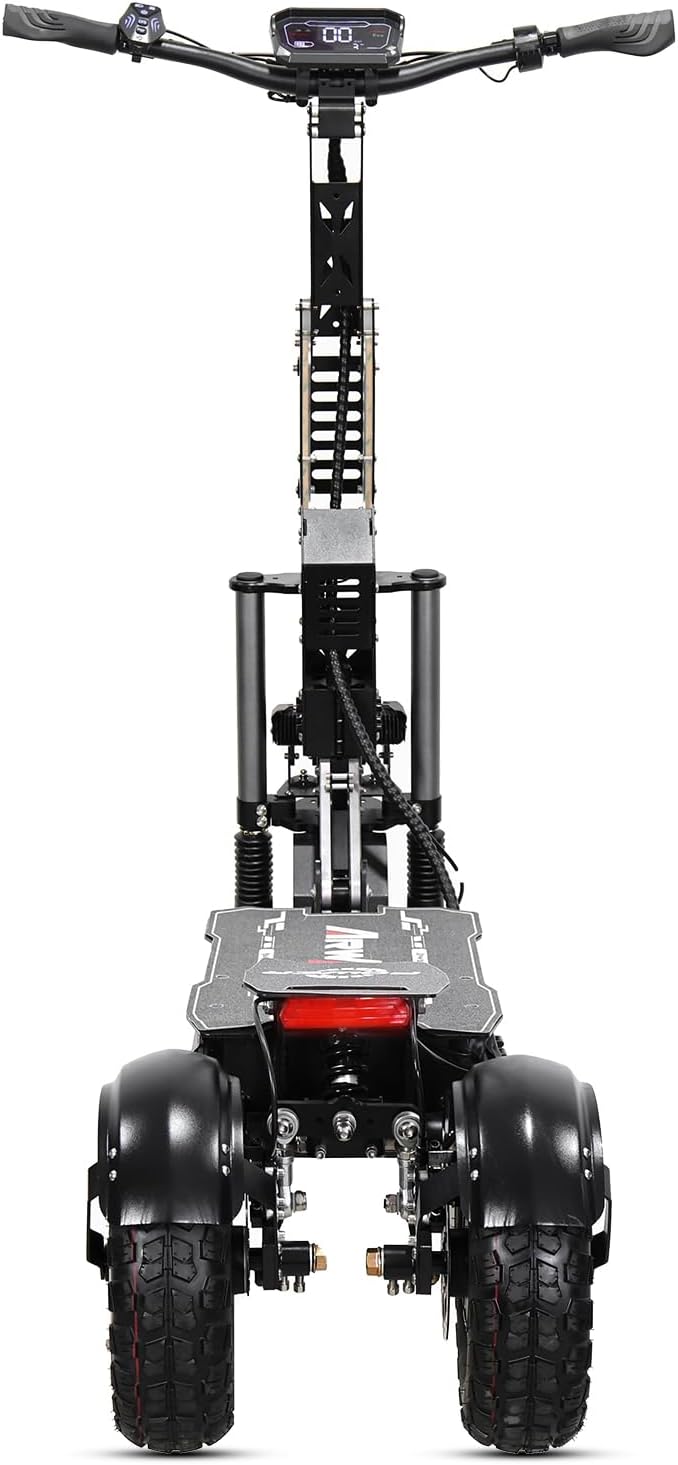
Image 6.1: Rear view of the Arwibon MT30, highlighting the 13-inch off-road tires and rear suspension.
- Check tire pressure regularly (refer to tire sidewall for recommended PSI).
- Inspect tires for wear, punctures, or damage before each ride.
- Ensure valve caps are securely in place.
6.3 Brake System
- Regularly check brake levers for proper tension and responsiveness.
- Inspect brake pads for wear and replace if necessary.
- Ensure brake cables are free from kinks or damage.
6.4 General Cleaning
- Wipe down the scooter with a damp cloth after use.
- Avoid using high-pressure water jets directly on electronic components.
- Do not use harsh chemicals or abrasive cleaners.
6.5 Storage
- Store the scooter in a cool, dry place away from direct sunlight and extreme temperatures.
- Ensure the scooter is clean and dry before storing.
7. Troubleshooting
This section addresses common issues you might encounter with your Arwibon MT30 scooter.
| Problem | Possible Cause | Solution |
|---|---|---|
| Scooter does not power on | Low battery; Loose connections; Faulty power button | Charge battery; Check all visible connections; Contact support if issue persists |
| Reduced range or speed | Low tire pressure; Overloaded scooter; Battery degradation; Riding uphill frequently | Inflate tires to correct PSI; Reduce load; Ensure proper charging habits; Adjust riding style |
| Brakes feel weak or unresponsive | Worn brake pads; Loose brake cables; Air in hydraulic system (oil brake) | Inspect and replace brake pads; Adjust cable tension; Seek professional service for hydraulic brakes |
| Unusual noises during operation | Loose components; Debris in wheels; Motor issue | Inspect scooter for loose parts and tighten; Clear debris; Contact support if noise persists |
8. Specifications
Technical details of the Arwibon MT30 Electric Scooter:
| Feature | Specification |
|---|---|
| Brand | Arwibon |
| Model Name | MT30 |
| Motor Power | 6000W (Dual 3000W Motors) |
| Top Speed | Up to 40 MPH |
| Range | Up to 40 Miles |
| Battery | 60V 27Ah |
| Tires | 13-inch Off-Road Tires |
| Suspension | Hydraulic (Front), Spring (Rear) |
| Braking System | Front Disc Brake, Rear Oil Brake |
| Weight Limit | 440 Pounds |
| Product Dimensions | 50.3"L x 28.7"W x 53.1"H |
| Frame Material | Aluminum |
| Special Features | Dual Motor, Foldable Design, Full Suspension |
9. Warranty and Support
The Arwibon MT30 Electric Scooter comes with a 12-month warranty from the date of purchase, covering manufacturing defects. This warranty does not cover damage caused by misuse, accidents, unauthorized modifications, or normal wear and tear.
For technical assistance, warranty claims, or any questions regarding your scooter, please contact Arwibon customer service. Refer to your purchase documentation for specific contact information.


