1. Introduction
This manual provides instructions for the mGYDY KT-LCD4 Ebike LCD Display Mini Meter Control Panel. This display is designed to provide essential cycling data and control functions for electric bicycles equipped with a compatible KT series controller.
Important Compatibility Note:
The KT-LCD4 display is exclusively compatible with KT series controllers. It will not function with controllers from other manufacturers. Please verify that your ebike's controller is a KT series model before attempting installation or operation. This display requires connection via a 5-pin communication cable (not included in all packages).
2. Setup and Installation
2.1 Compatibility Check
Before installation, ensure your ebike controller is a KT (Kunteng) series controller. Look for a 'KT' logo or model number on your controller. The display will not operate with non-KT controllers.
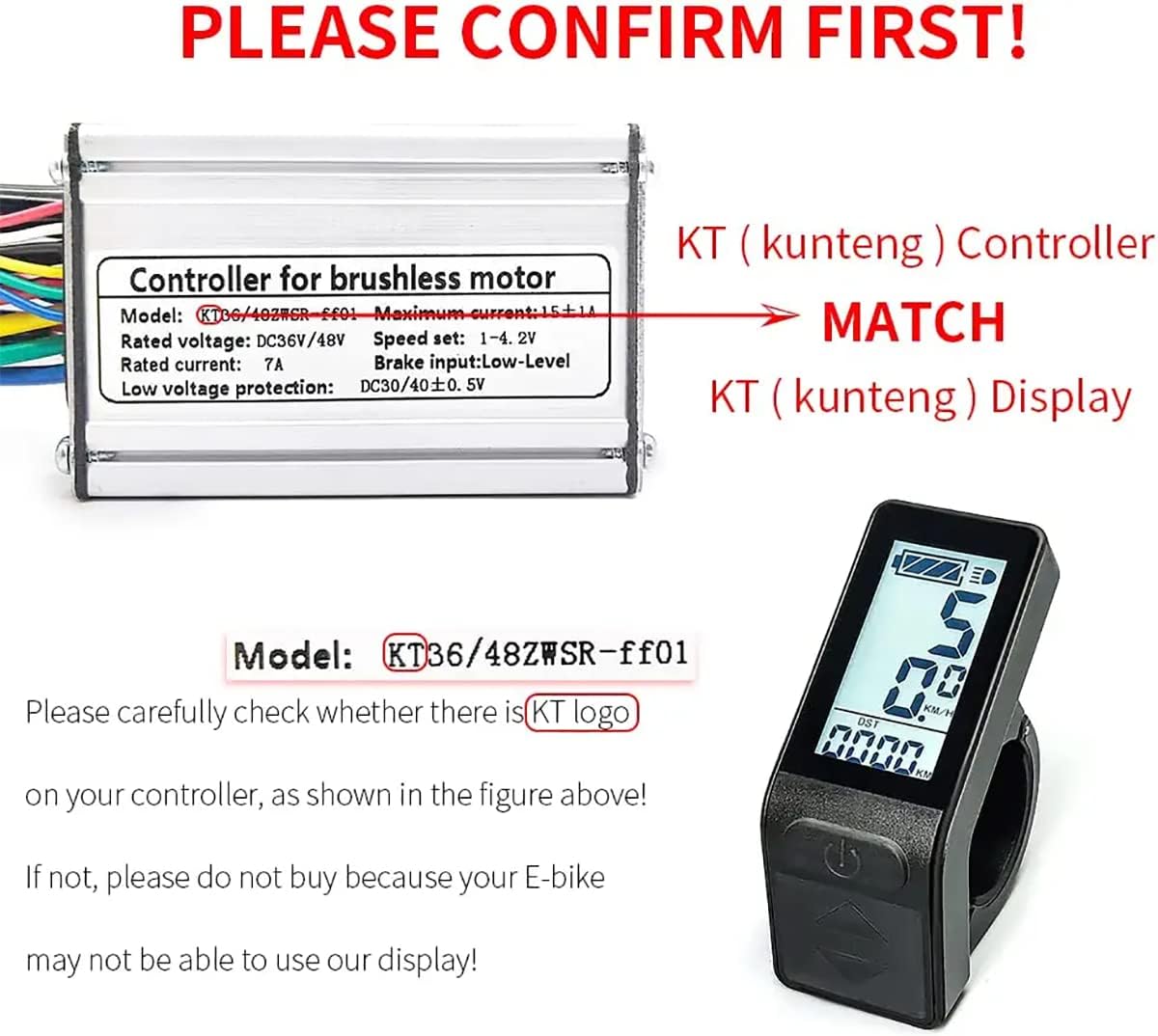
Figure 2.1: Compatibility verification. This image illustrates the necessity of matching the KT-LCD4 display with a KT (Kunteng) series controller for proper function. Users should check their controller for the 'KT' logo.
2.2 Mounting the Display
The KT-LCD4 display is designed for handlebar mounting. It features removable screws for straightforward installation without requiring the removal of other handlebar accessories. The display is suitable for handlebars with a diameter of 22.2mm.

Figure 2.2: Easy installation feature. This image demonstrates the removable screws on the KT-LCD4 display, facilitating simple installation onto the ebike handlebar.
2.3 Electrical Connection
Connect the display to your KT series controller using a 5-pin waterproof (WP) or standard (SM) connector cable. The display automatically identifies and adapts to 24V, 36V, 48V, or 52V lithium battery systems.
3. Operating Instructions
3.1 Display Overview and Buttons
The KT-LCD4 features a compact design with clear data display and three control buttons:
- SW Button (Power/Mode): Used to power on/off the display and cycle through display modes.
- UP Button: Used to increase values, select options, or increase assist level.
- DOWN Button: Used to decrease values, select options, or decrease assist level.

Figure 3.1: Display functions and button layout. This image highlights the various indicators and control buttons on the KT-LCD4 display when mounted on an ebike handlebar.
3.2 Displayed Information
The display provides comprehensive riding data, including:
- Riding speed (current, average, maximum)
- Single trip mileage (DST) and accumulated total mileage (ODO)
- Riding time
- Power-assisted gear (PAS level)
- Motor power and temperature
- Battery voltage and charging status
- Braking status
- Working environment temperature
- 6Km/h power promotion function
- Cruise control function (CRU)
- Night driving mode (backlight and headlights)
- Automatic prompt function (e.g., error codes)

Figure 3.2: Detailed display elements and button functions. This diagram provides a comprehensive breakdown of all indicators and controls on the KT-LCD4 display.
3.3 Parameter Settings
The KT-LCD4 display allows for user-adjustable parameters (P and C parameters) to optimize performance for different ebike configurations. These settings can adjust motor parameters, speed measurement, speed limits, battery parameters, assistance control, and controller minimum voltage/maximum current. For example, if your Pedal Assist System (PAS) has 10 or 12 magnetic points, you can achieve a precise match by modifying the C parameters.
4. Maintenance
The KT-LCD4 display is constructed from durable plastic materials and is waterproof to IP56 standards, offering protection against dust and water splashes. To maintain its condition:
- Clean the display screen with a soft, damp cloth. Avoid abrasive cleaners or solvents.
- Ensure all connections remain secure and free from corrosion.
- Avoid exposing the display to extreme temperatures or direct sunlight for prolonged periods.
5. Troubleshooting
If you encounter issues with your KT-LCD4 display, consider the following:
- Display Not Powering On: Verify that the display is correctly connected to a compatible KT series controller and that the ebike's battery is charged and connected.
- Incorrect Readings: Check parameter settings (P and C parameters) to ensure they are configured correctly for your ebike's specifications, especially wheel diameter and PAS sensor type.
- Error Codes: The display may show error codes. Refer to your KT controller's manual or contact support for specific error code interpretations.
- Incompatibility: Reconfirm that both your controller and display are KT series. Incompatibility is a common reason for non-functionality.
For detailed tutorials on parameter settings or further assistance, please contact mGYDY customer support.
6. Specifications
| Feature | Specification |
|---|---|
| Model | KT-LCD4 Display |
| Material | Plastic |
| Color | Black |
| Weight | Approximately 167g |
| Voltage Compatibility | 24V / 36V / 48V / 52V (Automatic Identification) |
| Connector Type | 5-Pin SM Plug / WP Plug |
| SM Cable Length | 180cm |
| WP Cable Length | 25cm |
| Handlebar Diameter | 22.2mm |
| Dimensions (Approx.) | 55mm (Height) x 40mm (Width) x 23mm (Depth) |
| Waterproof Rating | IP56 |
| Compatible Controller | KT Controller Series |
| Intended Use | Mountain Bikes, Road Bicycles |

Figure 6.1: Product parameters. This image provides a summary of the KT-LCD4 display's key specifications.

Figure 6.2: Product dimensions. This image illustrates the physical measurements of the KT-LCD4 display.
7. Support
For further assistance, detailed tutorials on parameter settings, or any technical inquiries, please contact mGYDY customer support. Refer to the product packaging or purchase platform for contact information.


