
1. Introduction
Thank you for choosing the Jauarta OCS-P2 Electronic Crane Scale. This high-precision weighing device is designed for various industrial applications, including factories, warehouses, docks, and grain industries. Its portable design ensures convenience and ease of use. Please read this manual thoroughly before operation to ensure safe and correct usage.
Key Features:
- High Precision: Equipped with a high-precision weighing sensor, this electronic hanging scale undergoes rigorous high and low-temperature testing to ensure accurate measurements.
- High Capacity: Featuring a thickened hook and lifting ring, this electronic hanging scale offers a high load capacity of up to 1500 kg.
- Wireless Remote Control: The scale includes a wireless remote control, allowing operation from up to 20 meters away for enhanced convenience.
- Clear LED Display: A large LED display provides clear and quick readings. Multiple measurement units are supported to meet diverse requirements (kg, lb, N, jin, viss).
- Durable Construction: Features an aluminum alloy casing, alloy steel sensor, and fine steel lifting ring and hook. The display panel is made of high-temperature resistant acrylic plate.
2. Safety Information
Always follow basic safety precautions when using this product to reduce the risk of injury or damage. This scale is designed for weighing; do not use it for lifting or transporting people.
- Ensure the scale is securely attached to a suitable lifting mechanism before use.
- Do not exceed the maximum weight capacity of 1500 kg.
- Keep hands and body clear of suspended loads.
- Do not operate the scale in extreme weather conditions or environments with excessive dust or moisture unless specifically designed for such conditions.
- Replace batteries promptly when the low battery indicator appears.
3. Product Components
The Jauarta OCS-P2 Electronic Crane Scale package includes the following items:
- Electronic Crane Scale Unit (with LED display, lifting ring, and hook)
- Wireless Remote Control
- User Manual (this document)
Note: 4 AA batteries for the scale and 2 AAA batteries for the remote control are not included and must be purchased separately.

Figure 3.1: Front view of the Jauarta OCS-P2 Electronic Crane Scale, showing the LED display, lifting ring, and hook.

Figure 3.2: Back view of the Jauarta OCS-P2 Electronic Crane Scale, showing the battery compartment.
4. Setup
4.1 Battery Installation
- For the Scale: Locate the battery compartment on the back of the crane scale. Open the cover and insert 4 AA batteries, ensuring correct polarity (+/-). Close the battery cover securely.
- For the Remote Control: Locate the battery compartment on the back of the remote control. Open the cover and insert 2 AAA batteries, ensuring correct polarity (+/-). Close the battery cover securely.
4.2 Attaching the Scale
- Ensure the lifting ring is securely fastened to the top of the scale unit.
- Attach the crane scale to your lifting equipment (e.g., hoist, crane) using the lifting ring. Ensure the connection is stable and capable of supporting the maximum load.
- Verify that the bottom hook is securely attached to the scale unit.
5. Operating Instructions
5.1 Power On/Off
- To Power On: Press the ON/OFF button on the scale or the remote control. The LED display will light up and show '0.0' when ready.
- To Power Off: Press and hold the ON/OFF button for a few seconds until the display turns off.
5.2 Weighing
- Ensure the scale is powered on and displays '0.0'.
- Carefully attach the item to be weighed to the scale's hook.
- The weight will be displayed on the LED screen. Wait for the reading to stabilize.
5.3 Tare Function
The Tare function allows you to subtract the weight of a container or packaging, so only the net weight of the item is measured.
- Place the empty container or packaging on the hook.
- Press the TARE/ZERO button on the scale or remote control. The display will reset to '0.0'.
- Place the item to be weighed inside the container. The display will show the net weight of the item.
5.4 Unit Conversion
The scale supports multiple measurement units: kg (kilograms), lb (pounds), N (Newtons), jin, and viss.
- Press the UNIT button on the scale or remote control to cycle through the available units. The current unit will be indicated on the LED display.
5.5 Hold Function
The Hold function allows you to freeze the displayed weight reading.
- While weighing an item, press the HOLD button on the scale or remote control. The displayed weight will be held, indicated by a 'HOLD' symbol on the screen.
- Press the HOLD button again to release the reading and return to live weighing.
5.6 Remote Control Operation
The wireless remote control allows for convenient operation from a distance of up to 20 meters.

Figure 5.1: Jauarta OCS-P2 Electronic Crane Scale shown with its wireless remote control.
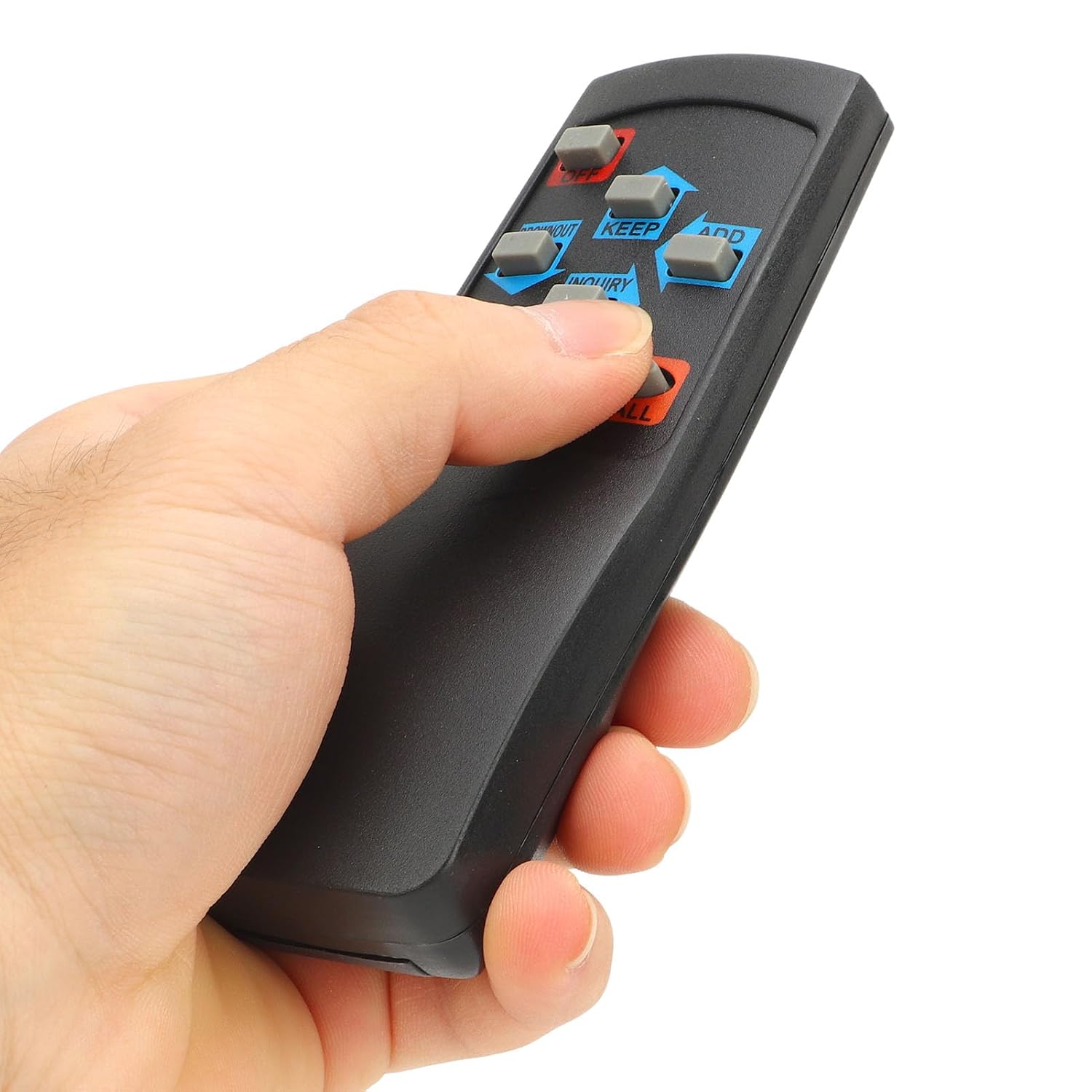
Figure 5.2: Close-up of a hand operating the remote control, showing various function buttons.
The remote control duplicates the main functions of the scale, including Power On/Off, Tare/Zero, Unit conversion, and Hold. Ensure the remote has fresh AAA batteries for optimal performance.
6. Maintenance
6.1 Cleaning
- Wipe the scale with a soft, damp cloth. Do not use abrasive cleaners or solvents.
- Ensure no liquid enters the display or battery compartments.
6.2 Battery Replacement
- When the low battery indicator appears on the LED display, replace the batteries promptly to ensure accurate readings and prevent damage from battery leakage.
- Always replace all batteries at once with new ones of the same type.
6.3 Storage
- Store the scale in a dry, cool place, away from direct sunlight and extreme temperatures.
- If storing for an extended period, remove all batteries from both the scale and the remote control to prevent leakage.
7. Troubleshooting
| Problem | Possible Cause | Solution |
|---|---|---|
| Scale does not turn on | Dead or incorrectly installed batteries. | Replace batteries with new ones, ensuring correct polarity. |
| Inaccurate readings | Overload; unstable environment; scale not zeroed; damaged sensor. | Ensure load is within capacity. Use in a stable environment. Press TARE/ZERO before weighing. Contact support if sensor damage is suspected. |
| Display shows 'OL' or 'Err' | Overload. | Remove the load immediately. Ensure the weight does not exceed 1500 kg. |
| Remote control not working | Dead batteries; out of range; obstruction. | Replace AAA batteries. Ensure remote is within 20 meters of the scale. Remove any obstructions between remote and scale. |
8. Specifications
- Model: OCS-P2
- Color: Blue
- Product Material: Aluminum alloy casing
- Sensor Material: Alloy steel
- Lifting Ring & Hook Material: Fine steel
- Display Mode: LED screen
- Display Panel Material: High-temperature resistant acrylic plate, cast iron spray front plate
- Power Source (Scale): 4 x AA batteries (not included)
- Power Source (Remote Control): 2 x AAA batteries (not included)
- Wireless Remote Control Distance: ≤ 20 meters / 65.6 feet
- Maximum Weighing Capacity: Approximately 1500 kg
- Measurement Units: kg, lb, N, jin, viss
- Product Dimensions (L x W x H): 28 x 18 x 10 cm
- Product Weight: 1.6 kg
- Manufacturer: Jauarta
- Country of Origin: China

Figure 8.1: Dimensions of the Jauarta OCS-P2 Electronic Crane Scale.
9. Warranty and Support
Warranty information for the Jauarta OCS-P2 Electronic Crane Scale is not provided in the product data. For any support inquiries, technical assistance, or questions regarding spare parts, please contact your retailer or the manufacturer directly.
Spare parts availability: Information unavailable.