
Product Overview
The Bettdow Projector Stand BD3095 is designed to provide a stable and adjustable platform for your projector. It features a standard 1/4-inch screw interface for wide compatibility, flexible angle adjustment, and 360-degree rotation to meet various projection needs. Its lightweight design ensures portability and ease of use.
- 1/4-inch Screw Interface: Ensures broad compatibility with projectors featuring a standard 1/4-inch threaded hole.
- Flexible Angle Adjustment: Allows for precise pitch angle adjustments to optimize projection.
- 360-Degree Rotation: Provides full rotational capability for versatile positioning.
- Easy Installation: Designed for quick and straightforward setup without complex tools.
- Lightweight and Portable: Weighing approximately 240g, it is easy to transport and reposition.
Setup Instructions
Follow these steps to set up your Bettdow Projector Stand BD3095:
- Attach Projector: Locate the 1/4-inch threaded hole on the bottom of your projector. Align the projector with the 1/4-inch screw on the stand's top plate. Gently twist the projector clockwise onto the screw until it is securely fastened. Ensure the connection is firm to prevent wobbling.
- Position the Stand: Place the projector stand on a stable, flat surface. The base of the stand is equipped with non-slip silicone pads to ensure stability.
- Wall Mounting (Optional): The stand includes screws for optional wall mounting. However, the product is not made of stainless steel, and hanging casting is not recommended for heavy projectors. For wall mounting, ensure the wall can support the combined weight of the stand and projector, and use appropriate tools for installation.

Image: The 1/4-inch standard screw on the projector stand, compatible with various projectors.

Image: View of the stand's base with anti-slip silicone pads for secure placement.
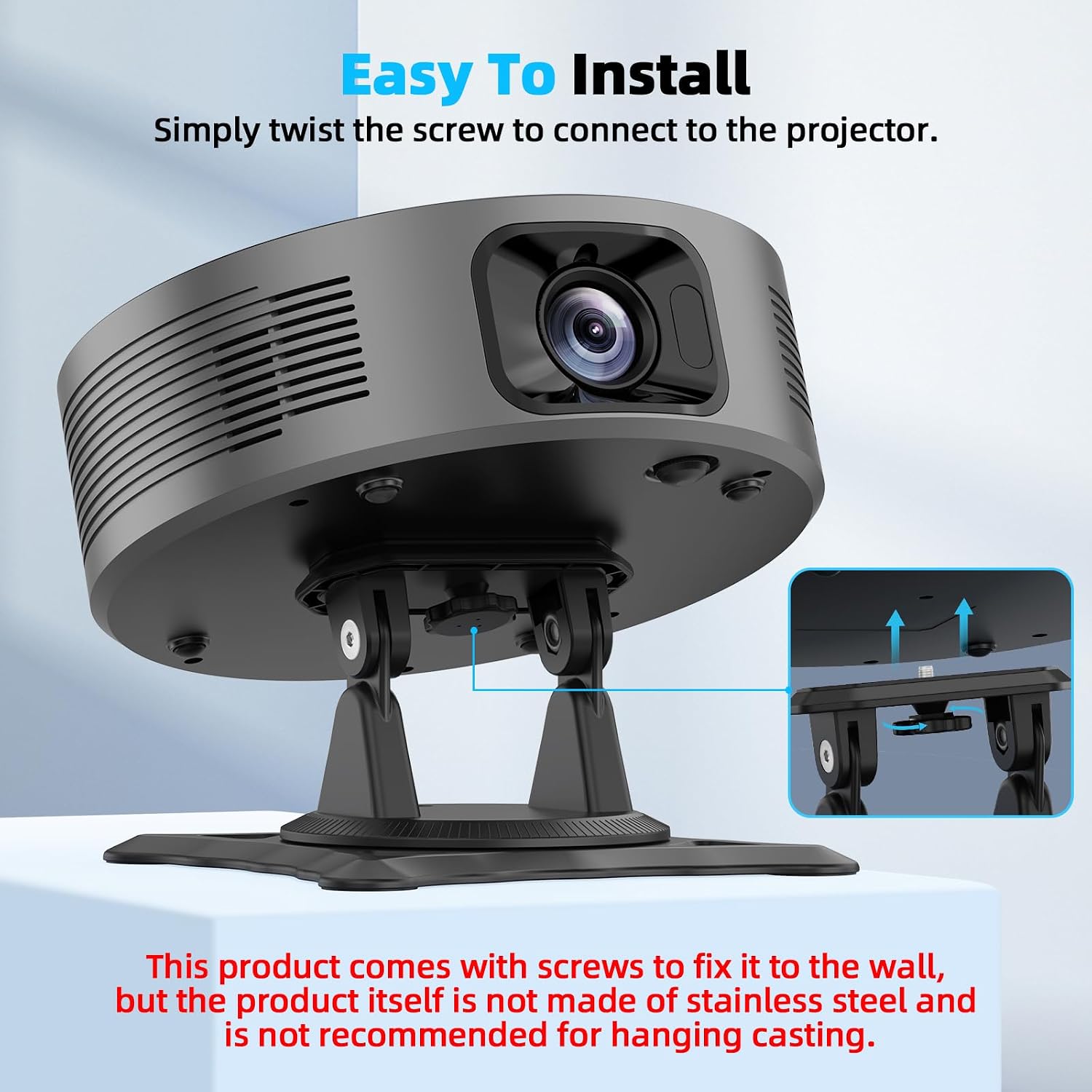
Image: Projector mounted on the stand, illustrating the simple attachment process and optional wall-mounting screws.
Operating Instructions
Adjusting your projector's position with the Bettdow Projector Stand is straightforward:
- Angle Adjustment: The stand allows for flexible up and down angle adjustments. Gently tilt the projector to achieve the desired pitch angle for your projection surface. The stand supports approximately 180 degrees of vertical tilt.
- 360-Degree Rotation: The base of the stand features a 360-degree swivel mechanism. Rotate the entire projector and stand assembly to adjust the horizontal orientation of your projection.

Image: Diagram illustrating the flexible 180-degree angle adjustment and 360-degree rotation capabilities of the stand.
Maintenance
To ensure the longevity and optimal performance of your projector stand:
- Cleaning: Wipe the stand with a soft, dry cloth. Avoid using abrasive cleaners or solvents, as these may damage the finish.
- Screw Tightness: Periodically check the tightness of the 1/4-inch screw connecting the projector to the stand. If it feels loose, gently tighten it by hand. Do not overtighten.
- Storage: When not in use, store the stand in a cool, dry place away from direct sunlight and extreme temperatures.
Troubleshooting
If you encounter issues with your projector stand, refer to the following common problems and solutions:
| Problem | Possible Cause | Solution |
|---|---|---|
| Projector feels unstable or wobbles on the stand. | The 1/4-inch screw is not fully tightened, or the stand is on an uneven surface. | Ensure the projector is securely twisted onto the 1/4-inch screw. Place the stand on a flat, stable surface. |
| Difficulty adjusting the angle or rotation. | Friction in the adjustment mechanism. | Apply gentle, even pressure when adjusting. The mechanism is designed for smooth operation without requiring excessive force. |
| Stand slides on the surface. | Non-slip pads are dirty or the surface is excessively smooth. | Clean the non-slip silicone pads on the base. Ensure the surface is clean and dry. |
Specifications
| Model Number | BD3095 |
| Product Weight | Approximately 240g (0.53 lbs) |
| Product Material | ABS |
| Load-bearing Capacity | Up to 5 KG (11 lbs) |
| Package Dimensions | 7.8 x 7.48 x 4.02 inches |
| Mounting Type | Tabletop Mount |
| Special Features | Adjustable, Kickstand, Lightweight, Non-Slip |
| Compatible Devices | Projectors with 1/4-inch screw hole |

Image: Detailed dimensions and key parameters of the Bettdow Projector Stand BD3095.
Warranty and Support
For warranty information and customer support, please refer to the product packaging or contact Bettdow customer service directly. Keep your purchase receipt for any warranty claims.