
radtel
Radtel RT-900 Handheld Walkie Talkie Instruction Manual
Model: RT-900
Manufacturer: Xiamen Radtel Electronics Co.,Ltd
1. Introduction
This manual provides detailed instructions for the operation, maintenance, and troubleshooting of your Radtel RT-900 8W Multi Band Ham Radio Handheld Walkie Talkie. Please read this manual thoroughly before using the device to ensure proper and safe operation.

Figure 1.1: Radtel RT-900 Walkie Talkie shown alongside its mobile application interface, demonstrating the device's modern design and digital programming capabilities.
2. What's in the Box
Verify that all items are present in the package:
- 1x RT-900 BT main unit
- 1x 2200mAh Li-Ion battery
- 1x Dual-band antenna
- 1x Belt clip
- 1x Type-C charging cable
- 1x Power adapter with USB port
- 1x English user manual (this document)
3. Product Overview
3.1. Key Features
- Multi-Band Operation: Supports VHF/UHF frequencies, including Aviation Air Band reception.
- High Power Output: 8W for extended communication range.
- Advanced Noise Reduction: Ensures clear audio in noisy environments.
- Flexible Programming: Program via mobile app (iOS/Android), PC CPS software, or CHIRP.
- Large LCD Display: Shows channel number, frequency, and names simultaneously.
- VOX Function: Hands-free voice-activated transmission.
- NOAA Weather Radio: Stay informed with weather alerts.
- Type-C Charging: Convenient and fast charging.
- 256 Channels: Ample storage for various frequencies.

Figure 3.1: Front view of the Radtel RT-900, highlighting its display and keypad layout.

Figure 3.2: Comparison illustrating the features of the Standard and Bluetooth versions of the RT-900.
4. Setup
4.1. Battery Installation and Charging
The RT-900 comes with a 2200mAh Li-Ion battery. Ensure the battery is fully charged before first use.
- Align the battery with the back of the radio and slide it into place until it clicks securely.
- To charge, connect the Type-C charging cable to the port on the bottom of the battery.
- Connect the other end of the cable to the provided power adapter or any compatible USB power source (e.g., laptop, car charger).

Figure 4.1: The RT-900 battery being charged via a Type-C cable, illustrating various charging environments such as wall outlet, laptop, and car charger.
4.2. Antenna Attachment
Screw the dual-band antenna clockwise onto the antenna connector on top of the radio until it is finger-tight. Do not overtighten.
5. Operating Instructions
5.1. Power On/Off and Volume
To power on the radio, rotate the top-left knob clockwise. Continue rotating to adjust the volume. Rotate counter-clockwise until a click is heard to power off.
5.2. Switching Channel Frequency and AB Band
The RT-900 supports both Frequency (VFO) mode and Channel (Memory) mode. You can also switch between A and B bands for dual watch functionality.
Video 5.1: Demonstrates how to switch between frequency mode and channel mode, and how to select between the A and B bands on the Radtel RT-900.
5.3. Programming the Radio
The RT-900 offers multiple programming methods for convenience:
- Mobile App: Supports iOS and Android. Scan the QR code in the product packaging or search for the Radtel app in your app store.
- PC CPS Software: Use the dedicated Computer Programming Software for detailed configuration.
- CHIRP Programming: Compatible with CHIRP software for advanced users.

Figure 5.3.1: Illustrates the RT-900's compatibility with CHIRP software for programming and highlights its noise reduction capabilities.
Video 5.3.2: A guide on how to program the Radtel RT-900 using CHIRP software.
5.4. Storing VFO Frequency into a Channel
To save a VFO (Variable Frequency Oscillator) frequency into a memory channel:
- Tune to the desired frequency in VFO mode.
- Access the menu and navigate to the memory storage option.
- Select an empty channel or overwrite an existing one to save the frequency.
Video 5.4.1: Instructions on how to store a VFO frequency into a channel on the Radtel RT-900.
5.5. Fast Frequency Copy from Other Radios
The RT-900 can quickly copy frequencies from other radios:
- Activate the frequency copy function on your RT-900.
- Place the transmitting radio near the RT-900.
- Transmit a signal from the other radio. The RT-900 will detect and display the frequency.
- Confirm to save the copied frequency.

Figure 5.5.1: Overview of the RT-900 Standard Edition features, including UV full frequency band, 2200mAh battery, Aviation frequency band, VOX, 256 Channels, and Type-C fast charging.
Video 5.5.2: Demonstrates the process of quickly copying a frequency from another radio to the Radtel RT-900.
5.6. Noise Reduction
The RT-900 features advanced noise reduction technology to provide clear communication even in loud environments. This feature is automatically active to filter out background noise.
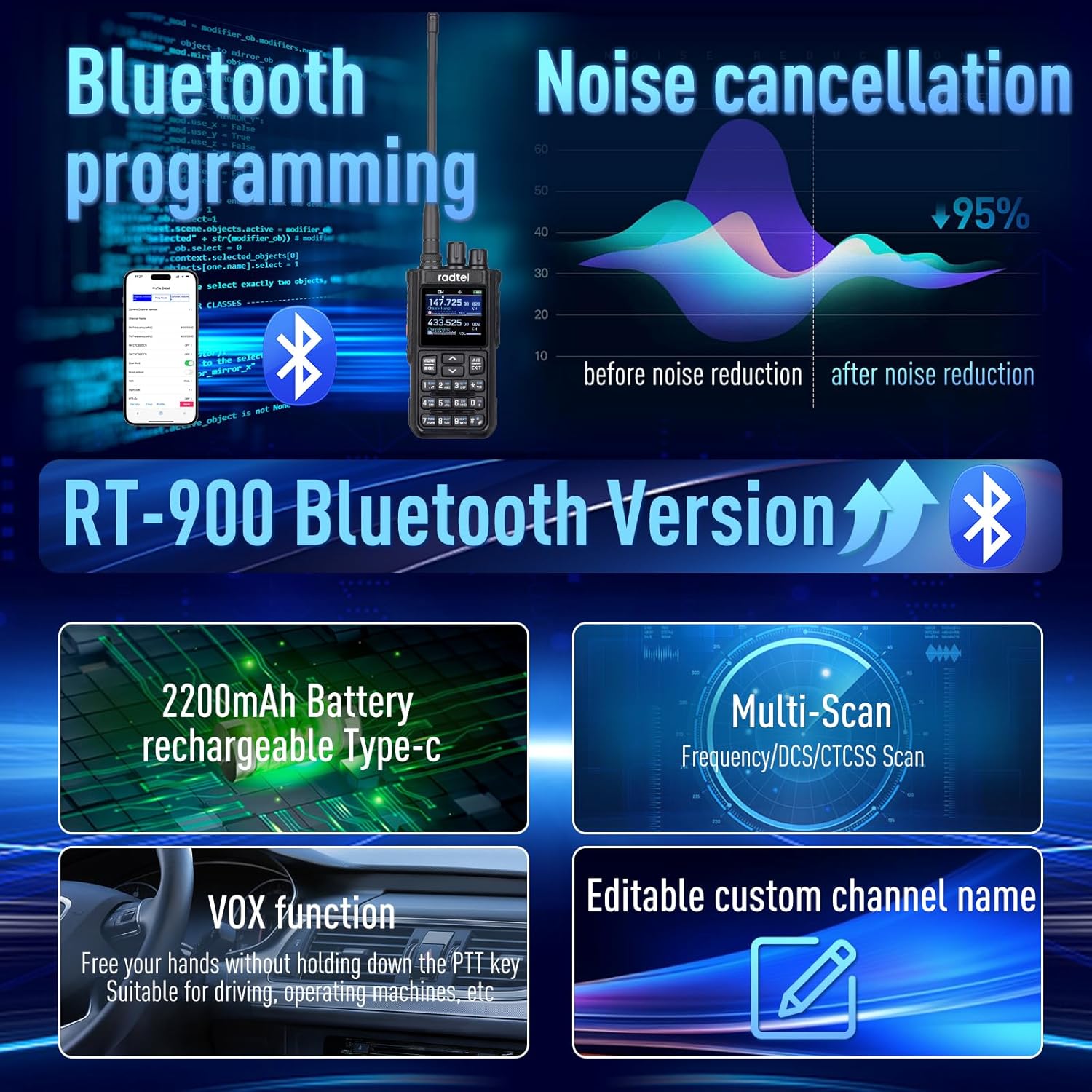
Figure 5.6.1: Visual representation of the noise cancellation feature, showing a significant reduction in noise after processing.
5.7. VOX Function (Voice Operated Transmission)
The built-in VOX function allows for hands-free communication. When enabled, the radio will transmit automatically when it detects your voice, eliminating the need to press the PTT button.
- Access the radio's menu to enable or disable the VOX function.
- Adjust the VOX sensitivity level to suit your environment and voice volume.
5.8. NOAA Weather Radio and Aviation Air Band
The RT-900 can receive NOAA weather alerts and communications from the aviation band (108-136MHz RX). This allows users to stay informed about weather conditions and air traffic.
- Tune to the designated NOAA weather frequencies for local alerts.
- Switch to the aviation band to listen to air traffic communications.
6. Maintenance
- Cleaning: Use a soft, damp cloth to clean the radio's exterior. Do not use harsh chemicals or solvents.
- Battery Care: To prolong battery life, avoid overcharging and fully discharging the battery. Store the radio and battery in a cool, dry place when not in use for extended periods.
- Antenna: Ensure the antenna is securely attached. Avoid bending or stressing the antenna.
- Storage: Store the radio in a dry, dust-free environment away from direct sunlight and extreme temperatures.
7. Troubleshooting
| Problem | Possible Cause | Solution |
|---|---|---|
| Radio does not power on. | Battery is low or not installed correctly. | Charge the battery or re-install it securely. |
| Poor audio quality / Noise. | Weak signal, interference, or noise reduction settings. | Ensure good signal strength. Check noise reduction settings. Adjust volume. |
| Cannot program radio via app/PC. | Incorrect software/driver, Bluetooth not enabled, or radio not in programming mode. | Verify correct software/drivers are installed. Ensure Bluetooth is active on radio and device. Follow programming instructions carefully. |
| Short battery life. | Frequent transmission, high power setting, or aging battery. | Reduce transmission time. Use lower power settings when possible. Consider replacing the battery if it's old. |
| Side button functions revert to factory settings. | Possible firmware bug or incorrect save procedure. | Ensure firmware is updated to the latest version. Double-check save procedures after customizing settings. |
8. Specifications
| Feature | Detail |
|---|---|
| Model Number | RT-900 |
| Item Weight | 14.4 ounces (approx. 408 grams) |
| Product Dimensions | 1.57 x 2 x 10.62 inches (approx. 4 x 5.1 x 27 cm) |
| Batteries | 1x 9V batteries required (included) - Note: Product details indicate 2200mAh Li-Ion, 9V might be a generic placeholder. |
| Number of Channels | 256 |
| Frequency Range | 144-148Mhz (VHF) / 420-450Mhz (UHF) |
| Tuner Technology | UHF/VHF |
| Talking Range Maximum | 6 Kilometers (approx. 3.7 miles) |
| Voltage | 7.4 Volts |
| Water Resistance Level | Not Water Resistant |
| Special Features | Bluetooth programming, Type-C charging, Noise reduction |
| Country of Origin | China |
9. Warranty & Support
9.1. Warranty Information
The Radtel RT-900 comes with a 1-Year Warranty from the date of purchase. This warranty covers manufacturing defects and malfunctions under normal use. Please retain your proof of purchase for warranty claims.
For detailed warranty terms and conditions, please refer to the official Radtel website or contact customer support.
9.2. Customer Support
For technical assistance, troubleshooting, or any inquiries regarding your Radtel RT-900, please contact Radtel customer support. Contact information can typically be found on the manufacturer's official website or on the product packaging.
When contacting support, please have your product model (RT-900) and purchase details ready.
Related documents


Ask a question about this manual
Ask about setup, troubleshooting, compatibility, parts, safety, or missing instructions. Manuals+ will review the question and use this page’s manual context to help answer it.