
1. Introduction
Thank you for choosing the XINFUTE CU-CLD106 replacement remote control. This manual provides essential information for setting up, operating, and maintaining your new remote control. This remote is designed to be compatible with specific Pioneer LaserDisc player models, including CLD-S105, CLD-S180, and CLD-S270.
2. Product Overview
The XINFUTE CU-CLD106 remote control is a direct replacement designed to provide full functionality for compatible Pioneer LaserDisc players. It features a durable ABS material construction and an ergonomic design for comfortable use.
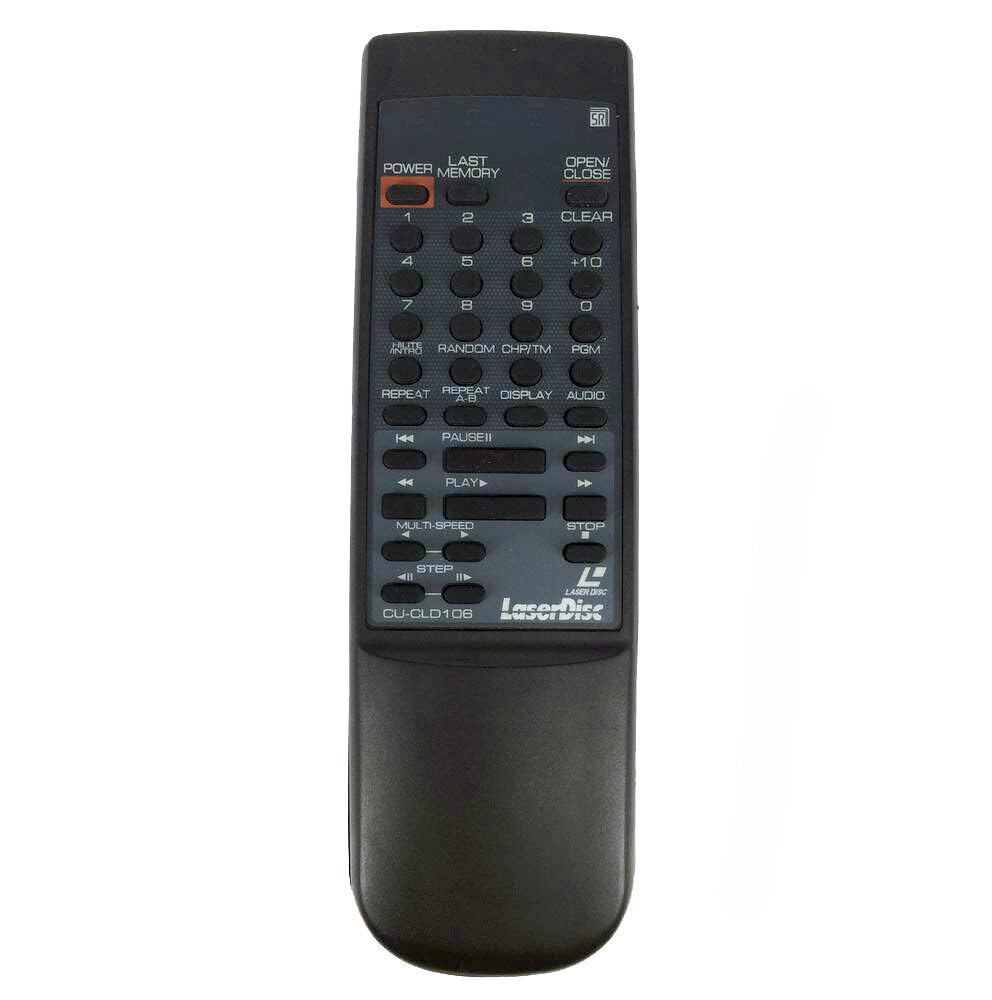
Figure 2.1: Front view of the CU-CLD106 remote control. This image displays the full button layout, including power, numeric keys, playback controls, and function buttons for LaserDisc operation.

Figure 2.2: Back view of the CU-CLD106 remote control. This image shows the smooth, black rear casing and the location of the battery compartment cover.

Figure 2.3: Battery compartment of the CU-CLD106 remote control with the cover removed. This image illustrates the two slots for AAA batteries and the spring contacts.
3. Setup
3.1. Battery Installation
The remote control requires two (2) AAA batteries for operation. Batteries are not included with the remote control.
- Locate the battery compartment on the back of the remote control.
- Slide the battery compartment cover downwards or press the latch and lift to open it. (Refer to Figure 2.2 and 2.3).
- Insert two new AAA batteries, ensuring the positive (+) and negative (-) terminals align correctly with the markings inside the compartment.
- Replace the battery compartment cover by sliding it back into place until it clicks securely.
Note: Always use fresh batteries and replace both batteries at the same time. Do not mix old and new batteries or different types of batteries.
4. Operating Instructions
This remote control is designed to replicate the functions of the original Pioneer LaserDisc player remote for models CLD-S105, CLD-S180, and CLD-S270. Point the remote control directly at the LaserDisc player's infrared sensor for optimal performance.
4.1. Basic Functions
- POWER: Turns the LaserDisc player on or off.
- OPEN/CLOSE: Opens or closes the disc tray.
- PLAY (►): Starts disc playback.
- PAUSE (▐▐): Pauses disc playback. Press again to resume.
- STOP (■): Stops disc playback.
- SKIP (◀◀ / ►►): Skips to the previous or next track/chapter.
- FAST FORWARD / REWIND (►►► / ◀◀◀): Fast forwards or rewinds through the disc.
4.2. Advanced Functions
- Numeric Buttons (0-9, +10): Used for direct track/chapter selection. Enter the desired number and press PLAY.
- CLEAR: Clears an incorrect entry or selection.
- RANDOM: Initiates random playback of tracks.
- CH/TM (Chapter/Time): Toggles display modes or selection for chapter/time search.
- DISPLAY: Shows disc information on the screen.
- AUDIO: Selects audio tracks or modes (e.g., stereo, mono, digital audio).
- REPEAT: Repeats the current track, chapter, or entire disc.
- MULTI-SPEED: Adjusts playback speed.
- STEP: Advances playback frame by frame.
- LAST MEMORY: Recalls the last playback position.
- PGM (Program): Used for programming a sequence of tracks for playback.
5. Maintenance
5.1. Cleaning
To clean the remote control, gently wipe it with a soft, dry cloth. For stubborn dirt, slightly dampen the cloth with water. Do not use abrasive cleaners, solvents, or alcohol, as these can damage the remote's surface or internal components.
5.2. Battery Replacement
Replace batteries when the remote's range decreases or it stops responding. Always replace both AAA batteries simultaneously. Remove batteries if the remote will not be used for an extended period to prevent leakage and damage.
6. Troubleshooting
- Remote not responding:
- Check if the batteries are inserted correctly with the correct polarity.
- Replace old batteries with new ones.
- Ensure there are no obstructions between the remote control and the LaserDisc player's infrared sensor.
- Make sure you are within the effective operating range of the remote control.
- Specific functions not working:
- Verify that your LaserDisc player model (CLD-S105, CLD-S180, CLD-S270) is compatible with this remote.
- Some advanced functions may require specific disc types or player modes. Refer to your LaserDisc player's original manual for detailed operation of these features.
7. Specifications
| Model Number | CU-CLD106 |
| Brand | XINFUTE |
| Compatible Devices | Pioneer LaserDisc Players (CLD-S105, CLD-S180, CLD-S270) |
| Material | ABS Material |
| Color | Black (As Shown) |
| Power Source | 2 x AAA Batteries (not included) |
| Product Dimensions | 6 x 3 x 1 inches (approximate) |
| Item Weight | 2.82 ounces (approximate) |
8. Support
All XINFUTE products are inspected before shipment to ensure quality. If you encounter any issues or are not satisfied with your purchase, please contact us directly. We recommend reaching out within 24 hours of receiving your product for assistance. Our customer support team is available to help with any questions or concerns regarding the CU-CLD106 remote control.