
Introduction
Thank you for choosing the Transformers TF-T26 Pro Wireless Earbuds. These earbuds are designed to provide a high-quality audio experience for both gaming and music, featuring Bluetooth 5.4 technology for stable connectivity. This manual will guide you through the setup, operation, and maintenance of your new earbuds to ensure optimal performance.
What's in the Box
- User Manual
- Charging Case
- Ear Cushions (various sizes)
- Type-C Charging Cable
Product Overview
The Transformers TF-T26 Pro earbuds feature an ergonomic design with earhooks for a secure fit, making them suitable for sports and active use. The charging case includes an LED digital display to show battery status.
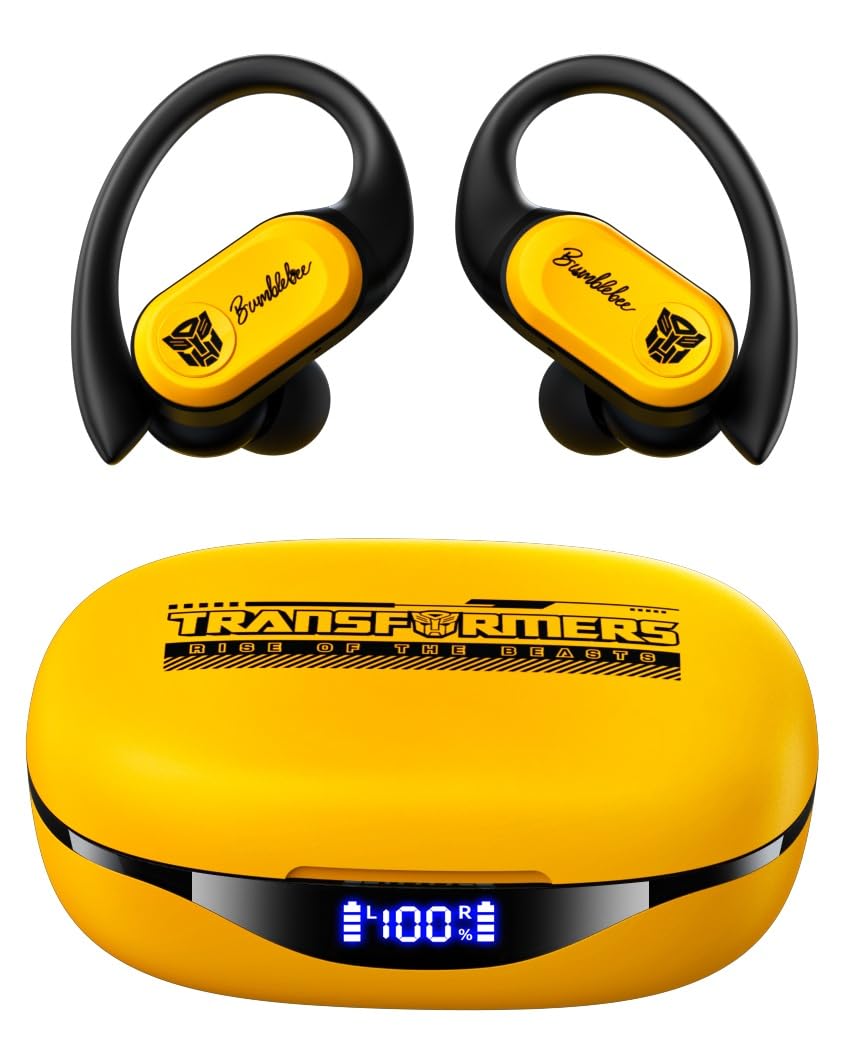
Image: Transformers TF-T26 Pro Wireless Earbuds in their charging case.

Image: Earbuds in charging case with LED battery display.
Setup
1. Charging the Earbuds and Case
Before first use, fully charge the earbuds and charging case. Connect the provided Type-C charging cable to the charging port on the case and a power source. The LED digital display on the case will indicate the charging status and battery level.
- Charging Time: Approximately 1.5 hours for both earbuds and case.
- Earbud Playtime: Up to 8 hours on a single charge.
- Total Playtime with Case: Up to 65 hours.

Image: Battery life and Type-C charging details.
2. Bluetooth Pairing
- Open the charging case. The earbuds will automatically enter pairing mode.
- On your device (smartphone, tablet, etc.), enable Bluetooth.
- Search for available devices and select "TF-T26 Pro" from the list.
- Once connected, you will hear an audible confirmation, and the device will show "Connected".
The earbuds utilize Bluetooth 5.4 technology for a fast and stable connection.

Image: Bluetooth 5.4 fast pairing connection.
Operating Instructions
Wearing the Earbuds
Select the appropriate ear cushions for a comfortable and secure fit. The earhooks are designed to keep the earbuds stable during movement.

Image: Ergonomic design and flexible earhooks for secure fit.
Touch Controls
The TF-T26 Pro earbuds feature intelligent touch controls for easy management of audio playback and calls.

Image: Intelligent Touch Control functions.
- Single Tap (L/R): Volume + (R), Volume - (L)
- Double Tap (L/R): Pause/Play, Answer/Hang Up Call
- Triple Tap (L): Previous Song
- Triple Tap (R): Next Song
- Long Press (2s) (L/R): Reject Call
- Long Press (2s) (L): Voice Assistant
- Long Press (2s) (R): Game Mode / Music Mode Switch
Audio Modes
Switch between two distinct audio modes:
- Gaming Mode: Provides ultra-low latency audio synchronization, ideal for mobile gaming and video playback.
- Music Mode: Delivers rich HiFi sound with deep bass, clear mids, and crisp highs for an immersive listening experience.
Sound Quality
The earbuds are equipped with 13mm magnetically levitated drivers, providing rich and detailed audio across all frequencies.

Image: 13mm Magnetic Suspension Diaphragm Speaker.
ENC Call Clarity
Advanced Environmental Noise Cancellation (ENC) technology reduces ambient noise during calls, ensuring your voice is heard clearly.
Maintenance
Cleaning
Regularly clean the earbuds and charging case with a soft, dry cloth. Avoid using harsh chemicals or abrasive materials. Ensure the charging contacts are free of debris.
Storage
When not in use, store the earbuds in their charging case to protect them from dust and damage. Store in a cool, dry place.
Water Resistance
The earbuds feature an IPX5 waterproof rating, making them resistant to splashes, sweat, and rain. They are suitable for workouts and outdoor activities but should not be submerged in water.

Image: IPX5 Waterproof rating for comfortable movement without fear of sweat.
Troubleshooting
- Earbuds not pairing: Ensure both earbuds are in the charging case, then open the lid to activate pairing mode. Check your device's Bluetooth settings and try reconnecting.
- No sound: Verify the earbuds are connected to your device and the volume is turned up on both the earbuds and your device.
- Charging issues: Clean the charging contacts on both the earbuds and the case. Ensure the Type-C cable is securely connected to a working power source.
- Poor call quality: Ensure the earbuds are properly seated in your ears. The ENC feature works best when the microphone is not obstructed.
Specifications
| Feature | Detail |
|---|---|
| Model Name | TF-T26 Pro |
| Bluetooth Version | 5.4 |
| Bluetooth Range | 26-32 FT (8-10 meters) |
| Earbud Battery Capacity | 50mAh |
| Charging Case Battery Capacity | 550mAh |
| Earbud Playtime | Up to 8 hours |
| Total Playtime (with case) | Up to 65 hours |
| Charging Port | Type-C |
| Charging Time | Approx. 1.5 hours |
| Frequency Response Range | 20Hz-20KHz |
| Speaker Impedance | 32Ω |
| Sensitivity | 109dB±3dB |
| Driver Size | 13mm |
| Water Resistance | IPX5 |
| Noise Control | Environmental Noise Cancellation (ENC) |
Official Product Video
Video: An overview of the Transformers TF-T26 Pro Wireless Earbuds, demonstrating features like Bluetooth pairing, smart touch controls, secure fit for sports, IPX5 waterproofing, Hi-Fi sound quality, and ENC noise cancellation for calls.
Warranty and Support
Your Transformers TF-T26 Pro Wireless Earbuds come with a 30-day warranty from the date of purchase. For any support inquiries or warranty claims, please refer to your purchase documentation or contact the retailer.


