
1. Important Safety Information
Please read this manual thoroughly before installation and operation. Keep these instructions for future reference.
- Ensure the power supply is disconnected before installation, cleaning, or maintenance.
- Installation must be performed by a qualified electrician in accordance with local wiring regulations.
- The mounting structure must be capable of supporting the fan's weight (approximately 10 kg).
- Ensure fan blades are at least 2.3 meters (7.5 feet) from the floor and 0.5 meters (1.6 feet) from any walls or obstructions.
- Do not insert objects into the fan blades while the fan is operating.
- This appliance is for indoor use only.
2. Package Contents
Verify that all components are present and undamaged:
- Ceiling Fan Motor Assembly
- Fan Blades (5x)
- LED Light Kit
- Remote Control with Wall Mount
- Mounting Bracket and Hardware
- Downrod
- User Manual

Image: Key components including the remote control, LED light module, and LED driver board.
3. Specifications
| Brand | Newday |
| Model Number | ND-56-1126BKM-DE |
| Size | 142 cm (56 inches) |
| Height | 32 cm (12.6 inches) |
| Weight | 10 kg |
| Room Size Recommendation | 16-36 m² |
| Fan Blade Material | ABS Plastic |
| Motor Type | DC Motor (32W) |
| Air Volume | 7000 CFM (Max) |
| Fan Speeds | 6 speeds + Sleep Mode |
| Light Type | Integrated Dimmable LED (24W) |
| Luminous Flux | 460 LM (20%) - 2300 LM (100%) |
| Color Temperature | 3000K (Warm White) - 6500K (Cool White) |
| LED Lifespan | 30,000 hours |
| Control Method | Remote Control |
| Timer Functions | 1 hour, 3 hours, 6 hours |
| Special Features | Memory Function, Reversible (Summer/Winter Mode) |
| Voltage | 220 Volts |

Image: Fan dimensions and compatible room sizes, illustrating flat and sloped ceiling installation.

Image: Energy efficiency label for the fan.

Image: Detailed product information sheet in English.
4. Setup (Installation)
Installation of the Newday ceiling fan is designed to be straightforward, but professional installation is recommended for safety and optimal performance.
4.1 Pre-Installation Checks
- Ensure the ceiling junction box is securely mounted and can support the fan's weight.
- Verify that the electrical wiring is compatible with the fan's voltage (220V).
- Gather all necessary tools: screwdriver, wire strippers, ladder, etc.
4.2 Mounting the Fan
- Attach the mounting bracket to the ceiling junction box.
- Hang the motor assembly onto the mounting bracket.
- Connect the electrical wires according to the wiring diagram provided in the separate installation guide. Ensure all connections are secure.
- Carefully tuck all wires and the receiver into the canopy. This step may require patience due to limited space.
- Secure the canopy to the mounting bracket.
- Attach the fan blades to the motor hub. Ensure they are firmly secured.
- Install the LED light kit and light cover.
The fan supports both flat ceiling mounts and sloped ceilings with an inclination of up to 15 degrees.

Image: General installation guide with wiring diagram.
5. Operating Instructions
The Newday ceiling fan is operated using the included remote control.
5.1 Remote Control Functions

Image: Remote control layout and functions.
- Fan On/Off: Press the fan icon button to turn the fan on or off.
- Fan Speed: Buttons 1-6 control the fan speed. 1 is the lowest, 6 is the highest.
- Light On/Off: Press the light bulb icon button to turn the light on or off.
- Color Temperature Adjustment: Press and hold "WW" to increase color temperature (towards cool white, 6500K). Press and hold "DW" to decrease color temperature (towards warm white, 3000K).
- Brightness Adjustment: Press "+" to increase brightness (20%-100%). Press "-" to decrease brightness (100%-20%).
- Sleep Mode: Activates a gentle airflow by cycling through speeds 1, 2, and 3 every 20 seconds.
- Timer Function: Set the fan to turn off automatically after 1 hour, 3 hours, or 6 hours using the respective buttons. Note: Using any other remote function after setting the timer will cancel the timer.
- Memory Function: The fan remembers the last brightness, color temperature, and speed settings when powered off and on.
5.2 Summer and Winter Mode (Reversible Function)
The fan features a reversible motor for year-round comfort.
- Summer Mode (Anti-clockwise rotation): Creates a downward airflow, generating a cooling breeze.
- Winter Mode (Clockwise rotation): Creates an upward airflow, circulating warm air trapped near the ceiling to balance room temperature.
To switch modes, press the reverse function button on the remote control while the fan is operating. The fan will slowly stop and then begin rotating in the opposite direction.

Image: Summer and Winter mode operation.

Image: Stepless adjustable color temperature and brightness.

Image: Fan speed settings and air volume.
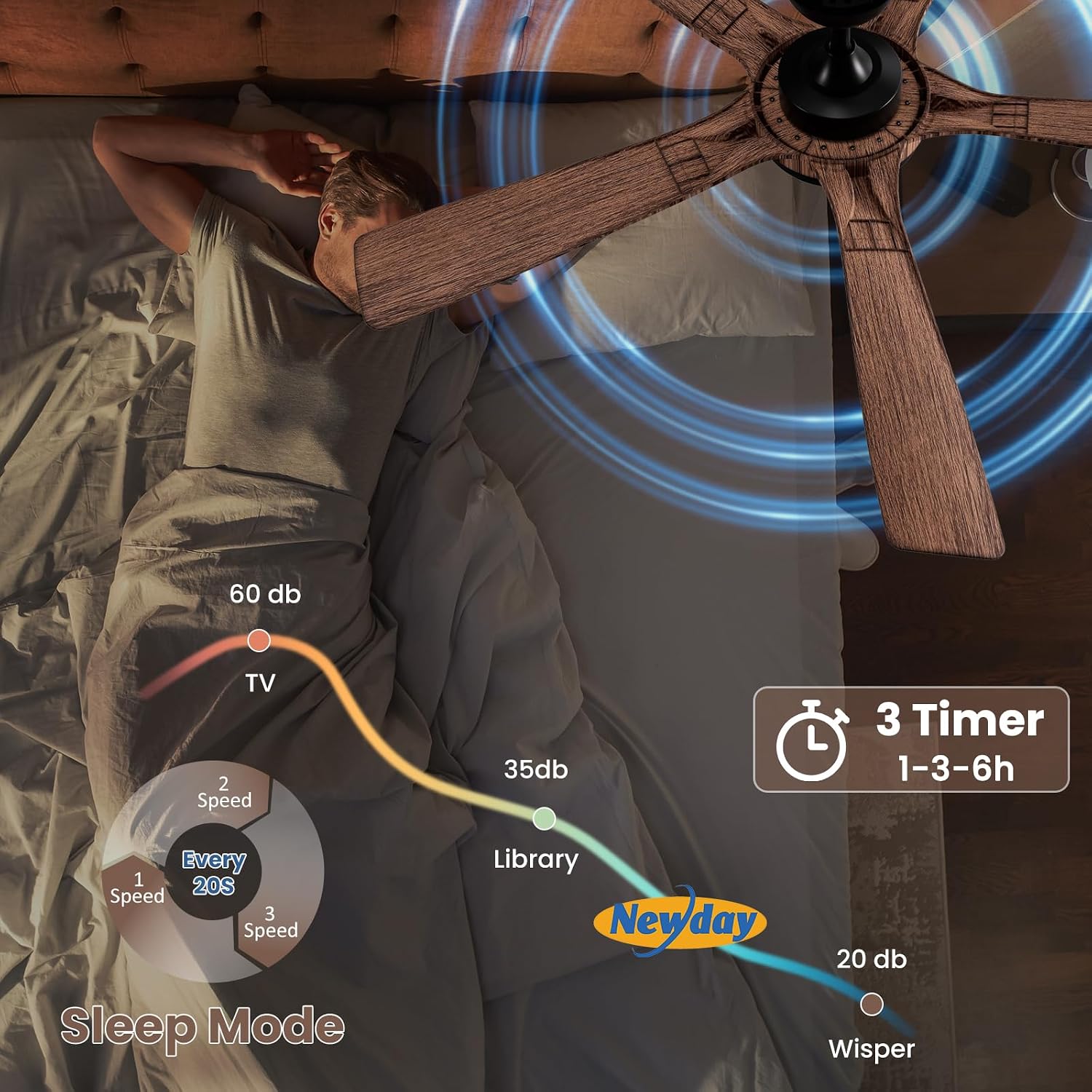
Image: Sleep mode, timer functions, and noise levels.
6. Maintenance
Regular maintenance ensures the longevity and optimal performance of your ceiling fan.
- Cleaning: Periodically clean the fan blades and motor housing with a soft, damp cloth. Do not use abrasive cleaners or solvents. Ensure the power is off before cleaning.
- Blade Inspection: Check fan blades for any signs of damage or warping. The ABS plastic blades are designed for durability and resistance to deformation.
- Tightness: Annually check all screws and fasteners for tightness. Loose connections can cause noise or wobble.
- Light Source: The integrated LED light is designed for a long lifespan (30,000 hours) and is not user-replaceable. If the light fails, contact customer support.

Image: Comparison of fan blade materials, highlighting the durability of ABS plastic.
7. Troubleshooting
If you encounter issues with your Newday ceiling fan, refer to the following common problems and solutions:
| Problem | Possible Cause | Solution |
|---|---|---|
| Fan does not start | No power supply; Loose wiring; Remote control battery dead. | Check circuit breaker; Verify wiring connections; Replace remote control battery. |
| Light does not work | Loose wiring; LED module failure. | Check light kit wiring; Contact customer support if LED module is faulty. |
| Fan wobbles | Loose blades; Uneven blade balance; Loose mounting bracket. | Ensure all blade screws are tight; Check mounting bracket for secure installation; Use a balancing kit if necessary. |
| Excessive noise | Loose screws; Motor issue; Blades hitting an obstruction. | Tighten all screws; Ensure no obstructions are near blades; If motor noise persists, contact support. |
| Remote control not responding | Dead battery; Remote not paired; Obstruction between remote and receiver. | Replace battery; Refer to pairing instructions (if applicable); Ensure clear line of sight. |
If the problem persists after attempting these solutions, please contact Newday customer support.
8. Warranty and Support
Newday is committed to providing reliable products and excellent customer service.
- Warranty: This product comes with a 2-year warranty from the date of purchase, covering manufacturing defects.
- Customer Service: We offer 24-hour support to assist with any questions or issues you may have.
- Contact: If you require assistance with your ceiling fan, please contact Newday customer support. We are dedicated to providing the best solution.

Image: Newday brand logo.