1. Introduction
The GOYOJO Digital Gauss Meter is a portable, multifunctional magnetic field measuring instrument. It utilizes high-sensitivity, low-drift Hall sensors and advanced digital signal processing technology to provide accurate measurements. This device is designed for measuring the surface magnetic field of permanent magnet materials, residual magnetism of mechanical parts, and magnetic fields in separators and iron removers. It serves as an essential tool for magnetic material manufacturers, mechanical engineering, and research institutions.

Image 1.1: The GOYOJO Digital Gauss Meter with its connected Hall probe, demonstrating magnetic field measurement.
2. Safety Information
Please read and understand all safety instructions before operating the device. Failure to follow these instructions may result in injury or damage to the instrument.
- Do not attempt to disassemble or modify the instrument. Unauthorized modifications can lead to malfunction and void the warranty.
- Keep the device away from water and other liquids to prevent electrical shock or damage.
- Avoid exposing the instrument to extreme temperatures, direct sunlight, or high humidity.
- Handle the Hall probe with care. It is a sensitive component and can be damaged by excessive force or bending.
- Ensure the battery compartment is securely closed during operation.
- Dispose of batteries according to local regulations.
3. Package Contents
Verify that all items listed below are included in your package:
- GOYOJO Digital Gauss Meter x1
- Hall Sensor Probe x1
- 9V Battery x1
- User Manual x1
4. Product Overview
The GOYOJO Digital Gauss Meter features a clear display, intuitive controls, and a high-precision Hall sensor for reliable magnetic field measurements.

Image 4.1: Overview of the GOYOJO Digital Gauss Meter, showcasing its display and control buttons.
4.1 Device Components
- Main Unit: The primary device housing the display, control buttons, and internal electronics.
- LCD Display: Backlit screen showing measurement values, units, N/S pole indication, and battery status.
- Control Buttons:
- ON/OFF: Powers the device on or off.
- PEAK: Toggles between Peak Hold mode and Real-time mode.
- ZERO: Performs a one-key zeroing operation.
- UNIT: Switches between mT (millitesla) and Gs (Gauss) units.
- LIGHT: Activates or deactivates the display backlight.
- Hall Probe: External sensor connected to the main unit for detecting magnetic fields.
- Probe Connector: Secure port on the main unit for attaching the Hall probe.
5. Setup
5.1 Battery Installation
The device is powered by a 9V battery.
- Locate the battery compartment on the back of the main unit.
- Open the battery compartment cover.
- Connect the 9V battery to the battery clip, ensuring correct polarity.
- Place the battery inside the compartment and close the cover securely.
5.2 Connecting the Hall Probe
The Hall probe is essential for magnetic field detection.
- Identify the probe connector port on the top of the main unit.
- Align the Hall probe connector with the port.
- Gently push and twist the connector clockwise until it is securely fastened.
- Ensure the connection is firm to prevent intermittent readings.

Image 5.1: Proper connection of the Hall probe to the main unit and the importance of perpendicular orientation for accurate measurement.
6. Operating Instructions
6.1 Power On/Off
- To power on the device, press the ON/OFF button.
- To power off the device, press and hold the ON/OFF button for a few seconds.
- The device features an automatic shutdown function after 5 minutes of inactivity to conserve battery life.
6.2 Measurement Modes
The Gauss Meter supports two primary measurement modes: Peak Hold and Real-time.

Image 6.1: Illustration of the Peak Hold and Real-time measurement modes on the device display.
- Peak Hold Mode: Press the PEAK button once to enter Peak Hold mode. In this mode, the display will show the maximum magnetic field value detected since entering the mode. This is useful for capturing transient or fluctuating magnetic fields.
- Real-time Mode: Press the PEAK button again to return to Real-time mode. The display will show the current magnetic field strength as it is being measured.
6.3 Zeroing
Before taking measurements, it is recommended to perform a zeroing operation to ensure accuracy.
- Ensure the Hall probe is away from any magnetic fields.
- Press the ZERO button. The display should show '000.00' or a value very close to zero.
6.4 Unit Switching
The device supports two units for magnetic field measurement: millitesla (mT) and Gauss (Gs).
- Press the UNIT button to toggle between mT and Gs.
- Note that 1 mT = 10 Gs.
6.5 Backlight Function
The display features a backlight for improved visibility in low-light conditions.
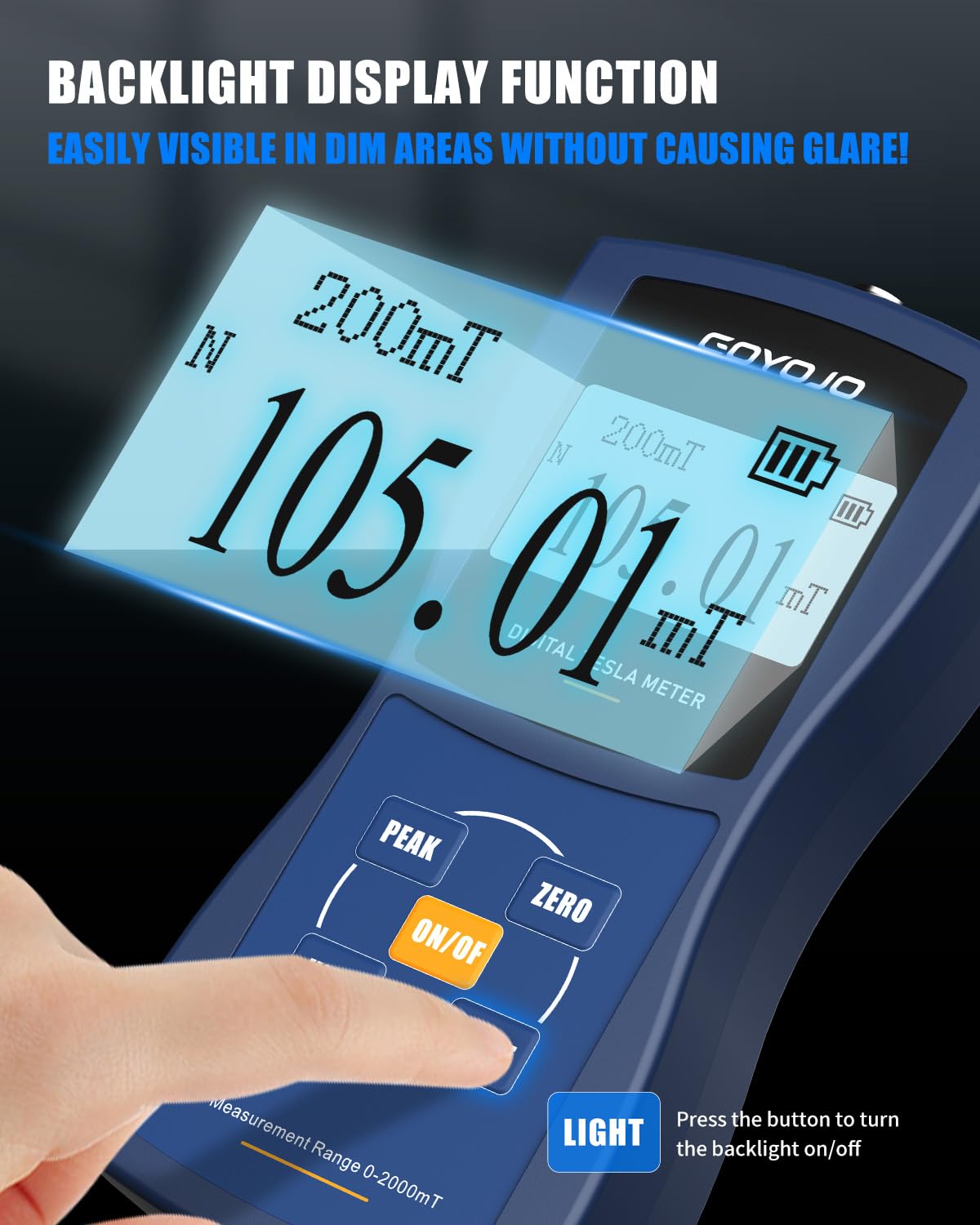
Image 6.2: The backlit display of the GOYOJO Digital Gauss Meter, enhancing readability in various lighting conditions.
- Press the LIGHT button to turn the backlight on or off.
6.6 N/S Pole Detection
The device can detect and display the North (N) or South (S) pole of a magnetic field.
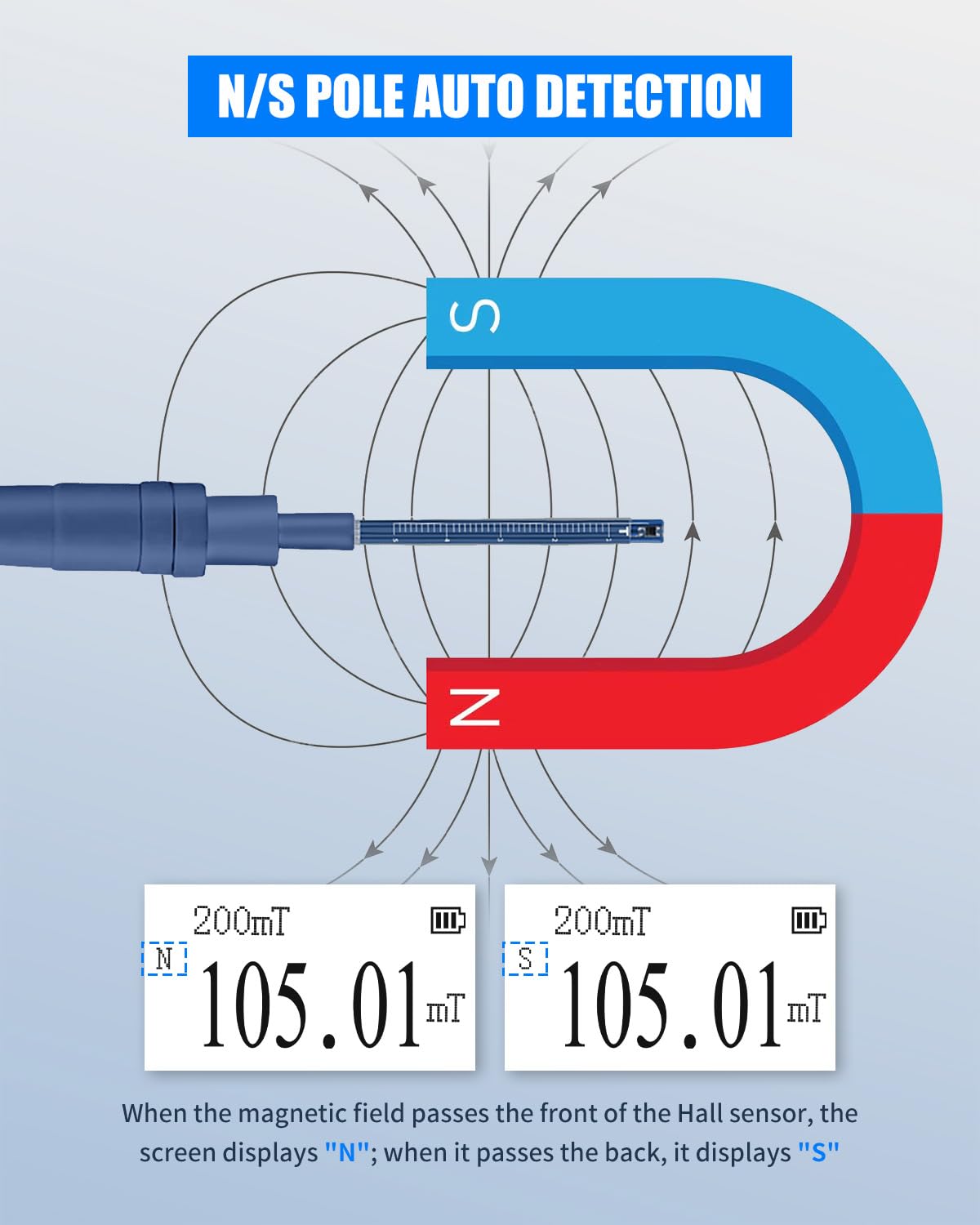
Image 6.3: Visual representation of how the Hall sensor detects and indicates North (N) and South (S) poles on the display.
- When the magnetic field passes the front of the Hall sensor, the screen displays "N".
- When it passes the back of the Hall sensor, the screen displays "S".
7. Maintenance
- Cleaning: Use a soft, dry cloth to clean the device. Do not use abrasive cleaners or solvents.
- Storage: When not in use for extended periods, remove the 9V battery to prevent leakage. Store the device and probe in a cool, dry place, away from strong magnetic fields and direct sunlight.
- Probe Care: The Hall probe is delicate. Avoid bending or applying excessive pressure to the probe tip. Always store it safely to prevent damage.
8. Troubleshooting
- Device does not power on: Check if the 9V battery is correctly installed and has sufficient charge. Replace the battery if necessary.
- Inaccurate or fluctuating readings:
- Ensure the Hall probe is positioned perpendicular to the magnetic field being measured.
- Perform a zeroing operation in an area free of magnetic fields.
- Check for any external magnetic interference in the measurement environment.
- Display is dim or unreadable: Press the LIGHT button to activate the backlight. If the issue persists, the battery may be low.
- Probe not detected: Ensure the Hall probe is securely connected to the main unit's connector port.
9. Specifications
The following table details the technical specifications of the GOYOJO Digital Gauss Meter (GT129 Series):
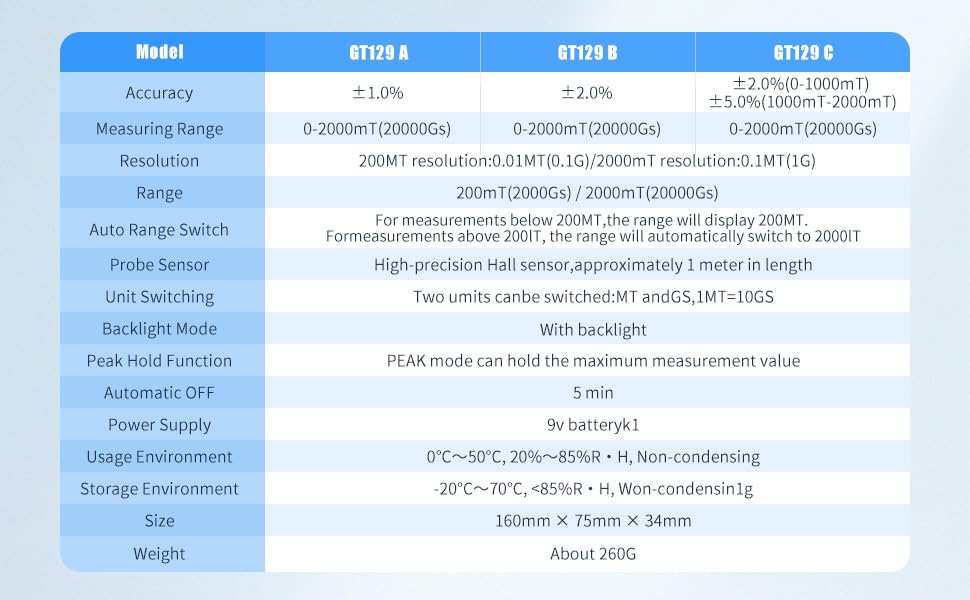
Image 9.1: Detailed specifications for the GT129A, GT129B, and GT129C models of the GOYOJO Digital Gauss Meter.
| Feature | GT129 A | GT129 B | GT129 C |
|---|---|---|---|
| Accuracy | ±1.0% | ±2.0% | ±2.0% (0-1000mT) ±5.0% (1000mT-2000mT) |
| Measuring Range | 0-2000mT (20000Gs) | ||
| Resolution | 200mT resolution: 0.01mT (0.1G) | 2000mT resolution: 0.1mT (1G) | |
| Range | 200mT (2000Gs) / 2000mT (20000Gs) | ||
| Auto Range Switch | For measurements below 200mT, the range will display 200mT. For measurements above 200mT, the range will automatically switch to 2000mT. | ||
| Probe Sensor | High-precision Hall sensor, approximately 1 meter in length | ||
| Unit Switching | Two units can be switched: mT and Gs, 1mT = 10Gs | ||
| Backlight Mode | With backlight | ||
| Peak Hold Function | PEAK mode can hold the maximum measurement value | ||
| Automatic OFF | 5 min | ||
| Power Supply | 9V battery x1 | ||
| Usage Environment | 0°C ~ 50°C, 20% ~ 85% RH, Non-condensing | ||
| Storage Environment | -20°C ~ 70°C, <85% RH, Non-condensing | ||
| Size | 160mm × 75mm × 34mm | ||
| Weight | About 260g | ||
10. Warranty and Support
GOYOJO provides dedicated customer support for this Digital Gauss Meter.
- Warranty: A 2-month replacement guarantee is provided from the date of purchase.
- Technical Support: Lifetime technical support is available to ensure a reliable and worry-free experience with your device.
- For any inquiries or assistance, please contact GOYOJO customer service. Refer to the product packaging or official website for contact details.


