
1. Introduction
Thank you for purchasing the Kaiser MSA-2073M Professional One Body Speaker. This powerful and versatile audio system is designed to deliver clear, robust sound for various events, both indoors and outdoors. Featuring dual 8-inch woofers, 70W RMS power, Bluetooth connectivity, a wireless microphone, and dynamic Infinity Light effects, the MSA-2073M is built to enhance your audio experience. Please read this manual carefully to ensure proper setup, operation, and maintenance of your speaker.
2. Safety Instructions
- Do not expose the speaker to rain or moisture to prevent fire or electric shock.
- Do not open the speaker casing. Refer all servicing to qualified personnel.
- Keep the speaker away from heat sources such as radiators, heat registers, stoves, or other apparatus that produce heat.
- Use only attachments/accessories specified by the manufacturer.
- Unplug the speaker during lightning storms or when unused for long periods.
- Ensure proper ventilation. Do not block any ventilation openings.
- Do not place heavy objects on top of the speaker.
- Avoid placing the speaker in unstable positions where it might fall.
3. Package Contents
Please check the contents of your package. If any items are missing or damaged, contact your retailer.
- Kaiser MSA-2073M Professional One Body Speaker
- Wireless Microphone
- USB Charging Cable
- Audio Cable (3.5mm AUX)
- User Manual
4. Product Overview
Familiarize yourself with the different parts and controls of your Kaiser MSA-2073M speaker.

Figure 4.1: Front View. Shows the speaker's front panel with dual 8-inch woofers and the dynamic Infinity Light display.

Figure 4.2: Rear View. Displays the speaker's rear, including the integrated handle and transport wheels for easy mobility.
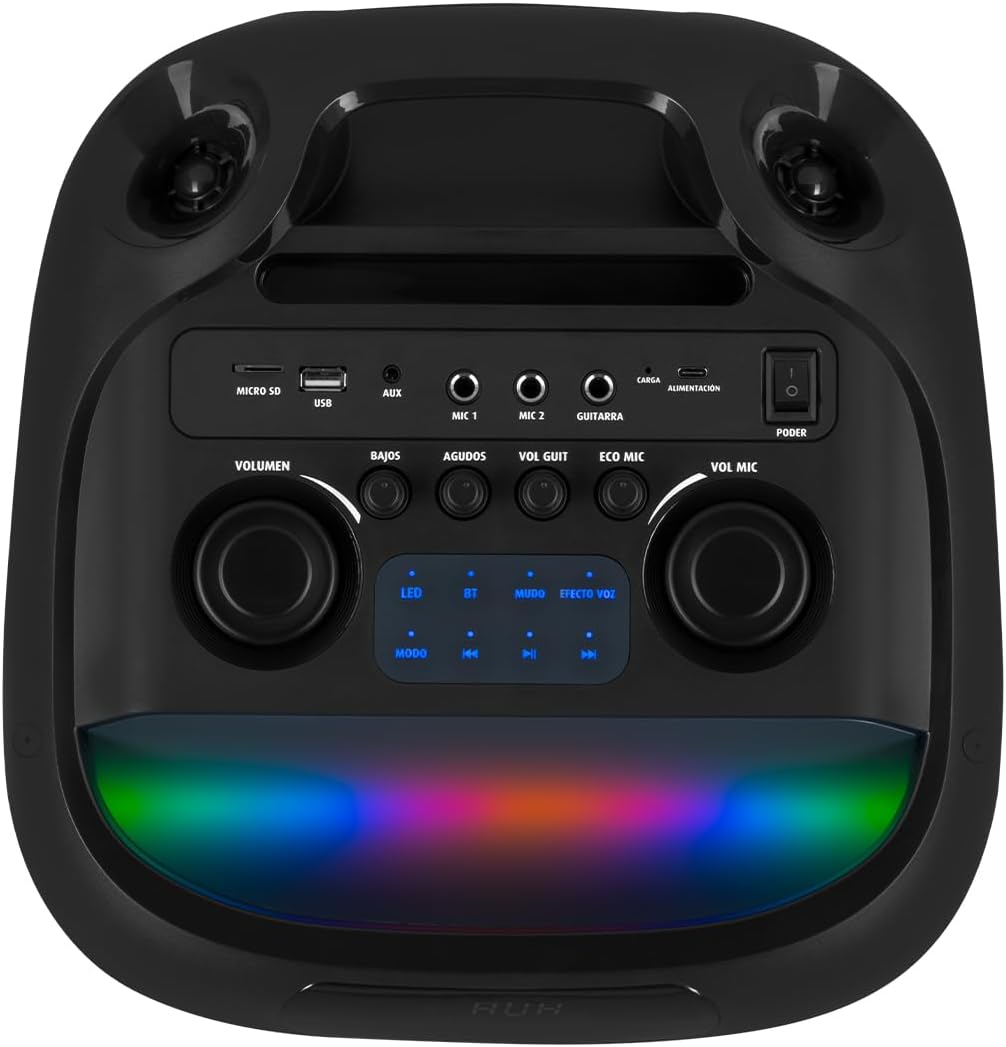
Figure 4.3: Control Panel. Details the top-mounted control panel with inputs for USB, Micro SD, AUX, two microphones, and a guitar, along with volume, bass, treble, and effect controls.

Figure 4.4: Wireless Microphone. The included wireless microphone for vocal performances and announcements.
5. Setup
5.1 Unpacking
- Carefully remove the speaker and all accessories from the packaging.
- Retain the packaging for future transport or storage.
5.2 Initial Charging
Before first use, it is recommended to fully charge the speaker's internal battery.
- Connect the provided USB charging cable to the speaker's charging port (labeled 'CARGA' or 'ALIMENTACIÓN' on the control panel).
- Connect the other end of the USB cable to a compatible USB power adapter (not included) or a powered USB port.
- The charging indicator light will illuminate. Allow several hours for a full charge.
- Once fully charged, the indicator light may change or turn off. Disconnect the charging cable.
5.3 Power On/Off
To power on the speaker, locate the 'PODER' (Power) switch on the control panel and slide it to the 'ON' position. To power off, slide it to 'OFF'.
6. Operating Instructions
6.1 Bluetooth Connection
Connect your mobile device wirelessly to the speaker.
- Turn on the speaker. The 'BT' indicator on the control panel should blink, indicating it's in pairing mode.
- On your mobile device, enable Bluetooth and search for available devices.
- Select "Kaiser MSA-2073M" from the list of devices.
- Once paired, the 'BT' indicator will stop blinking and remain solid. You can now play audio from your device through the speaker.
- The Bluetooth range is up to 10 meters.
6.2 AUX Input
Connect external audio devices using the 3.5mm AUX cable.
- Connect one end of the 3.5mm audio cable to the 'AUX' port on the speaker.
- Connect the other end to the headphone jack or audio output of your external device.
- Press the 'MODE' button on the speaker until 'AUX' mode is selected.
- Play audio from your external device.
6.3 USB/Micro SD Playback
Play music directly from a USB flash drive or Micro SD card.
- Insert a USB flash drive into the 'USB' port or a Micro SD card into the 'MICRO SD' slot.
- The speaker will automatically switch to USB/Micro SD mode and begin playing compatible audio files. If not, press the 'MODE' button to select the correct input.
- Use the playback controls (play/pause, next/previous track) on the speaker to manage your music.
6.4 Microphone Usage
Use the included wireless microphone for karaoke or announcements.
- Ensure the wireless microphone is powered on.
- The microphone will automatically connect to the speaker.
- Adjust the microphone volume using the 'VOL MIC' knob on the control panel.
- Use the 'ECO MIC' knob to adjust the echo effect for the microphone.
- The speaker also features five voice effects for the microphone, accessible via the 'EFECTOS VOZ' button.
6.5 Guitar Input
Connect an electric guitar to the speaker.
- Connect your guitar to the 'GUITARRA' input jack on the control panel.
- Adjust the guitar volume using the 'VOL GUIT' knob.
6.6 Sound Adjustments
Customize your audio output.
- VOLUME: Adjusts the overall master volume of the speaker.
- BAJOS (Bass): Adjusts the low-frequency output.
- AGUDOS (Treble): Adjusts the high-frequency output.
6.7 Infinity Light Effects
Enhance your listening experience with dynamic LED lighting.
- Press the 'LED' button on the control panel to cycle through different light modes or turn the lights off.
- The lights synchronize with the music for an immersive effect.
6.8 KSR-LINK (True Wireless Stereo)
Connect two MSA-2073M speakers for a true wireless stereo experience.
- Ensure both speakers are powered on and in Bluetooth mode, but not connected to any device.
- On one speaker, press and hold the 'MUDO' (Mute) button (which also functions as the KSR-LINK pairing button). You will hear a confirmation tone.
- The two speakers will automatically pair with each other.
- Once paired, connect your mobile device to one of the speakers via Bluetooth as described in section 6.1. Audio will now play in stereo through both speakers.
7. Charging
The speaker features a rechargeable battery for portable use. A full charge allows for prolonged use.
- Connect the USB charging cable to the speaker's charging port and a power source.
- The charging indicator will show the charging status.
- Avoid overcharging the battery. Disconnect the charger once the battery is full.
8. Maintenance
8.1 Cleaning
- Wipe the speaker with a soft, dry cloth.
- Do not use abrasive cleaners, waxes, or solvents.
8.2 Storage
- Store the speaker in a cool, dry place away from direct sunlight and extreme temperatures.
- If storing for an extended period, charge the battery periodically to maintain its lifespan.
9. Troubleshooting
| Problem | Possible Cause | Solution |
|---|---|---|
| No power | Battery is depleted; Power switch is off. | Charge the speaker; Turn the power switch to 'ON'. |
| No sound | Volume is too low; Incorrect input mode selected; Device not connected properly. | Increase volume; Press 'MODE' to select correct input; Reconnect device/Bluetooth. |
| Bluetooth not connecting | Speaker not in pairing mode; Device too far; Already connected to another device. | Ensure 'BT' indicator is blinking; Move device closer; Disconnect from other devices and try again. |
| Microphone not working | Microphone is off; Microphone volume is low; Microphone battery is low. | Turn on microphone; Increase 'VOL MIC' knob; Charge/replace microphone battery. |
10. Specifications
| Feature | Specification |
|---|---|
| Brand | Kaiser |
| Model | MSA-2073M |
| Speaker Size | 2 x 8 inches |
| RMS Power Output | 70 Watts |
| PMPO Power Output | 28000 Watts |
| Connectivity Technology | Wireless (Bluetooth) |
| Bluetooth Range | Up to 10 meters |
| Audio Output Mode | Stereo |
| Impedance | 3 Ohm |
| Frequency Response | 60 Hz |
| Control Method | Push Button, Rotary Knobs |
| Power Source | Battery |
| Dimensions (DxWxH) | 37.4 x 36.2 x 80 cm |
| Item Weight | 10.8 Kilograms |
| Included Accessories | Wireless microphone |
11. Product Video Overview
Video 11.1: Product Features and Unboxing. This video provides a quick overview of the Kaiser MSA-2073M speaker, showcasing its unboxing, key features like 70W RMS power, 10m Bluetooth range, included cables, and detailed views of the control panel with independent volume, bass, treble, microphone, guitar, and echo controls. It also highlights the five voice effects for the microphone, 3 Ohm impedance, and convenient transport wheels. The video also mentions the KSR-LINK technology for connecting two speakers.
12. Warranty and Support
Your Kaiser MSA-2073M speaker comes with a 90-day factory warranty. Please retain your proof of purchase for warranty claims.
For technical support, troubleshooting assistance, or warranty inquiries, please contact Kaiser customer service through their official website or the retailer where you purchased the product. Do not attempt to repair the device yourself, as this may void your warranty.
