
1. Introduction
The Grandstream DP735 is a ruggedized DECT cordless IP phone designed to provide mobility and high-performance telephony within various environments, including business, warehouse, retail, and residential settings. This handset is intended for use with Grandstream's DP750, DP752, and DP755 DECT VoIP base stations (sold separately), offering a robust and flexible communication solution.
This manual provides essential information for setting up, operating, and maintaining your DP735 handset, ensuring optimal performance and longevity.
2. Safety Information
Please read and follow these safety precautions to prevent damage to the device or injury to yourself and others:
- Use only the approved power adapter and battery pack provided or recommended by Grandstream.
- Do not expose the handset to extreme temperatures, direct sunlight, or excessive moisture.
- Avoid dropping or subjecting the handset to severe impact, despite its ruggedized design.
- Keep the device away from medical devices, as it may interfere with their operation.
- Do not attempt to disassemble or repair the handset yourself. Refer all servicing to qualified personnel.
- Dispose of batteries and the device according to local regulations.
3. Package Contents
Verify that your package contains the following items:
- Grandstream DP735 DECT Handset
- Charging Cradle
- Power Adapter
- Rechargeable Battery Pack
- Belt Clip
- Quick Start Guide (This User Manual provides comprehensive details)
4. Product Overview
The DP735 handset features a robust design and a comprehensive set of telephony functions.
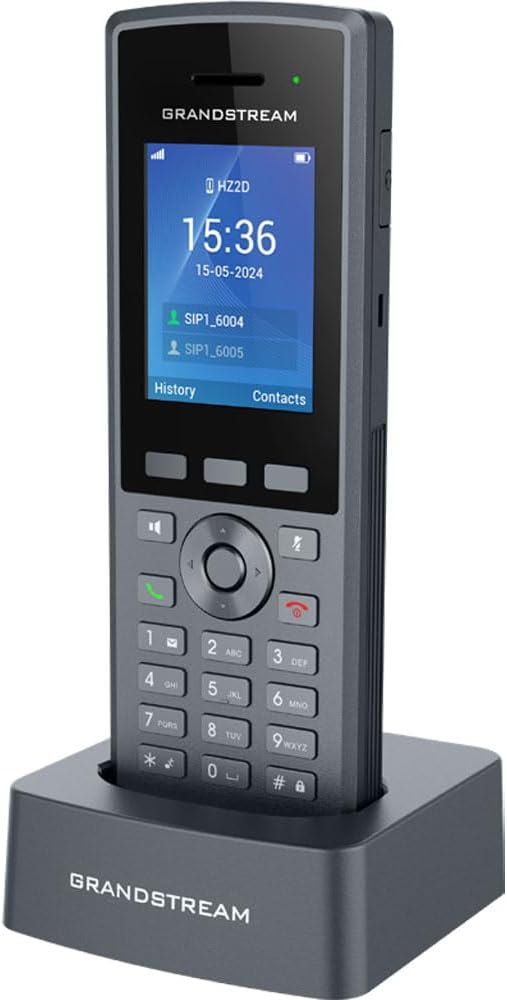
Figure 4.1: Grandstream DP735 DECT Handset in its charging cradle, showcasing the display and keypad.

Figure 4.2: Front view of the Grandstream DP735 DECT Handset, highlighting the 2.4-inch color TFT LCD display and the full keypad with navigation buttons.
Key Features:
- Display: 2.4-inch color TFT LCD display for clear navigation and information.
- Audio: Full HD audio for superior call quality and clarity, with a full duplex speakerphone.
- Connectivity: 3.5mm headset jack for hands-free operation.
- Accounts: Supports up to 20 SIP accounts per handset when paired with a DP755 base station.
- Security: DECT authentication & encryption technology to protect calls and accounts.
- Conferencing: 3-way audio conferencing capability.
- Special Buttons: Dedicated Push-to-Talk button for instant communication.
- Sensors: Built-in proximity and accelerometer sensors.
- Durability: Ruggedized design, IP67 Rated (Waterproof, dust-proof, cleaning chemical resistant, anti-microbial casing), and drop safe from 2.5m.
- Battery Life: Up to 65 hours of talk time and 650 hours of standby time.
5. Setup
5.1. Installing the Battery
- Remove the battery cover on the back of the handset.
- Insert the rechargeable battery pack, ensuring the contacts align correctly.
- Replace the battery cover, pressing firmly until it clicks into place.
5.2. Charging the Handset
- Connect the power adapter to the charging cradle.
- Plug the power adapter into a wall outlet.
- Place the DP735 handset into the charging cradle. The display will indicate charging status.
- Allow the handset to charge fully before first use (approximately 4 hours).
5.3. Pairing with a DECT Base Station
The DP735 handset must be registered to a Grandstream DECT VoIP base station (DP750, DP752, or DP755) to function. Refer to your base station's user manual for specific registration instructions. Generally, the process involves:
- Activating registration mode on your DECT base station.
- On the DP735 handset, navigate to the registration menu (usually found under "Settings" or "Registration").
- Select the base station to register with and enter the system PIN if prompted (default is often 0000).
- The handset will display a confirmation message upon successful registration.
5.4. Initial Configuration (SIP Accounts)
Once registered, SIP accounts need to be configured on the base station and assigned to the handset. This can be done via:
- Web User Interface (Web UI) of the DECT Base Station: Access the base station's IP address via a web browser and configure SIP accounts.
- Zero Config Provisioning: If using Grandstream's UCM series of IP PBXs, the DP735 supports Zero Config provisioning for automated setup.
- Automated Provisioning: Options include TR-069 and XML config files for large deployments.
6. Operating Instructions
6.1. Making and Receiving Calls
- To Make a Call: Dial the number using the keypad and press the Green Call Button.
- To Answer a Call: Press the Green Call Button when the phone rings.
- To End a Call: Press the Red End Call Button.
6.2. Using Speakerphone
During a call, press the Speakerphone Button (often indicated by a speaker icon) to toggle between handset earpiece and speakerphone mode. The DP735 features a full duplex speakerphone for clear hands-free communication.
6.3. 3-Way Audio Conferencing
To initiate a 3-way conference call:
- Make a call to the first party.
- Once connected, press the Conference Button (or navigate to "Conference" option on the display).
- Dial the number of the second party and press the Green Call Button.
- Once the second party answers, press the Conference Button again to join all parties.
6.4. Push-to-Talk (PTT)
The DP735 features a dedicated Push-to-Talk button. When configured, this allows for instant, one-way communication with other compatible devices or groups. Refer to your system administrator or base station manual for PTT setup and usage details.
6.5. Navigating Menus
Use the navigation cluster (up, down, left, right, and center "OK" button) below the display to browse menus, select options, and adjust settings on the 2.4-inch color TFT LCD display.
6.6. Using a Headset
Plug a compatible 3.5mm headset into the headset jack on the side of the DP735 handset for private conversations or hands-free operation.
7. Maintenance
7.1. Cleaning the Handset
The DP735 features an anti-microbial casing and is resistant to cleaning chemicals. To clean the handset:
- Disconnect the handset from the charging cradle.
- Use a soft, damp cloth with a mild, non-abrasive cleaning solution.
- Wipe the surface gently. Avoid excessive moisture near openings.
- Do not use harsh chemicals or abrasive materials.
7.2. Battery Care
To maximize battery life and performance:
- Charge the handset regularly.
- Avoid fully discharging the battery frequently.
- Store the handset in a cool, dry place if not in use for extended periods.
- If the battery performance significantly degrades, consider replacing it with an authorized Grandstream battery pack.
7.3. Ruggedized Features
The DP735 is designed for durability:
- IP67 Rated: This means it is protected from dust ingress and can withstand immersion in water up to 1 meter for 30 minutes. Ensure all port covers are securely closed to maintain water resistance.
- Drop Safe: The handset is designed to withstand drops from up to 2.5 meters.
- While ruggedized, avoid intentional abuse or exposing the device to conditions beyond its specified ratings.
8. Troubleshooting
This section addresses common issues you might encounter with your DP735 handset.
| Problem | Possible Cause | Solution |
|---|---|---|
| Handset does not power on. | Battery is not charged or not installed correctly. | Ensure battery is correctly installed and charge the handset for at least 30 minutes. |
| Cannot make/receive calls. | Handset not registered to base station; SIP account not configured; out of range. | Verify handset registration. Check SIP account configuration on base station. Move closer to the base station. |
| Poor audio quality. | Weak DECT signal; network issues; headset problem. | Move closer to the base station. Check network connection of the base station. Test with a different headset. |
| Handset display is blank. | Handset is off; battery drained; display settings. | Press any button to wake up. Charge the handset. Check display brightness settings. |
9. Specifications
Below are the technical specifications for the Grandstream DP735 DECT Handset:
- Model: DP735
- Compatible Devices: Grandstream’s UCM series of IP PBXs, Grandstream’s DP750, DP752 and DP755 DECT VoIP base stations, SIP-based systems
- Display: 2.4-inch (240x320) color TFT LCD
- Audio: HD audio, full duplex speakerphone
- Headset Jack: 3.5mm
- SIP Accounts: Up to 20 per handset (with DP755)
- Talk Time: Up to 65 hours
- Standby Time: Up to 650 hours
- Range: Up to 400 meters outdoors (with DP755), 50 meters indoors
- Durability: IP67 Rated (Waterproof, dust-proof, cleaning chemical resistant, anti-microbial casing), drop safe from 2.5m
- Sensors: Built-in proximity and accelerometer
- Dimensions: Approximately 20 x 13 x 9 cm (Parcel Dimensions)
- Weight: 0.53 Kilograms
- Power Source: Battery Powered
10. Warranty and Support
For warranty information, please refer to the warranty card included with your product or visit the official Grandstream website. Technical support and additional resources can also be found on the Grandstream support portal.
For further assistance, please contact your vendor or Grandstream technical support directly.


