
Introduction
This manual provides essential instructions for the safe and efficient use of your Makita 12Vmax CXT Starter Kit, model 199645-0. This kit includes one 12Vmax CXT Lithium-Ion 2.0Ah Battery (BL1021B) and one Standard Charger (DC10WD). Please read this manual thoroughly before initial use and retain it for future reference.
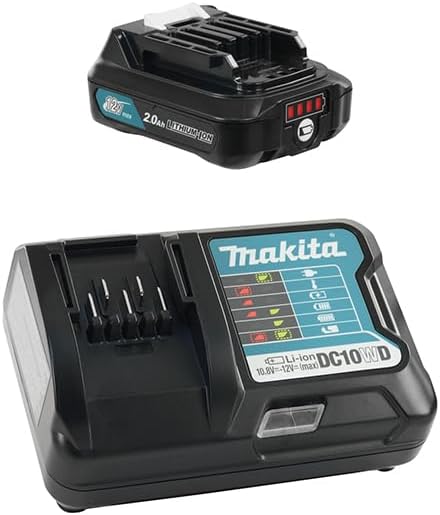
Product Components
The Makita 12Vmax CXT Starter Kit (199645-0) includes the following items:
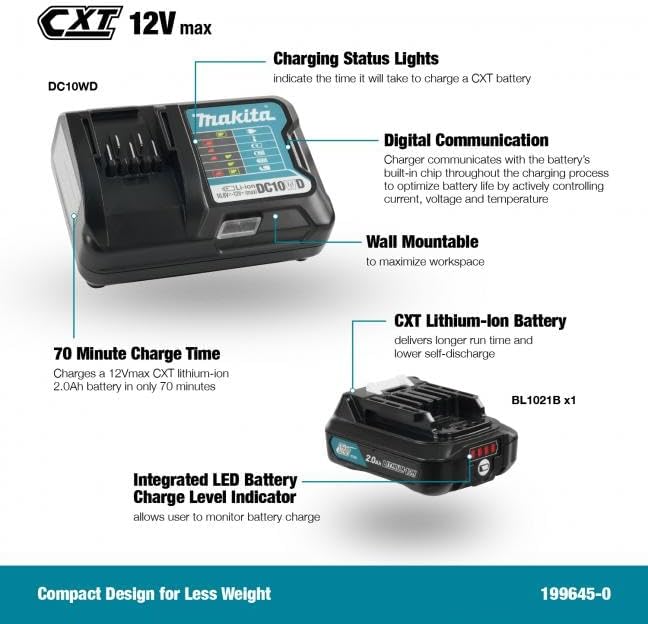
- 1x 12Vmax CXT Lithium-Ion 2.0Ah Battery (BL1021B): Provides power to compatible Makita 12Vmax CXT tools. Features an integrated LED battery charge level indicator.
- 1x Standard Charger (DC10WD): Designed to charge Makita 12Vmax CXT Lithium-Ion batteries. Features digital communication with the battery and a compact, wall-mountable design.
Setup
Charging the Battery
- Connect the Standard Charger (DC10WD) to a suitable power outlet.
- Slide the 12Vmax CXT Lithium-Ion Battery (BL1021B) into the charger until it clicks into place. Ensure it is securely seated.
- The charger's indicator lights will show the charging status. The DC10WD charger communicates with the battery's built-in chip to optimize battery life by actively controlling current, voltage, and temperature during the charging process.
- A 12Vmax CXT 2.0Ah battery typically charges in approximately 70 minutes.
- Once charging is complete, remove the battery from the charger.

Operating
Battery Installation and Removal
To install the battery, align the battery with the tool's battery slot and slide it in until it locks securely. To remove, press the release button on the battery and slide it out.
Checking Battery Charge Level
The 12Vmax CXT battery features an integrated LED battery charge level indicator. Press the button on the battery to illuminate the LEDs, indicating the remaining charge.

Maintenance
Proper maintenance ensures the longevity and performance of your Makita CXT Starter Kit.
- Cleaning: Keep the battery and charger clean and free from dust and debris. Use a dry cloth to wipe surfaces. Do not use water or chemical cleaners.
- Storage: Store batteries and chargers in a cool, dry place away from direct sunlight and extreme temperatures. For long-term storage, charge batteries to approximately 50% capacity.
- Inspection: Regularly inspect the battery and charger for any signs of damage, such as cracks, frayed cables, or corrosion. Do not use damaged components.
Troubleshooting
If you encounter issues with your Makita 12Vmax CXT Starter Kit, refer to the following common troubleshooting steps:
| Problem | Possible Cause | Solution |
|---|---|---|
| Battery not charging | Charger not plugged in; faulty power outlet; battery not properly seated; damaged battery or charger. | Ensure charger is securely plugged in. Test power outlet with another device. Re-seat the battery firmly. Inspect battery and charger for damage; replace if necessary. |
| Charger indicator lights not working | No power to charger; internal fault. | Check power connection. If still not working, the charger may be faulty and require replacement. |
| Battery not holding charge | Battery has reached end of its lifespan; improper charging/storage. | Lithium-ion batteries have a finite lifespan. If the battery is old or has been improperly maintained, it may need to be replaced. Ensure proper charging and storage practices are followed. |
Specifications
Key technical specifications for the Makita 12Vmax CXT Starter Kit (199645-0):
- Model Number: 199645-0
- Battery Type: 12Vmax CXT Lithium-Ion
- Battery Capacity: 2.0Ah (BL1021B)
- Charger Model: DC10WD
- Charging Time (2.0Ah battery): Approximately 70 minutes
- Power Source: AC
- Output Voltage: 12 Volts (DC)
- Product Dimensions: 8.7 x 6.4 x 3.7 cm (Battery and Charger combined dimensions may vary)
- Item Weight: 830 g (total kit)
- Country of Origin: China
Warranty Information
The Makita 12Vmax CXT Starter Kit (199645-0) typically comes with a 3-year limited warranty. For specific terms and conditions, please refer to the warranty card included with your product or visit the official Makita website. This warranty generally covers defects in materials and workmanship under normal use.
Support
For further assistance, technical support, or to inquire about replacement parts, please contact Makita customer service or visit the official Makita website. You can find more information and support resources at the Makita Store.