
1. Product Overview
The Intelamp Solar Flood Light is a waterproof, linkable outdoor lighting solution designed for various applications such as patios, yards, streets, and driveways. It features a powerful 12000mAh battery, 3000LM brightness, and an advanced motion sensor with remote control capabilities. The unique linking function allows multiple lights to illuminate simultaneously when motion is detected by one unit or its separate sensor, ensuring a well-lit path without dark areas.
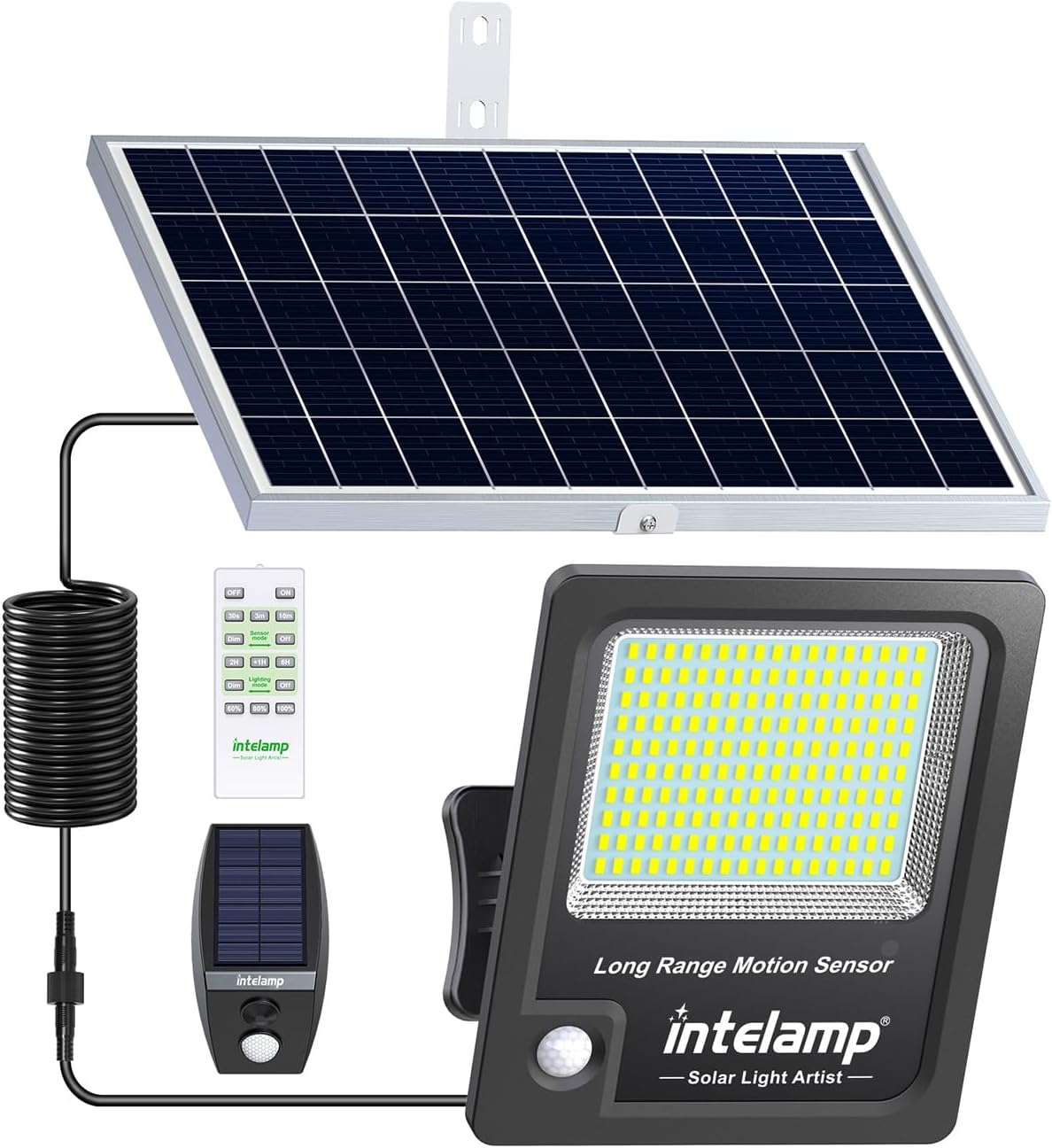
This floodlight is engineered for all-night brightness, even on cloudy or rainy days, thanks to its monocrystalline silicon solar panels and large battery capacity. Its IP65 waterproof rating ensures durability and reliable performance in harsh weather conditions.

2. What's in the Box
- Instruction Manual
- Remote Control
- Motion sensor
- Mounting Hardware
3. Setup
The Intelamp Solar Flood Light offers flexible installation options to suit various outdoor environments. Proper placement of the solar panel is crucial for optimal charging and performance.
3.1 Choosing a Location
Select a location for the floodlight and its solar panel that receives direct sunlight for at least 6-8 hours daily. Avoid areas shaded by trees, buildings, or other obstructions, as this will reduce charging efficiency.
3.2 Mounting the Light and Solar Panel
The light and solar panel can be installed on various surfaces such as trees, poles, or walls using the provided mounting hardware. Ensure the mounting surface is sturdy enough to support the weight of the unit.

3.3 Connecting the Components
- Securely mount the solar panel in a location with maximum sun exposure.
- Mount the floodlight in the desired area, ensuring it can illuminate the target space effectively.
- Connect the cable from the solar panel to the input port on the floodlight. Ensure the connection is secure and waterproof.
- If using the separate motion sensor, mount it in an area where it can detect motion within 26 feet and connect it to the system as per the detailed instructions in the manual.

4. Operating Instructions
The Intelamp Solar Flood Light can be controlled using the included remote control, offering various modes and brightness adjustments.
4.1 Remote Control Functions

- Power (OFF / ON): Turns the light completely off or on.
- Sensor Mode (30s / 3m / 10m): Sets the duration for high brightness after motion detection. The light will dim or turn off when no one is around.
- Lighting Mode (2H / +1H / 6H): Sets the duration for the light to stay on automatically at night (2-12 hours). The light will dim or turn off after the timed light-up.
- Bright Adjustment (60% / 80% / 100%): Adjusts the brightness level of the light.
4.2 Linkable Feature
The floodlight system includes a unique linkable function. When one light detects motion (either via its built-in sensor or the separate motion sensor), it will signal other linked lights within 100 feet to also illuminate. This creates a continuous, well-lit path as you move.

The separate motion sensor can detect motion within 26 feet and signal lights within 100 feet to illuminate in advance, providing proactive lighting.
4.3 Lighting Modes Explained
The floodlight offers several operational modes to customize your lighting experience:
- Mode 1 (Motion Sensing with Dim Background): The light stays at 20% brightness. When motion is detected, it brightens to 100% for 30 seconds, 3 minutes, or 10 minutes (selectable via remote), then returns to 20% brightness.
- Mode 2 (Motion Sensing Only): The light remains off. When motion is detected, it turns on to 100% brightness for 30 seconds, 3 minutes, or 10 minutes (selectable via remote), then turns off completely.
- Mode 3 (Timed Lighting with Dimming): In the dark or at night, the light turns on at 80% brightness for a set duration (2, 3, or 6 hours, selectable via remote), and then automatically switches to a reduced brightness (20%) for the remainder of the night.
- Mode 4 (Timed Lighting with Auto-Off): In the dark or at night, the light turns on at 80% brightness for a set duration (2, 3, or 6 hours, selectable via remote), and then automatically turns off completely.


5. Maintenance
To ensure the longevity and optimal performance of your Intelamp Solar Flood Light, regular maintenance is recommended.
- Clean the Solar Panel: Periodically wipe the solar panel with a soft, damp cloth to remove dust, dirt, leaves, or snow. A clean panel ensures maximum sunlight absorption for efficient charging.
- Check Connections: Occasionally inspect all cable connections to ensure they are secure and free from corrosion or damage.
- Clear Obstructions: Ensure no new obstructions (e.g., growing branches, new structures) are blocking direct sunlight to the solar panel.
- Battery Care: While the battery is designed for long life, prolonged periods of low sunlight (e.g., during winter or extended cloudy weather) may reduce its charge. The light is designed to intelligently adjust brightness to conserve power during such times.
6. Troubleshooting
If you encounter issues with your Intelamp Solar Flood Light, refer to the following common troubleshooting steps:
| Problem | Possible Cause | Solution |
|---|---|---|
| Light does not turn on at night. | Insufficient solar charge. | Ensure the solar panel is in direct sunlight for 6-8 hours daily. Clean the solar panel surface. |
| Light flickers or is dim. | Low battery charge or dirty solar panel. | Allow several sunny days for full charge. Clean the solar panel. |
| Motion sensor not working. | Sensor obstructed or incorrect mode. | Ensure the sensor is clear of obstructions. Check remote settings to confirm it's in a motion-sensing mode. |
| Lights not linking. | Lights out of range or interference. | Ensure lights are within 100ft of each other or the separate sensor. Reduce potential signal interference. |
| Remote control not responding. | Battery depleted or line of sight issue. | Replace remote control battery. Ensure direct line of sight to the light's receiver. |
7. Specifications
| Feature | Detail |
|---|---|
| Brand | intelamp |
| Model Name | YL005-10EP |
| Color | Jet Black |
| Material | Acrylonitrile Butadiene Styrene |
| Product Dimensions | 14.1"L x 9.64"W x 4.41"H |
| Item Weight | 5.9 Pounds |
| Power Source | Solar Powered |
| Brightness | 3000 Lumen |
| Wattage | 12 watts |
| Battery Capacity | 12000mAh (Nonstandard Battery, included) |
| Water Resistance Level | IP65 Waterproof |
| Control Method | Remote |
| Special Features | Energy Efficient, Low Voltage, Motion Sensor, Timer, Waterproof |
| Color Temperature | 6500 Kelvin |
8. Warranty and Support
The Intelamp Solar Flood Light comes with a Limited Warranty. For specific details regarding warranty coverage and duration, please refer to the documentation included with your product or contact Intelamp customer support directly.
For technical assistance, troubleshooting, or any product-related inquiries, please contact the manufacturer, INTELAMP. Contact information can typically be found on the product packaging or the official Intelamp website.
