
VOWNER VOWNER-419
VOWNER Vanity with Lighted Mirror - Instruction Manual
Model: VOWNER-419 | Brand: VOWNER
1. Setup Instructions
Please follow these steps carefully for proper assembly of your VOWNER Vanity. It is recommended to have two people for assembly.
Video: How to install this vanity? This video provides a visual guide for the assembly process, demonstrating each step from unboxing to final setup.
- Prepare Components: Unpack all parts and identify them using the included hardware list. Ensure all pieces are present and undamaged. (Refer to video: 0:00 - 0:01)
- Assemble Side Panels: Attach the drawer slides to the designated side panels (parts 6, 7, 8, 9) using screws (E). (Refer to video: 0:02 - 0:15)
- Construct Side Panel Bases: Insert wooden dowels (P) into the smaller support pieces (parts 24, 25, 28). Attach these supports to the side panels using screws (B). (Refer to video: 0:16 - 0:33)
- Assemble Central Desk Structure: Connect the central shelves (parts 18, 19) to the side panel assemblies using screws (F). Ensure the structure is stable. (Refer to video: 0:34 - 0:43)
- Attach Mirror Panel: Secure the mirror panel (part 5) to the top of the assembled desk structure using screws (A) and (B). Ensure the mirror is firmly attached. (Refer to video: 0:44 - 1:18)
- Install Power Strip and Hairdryer Holder: Mount the power strip (K) into the designated cutout on the side panel using screws (E). Attach the hairdryer holder (N) using screws (J). (Refer to video: 1:23 - 1:28)
- Install Light Bulbs and Connect Wiring: Carefully screw the light bulbs (R) into the mirror frame. Connect the wiring (S) as indicated to power the lights. (Refer to video: 1:31 - 1:39)
- Assemble Drawers: Assemble all 11 drawers according to the diagrams, ensuring the drawer slides (DL, DR) are correctly installed using screws (E). Attach the crystal knobs (Q) to the drawer fronts. (Refer to video: 1:40 - 1:59)
- Insert Drawers: Slide the assembled drawers into their respective slots on the vanity. (Refer to video: 2:00 - 2:07)
- Assemble Stool: Assemble the cushioned stool by attaching the base pieces (parts 30, 31) to the top (part 32) and bottom (part 33) using screws (F) and hinges (H, W). (Refer to video: 2:08 - 2:28)
- Apply Screw Covers: Place the white screw covers (L) over all visible screw heads for a clean finish. (Refer to video: 2:32 - 2:33)
2. Operating Instructions
2.1 Lighting Modes and Brightness
The vanity mirror features built-in LED bulbs with three color temperature modes and adjustable brightness.
- Power On/Off: Press the touch sensor (T) on the mirror to turn the lights on or off.
- Change Color Mode: Briefly press the touch sensor (T) to cycle through Warm White, Natural White, and Cool White lighting modes.
- Adjust Brightness: Press and hold the touch sensor (T) to increase or decrease the brightness. Release when the desired brightness is reached.

Image: The vanity lights offer three distinct color temperatures: Warm White for a cozy ambiance, Natural White for true-to-life color rendering, and Cool White for bright, invigorating illumination.

Image: A visual representation of the adjustable brightness feature, allowing users to fine-tune the light intensity from 0% to 100% to suit their needs.
2.2 Charging Station
The vanity is equipped with 2 standard plug sockets and 2 USB ports for convenient charging of electronic devices.
- Using Power Outlets: Plug your hair dryer, curling iron, or other beauty devices directly into the standard sockets.
- Using USB Ports: Connect your smartphone, tablet, or other USB-powered devices to the USB ports for charging.
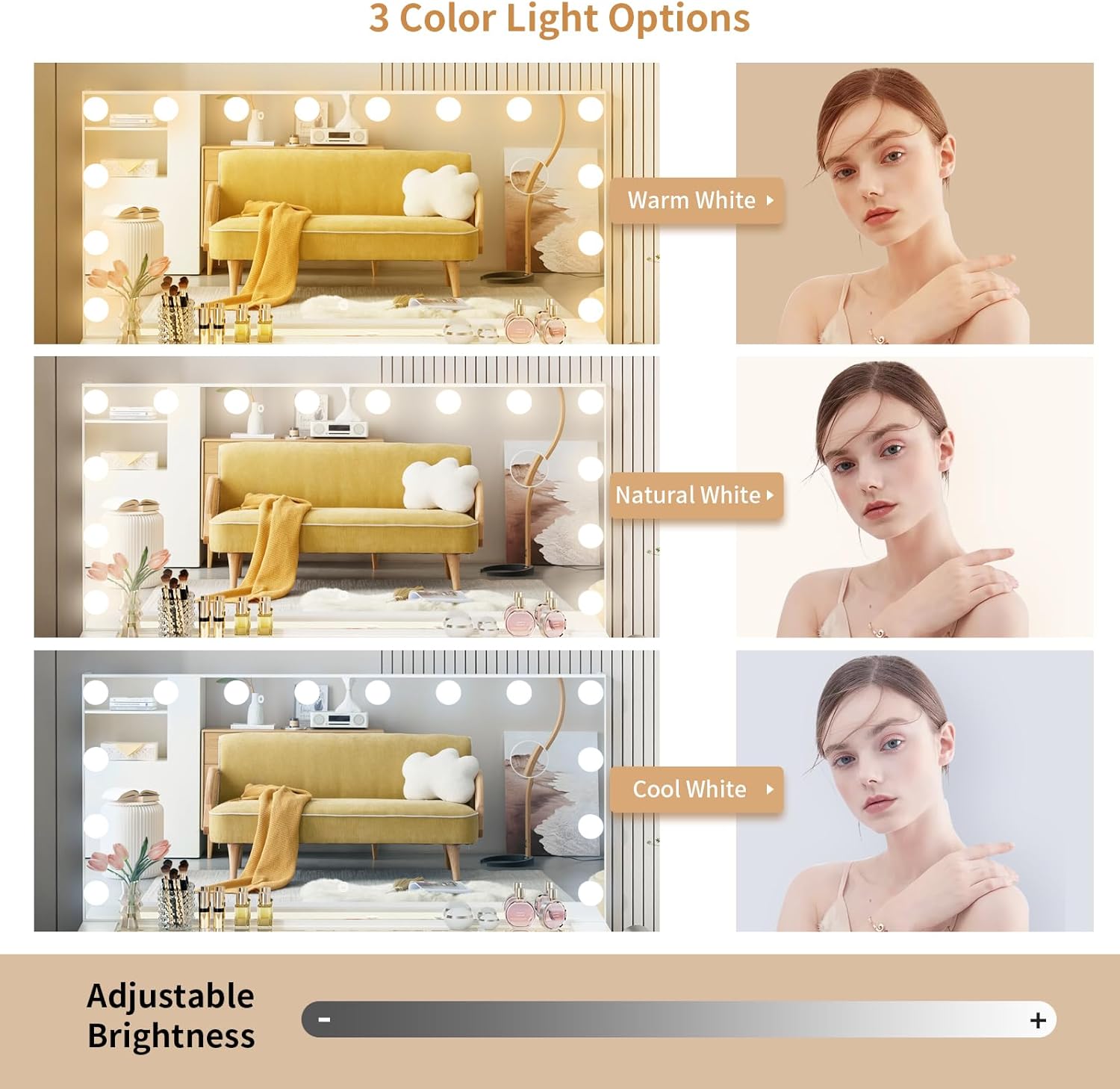
Image: A close-up view of the integrated power strip, highlighting the two standard electrical outlets and two USB charging ports for convenient access to power.
3. Maintenance
3.1 Cleaning
- Surface Cleaning: Wipe the vanity surfaces with a dry, soft cloth. For stubborn marks, a slightly damp cloth with mild soap can be used, followed by immediate drying.
- Mirror Cleaning: Use a glass cleaner and a lint-free cloth to clean the mirror surface. Avoid spraying cleaner directly onto the mirror frame or electrical components.
- Drawer Cleaning: Periodically empty and wipe the inside of the drawers to remove dust and debris.
3.2 General Care
- Weight Limit: Do not exceed the maximum weight limit of 124 pounds on the vanity top.
- Electrical Safety: Always unplug the vanity from the power outlet when not in use or before cleaning electrical components. Keep liquids away from the power strip and wiring.
- Drawer Operation: Ensure drawers slide smoothly. If they become stiff, check for obstructions or apply a silicone-based lubricant to the slides.
4. Troubleshooting
| Problem | Possible Cause | Solution |
|---|---|---|
| Lights not turning on. | Power cord not plugged in; loose connection; faulty bulb; power outage. | Check power connection. Ensure all light bulbs are securely screwed in. Test the outlet with another device. Replace faulty bulbs if necessary. |
| Lights flickering or dim. | Loose bulb connection; low power supply; faulty wiring. | Tighten all light bulbs. Ensure the vanity is plugged directly into a wall outlet, not an overloaded extension cord. If problem persists, contact customer support. |
| Drawers are difficult to open/close. | Obstruction in the drawer slide; misaligned drawer; loose screws on slides. | Remove the drawer and check for any objects blocking the slides. Ensure the drawer is properly aligned on the tracks. Tighten any loose screws on the drawer slides. |
| Power outlets/USB ports not working. | Vanity not powered; internal wiring issue; device not compatible. | Ensure the vanity is plugged in and receiving power. Test with different devices. If still not working, contact customer support. |
5. Product Specifications
| Feature | Detail |
|---|---|
| Brand | VOWNER |
| Model Number | VOWNER-419 |
| Product Dimensions | 15.8"D x 46"W x 53.9"H |
| Item Weight | 124 pounds |
| Frame Material | Engineered Wood |
| Desktop Material | Glass Desktop |
| Lighting Modes | 3 Color (Warm, Natural, Cool White) |
| Brightness | Adjustable |
| Drawers | 11 |
| Charging Station | 2 Standard Plug Sockets, 2 USB Ports |
| Assembly Required | Yes |
6. Warranty and Support
For any questions regarding assembly, missing parts, or product defects, please contact VOWNER customer service. Refer to your purchase documentation for specific warranty details and contact information.
You can also visit the official VOWNER store for more information and support: VOWNER Amazon Store
Ask a question about this manual
Ask about setup, troubleshooting, compatibility, parts, safety, or missing instructions. Manuals+ will review the question and use this page’s manual context to help answer it.