
1. Introduction
Thank you for choosing the ETURBEV TA654A External Sound Level Meter. This device is designed for accurate measurement of environmental noise levels, featuring a large display for clear readability and an alarm function for monitoring sound thresholds. This manual provides essential information for the safe and efficient operation, setup, and maintenance of your sound level meter.
2. Safety Information
- Read all instructions carefully before using the device.
- Do not expose the device to extreme temperatures, humidity, or direct sunlight.
- Avoid strong vibrations or impacts to prevent damage.
- Do not attempt to disassemble or modify the device. Refer all servicing to qualified personnel.
- Keep the device away from water and other liquids.
- Ensure proper power supply voltage is used as specified.
3. Product Overview
3.1 Components
The ETURBEV TA654A External Sound Level Meter typically includes the following components:
- Main Unit: Features a large digital display and control buttons.
- Microphone: Integrated or external, for sound detection.
- External Probe (TA654A only): A 5-meter external probe for flexible measurement placement.
- Power Input: For connecting the power adapter.
- USB Port: For data output or power.
- Alarm Signal Output Interface: 3.5mm jack for connecting an external alarm device.
3.2 Features
- Large digital display for clear real-time sound level readings.
- Wall-mounted design for fixed installation.
- Environmental noise alarm function with adjustable thresholds.
- High measurement accuracy.
- External 5m probe for flexible monitoring (TA654A model).
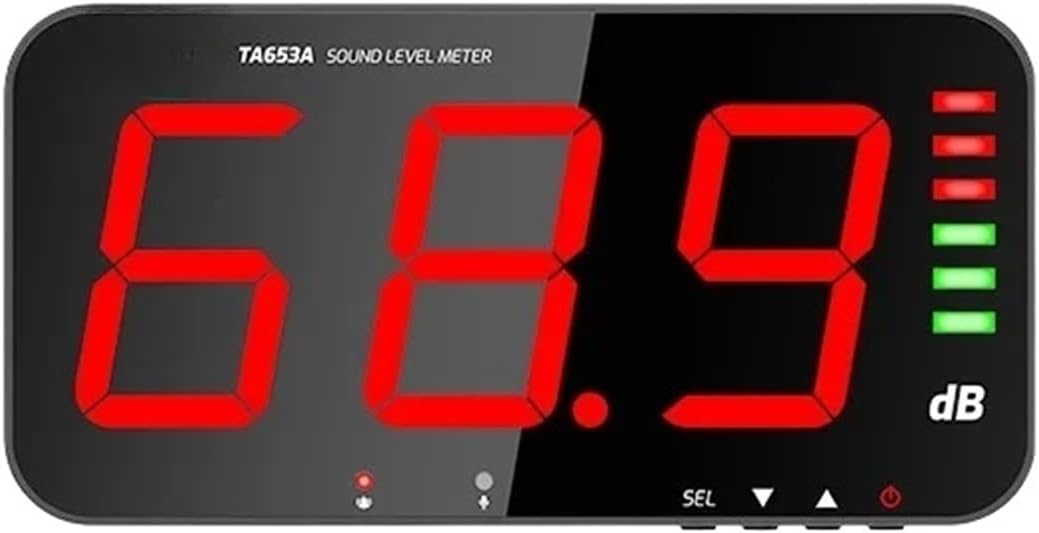
Figure 1: Front view of the ETURBEV TA653A/TA654A Sound Level Meter, showing a large digital display indicating "68.9 dB" and LED indicators on the right side. The model "TA653A SOUND LEVEL METER" is visible at the top.
4. Setup
4.1 Unpacking
- Carefully remove the sound level meter and all accessories from the packaging.
- Inspect the device for any signs of damage. If damaged, do not use and contact customer support.
- Retain the packaging for future storage or transport.
4.2 Mounting
The device is designed for wall-mounting. Choose a suitable location that is stable, free from vibrations, and allows for optimal sound measurement without obstruction.
- Mark the desired mounting points on the wall using the device's mounting holes as a template.
- Drill appropriate holes and insert wall anchors if necessary.
- Secure the device to the wall using screws.
4.3 Power Connection
Connect the provided power adapter to the device's power input port (DCV OUT or USB, refer to the specific port on your device) and then plug it into a standard electrical outlet.
4.4 External Probe Connection (TA654A only)
For the TA654A model, connect the 5-meter external probe to the designated probe input port on the device. Ensure the connection is secure.
4.5 External Alarm Connection (Optional)
If using an external alarm, connect it to the 3.5mm alarm signal output interface on the side of the device.

Figure 2: Side view of the ETURBEV Sound Level Meter, illustrating the alarm signal output interface. It shows a 3.5mm jack connected to an external alarm device (red siren) and a USB port.
5. Operating Instructions
5.1 Powering On/Off
- Power On: Once connected to power, the device should automatically power on and display the current sound level. If not, press the power button (usually indicated by a power symbol) on the device.
- Power Off: Press and hold the power button until the display turns off, or disconnect the power supply.
5.2 Reading the Display
The large digital display shows the real-time sound pressure level in decibels (dB). Observe the numerical value for the current noise level.
5.3 Setting Alarm Thresholds
The device features an environmental noise alarm. Refer to the buttons on your device (e.g., "SEL", "▲", "▼" as seen in Figure 1) to navigate the menu and set the desired upper decibel limit for the alarm. When the measured sound level exceeds this threshold, the device will trigger the internal or external alarm.
- Press the "SEL" button to enter the settings menu.
- Use the "▲" and "▼" buttons to adjust the alarm threshold value.
- Press "SEL" again to confirm and exit the settings.
Note: Specific button functions may vary slightly. Consult the on-screen prompts or device markings for precise operation.
6. Maintenance
6.1 Cleaning
- Wipe the device exterior with a soft, dry cloth.
- Do not use abrasive cleaners, solvents, or harsh chemicals.
- Keep the microphone area clean and free from dust or debris.
6.2 Storage
When not in use for extended periods, store the device in a cool, dry place, away from direct sunlight and extreme temperatures.
6.3 Calibration
While the device is factory-calibrated, professional calibration may be required periodically for applications demanding high precision. Contact a certified calibration service if necessary.
7. Troubleshooting
| Problem | Possible Cause | Solution |
|---|---|---|
| Device does not power on. | No power supply or faulty connection. | Check power adapter and cable connections. Ensure the power outlet is functional. |
| Incorrect or unstable readings. | Microphone obstructed or damaged; device not properly calibrated; environmental interference. | Ensure microphone is clear. Relocate the device away from strong electromagnetic fields. Consider professional calibration. |
| Alarm not triggering. | Alarm threshold set too high; external alarm not connected or faulty. | Verify alarm threshold settings. Check connection and functionality of external alarm device. |
| External probe not working (TA654A). | Probe not connected securely or probe is faulty. | Ensure the external probe is firmly connected to its port. If issues persist, the probe may need replacement. |
8. Specifications
| Parameter | Value |
|---|---|
| Model | TA654A External (also applicable to TA653A for core functions) |
| Measurement Range | 30-130 dB |
| Resolution | 0.1 dB |
| Measurement Accuracy | ±1.5 dB |
| Operating Temperature | 0-40°C |
| Device Dimensions (approx.) | 323 x 173 x 40 mm |
| Item Weight (approx.) | 1.76 ounces (50 grams) (Note: This weight may refer to a component or be an approximation. Actual device weight may vary.) |
| Certification | CE |
| Manufacturer | ETURBEV |
9. Warranty and Support
For warranty information or technical support, please contact your retailer or the manufacturer directly. Keep your purchase receipt as proof of purchase.
Manufacturer: ETURBEV