Introduction
Welcome to the instruction manual for your LDARC 1/64 Scale Mini RC Rock Crawler R01. This compact remote control vehicle is designed for navigating various terrains with precision and features realistic details and lighting. Please read this manual thoroughly before operating your RC car to ensure safe and optimal performance.

Image: The LDARC R01 Mini RC Rock Crawler in yellow, its remote control, and a portable carrying case.
Safety Information
This product is recommended for individuals aged 15 years and up. Adult supervision is advised for younger users. Always operate the RC car in a safe environment, away from obstacles, people, and pets. Do not operate near water or in wet conditions.
What's in the Box
- LDARC R01 RC Car (Yellow)
- CT03 Remote Control Transmitter
- Portable Handbag
- USB Charging Cable
- 1 AA Battery (for remote control)
- Instruction Manual

Image: The RC car and its remote control neatly packed inside the included portable carrying case.
Setup
1. Charging the RC Car Battery
The RC car features a built-in 95mAh LiPo battery. Connect the included USB charging cable to the car's charging port and to a standard USB power source (e.g., computer, USB wall adapter). The charging indicator light will show the charging status. A full charge provides up to 60 minutes of operation time.
2. Installing Remote Control Batteries
The CT03 remote control requires 1 AA battery (included). Open the battery compartment on the back of the remote control and insert the battery, ensuring correct polarity. Close the compartment securely.

Image: Visual guide for battery handling, showing the car's battery compartment and the remote's power source.
3. Binding the Remote Control
Typically, the RC car and remote control come pre-bound. If re-binding is necessary, ensure both devices are powered off. Turn on the RC car, then turn on the remote control. The remote should automatically connect to the car. Refer to the remote control's specific instructions for detailed binding procedures if issues arise.
Operating Instructions
1. Remote Control Overview (CT03 Transmitter)

Image: Detailed diagram illustrating the functions of the CT03 remote control transmitter, including signal strength, voltage display, and button assignments.
- [OK] Key: Confirmation or menu navigation.
- A Light Switch: Controls the vehicle's lighting.
- TH Beginner Mode (TH): Adjusts throttle sensitivity (Low/Middle/Big).
- ST Beginner Mode (Direction): Adjusts steering sensitivity (Small/Middle/Big).
- E High and Low Beam: Toggles between high and low beam headlights.
- D Emergency Flashers/Turn Signal Light Switch: Activates hazard lights or turn signals.
- Power (on/off) & Charge Light: Main power switch and charging indicator.
- USB-C (5V): Charging port for the remote control.
- Rear Light: Controls the vehicle's rear lights.
2. Driving the RC Car
Use the steering wheel on the remote for directional control (left/right) and the trigger for throttle control (forward/reverse). Start with beginner modes to familiarize yourself with the controls before switching to higher sensitivity settings.

Image: Illustrates the RC car in motion, demonstrating its capability for dynamic movement.
3. Lighting Functions
The R01 features simulated lighting. Use the 'A Light Switch' to turn lights on/off and the 'E High and Low Beam' switch to adjust headlight intensity. The 'D Emergency Flashers/Turn Signal Light Switch' controls turn signals and hazard lights for added realism.
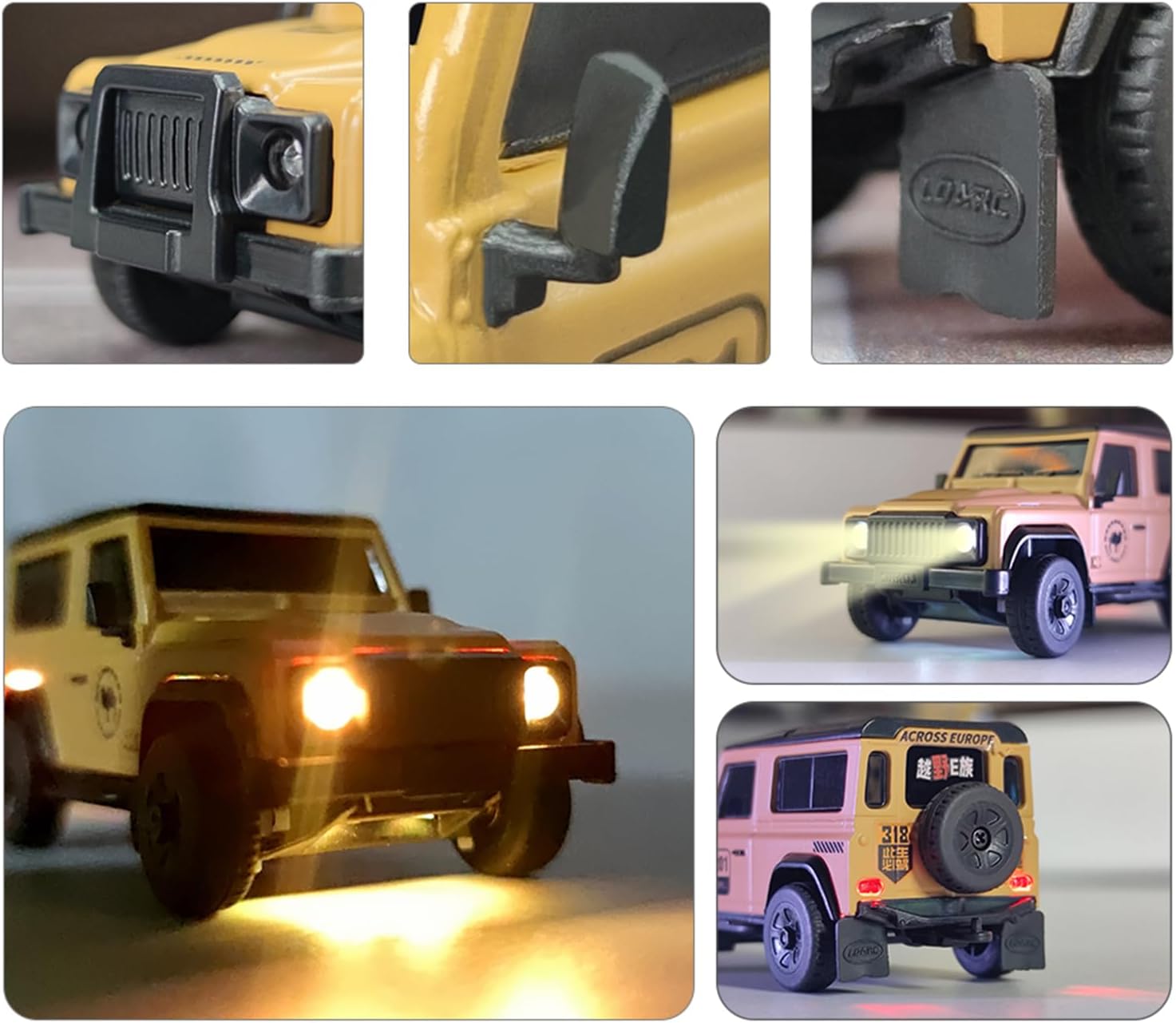
Image: Close-up views of the RC car's detailed features, including its functional LED headlights and taillights.
Maintenance
1. Cleaning
After use, especially on dusty or dirty surfaces, gently clean the car's body and chassis with a soft, dry cloth. Avoid using water or chemical cleaners directly on electronic components.
2. Battery Care
To prolong battery life, avoid overcharging or completely draining the LiPo battery. Store the car and remote with partially charged batteries if not in use for extended periods. Remove AA batteries from the remote if storing for a long time.
3. Component Inspection
Regularly inspect the wheels, gears, and steering components for any debris or damage. The R01 features metal gears for durability; however, ensure they remain free of obstructions for smooth operation.

Image: Detailed view of key internal components such as bearings, servo, and metal gears, highlighting the build quality.
Troubleshooting
- Car Not Responding:
- Ensure both the car and remote control are powered on.
- Check battery levels in both the car and remote. Recharge or replace as needed.
- Verify that the car and remote are properly bound. Refer to the "Binding the Remote Control" section.
- Short Battery Life:
- Ensure the car's LiPo battery is fully charged before use.
- Battery performance can decrease over time; consider replacing if significantly degraded.
- Low Battery Voltage Alarm:
- The remote control provides real-time voltage display and a low voltage alarm. If the alarm sounds, or the front and rear headlights flash rapidly, the car's battery is low. Immediately stop operation and recharge the car. The vehicle will not move under low battery conditions for safety.
- Erratic Movement/Steering:
- Check for obstructions in the wheels or steering mechanism.
- Ensure the steering trim on the remote control is centered.
- Adjust ST Beginner Mode settings for desired steering sensitivity.
Specifications
| Product Dimensions | 7.48 x 4.33 x 5.51 inches |
| Item Weight | 1 pounds |
| Model Number | R01 RTR |
| Manufacturer Recommended Age | 15 years and up |
| Car Battery | Built-in 95mAh LiPo (up to 60 minutes run time) |
| Remote Control Battery | 1 AA battery (included) |
| Remote Control Channels | 10-channel CT03 transmitter |
| Scale | 1/64 Scale |
Support
For further assistance, technical support, or warranty inquiries, please contact captainrc customer service through the retailer where the product was purchased or visit the official captainrc store page on Amazon: captainrc Amazon Store.


